Samsung Music
- 811.37K
- 3.8
- Installs
- 1.00B
- Price
- Free

Screenshots

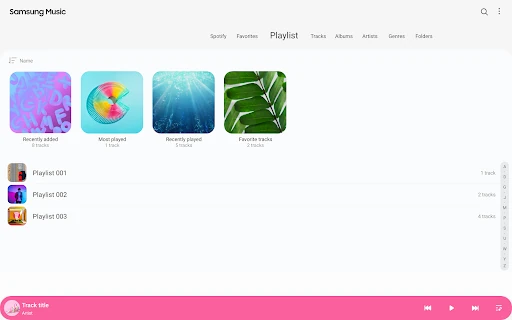
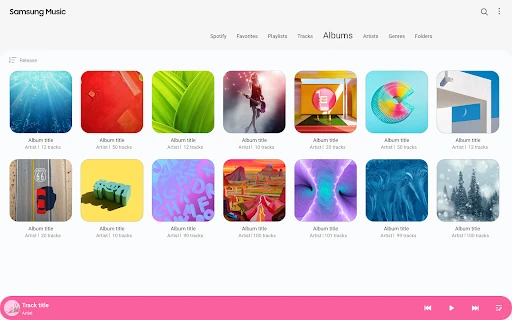
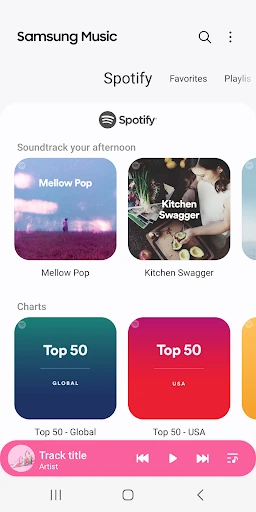
Analysis by Reviewed APKs
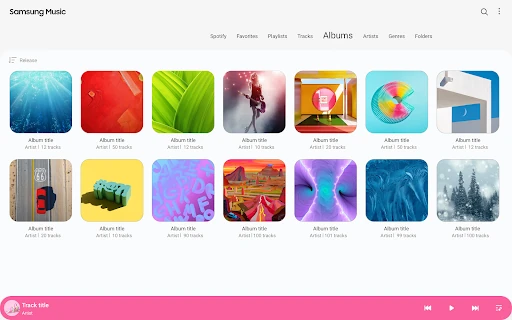
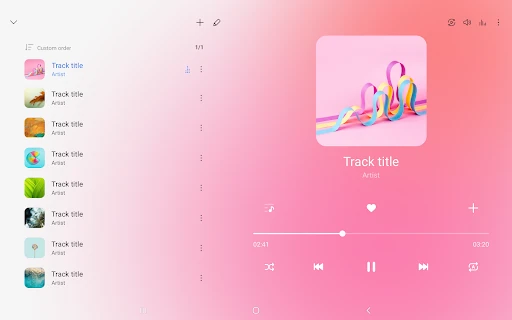
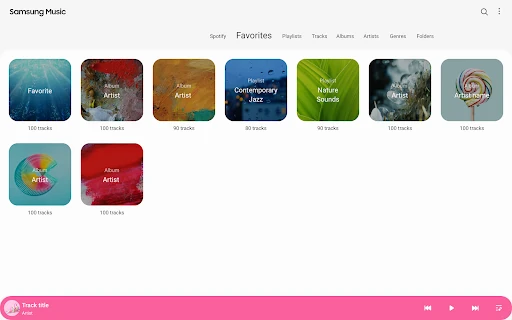
Samsung Music is a music player for listening to audio files on a Samsung Android device and sorting a library by track, album, artist, genre, folder, or composer. I see it as a practical fit for people who already keep music on their phone and want a straightforward way to find it. Its focused library tools are useful; the Spotify recommendations add a small discovery option without changing its main job.
A library for daily listening
When I want music for a commute, a walk, or a quiet evening at home, I often want to get straight to tracks I already have rather than browse a large streaming catalog. Samsung Music is built for that kind of routine: it plays supported audio files stored on the device and lets me approach the collection through familiar categories. I can start with an artist or album, or look through folders when I know where a file lives.
That category-based browsing matters when a library gets bigger than a handful of albums. A song title may slip my mind, but I might remember the performer, the genre, or the folder it came from. Having several routes into the same collection makes the player feel useful for ordinary listening, not just for tapping play on the last track. Supported formats include MP3, AAC, and FLAC, though format support can vary by device.
A player, not a streaming hub
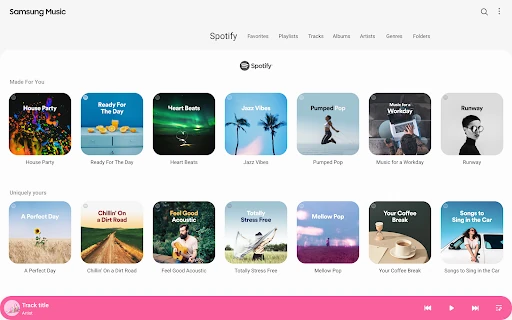
The clearest comparison is with a streaming service. Samsung Music centers on music files already available on the device, while its Spotify tab offers recommendations from Spotify in countries where Spotify operates. That tab can point me toward something to explore, but the app’s described core is still playback and organization of a personal music library. It is not presented as a replacement for a streaming subscription or a broad online music catalog.
That distinction helps set expectations. If I want to organize local tracks by album or folder, this is a natural sort of tool to try, especially on a Samsung device. If my listening depends on streaming catalogs, downloads from online services, or elaborate social discovery, I would look at services designed around those jobs instead. Samsung Music keeps its emphasis narrower, which can be a plus when I simply want to find and play what I have.
Small habits that help
I get more out of a library player when I keep track of how my music is organized. If I know whether I usually think in terms of albums, artists, or folders, I can head to the relevant category instead of scanning the whole collection. On a day when I remember only a broad style, genre browsing gives me another route. These are modest habits, but they reduce the small friction of finding a particular listening mood.
I would also treat Spotify recommendations as a separate discovery doorway rather than mix them up with the local library. When I feel like hearing something new, I can check the Spotify tab where it is available; when I want a known album or file, I can use the player’s own categories. That simple split keeps expectations clear. It also makes the app easier to return to, because each listening task has an obvious starting point.
More From Our News Desk

Zoom Meetings, Google Meet, or Teams: Which Is Easiest to Join?

How I Build a Free Streaming Lineup With Tubi

Why Crunchyroll Is the Default Anime App for So Many Fans

YouTube TV: A Practical Guide to Cutting Cable

Rummikub and the Small Comfort of Phone Games

TeamViewer Remote Control or AnyDesk for Helping Family?
Who may enjoy it
I would recommend Samsung Music to people who keep supported audio files on a Samsung Android device and want a direct way to browse and play them. It makes particular sense for listeners who remember music by album, performer, genre, or folder and would rather use those familiar groupings than hunt through one long list. The Spotify recommendation tab may also be a useful extra for people who occasionally want a nudge toward new music.
It may be less appealing if nearly all of your listening happens through streaming services, or if you expect a music app to supply a large catalog on its own. The available description focuses on playing and organizing audio files, not on replacing a streaming platform. People using another Android device may also want to check compatibility and behavior on their particular hardware, since the app is optimized for Samsung devices and supported formats can vary.
Samsung Music is published by Samsung Electronics Co., Ltd. On Google Play, it has over a billion installs and a 3.8-star rating from around 811,000 ratings. The app is free to install, contains ads, and does not offer in-app purchases. Google Play gives it a Teen content rating. Those store details provide a useful snapshot, though ratings and app details can change over time.
The listed Android requirement is Android 9 or later. The current version in the supplied app details is 16.2.42.0, released on February 17, 2016, with its most recent update dated September 17, 2025. That update notes a bug fix. Samsung Music is in the Music & Audio category and is described as optimized for Samsung Android devices.
A Closer Look at Samsung Music
A straightforward first impression
When I first opened the idea of Samsung Music, what stood out was its simple purpose: play audio and make a collection easier to browse. The interface is described as clean and intuitive, and the category choices give me a clear sense of how I might navigate before I even start listening. It is not trying to frame every session as a search for something new; familiar music has a place at the center.
Getting started depends on allowing the player to access music and audio storage, which it needs to read and play files, including files on an SD card. Notifications are optional, and the description says basic features may still work if optional permissions are denied. Korean devices have an additional phone permission for verifying the phone when using the music service. That permission detail is specific, rather than a reason to assume every user will see the same prompts.
Finding music day to day
On an ordinary day, the most practical part is the choice of library views. Tracks are useful when I know a title, albums when I want to hear a release in order, and artists when I am in the mood for one performer. Genre and composer offer other ways to narrow things down, while folders can help when the files are already arranged in a particular structure.
I like that these options address different kinds of memory. Sometimes I remember the name of a song; sometimes I remember where I saved it or who made it. A player that can meet me at those different starting points saves needless browsing. It does not require a complicated routine to benefit from that organization: choosing the category that matches what I remember is already a useful small shortcut.
Formats and recommendations
Format support is a practical feature rather than a flashy one. Samsung Music supports playback of formats such as MP3, AAC, and FLAC, so it can cover several common types of audio files. The supported formats may differ by device, which is worth keeping in mind if a particular file does not behave as expected. The app’s job is to play compatible files, not to promise that every format works everywhere.
The Spotify tab is the more discovery-oriented feature. It can show playlist recommendations from Spotify and help users find music they may enjoy there, but it is available only in countries where Spotify is offered. I see this as an optional detour from the local collection, not a reason to confuse Samsung Music with Spotify itself. Its presence adds a route toward recommendations while leaving library playback as the central experience.
A simple listening routine
A realistic routine might start with choosing an album for a commute, then returning to a folder view later to find a set of files I have stored together. If I want a change of pace, I can browse by genre or artist instead of searching from scratch. That kind of switching between categories is where the app’s organization can quietly earn its place in a daily routine.
On a slower evening, I might use the Spotify recommendations tab as a prompt to explore something different, if it is available in my country. I would keep the task simple: use the library for music I already have and the recommendation area when I want suggestions. This avoids expecting the player to do everything a dedicated streaming service does, and keeps the app’s two roles easy to understand.
Limits to keep in mind
The biggest limitation is also the clearest boundary: Samsung Music is described as a player and organizer for audio files, not as a full streaming catalog. Anyone whose collection lives mainly in online services may not get much from its local-library focus. The Spotify recommendations are a supplement, and their availability depends on whether Spotify serves the user’s country.
Device differences can matter, too. The app is optimized for Samsung Android devices, and the description notes that supported file formats may vary by device. A user should not assume every file type will play on every model. The store also labels the app as containing ads, so people who prefer an ad-free experience should factor that into their expectations before settling into it.
Samsung Music makes sense as a focused library player: it offers several practical ways to organize and find audio files, supports common formats, and adds Spotify recommendations in supported countries. I appreciate that its purpose is easy to understand. It is most compelling when the music I want is already on my device, rather than waiting in a streaming catalog.
I would try it if I use a Samsung Android device and want a simple home for local music. I would choose a streaming-first app for a listening routine built around online catalogs instead. The ads and device-dependent format support are worth keeping in mind, but for straightforward playback and browsing, Samsung Music has a clear everyday role.
Samsung Music Frequently Asked Questions
What is Samsung Music used for?
Samsung Music is a player for music and audio files on an Android device, with an emphasis on Samsung devices. It can organize a library by track, album, artist, genre, folder, or composer, and supports formats including MP3, AAC, and FLAC. It also offers Spotify playlist recommendations in countries where Spotify is available.
Which devices can run Samsung Music?
Samsung Music is an Android app optimized for Samsung Android devices. The listed minimum requirement is Android 9. Device differences can affect supported file formats, so it is sensible to check the Google Play store details for your device before relying on playback of a particular format.
Does Samsung Music cost money?
Samsung Music is free to install on Google Play, and the supplied app details say it has no in-app purchases. It does contain ads. Store information can change, so check the Google Play listing for current details before installing if cost or advertising is a deciding factor.
Can Samsung Music stream music?
Its main described role is playing and organizing audio files stored on the device. Samsung Music also has a Spotify tab with playlist recommendations, available in countries where Spotify operates. It is not described as a replacement for a streaming service catalog, so check Spotify and the store details for current availability in your region.
Who is Samsung Music best suited to?
I would consider it for someone with music files on a Samsung Android device who wants to find them by familiar categories and play supported formats. It may be less suitable for listeners who depend mainly on streaming catalogs. Samsung Music contains ads, and its compatibility and file-format support can vary by device, so check the store details for your model.
Pros
- Organizes a music library by track, album, artist, genre, folder, and composer.
- Plays common audio formats including MP3, AAC, and FLAC, depending on device support.
- Spotify playlist recommendations offer an extra discovery option in supported countries.
- Free to install, with no in-app purchases listed.
Cons
- Contains ads, which may distract listeners who prefer an uninterrupted interface.
- Optimized for Samsung devices, so the experience may be less suited to other hardware.
- Spotify recommendations depend on country availability, and file-format support varies by device.
- Category
- Music & Audio
- Version
- 16.2.42.0