Smule: Sing, Duet & Karaoke
- 4.07M
- 4
- Installs
- 100.00M
- Price
- Free

Screenshots


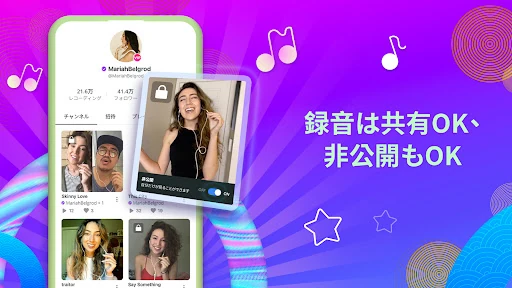
Analysis by Reviewed APKs
Smule: Sing, Duet & Karaoke is a karaoke and recording app for people who want to sing along, make performances with others, or share a song they have recorded. I like that it can serve both a quick at-home sing-along and a more collaborative music habit. Its mix of lyrics, vocal tools, and community features is appealing, though the paid upgrade shapes what you can create on your own.
A song for an ordinary evening
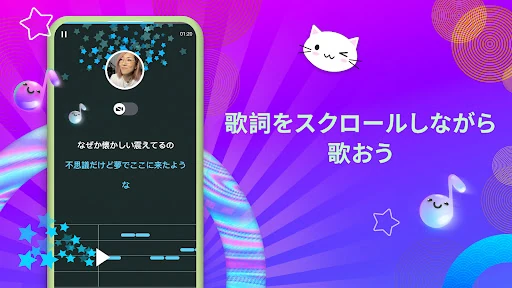
When I first picture using Smule, it is on an ordinary evening when I want to sing a favorite song without turning the living room into a full recording setup. I can browse a large song catalog, follow scrolling lyrics, and record a performance. That makes the app feel approachable: I can start with a familiar tune, focus on the words, and decide afterward whether I want to keep or share the result.
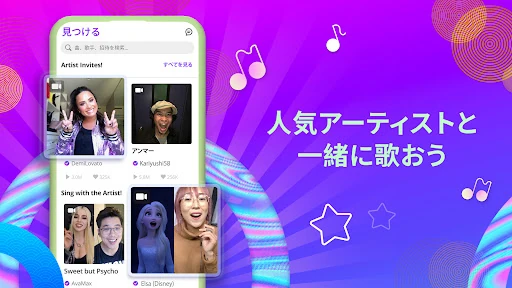
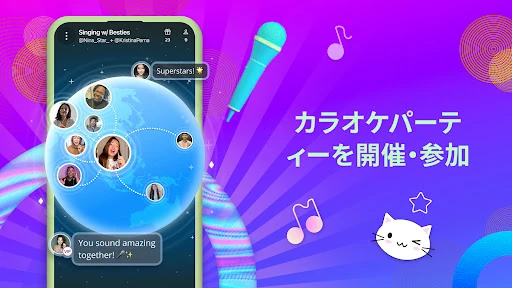
The collaborative side gives the same session another direction. I can join an existing duet and add my part, or take part in a group performance. Instead of waiting for friends to be in the same room, I can connect with other singers through recordings and live karaoke sessions. For someone who enjoys singing but wants a little company, that social element is the difference between a backing track and a shared activity.
Karaoke, with a social layer
A basic karaoke app is usually about putting lyrics on screen and singing along. Smule includes that familiar activity, but gives it a wider creative and social frame: people can record performances, join duets, make music videos, and take part in live sessions. The catalog spans styles including pop, rock, country, R&B, K-pop, musicals, and classics, so it is designed for browsing as well as replaying a short list of favorites.
I would not treat Smule as a full music production studio or a substitute for formal singing lessons. Its tools are aimed at shaping karaoke recordings and helping singers experiment, not at replacing a dedicated recording workflow. It is also a community app, so people who want a completely private, solitary practice routine may prefer to stick to singing without sharing or collaborating. The social possibilities are a strength only if they appeal to you.
Make a small singing routine
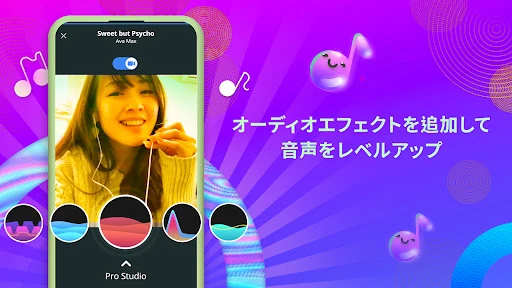
A useful way to get more from Smule is to choose one song for a relaxed practice session rather than browsing endlessly. Follow the lyrics, try a key that suits your vocal range, and use the pitch guidance as a prompt while singing. Reverb and other vocal effects can help you explore how a recording sounds, but I would treat them as creative options rather than a measure of singing ability.
I would also separate practice from sharing. Record a song when you feel like experimenting, then decide whether it belongs in a duet, group performance, or a video with visual effects and lyric overlays. Joining an existing duet is a lower-commitment way to sing with others; starting your own performance and using private group options are part of VIP. That distinction makes it easier to choose a workflow that matches how involved you want to be.
More From Our News Desk

Zoom Meetings, Google Meet, or Teams: Which Is Easiest to Join?

How I Build a Free Streaming Lineup With Tubi

Why Crunchyroll Is the Default Anime App for So Many Fans

YouTube TV: A Practical Guide to Cutting Cable

Rummikub and the Small Comfort of Phone Games

TeamViewer Remote Control or AnyDesk for Helping Family?
Who will enjoy singing here
I would recommend Smule to casual singers who enjoy karaoke and want an easy route into recording or collaborative performances. It should also suit people who like discovering songs across genres, singing along with scrolling lyrics, and trying effects or key changes. Beginners can use pitch guidance as they practice, while more confident singers may enjoy layering their voices into duets and group performances.
It may be a weaker fit if you want every creative option without a subscription, since solo recording and starting your own duets require VIP according to the app description. People who dislike social sharing or live community activities may also find much of Smule's appeal beside the point. If your main goal is simply to sing privately, the broader set of community features may feel like more than you need.
Smule: Sing, Duet & Karaoke is made by Smule and is listed in Google Play’s Music & Audio category. The store reports over 100 million installs and a 4.0-star rating from around 4.1 million ratings. It is rated Teen. The app’s displayed version varies with device, so the version number is not a single fixed figure for every Android phone.
The app is free to download and includes ads and in-app purchases. Google Play gives a per-item purchase range of $0.01 to $99.99. The listed release date is December 27, 2012, and the last update date is October 5, 2026. No minimum Android version is provided in the facts for this review, so check the Google Play entry for compatibility with a particular device.
A closer look at singing together
Opening the stage
My first impression is that Smule makes a familiar activity feel bigger than a simple lyric screen. The central idea is easy to understand: pick a song, sing, and decide whether the result is something to share or build on with other people. Scrolling lyrics make it possible to follow along without memorizing every line, which matters when I am trying an unfamiliar track.
The choice of how to participate is useful. I can approach the app as a singer looking for a quick karaoke session, or as someone curious about recording and collaboration. I would take a moment to work out which parts are available on the free tier before planning a solo recording session, since VIP is required for solo recording and starting your own duets.
The everyday singing experience
Day to day, the song catalog is the obvious starting point. Smule says it includes more than 15 million songs across a broad range of genres, which gives me room to move between a pop favorite, a musical number, and something older without treating the app as a one-style karaoke library. The lyrics stay central to the experience, while recording turns a sing-along into something I can revisit or share.
The social options make the experience less predictable than singing alone to a track. I can join an existing performance, harmonize, or take part in a group song. Live karaoke sessions offer another way to perform in real time. That variety is appealing, although it also means Smule's best fit is someone who is comfortable with singing as a shared activity rather than someone looking only for a private audio tool.
Tools for shaping a performance
The vocal tools give recordings some room for personal adjustment. Smule describes reverb, vocal effects, and pitch guidance, along with the ability to change a song’s key to better suit a singer’s range. I like the practical emphasis here: instead of expecting every song to fit as written, the app lets a singer experiment with the sound and find a more comfortable starting point.
Video creation adds a visual side to a performance, with dynamic effects and lyric overlays. The app also describes optional AI-powered voice features for experimenting with tone, texture, and style. These are creative extras rather than requirements for singing. A simple recording or duet can remain the focus, while people who enjoy polishing a performance have more ways to play with it.
A routine that stays manageable
For a practical routine, I would start by choosing a song I already know and singing through it once with the lyrics on screen. Then I would try a key adjustment if the original feels uncomfortable, and use pitch guidance as a reference while practicing. Keeping the session focused on one song makes it easier to notice the effect of those choices than jumping between tracks every few minutes.
After that, I could record a version or join a duet if I want another voice in the mix. A group performance is a natural next step when I feel like collaborating, while a music video gives the song a more visual presentation. Challenges and trending songs can also help with finding something new to sing, but they are optional; a personal routine does not need to become a public performance.
The limits to keep in mind
The main practical limit is the line between free participation and VIP creation tools. The description says users can join duets for free, while recording solo, starting a duet, and making private group performances require an upgrade. That does not prevent someone from trying the collaborative side, but it can matter if the reason for installing Smule is to make independent recordings from the start.
Smule also asks more of users who want a quiet, no-frills experience. Its identity includes a worldwide singing community, sharing, challenges, and live sessions, so people who have no interest in those elements may not use much of what sets it apart. Ads and optional purchases are part of the app’s store details, too. I would approach it as a social karaoke service with creative tools, not as a bare-bones lyric player.
Smule brings karaoke, recording, vocal effects, and collaboration together in a way that can suit both casual sing-alongs and more involved performances. I especially like the choice between joining someone else’s duet and exploring tools that shape a recording. The free-to-VIP divide is worth understanding before settling on a particular way to use it.
I recommend giving it a try if singing with other people, exploring a broad song catalog, or sharing performances sounds fun. If you want only private practice or unrestricted solo recording, its social emphasis and VIP requirements may be less appealing. For an everyday karaoke habit with room to collaborate, Smule has plenty to explore.
Smule Frequently Asked Questions
What is Smule: Sing, Duet & Karaoke used for?
Smule is for singing karaoke, following on-screen lyrics, recording performances, and collaborating with other singers. You can join duets, take part in group performances or live karaoke sessions, and use vocal and video effects. It also offers pitch guidance and key adjustment for experimenting with songs. The app supports both casual singing and sharing performances with a community.
Which devices can run Smule: Sing, Duet & Karaoke?
Smule is listed as an Android app on Google Play. The Android version requirement can vary with device and compatibility, so check the Google Play entry for the requirements shown for your phone or tablet. The version number also varies by device. The facts available here do not identify a separate platform listing.
Does Smule: Sing, Duet & Karaoke cost money?
Smule is free to download and includes ads and in-app purchases. Google Play shows in-app items ranging from $0.01 to $99.99 each. The description says joining duets is available for free, while VIP unlocks options including solo recording and starting your own duets. Purchase details and availability can vary, so check the store before buying.
What Android version does Smule: Sing, Duet & Karaoke require?
The minimum Android version is not provided in the facts for this review. Requirements may depend on the device and can change, so the Google Play entry is the best place to check compatibility for a particular phone or tablet. Smule’s displayed app version varies with device as well.
Is Smule: Sing, Duet & Karaoke good for beginners?
It can suit beginners who want to sing along, practice with pitch guidance, and explore songs without needing a formal recording setup. Joining existing duets offers a way to participate with others, while video effects and vocal adjustments are optional. It may be less suitable if you want private, unrestricted solo recording, since that feature requires VIP.
Pros
- Large, varied song catalog with scrolling lyrics for sing-alongs.
- Duets and group performances make karaoke a shared activity.
- Key adjustment, pitch guidance, and vocal effects encourage experimentation.
- Video effects and lyric overlays add a visual option to recordings.
Cons
- Solo recording and starting your own duets require VIP.
- Ads and in-app purchases are part of the free app experience.
- Its community focus may not suit singers who want a private tool.
- Category
- Music & Audio