Olive Garden Italian Kitchen
- 17.06K
- 3.5
- Installs
- 1.00M
- Price
- Free

Screenshots
Analysis by Reviewed APKs
Olive Garden Italian Kitchen is a practical companion for planning a visit, checking a nearby restaurant, joining its waitlist, or arranging a ToGo meal. I see it as most useful for people who already choose Olive Garden and want to handle a few parts of the outing from their phone. Its mix of location details, ordering, and saved favorites is convenient, though its purpose is intentionally narrow.
Before Dinner, Not At Dinner
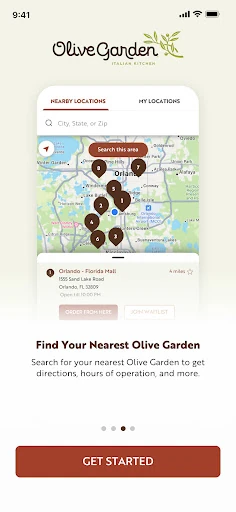
When I first opened Olive Garden Italian Kitchen, I pictured using it on an ordinary weeknight: a couple of people are hungry, nobody has settled on a plan, and I want to know whether a nearby restaurant is an option. The app can help me find a location, check its hours and directions, and browse the menu before we head out. That makes the decision feel a little less last-minute.
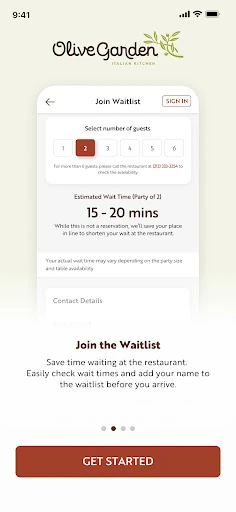
For a busier evening, the waitlist tools are the clearest reason to open the app before leaving home. I can look at an estimated wait, add my name, then check in with the host when I arrive. It is a useful bridge between deciding to eat out and walking through the door. The estimate is still just an estimate, but having it ahead of time can make planning easier.
A Restaurant Companion, Not A Food Guide
Compared with a general map or a delivery service, this app is built around one restaurant brand. Its advantage is that location information, menu browsing, waitlisting, ToGo ordering, saved orders, payment, and gift cards sit together in one place. If Olive Garden is already on the shortlist, that focus can be handy. I do not have to treat it as a broad restaurant-discovery tool to get value from it.
That focus is also its boundary. I would not open it to compare unrelated restaurants, search for recipes, or plan meals across different chains. The app is for the Olive Garden visit or order itself, rather than a full dining directory. Availability and prices can vary by location, so I would use the restaurant details and menu as planning tools, then check the specifics for the place I intend to use.
Make Repeat Orders Easier
A small habit that makes the app more useful is saving a preferred location once I have chosen where I usually go. The next time I want directions or want to check hours, I can get back to that restaurant more directly. When I am deciding what to eat, browsing the menu in advance also gives me time to choose without holding up the rest of the group.
For takeout, I would save a meal I order often and use the reorder option when that same choice sounds good again. The app also supports personalizing meals, so it is worth taking a moment to set the order the way I prefer before saving it. If I use an Olive Garden gift card, managing it in the app can keep that payment option close at hand for another visit.
More From Our News Desk

Zoom Meetings, Google Meet, or Teams: Which Is Easiest to Join?

How I Build a Free Streaming Lineup With Tubi

Why Crunchyroll Is the Default Anime App for So Many Fans

YouTube TV: A Practical Guide to Cutting Cable

Rummikub and the Small Comfort of Phone Games

TeamViewer Remote Control or AnyDesk for Helping Family?
Who Will Get The Most From It
I would recommend Olive Garden Italian Kitchen to people who visit the chain regularly, order its food to go, or like to check restaurant details before heading out. It puts several useful parts of that routine together: finding a location, checking an estimated wait, browsing the menu, and returning to saved orders. For an occasional visitor, even one of those jobs may be enough to make having the app worthwhile.
It may not suit someone looking for a general restaurant finder or a way to manage meals from many different places. The app's usefulness depends on wanting Olive Garden specifically, and some people will prefer to browse or order another way. I would also keep in mind that restaurant participation and prices can vary. If those details matter to a particular outing, checking the chosen location before relying on a plan is sensible.
Olive Garden Italian Kitchen is a Food & Drink app from Darden Restaurants, Inc. On Google Play it has over one million installs and a 3.5-star rating from around 17,000 ratings. The app is free to download, and the provided store facts say it contains no ads and offers no in-app purchases.
The app is rated Everyone, and its current version is 8.00.0. The supplied release date is March 29, 2016, and the last update date is October 15, 2026. No minimum Android version is included in the available app facts, so Android compatibility is best checked on Google Play for the device in question.
How It Fits Into A Real Visit
A Straightforward Starting Point
My first impression is of an app with a clearly defined job: help me get from choosing Olive Garden to arranging the visit or order. The opening decision is practical rather than abstract. I can look for a restaurant, browse what is on the menu, or move toward a ToGo order. That makes sense for an app I might open while planning dinner, rather than one I would browse for entertainment.
The setup that seems most helpful is selecting and saving a preferred location. Once that is done, restaurant hours, directions, and location information are easier to reach when I am making plans. I also like that waitlist information can be part of the pre-visit routine. It gives me a way to check the situation before I set off, without promising that the wait will match the estimate exactly.
Useful In Small Moments
Day to day, I would expect to use the app in brief bursts. I might check the menu while deciding what to order, look up hours before driving over, or add my name to the waitlist while getting ready. Those are modest tasks, but placing them together can cut down on switching between separate restaurant-related steps when Olive Garden is already the plan.
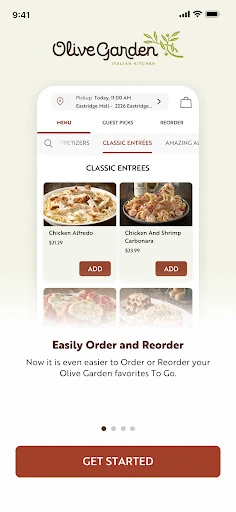
The ToGo side is better suited to a deliberate order than to casual browsing across restaurant brands. I can explore the menu, place a pickup or delivery order, and save an order to make a later repeat quicker. That is especially convenient when a familiar meal is the goal. I would still pause to review the selected items and restaurant details before submitting an order.
Favorites And Payment Tools
Saved orders are one of the app's more practical touches for repeat customers. Rather than rebuilding a familiar ToGo order every time, I can keep a favorite for another occasion and personalize meals to my preference. That does not change the app into a meal planner, but it can remove a few small steps from ordering a lunch or dinner I already know I want.
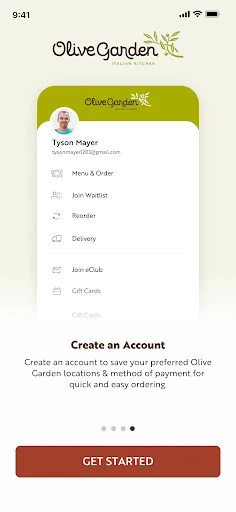
Payment and gift card tools make the app more than a menu viewer. It supports saving payment details for quicker checkout and using, adding, reloading, or managing Olive Garden gift cards. I would treat these as convenience options for someone who wants to pay through the app, not as reasons everyone needs to use it. The basic usefulness remains finding a location, planning a visit, or placing an order.
A Low-Fuss Dinner Routine
One realistic routine starts before anyone is in the car. I would open the app, pick the restaurant I am considering, and check its hours and directions. If we are eating there, I can look at the estimated wait and add my name to the waitlist. When we arrive, the app's described process includes checking in with the host, so I would still expect a real-world step at the restaurant.
For a night at home, I would take a different path: browse the menu, choose pickup or delivery, and save the order if it is one I am likely to repeat. If a gift card is part of the plan, I can use the app's gift card tools as well. The workflow is most appealing when it saves repeated effort, rather than when I expect it to make every dining decision for me.
Keep The Scope In Mind
The biggest limitation is the obvious one: this is an Olive Garden app. Its restaurant search and ordering tools do not make it a comprehensive guide to other places nearby. People who rarely visit the chain may find they have little reason to keep it installed, especially if they are comfortable checking restaurant information or placing an order another way.
The other point to keep in view is that details can depend on the restaurant. The app describes estimated wait times, location information, and pickup or delivery ordering, while its own description says prices and participation may vary. I would confirm the relevant location and order details when planning a specific visit. The app can organize the process, but it does not remove the need to check what applies locally.
Overall, the app offers a focused set of conveniences rather than a wide set of dining features. Its strongest case is for someone who already has a reason to visit, order ToGo, or use an Olive Garden gift card. If that matches my routine, saving a location and a couple of favorite orders could make the app feel more useful with each return.
Olive Garden Italian Kitchen is a sensible utility for regular customers: it brings restaurant details, waitlisting, menu browsing, ToGo orders, saved favorites, payment, and gift cards into one brand-specific app. I like that its purpose is easy to understand, even if that narrow focus will not appeal to everyone.
I would try it if I often visit Olive Garden or place its orders for pickup or delivery. If I rarely choose the chain, it is harder to justify as a daily app. The clearest benefit is convenience around a restaurant I already plan to use, not discovery beyond it.
Olive Garden Frequently Asked Questions
What is Olive Garden Italian Kitchen used for?
Olive Garden Italian Kitchen helps users find a restaurant, view hours and directions, check estimated wait times, join the waitlist, and browse the menu. It also supports ToGo pickup or delivery ordering, saved and repeat orders, meal personalization, payment details, and Olive Garden gift cards. It is designed for handling parts of an Olive Garden visit or order.
What devices can run Olive Garden Italian Kitchen?
The app is available for Android through Google Play. The provided app details do not specify a minimum Android version, so the compatible requirements may vary by device and are worth checking on the Google Play store page before installing. The app is intended for use with Olive Garden restaurant information and ordering.
What Android version does Olive Garden Italian Kitchen require?
A minimum Android version is not included in the supplied app facts. Requirements can vary as the app is updated and by device, so check the Google Play store page on the Android phone or tablet you plan to use. The store page is the best place to confirm current compatibility.
Does Olive Garden Italian Kitchen cost money?
The app is free to download on Google Play, and the supplied facts say it has no in-app purchases and contains no ads. Restaurant food and order prices are separate from downloading the app, and the app description says prices and participation may vary. Check the selected restaurant for details that apply to your order.
Is Olive Garden Italian Kitchen a good fit for me?
It is a good fit if you visit Olive Garden, order its food to go, or want restaurant and waitlist details before a visit. Its tools are focused on that chain, so someone seeking a general restaurant finder or a way to plan orders across many brands may not find it as useful. Whether it suits you depends on your routine.
Pros
- Combines restaurant details, estimated waits, menu browsing, and ordering in one brand-focused app.
- Saved locations and favorite orders can make repeat visits and ToGo meals quicker to arrange.
- Includes Olive Garden gift card management and options for payment through the app.
Cons
- Its tools are limited to Olive Garden rather than general restaurant discovery or comparison.
- Prices and restaurant participation can vary, so details still need checking for a specific location.
- Category
- Food & Drink
- Version
- 8.00.0











