MyFrontier
- 89.51K
- 4.6
- Installs
- 1.00M
- Price
- Free

Screenshots
Analysis by Reviewed APKs
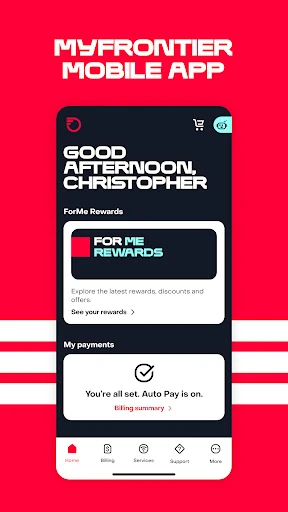
MyFrontier is a self-service app for people who already use Frontier internet, TV, or voice service. It brings account tasks like paying a bill, checking an order, changing an appointment, and getting troubleshooting help to a phone or tablet. After looking through its range of practical tools, I see it as most useful for handling routine Frontier business without making a call, rather than as a general-purpose communication app.
A bill-day helper
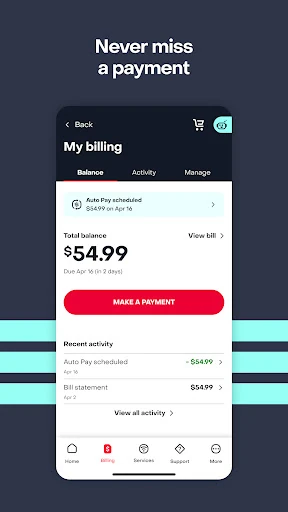
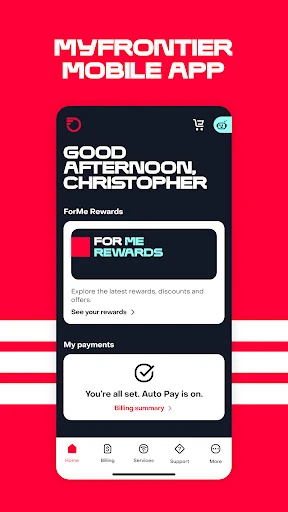
When I imagine using MyFrontier in an ordinary week, bill day is the clearest fit. I could open the app to make a one-time payment, review billing history, or compare a current statement with an earlier one. If I wanted fewer paper statements to keep track of, the app also offers paperless billing and Auto Pay setup. Those are straightforward account chores, gathered in one place instead of spread across separate tasks.
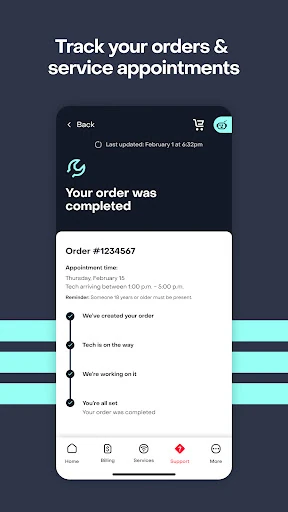
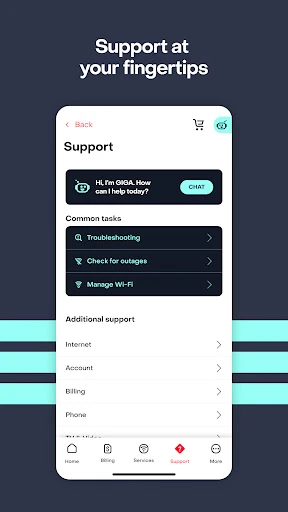
The app has uses beyond billing, too. If a service appointment no longer suits my schedule, I can change it, and customers following an order can check its progress and installation updates. For a connection or TV problem, the listed tools include outage checks, trouble-ticket tracking, equipment reboots, and help through a virtual assistant or Help Center. That makes MyFrontier feel most relevant when a small service task crops up unexpectedly.
For Frontier customers only
MyFrontier is an account companion, not a replacement for an internet provider or a general messaging app. Its features are specifically for people with Frontier High-Speed Internet, Frontier TV, or Frontier Voice service. Compared with calling customer support for every account change, it offers self-service options for payments, plan changes, appointment scheduling, and troubleshooting. That can be handy when I want to take care of something at a time that suits me.
It also is not a broad network-monitoring tool or a way to manage services from other providers. The app description focuses on Frontier accounts and does not describe features such as general web browsing, home-network analytics, or data-usage monitoring. I would choose it for account administration and support, not for controlling unrelated devices or comparing internet plans across companies. Its usefulness depends on having the matching Frontier service in the first place.
Make account tasks routine
A small habit that could make the app more useful is checking billing details when a statement is due, rather than opening it only after a payment question comes up. MyFrontier lets customers view payment and billing history and compare statements, so those tools can help put a current charge in context. Customers who prefer automatic payments can also use the app to set up Auto Pay, while paperless billing is another available account option.
For an installation or service visit, I would treat order tracking and appointment management as occasional check-in tools. The description also mentions real-time installation updates and direct messaging with a service technician, which may be useful while a job is underway. For a connection issue, I would start with an outage check or the available troubleshooting support, then use ticket tracking to follow an existing problem. These are practical moments, not features I need to visit every day.
More From Our News Desk

Zoom Meetings, Google Meet, or Teams: Which Is Easiest to Join?

How I Build a Free Streaming Lineup With Tubi

Why Crunchyroll Is the Default Anime App for So Many Fans

YouTube TV: A Practical Guide to Cutting Cable

Rummikub and the Small Comfort of Phone Games

TeamViewer Remote Control or AnyDesk for Helping Family?
Who will find it useful
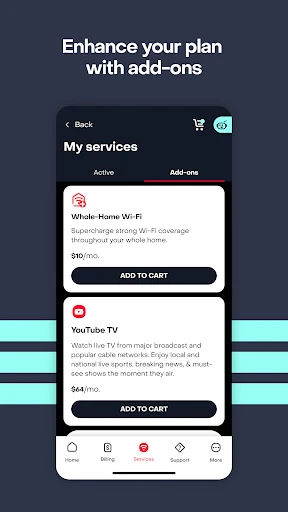
I would recommend MyFrontier to Frontier customers who like handling basic account administration on a phone or tablet. It covers several chores that otherwise might mean finding a bill, calling for help, or waiting until a computer is nearby: making a payment, reviewing statements, changing an appointment, and checking orders or trouble tickets. Customers considering a service upgrade can also use it to manage their plan and add-ons.
It may not be worth installing for someone who does not use Frontier internet, TV, or voice service, since the app is built around those accounts. It is also not a substitute for talking directly with a person in every support situation; the described help options include a virtual assistant and Help Center, but some issues may still call for other support. If you rarely manage your account from a mobile device, its convenience may matter less.
MyFrontier is developed by Frontier - A Verizon company. On Google Play, it has more than one million installs and a 4.6-star rating from about 89,500 ratings. The app is free to download, and the supplied store facts say it contains no ads and offers no in-app purchases. Its content rating is Everyone.
The supplied app facts give version 4.34.0, a release date of May 14, 2015, and a last update date of October 24, 2026. An Android minimum version was not included among the supplied details, so check the Google Play listing on your device for compatibility information. The app is intended for managing Frontier internet, TV, and voice services.
Everyday account management, in one place
A practical first impression
When I first opened the description of MyFrontier, what stood out was how many ordinary account jobs it tries to cover. Payments, statements, service changes, appointment scheduling, and troubleshooting all sit within the same service-focused app. Rather than presenting itself as a place to spend time, it is meant to help customers get a task done and move on with their day.
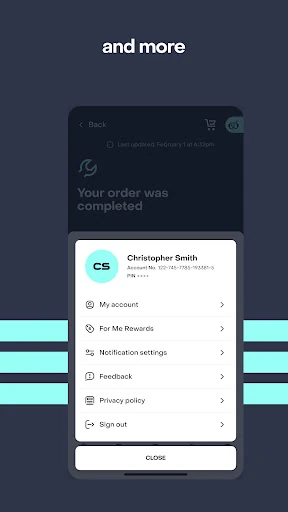
The app is designed for use from a smartphone or tablet, with account settings such as password reset, contact information, and notification preferences included among its tools. I would approach setup with a specific goal in mind, such as checking a bill or following an installation, then use the relevant account options as needed. The supplied details do not describe a particular onboarding process, so I would not assume setup works the same for every customer.
Useful when something changes
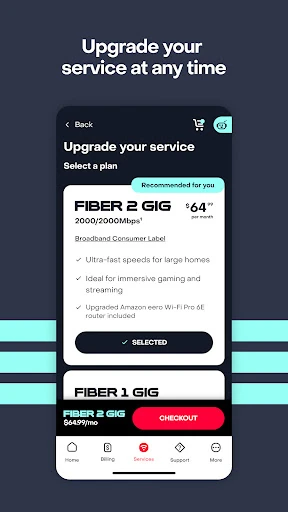
Most account apps are easiest to appreciate when a plan or schedule changes. MyFrontier lets customers make account changes and manage Frontier services, including upgrading to higher speeds or adding plan extras. The ability to change a service appointment is another concrete convenience: it can help when a scheduled visit no longer fits the day. These tasks are occasional, but avoiding a separate call for a simple change can matter.
Billing is the other regular reason I would expect to open the app. A customer can make a one-time payment, set up Auto Pay, enroll in paperless billing, and look at past billing and payment records. Comparing statements is particularly practical if I want to understand how the current bill differs from an earlier one. The app brings these account functions together, although it is still specific to Frontier service.
Support tools with a purpose
The troubleshooting tools are among the more useful inclusions because they address several different stages of a service problem. Customers can check for outages, track orders and trouble tickets, and reboot a gateway or TV set-top box. The app also offers a virtual assistant and Help Center for support. I like that the listed options include both basic self-service steps and ways to follow an issue that is already in progress.
For new or changing service, order tracking and installation updates give the app a role beyond billing. The description also says customers can message their service technician directly. That could be useful during an installation when timing or progress is on my mind. Personalized rewards, discounts, brand offers, and free goodies are also part of the app's stated offering, though the central appeal remains managing Frontier service.
A calm monthly routine
A sensible routine would be to check the account around statement time, review the current bill, and make a payment or adjust billing preferences if needed. I would compare the statement with an earlier one only when I had a reason to look more closely. Auto Pay and paperless billing are available for customers who want those arrangements, but they are choices rather than requirements for using the other account tools.
I would save the support features for the moments they are relevant. During an installation, I could check order progress and updates; if a service trouble ticket is open, I could return to track it. For a connection issue, the outage check or equipment reboot option may be a useful first step. This kind of occasional, task-based use fits the app better than opening it out of habit every day.
Keep the scope in mind
MyFrontier's main limitation is also its defining boundary: it is for Frontier customers and their service accounts. Someone looking for a general communication platform, a universal bill organizer, or tools for a different provider will not get those jobs done here. The advertised functions are account management, service support, payments, and related offers, so I would judge it on how well those needs match my own.
The app description lists several self-service support paths, but it does not promise that every service issue can be resolved inside the app. A virtual assistant, Help Center, outage check, or equipment reboot may be useful for some situations, while others may require more support. The minimum Android version can vary with device compatibility details, so it is worth checking Google Play before installing if that is a concern.
MyFrontier makes the most sense as a practical companion for a Frontier account. Its strongest case is convenience: bills, service changes, appointments, order tracking, and troubleshooting tools are collected in one mobile app. I would not expect it to be an all-purpose internet utility, but it covers a useful range of routine customer-service tasks.
If you have Frontier internet, TV, or voice service and prefer managing account details from your phone or tablet, I would give MyFrontier a try. If you are not a Frontier customer, or rarely handle service matters digitally, it is unlikely to earn much space on your home screen.
MyFrontier Frequently Asked Questions
What is the MyFrontier app used for?
MyFrontier is for managing Frontier internet, TV, and voice services from a smartphone or tablet. Its listed tools include paying bills, viewing billing history, changing service appointments, managing account details, tracking orders or trouble tickets, checking outages, and finding troubleshooting support. Customers can also manage service upgrades and add-ons through their account.
Which devices can run MyFrontier?
MyFrontier is available on Android through Google Play. The supplied facts do not specify a minimum Android version, and compatibility can depend on the device and current app requirements. Check the Google Play store page for the latest requirements before installing. The app is described for use on a smartphone or tablet.
Does MyFrontier cost money?
The app is free to download. The supplied Google Play facts say it has no in-app purchases and contains no ads. Frontier service itself is separate from the app, and the app is intended for customers managing those services. Check the store listing for current details, since app information and availability can vary.
Can I pay my Frontier bill with MyFrontier?
Yes. The app description includes one-time payments, Auto Pay setup, paperless billing, billing and payment history, and comparisons between current and past statements. Those tools make it useful for routine bill management. The app also covers other Frontier account tasks, including plan changes, appointment management, and troubleshooting.
Who is MyFrontier best suited for?
It is best suited to customers with Frontier High-Speed Internet, Frontier TV, or Frontier Voice who want to handle account tasks on a mobile device. People who do not use Frontier service are unlikely to benefit from its account-specific tools. Customers who prefer handling every support issue directly with a person may also find the self-service focus less suitable.
Pros
- Combines bill payments, statement history, service changes, and support tools for Frontier customers.
- Includes outage checks, order and ticket tracking, and equipment reboot options.
- Supports appointment changes and installation updates for customers following service work.
- Free to download, with no ads or in-app purchases in the supplied store facts.
Cons
- Its account tools are useful only to customers with Frontier services.
- The supplied details do not state a minimum Android version, so compatibility is worth checking.
- Self-service support may not cover every situation that requires help.
- Category
- Communication
- Version
- 4.34.0











