MyADT
- 193
- 1.3
- Installs
- —
- Price
- Free
Screenshots
Analysis by Reviewed APKs
MyADT is an account-management app for ADT customers who want to handle service details and support from an iPhone or iPad. I see its value in the practical jobs that otherwise might mean a call or email: checking account information, arranging an engineer visit, or logging a fault. Its role is deliberately narrower than controlling a security system, so it works best as a customer-service companion.
A service task from your phone
Imagine noticing a problem with your security service while getting ready for work. MyADT gives you a place to log a fault and access support material, rather than leaving you to search for account details or explain the issue in a first email. I like the basic idea: the app is aimed at the administrative step of getting help, not at turning a quick morning check into a full security-system session.
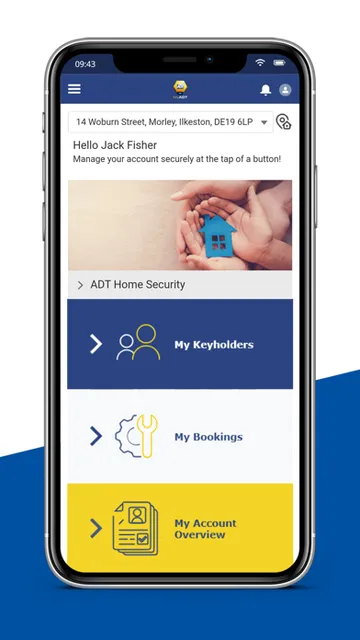
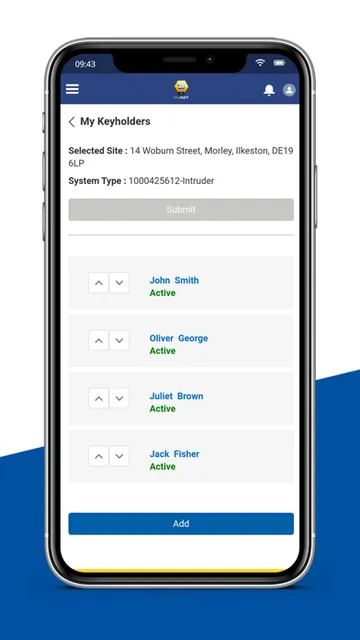
The same convenience applies when a household detail needs attention. You can view or update keyholder information, check account details, and book or manage engineer visits. I can picture using it during a lunch break to arrange a service visit, then returning to the day without having to make a separate call. These are ordinary customer-service chores, but putting them together can make them easier to keep track of.
Account care, not system control
The useful comparison is with a customer portal or a phone call to a service provider. MyADT brings account and contract information, visit booking, fault logging, and help material into one app. That makes it a better fit for managing the relationship around an ADT service than for general home security tasks. If I needed to arrange an inspection or update who can be contacted, those are the kinds of jobs this app is designed to handle.
It is important to keep the boundary clear: MyADT does not control the operation of your security system. If you already use the ADT Smart Services app to set or unset a smart security system, the description says that arrangement does not change. I would not choose MyADT expecting live security controls or system operation. Its appeal is narrower and more administrative, which will suit some customers and disappoint anyone looking for a single control app.
Small habits that help
My first practical habit would be to check account and keyholder details when something changes at home, rather than waiting until an engineer needs to contact someone. Since the app lets you view and update keyholder information, it can serve as a convenient reminder to keep those details current. That is a modest use, but it is exactly the sort of small task that is easy to postpone when it lives outside a familiar routine.
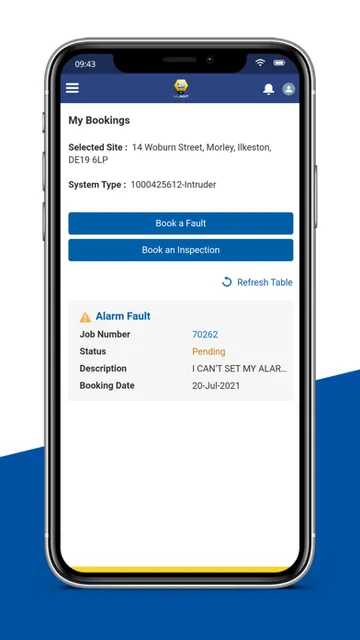
I would also keep it in mind when planning routine inspections or arranging an engineer visit. Booking and managing appointments in the same place as fault logging and support material gives the app a straightforward role in service upkeep. If a problem comes up, I would start with the relevant help material, then use the fault-logging option if needed. The app is most useful when treated as a practical service desk, not a daily security dashboard.
More From Our News Desk

Zoom Meetings, Google Meet, or Teams: Which Is Easiest to Join?

How I Build a Free Streaming Lineup With Tubi

Why Crunchyroll Is the Default Anime App for So Many Fans

YouTube TV: A Practical Guide to Cutting Cable

Rummikub and the Small Comfort of Phone Games

TeamViewer Remote Control or AnyDesk for Helping Family?
Who may find it useful
I would recommend MyADT to existing ADT customers who want a mobile route to routine account and service tasks. It is especially relevant if you expect to update keyholder information, book inspections, arrange engineer visits, log faults, or look for troubleshooting help. Those jobs can be occasional, but having them gathered in one place may be handy when a household detail changes or a service issue interrupts an otherwise busy day.
It may not suit someone who wants to operate a security system from their phone, since that is outside MyADT’s stated purpose. Customers already using ADT Smart Services for setting or unsetting a system should keep that distinction in mind. I would also be cautious about recommending it to someone who expects a polished experience based on store feedback alone: its App Store rating is low, so it is worth weighing that alongside the specific tasks you need.
MyADT is developed by ADT Fire and Security plc and is available on the Apple App Store for iOS. The minimum requirement is iOS 17.0, so it is worth checking your device’s software before installing. The app is free to download. The store gives it a 4+ age rating, and its current version is 264.000.
On the App Store, MyADT has a 1.3 out of 5 rating from 193 ratings. It was released on September 22, 2021, and was last updated on October 22, 2026. These figures offer a quick snapshot of the app’s store presence, though ratings reflect individual experiences and can change as more people review it.
A Closer Look at MyADT’s Service Role
First look and setup
When I first looked at what MyADT is meant to do, the clearest impression was focus. It is presented as a personalised place for account information and service tasks, not as a broad smart-home hub. That expectation matters: I would approach it as a way to reach the details and support I need as an ADT customer, rather than expecting a screen full of security controls.
Before getting started, I would check that the iPhone or iPad is running iOS 17.0 or later. The description frames the app around access to your own account and contract information, so its usefulness depends on being an ADT customer with relevant details to manage. I would also set expectations early: this is for administrative access and support, not for operating the security system itself.
Everyday account tasks
The everyday experience described here is built around a handful of practical actions. You can view and manage account details, update keyholder information, and book or manage engineer visits. I like that these jobs belong together: if a contact detail changes while arranging a visit, the app’s account-management purpose is relevant to the same moment, rather than requiring a separate service channel.
Fault logging and support material round out that service-focused routine. If something needs attention, you can log a fault and look for help or troubleshooting information. I would not expect that to replace every conversation with support, but it gives customers a mobile starting point for common service needs. The value is less about constant use and more about having the right administrative tools available when a need arises.
The useful features
Keyholder management is one of the more specific features, because it addresses information that can matter to a household beyond the main account holder. The ability to view and update those details gives the app a clear purpose between appointments and faults. It is not flashy, but it can save a bit of back-and-forth when a contact needs changing.
Appointment handling is another practical inclusion. MyADT lets customers book routine inspections and book or manage engineer visits, giving service planning a place alongside account information. I can see this helping when a calendar gets crowded: a visit is not just something to request, but something to manage as plans evolve. The app’s feature set stays grounded in the ongoing care of an ADT account.
The support and help material is also worth noting. It is described as a place to get guidance for making the best of a security service or troubleshooting. Paired with fault logging, that gives customers two sensible first steps when a question or issue comes up: look for relevant help, or record a fault for follow-up.
A simple service routine
A routine I could imagine is checking keyholder details when someone’s role in the household changes, then using MyADT when an inspection or engineer visit needs arranging. That keeps occasional chores from becoming a last-minute scramble. There is no need to open the app every morning; its strengths make more sense in a light-touch pattern, with a visit, account change, or service question prompting the next visit.
For a fault, I would use the help material as a first reference and log the issue if it needs service attention. If an appointment is already involved, the visit-management feature fits naturally into the same process. This is a straightforward workflow rather than an elaborate system, and that is part of the appeal: a few account and support tasks can live in one familiar mobile place.
Limits to keep in mind
The biggest limitation is also the clearest boundary: MyADT does not control the operation of your security system. Someone expecting to set or unset a system through this app will need to understand that its purpose is different. The description specifically says existing use of ADT Smart Services for those controls does not change, so MyADT should be seen as a companion for account and service matters.
Its usefulness is also tied to the tasks it supports. If you rarely need to review account information, maintain keyholder details, arrange visits, or seek troubleshooting help, you may have little reason to open it often. That does not make the app pointless; it just means its value is situational. I would judge it by whether those customer-service jobs are easier to manage on a phone.
Finally, the App Store rating is 1.3 from 193 ratings, a notably low score that is worth considering before relying on the app as your preferred route for service tasks. Ratings do not explain every individual experience, but they are a reasonable prompt to keep expectations measured and check whether the app meets your needs.
MyADT has a clear, useful job: putting ADT account details, keyholder updates, appointment management, fault logging, and support material within reach on iOS. I appreciate that it does not pretend to be a system-control app. That narrower role may make it a practical occasional tool for customers who want to handle service chores from their phone.
I would try it if I were an ADT customer who regularly needs those account or service options, provided my device meets the iOS 17.0 requirement. I would not recommend it as a replacement for an app used to operate a security system, and the low store rating calls for measured expectations. For the right customer, its focused set of administrative tools is the main reason to install it.
MyADT Frequently Asked Questions
What is the MyADT app used for?
MyADT is for ADT account and service tasks. It lets customers view and manage account details, update keyholder information, book or manage engineer visits, book routine inspections, log faults, and access support or troubleshooting material. It is not designed to control the operation of a security system.
Which devices can run MyADT?
MyADT is available for iOS through the Apple App Store. The minimum operating-system requirement is iOS 17.0, so check your device’s version before downloading. The store page is the best place to check current compatibility details, as requirements and supported devices may vary over time.
Does MyADT work on Android?
The app details provided here identify MyADT as an iOS app distributed through the Apple App Store. If you are looking for an Android version, check the relevant store for current availability. MyADT’s stated purpose is account and service management, rather than controlling a security system.
Does MyADT cost money?
MyADT is free to download on the Apple App Store. Check the store listing for current details about any charges or purchase options, since these may vary. The app’s described features focus on account information, appointment management, fault logging, keyholder details, and support material.
Is MyADT right for managing my security system?
MyADT is suited to ADT customers who need account information, keyholder updates, visit booking, fault logging, or support material. It is not for operating a security system. The description says that customers using ADT Smart Services to set or unset a system can continue using that app for those controls.
Pros
- Brings account details and keyholder information together in a mobile app.
- Supports booking and managing engineer visits and routine inspections.
- Includes fault logging and access to troubleshooting help material.
- Free to download from the Apple App Store.
Cons
- Does not control the operation of an ADT security system.
- Requires iOS 17.0 or later, limiting compatibility with older devices.
- Its 1.3 out of 5 App Store rating suggests keeping expectations measured.
- Category
- Business
- Version
- 264.000











