Manychat
- 2.17K
- 4.2
- Installs
- —
- Price
- Free

Screenshots


Analysis by Reviewed APKs
Manychat is a social messaging and automation app for creators, small businesses, and teams that want to keep up with conversations and turn engagement into follow-up. It brings tools for replies, automated responses, and performance tracking together on an iPhone. I like the practical focus: it is built to help manage busy social channels, not to replace the work of making good content or building relationships.
A Busy Social Inbox
Picture a creator finishing a post and then heading into a workday. Comments and story mentions keep arriving while they are away, and a promising question can quickly get buried. Manychat is designed to catch some of that activity with automated responses and bring social conversations into one place. I can see the appeal for anyone who wants an audience to hear back promptly without keeping several messaging apps open all day.
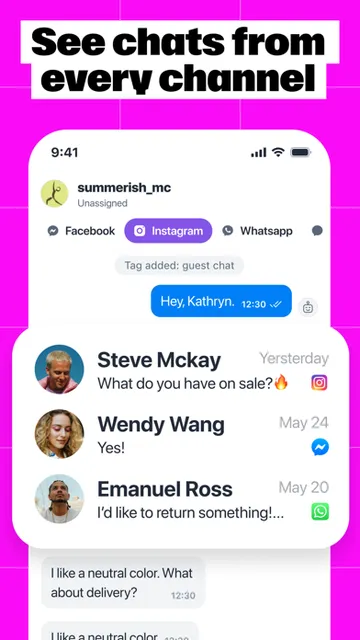
The useful part is the connection between a public interaction and a next step. A post comment or story mention can trigger a reply, while Live Chat gives a person a way to handle conversations directly. For a small shop, that might mean following up with someone asking about an offer; for a creator, it could mean responding to a follower who wants more information. The point is quicker follow-through, not a robotic substitute for every exchange.
Automation, Not Social Media
Manychat makes the most sense beside the social platforms it supports, rather than as a replacement for them. Its focus is on handling messages and automating responses across services such as Instagram, TikTok, Facebook, WhatsApp, and Telegram. If I were planning posts, editing video, or browsing a feed for entertainment, I would still use the relevant social app. Manychat is about the conversation and follow-up around that content.
That distinction also sets a sensible expectation. Automation can help respond to repeated interactions and keep leads moving, but it cannot make an offer compelling or supply the judgment a nuanced conversation needs. I would use it to reduce repetitive work and organize responses, then step in for personal questions. It is a business-oriented tool, so someone who only wants a casual social inbox may find its growth and conversion focus unnecessary.
Small Habits That Help
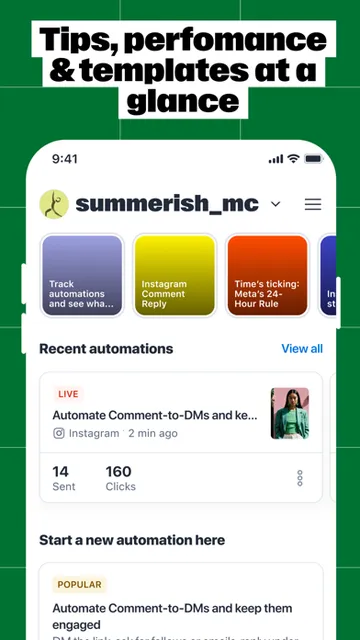
A little preparation makes an automation tool more useful. I would start by identifying the questions that come up again and again, then prepare concise answers that sound like the account rather than a generic help desk. Manychat describes message templates, default replies, and prebuilt automations for posts, comments, messages, and stories. Those are practical starting points when the goal is to answer common questions without composing the same response from scratch.
I would also make checking the inbox part of a regular routine instead of assuming automation has handled everything. Live Chat supports direct replies and team assignment, while notifications can help flag activity. For a campaign or offer, checking clicks, opens, and conversions afterward gives a reason to adjust the next response. That mix of quick automation and occasional human review seems more dependable than setting a flow and forgetting it.
More From Our News Desk

Zoom Meetings, Google Meet, or Teams: Which Is Easiest to Join?

How I Build a Free Streaming Lineup With Tubi

Why Crunchyroll Is the Default Anime App for So Many Fans

YouTube TV: A Practical Guide to Cutting Cable

Rummikub and the Small Comfort of Phone Games

TeamViewer Remote Control or AnyDesk for Helping Family?
Who Will Get the Most From It
I would recommend Manychat to creators, businesses, and social teams that receive enough comments and direct messages for response time to become a real chore. It has particular appeal if conversations arrive across several supported services or if a team needs to share reply work. The ability to connect engagement with offers, links, and information capture makes it more relevant to people who already use social channels to find customers.
It may be a poor fit for someone who has little incoming engagement or wants only a basic messaging app. Setting up automation and deciding which replies should remain personal both take thought; those steps may outweigh the time saved for a very small account. I would also look elsewhere if the main need is creating posts or managing a broader marketing plan. Manychat concentrates on social conversations and the actions that follow them.
Manychat is developed by ManyChat Inc. and is available for iPhone through the Apple App Store. The store lists a 4.2-star rating from 2,175 ratings and a 4+ age rating. Its listed release date is September 9, 2019, and the current version shown is 6.26.0.
The app is free to download, and the listed minimum requirement is iOS 17.0. The App Store shows a last update date of November 3, 2026. Pricing or in-app purchase details can change, so I would check the current App Store information before signing up or relying on a particular plan.
A Closer Look at Social Follow-Up
Getting Oriented
The first thing I notice about Manychat’s purpose is how clearly it is aimed at people managing social accounts for work. Rather than treating messages as isolated chats, it frames them as part of a larger process: capture an interaction, respond, and help the person take a next step. That is a useful lens for deciding whether the app belongs in a daily routine.
Getting started is described as signing up with a social handle or email. From there, the app’s value depends on which conversations and automations matter to the account. I would keep the first setup modest: choose a common interaction, prepare a sensible response, and see whether it saves time before building out more flows. Starting small makes it easier to keep replies relevant.
The Daily Conversation
The day-to-day promise is a central place to manage direct messages from multiple social services, rather than jumping between each one to keep track. Manychat describes Live Chat for replying or assigning work to a team, as well as templates for quicker responses. That combination suits the uneven rhythm of a busy inbox: some messages are routine, while others deserve a direct, thoughtful answer.
Push notifications are another practical part of the workflow. A notification can bring an incoming conversation to attention, while a prepared reply helps with a familiar question. I would still treat notifications as prompts rather than proof that every conversation is resolved. The app is intended to help avoid missed messages, but a person needs to review the exchange and decide when a custom response is the better choice.
Automation With a Purpose
The standout idea is using engagement as a trigger for a response. Manychat describes automations for post comments, story mentions, messages, and reel replies, along with prebuilt options that can be previewed and launched. This can be useful when the same kind of interaction tends to lead to the same helpful answer. It offers a practical way to stay responsive while avoiding a manual reply to every repeated prompt.
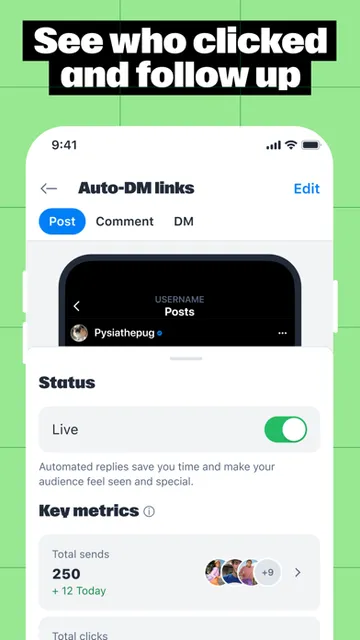
The app also connects conversations with sales-oriented actions. Its described tools include sharing affiliate links or discount codes, collecting contact details, and tracking clicks, opens, and conversions. Those functions make the app more than a message reader, though their usefulness depends on having a clear and appropriate reason to follow up. I would focus on a relevant next step for the audience, rather than adding an offer to every interaction.
A Routine for Campaigns
For a small campaign, I would begin with one post or story and decide what response would genuinely help someone who engages with it. A prebuilt automation can provide a starting point; a message template can keep the wording consistent. I would make sure the response leads somewhere useful, whether that is an answer, a freebie, or an offer the person actually asked about.
After the interaction has had time to run, I would check the in-app performance stats and look at clicks, opens, or conversions. That creates a simple loop: respond, review, and refine. It is more grounded than judging a campaign by likes alone. For ongoing use, I would also leave room to answer unusual questions in Live Chat, because an automated message is only a first step when someone needs a real conversation.
Limits to Keep in Mind
Automation needs oversight. A canned response can be fast, but it can also feel out of place if it does not match what the person said. I would avoid trying to automate every conversation, especially when a customer raises a specific concern or asks something outside the usual pattern. Manychat’s direct chat tools matter precisely because an automated response should not have to carry the whole relationship.
The app’s broad set of supported social services is useful, but the experience is still oriented around social messaging and engagement. It is not described as a tool for composing content or replacing the native social apps themselves. And because the app requires iOS 17.0, an older iPhone system may not meet its stated requirement. Anyone comparing plans should check the current App Store details, since pricing arrangements can change.
Manychat has a clear job: help social accounts respond more consistently, automate repeated interactions, and connect conversations to useful follow-up. I like that the concept pairs automation with Live Chat and performance checks, rather than treating every exchange as a one-way blast. It is most convincing when an account already has enough engagement to make inbox management a regular task.
I would recommend it to creators and businesses ready to organize social replies and build thoughtful automations. I would not choose it just to browse social feeds or send occasional personal messages. Start with one recurring interaction, keep the response human, and see whether the time saved is worth bringing another tool into the routine.
Manychat Frequently Asked Questions
What is Manychat used for?
Manychat helps businesses, creators, and teams manage social conversations and automate some replies. It describes tools for responding to comments and story activity, managing messages, using templates, and checking engagement results. It is focused on social messaging and follow-up rather than creating posts or replacing the social platforms where those conversations begin.
Which devices can run Manychat?
Manychat is available for iPhone through the Apple App Store, and its listed minimum requirement is iOS 17.0. The supplied app details do not provide an Android requirement. For the latest device compatibility information, check the current App Store entry before installing, since requirements can change over time.
Is Manychat free, or does it have in-app purchases?
Manychat is listed as free to download. Pricing and any available in-app purchase details may vary, so check the current App Store information for the terms that apply before signing up. The app’s described functions include managing messages, setting up automations, and reviewing performance, but store pricing details are the place to confirm costs.
Which social channels does Manychat support?
The app description names Instagram, TikTok, Facebook, WhatsApp, and Telegram, among other services. It is intended to centralize supported social conversations and automate certain interactions. The exact services and availability may vary, so check Manychat’s current App Store information before relying on a particular channel for your workflow.
Is Manychat a good fit for a small creator?
It can suit a creator who regularly receives comments or direct messages and wants to respond more consistently, use message templates, or automate common follow-up. Someone with very little incoming activity may not get enough benefit to justify setting up workflows. It is most useful when social conversations are already a meaningful part of the work.
Pros
- Combines social messaging with automated replies and direct Live Chat.
- Supports templates and prebuilt automations for common engagement.
- Includes tools to track clicks, opens, and conversions.
- Can help teams assign conversations and keep replies moving.
Cons
- Automation still needs regular human review to avoid impersonal replies.
- Its business and conversion focus may be excessive for casual users.
- Requires iOS 17.0 or later on iPhone.
- Category
- Business
- Version
- 6.26.0











