IAA Buyer Salvage Auctions
- 13.11K
- 4
- Installs
- 1.00M
- Price
- Free

Screenshots

Analysis by Reviewed APKs
IAA Buyer Salvage Auctions is a mobile marketplace for browsing and bidding on damaged, salvaged, and some lightly damaged vehicles. I see it fitting buyers who already know what they need, from repair shops looking for parts to individuals comparing auction vehicles. The inventory research tools make it more than a simple bidding screen, though the amount of detail and the auction format mean it rewards patient, focused browsing.
A Night of Vehicle Hunting
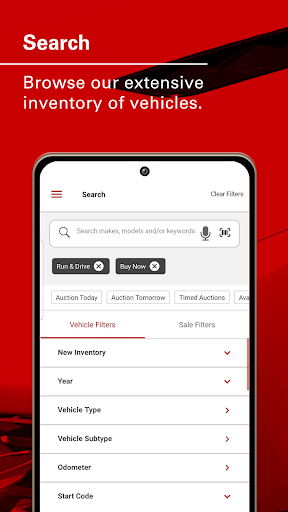
When I first opened IAA Buyer Salvage Auctions, I pictured using it after dinner to narrow down a vehicle search rather than scrolling through listings with no plan. You can search without an account, then filter by make, model, year, vehicle type, odometer, damage, and other details. That makes it practical to start with a specific need, such as a certain model or a vehicle that may have useful parts.
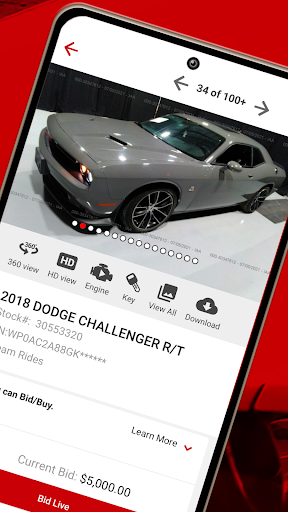
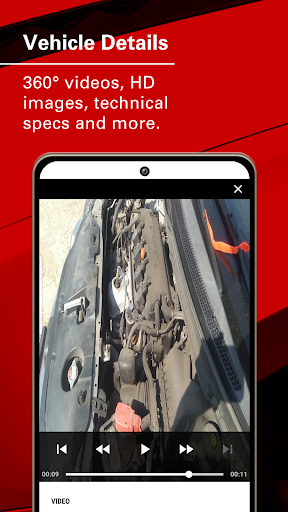
Once a listing catches my eye, the vehicle information gives me several angles to consider. I can check details such as the VIN and OEM specifications, look through high-resolution images or a 360-degree view, and, where available, watch and hear an engine-start clip. Run-and-drive, starts, and stationary categories add useful context. If I decide to bid, I need to log in to an IAA account.
An Auction Tool, Not a Dealer Lot
Compared with a standard used-car browsing app, IAA is built around auctions and vehicles that may have damage, salvage status, or a history that calls for closer inspection. Its inventory also includes some fleet vehicles and repossessions with little or no damage. I like that the app offers filters and vehicle-specific information, but the central task is evaluating auction inventory, not casually browsing a conventional dealer's ready-to-drive selection.
That distinction matters if you're comparing options from the couch. Photos, specifications, and engine clips can help you screen listings, but they are not a substitute for understanding a vehicle's condition and the auction process. The app serves dealerships, mechanics, body shops, scrap buyers, and individual buyers, but it is not a general car-maintenance tool or a broad marketplace for everyday local classifieds.
Make Searches More Useful
I get more out of an inventory app like this when I decide on a few priorities before searching. Make, model, year, and vehicle type are a sensible start; filters for damage, odometer, keys, fuel, transmission, and drive line can help make the results more specific. I would rather refine a search deliberately than open a long run of listings that do not match the job.
A watch list and account tools can support a repeatable routine once you're signed in. I can keep an eye on vehicles, review offers, and return to purchases or payments through My Account. Checking the auction sales lists by branch, city, state, or date also helps organize browsing around a particular location or sale. Those small habits make a large inventory easier to revisit.
More From Our News Desk

Zoom Meetings, Google Meet, or Teams: Which Is Easiest to Join?

How I Build a Free Streaming Lineup With Tubi

Why Crunchyroll Is the Default Anime App for So Many Fans

YouTube TV: A Practical Guide to Cutting Cable

Rummikub and the Small Comfort of Phone Games

TeamViewer Remote Control or AnyDesk for Helping Family?
Who Will Get the Most From It
I would recommend IAA Buyer Salvage Auctions to people who have a clear reason to shop salvage or lightly damaged vehicles. A body shop or mechanic could use the detailed filters and part interchange information while looking for a suitable vehicle or parts source. Buyers who already understand auctions may also appreciate having search, vehicle research, bidding, and account management together on a phone.
It may be a poor fit if you want a quick, uncomplicated way to buy a fully inspected everyday car. This app exposes a lot of vehicle and auction detail, and making a choice still takes judgment. Newcomers can browse without an account, which is a useful way to get oriented, but bidding and additional account features require signing in. I would approach it as a specialized buying tool, not a casual shopping feed.
IAA Buyer Salvage Auctions is a Business app from Insurance Auto Auctions, Inc. On Google Play it has over 1 million installs and a 4.0-star rating from about 13,000 ratings. The app is free to download, contains ads, and does not offer in-app purchases. Its content rating is Everyone, making the store's age classification straightforward.
The app was released on December 5, 2011, and its listed version is 2026.10.23, updated October 23, 2026. The supplied app details do not specify a minimum Android version, so it is worth checking compatibility on Google Play before installing. Bidding and added account features require logging in to an IAA account; vehicle searches can be made without one.
A Closer Look at the Auction Workflow
Starting With a Search
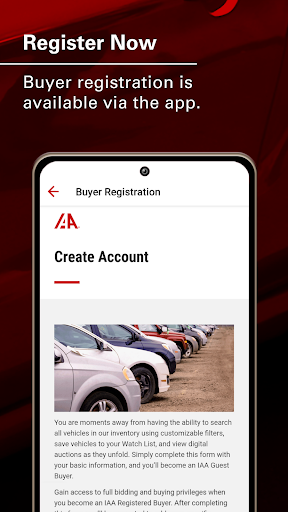
My first impression is that this app has a specific job and gets you to it quickly: find vehicles in IAA's inventory. You can begin searching without creating an account, which is handy if you're just checking what kinds of listings appear. Search by make and model, then use filters to narrow the field instead of treating every vehicle as a possible match.
The number of available criteria hints at the depth of the inventory. Along with basic vehicle type and year, the app describes filters for odometer, damage, keys, body style, fuel, transmission, airbags, and more. I would start with only the filters that matter most, then add others as needed. That keeps an early search manageable while still leaving room to get precise.
The Day-to-Day Browsing
In regular use, the app's value is the combination of finding a listing and checking its details without switching immediately to a different research tool. Vehicle data can include the VIN, OEM specifications, and part interchange numbers. I can compare those details with the reason I'm shopping, whether that is evaluating a vehicle or looking for parts information.
Images are another important part of that process. IAA 360 View and high-resolution images let me inspect the vehicle from different angles, while engine-start clips can show and sound whether an engine runs. The app also categorizes vehicles as Run and Drive, Starts, or Stationary and provides key images to indicate whether keys are available. These are useful clues, not guarantees about the full condition.
Tools Beyond the Listing
The app covers more than searching and viewing individual vehicles. Logged-in users can manage offers, check a watch list, review purchases, and manage payments through My Account. That gives repeat buyers a place to return to after the initial search, instead of treating each visit as an isolated browse.
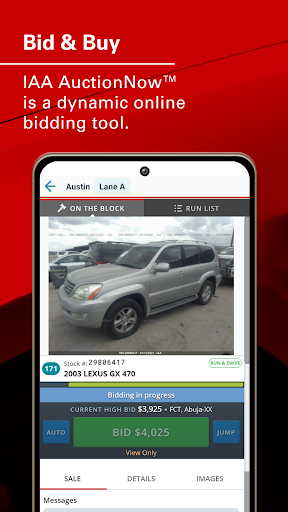
Auction browsing is organized in several ways. Users can look at sales by IAA branch, city, state, or date, and the app includes Timed Auctions, Buy Now, Dream Rides, Rec Rides, Specialty, and Virtual Lane as auction types. Branch location details and contact information are also available, with directions through Apple or Google Maps.
A Practical Buyer Routine
For a focused session, I would first settle on the kind of vehicle or parts need I am trying to meet. Then I would search by make and model, set a year or vehicle-type range, and add condition-related filters only when they help. Once I have a shortlist, I can inspect the photos, 360-degree view, specifications, and any engine-start clip before deciding whether a listing deserves more attention.
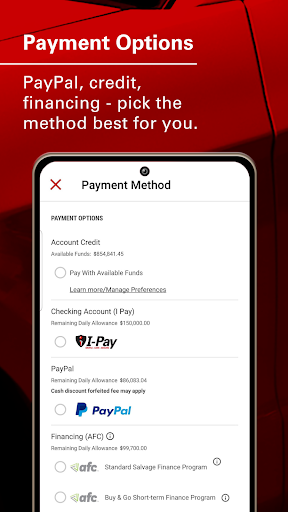
If I were following several candidates, I would use the watch list and check the relevant sale date or branch rather than trying to remember every listing. After signing in, the account area can help keep track of offers, purchases, and payments. Pay by App includes PayPal and floor plan financing for qualifying buyers, though the app's description does not set out the terms of those payment options.
Limits to Keep in Mind
The app's strongest tools help explain a listing, but they do not make every vehicle an easy purchase. Salvage and damaged vehicles can involve very different conditions, and a photo, category, or engine clip only answers part of the question. I would treat the research tools as aids for comparing options rather than as a replacement for careful evaluation.
There is also a clear difference between browsing and participating. Anyone can search inventory without an account, but bidding and additional features require an IAA login. That is a reasonable boundary for an auction service, although it means a curious first-time user can explore listings but cannot complete the full buying workflow until signed in.
IAA Buyer Salvage Auctions is a specialized, information-rich app for people who have a real use for auction vehicles. Its filters, vehicle details, images, engine clips, auction browsing, and account tools make a practical package for comparing listings and managing the next steps.
I would try it if I were shopping for salvage inventory, repair candidates, or parts sources and was comfortable doing careful research. If I wanted an uncomplicated used-car shopping experience, I would look elsewhere. The app makes browsing accessible, but the buyer still needs to bring patience and a clear purpose.
IAA Buyer Salvage Auctions Frequently Asked Questions
What is IAA Buyer Salvage Auctions used for?
IAA Buyer Salvage Auctions lets users search IAA inventory that includes salvaged and damaged vehicles, as well as some fleet and repossessed vehicles with little or no damage. Listings can include vehicle specifications, photos, 360-degree views, and engine-start clips. Users can browse sales and, after logging in to an IAA account, bid and use additional account features.
Which phones and devices support IAA Buyer Salvage Auctions?
IAA Buyer Salvage Auctions is an Android app distributed through Google Play. The supplied app details do not give a minimum Android version or a device compatibility list. Compatibility can vary by device, so check the Google Play store page on the device you plan to use before installing.
What Android version does IAA Buyer Salvage Auctions require?
The minimum Android version is not specified in the app details provided. Requirements can vary as the app is updated and across devices, so check the Google Play store page for the current compatibility information before downloading. The listed app version is 2026.10.23.
Does IAA Buyer Salvage Auctions cost money?
The app is free to download and does not offer in-app purchases. It contains ads. Vehicle searching is available without an account, while bidding and additional features require an IAA account. Costs or terms related to buying a vehicle are separate from the app download and may vary; check the store and IAA information for details.
Is IAA Buyer Salvage Auctions suitable for first-time buyers?
A first-time user can search inventory without an account and explore the vehicle filters and listing information. The app may be most useful to buyers who have a specific need and are prepared to evaluate auction vehicles carefully. Bidding requires an IAA account, and the app's research tools do not replace the buyer's own assessment of a vehicle.
Pros
- Detailed filters help narrow inventory by vehicle, condition, and mechanical characteristics.
- 360-degree views, high-resolution images, and engine clips add useful listing context.
- Search is available without an account, making initial browsing easy.
- Account tools bring offers, watch lists, purchases, and payments together.
Cons
- Bidding and additional features require an IAA account.
- Auction and salvage inventory may be too specialized for ordinary used-car shoppers.
- Listing images and engine clips cannot answer every condition question.
- Category
- Business
- Version
- 2026.10.23











