HomeWAV
- 10.95K
- 3.6
- Installs
- 1.00M
- Price
- Free

Screenshots

Analysis by Reviewed APKs
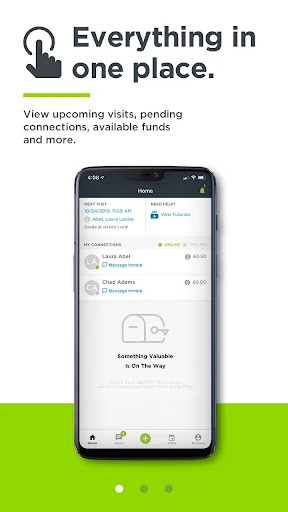
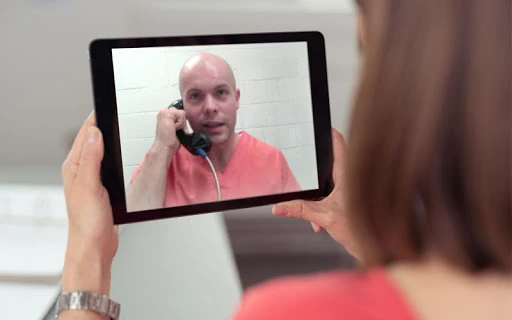
HomeWAV helps friends and family keep in touch with someone incarcerated at a participating detention facility. From the app, approved visitors can manage funds, receive a notification when the person is available, and connect by phone, video call, or message when the facility allows it. I see it as a practical way to make remote contact easier, though its usefulness depends on facility rules and the costs of each visit.
A visit from home
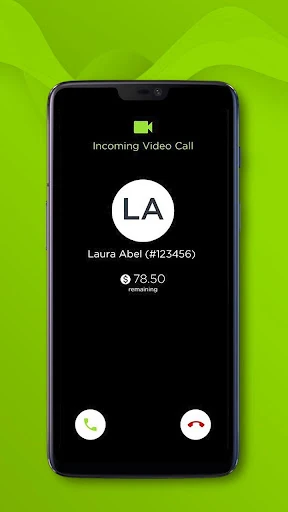
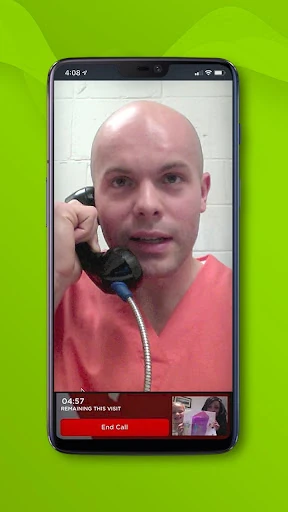
Picture a weekday evening when traveling to a facility is not realistic. With HomeWAV, I can sign in, check whether the person I’m visiting is available, and wait for a notification when they log in. If the facility permits it, they can start a phone call, video call, or message. That turns an otherwise difficult trip into a remote conversation from home, without requiring a scheduled video visit.
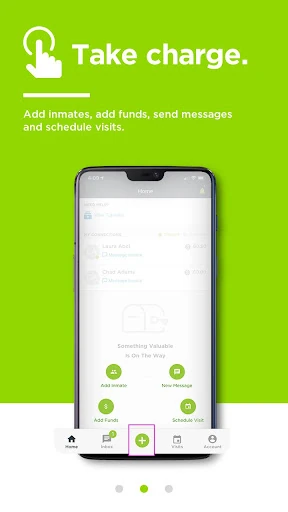
The first steps are account-based: new visitors can create a free account, while returning visitors sign in. Fully registered and approved visitors can choose a facility and add an inmate. After that, the app brings together practical tasks such as checking available funds and managing payment information. It is not a general-purpose video chat app; the person’s facility and its rules determine which types of contact are available.
A focused contact option
Compared with arranging an in-person visit, HomeWAV is geared toward staying connected remotely. It also offers a way to schedule onsite visits where that option is allowed. Remote video visits do not require scheduling, according to the app description, so the experience can be more flexible than planning a trip around a facility appointment. That flexibility still depends on the facility and on the person being available to start contact.
I would not treat HomeWAV as a replacement for every kind of communication or as a social app for general video calls. Its purpose is specifically to connect approved visitors with incarcerated people at participating facilities. Availability, allowed contact methods, and phone or video costs can vary. If you are looking for broad messaging with anyone in your contacts, this is a much narrower tool, built around a specific facility relationship.
Make contact easier
A little preparation can make a remote visit less fiddly. I would sign in ahead of the time I hope to talk, check that the visitor approval process is complete, and make sure the right facility and inmate are associated with my account. It also helps to review the available funds before a conversation rather than stopping to sort out payment information once the other person is ready to connect.
For video, HomeWAV suggests using Wi-Fi and a headset for the best results. I’d take that advice for a planned visit, especially if I’m calling from a busy room or a spot with unreliable mobile service. The app also lets visitors add, update, or change credit and debit information, and transfer funds. A quick check of those details can make the routine smoother, while keeping facility rules in mind.
More From Our News Desk

Zoom Meetings, Google Meet, or Teams: Which Is Easiest to Join?

How I Build a Free Streaming Lineup With Tubi

Why Crunchyroll Is the Default Anime App for So Many Fans

YouTube TV: A Practical Guide to Cutting Cable

Rummikub and the Small Comfort of Phone Games

TeamViewer Remote Control or AnyDesk for Helping Family?
Who may find it useful
I’d recommend HomeWAV to family members and friends who need a way to communicate with someone at a participating detention facility. It brings account access, funds, notifications, remote calls, messaging, and possible onsite visit scheduling into one place. For people who cannot easily travel, the option to have a remote video visit without scheduling may be especially useful, provided the facility allows that kind of contact.
It may be a poor fit if the person’s facility does not use HomeWAV, if you are not an approved visitor, or if you expect every contact method to be available everywhere. Costs for phone and video use vary, so people who need to budget closely should review the applicable details before relying on a particular option. The app is also specialized: it serves a particular communication need rather than everyday chats with a general contact list.
HomeWAV is a communication app from HomeWAV LLC. Google Play shows more than 1 million installs and a 3.6-star rating from about 10,900 ratings. The app is free to download, and its store information says it contains no ads and offers no in-app purchases. Phone and video costs can still vary, so the free download should not be confused with every conversation being free.
Google Play rates HomeWAV Everyone. The current version shown is 2.28.1. It was released on October 24, 2012, and its listed last update is October 23, 2026. The Android version requirement is not included in the supplied app facts, so check Google Play for device compatibility before installing.
How HomeWAV Fits Into a Visit
Getting started
When I first opened HomeWAV, its purpose was clear: this is a visitor’s tool for contact with someone in a detention facility, not a general social network. New visitors can create a free account, and returning users can log in with a username and password. The important qualifier is approval. The app says visitors must be fully registered and approved before they can choose a facility and add an inmate.
That makes setup less like downloading a video chat app and more like getting access to a specific service. I would start by checking that the relevant facility is available and completing the registration steps before counting on a visit. Once the account is ready, the app can be used to manage funds and contact details. It is sensible to have those basics sorted before trying to connect.
Everyday contact
The central routine is straightforward: log in, be available, and respond when the app notifies you that the person has logged in. The incarcerated person can initiate a phone call, video call, or message if the facility permits that option. That distinction matters. HomeWAV supports a connection, but the person on the other side starts it, and facility policy shapes what can happen.
I can see this working well as part of an ordinary evening at home. Rather than traveling for every conversation, a visitor can keep the app accessible and wait for a notification. For a planned remote video visit, the description says no scheduling is required. That can remove one planning step, but it does not mean a call is available on demand; facility rules and the other person’s availability still matter.
Useful account tools
The features I find most practical are the ones that reduce small administrative interruptions. Visitors can see available funds, add funds, or transfer them, and they can add, update, or change credit and debit information. HomeWAV says visitors pay only for the minutes they use, with no plans or packages. Phone and video rates vary, so I would check the relevant costs rather than assume one rate applies everywhere.
There is also support for onsite visit scheduling where the facility allows it. That gives the app a role beyond remote contact, although it is still the facility that determines whether scheduling is available. I like that the feature set is tied to concrete visitor tasks: account access, payment management, notifications, and ways to connect. It is a focused collection rather than a long list of unrelated extras.
A simple visit routine
For a remote visit, I would first sign in and make sure my account has been approved and connected to the right facility and person. Before settling in, I’d check the available funds and payment details. If I’m hoping for video, I’d choose a quiet place, connect to Wi-Fi, and use a headset, following HomeWAV’s own suggestions for best results.
Then I’d keep the app accessible and watch for the notification that the person has logged in. There is no need to schedule a remote video visit according to the app description, but the person must still initiate contact. This routine keeps the parts I can control—account readiness, connection, and payment details—from getting in the way if an opportunity to talk comes up.
Know the boundaries
The biggest limitation is that HomeWAV is not available at every facility. Even where it is used, phone calls, video calls, messaging, and onsite scheduling may depend on what the facility permits. That means the app’s feature list is not a promise that every visitor will see or use every option. I would verify what applies to the specific facility before building a routine around one contact method.
The other practical consideration is cost. The app says visitors pay only for minutes used and do not need plans or packages, but phone and video costs vary. That makes it worth checking the applicable rates and keeping track of funds. A strong Wi-Fi connection and headset are suggested for best results, but those tips cannot remove facility restrictions or make a call available when the other person is not logged in.
HomeWAV is a specialized, practical app for visitors who need to connect with someone at a participating detention facility. I like that it combines contact options with fund management and notifications, and that remote video visits do not require scheduling. Its usefulness is conditional, though: approval, facility rules, availability, and variable costs all shape the experience.
If someone you care about can use HomeWAV at their facility, I think it is worth trying as a way to make remote contact more manageable. Get the account and payment details ready, and check which options and rates apply. If the facility does not support it, or you need a general-purpose chat app, HomeWAV is not the right fit.
HomeWAV Frequently Asked Questions
What is HomeWAV used for?
HomeWAV helps approved visitors connect with incarcerated people at participating detention facilities. Depending on facility rules, the person can initiate a phone call, video call, or message. Visitors can also manage funds and payment details, receive a notification when the person logs in, and schedule onsite visits where that option is allowed.
Which devices and platforms support HomeWAV?
HomeWAV is an Android app available through Google Play. The supplied app information does not specify an Android version requirement, so check the Google Play page for the current compatibility details for your device. The description also suggests Wi-Fi and a headset for the best results during use.
What Android version does HomeWAV require?
The Android version requirement can vary with the app and device, and it is not provided in the app facts used for this review. Check HomeWAV on Google Play to see the current minimum requirement and whether your phone is compatible before installing.
Does HomeWAV cost money to use?
HomeWAV is free to download, with no ads or in-app purchases shown in its Google Play information. The app says visitors pay only for minutes used, without plans or packages, but phone and video costs vary. Check the applicable facility and service details in the store or app before relying on a particular price.
Is HomeWAV right for every visitor?
HomeWAV may suit friends and family who are approved visitors at a facility that uses the service. It is not available everywhere, and facility rules determine which contact methods are allowed. If you need ordinary messaging or video calls with a general list of contacts, this app is more specialized than you need.
Pros
- Combines visitor accounts, funds, notifications, and contact options in one app.
- Remote video visits do not require scheduling, according to the app description.
- Visitors can pay for minutes used without plans or packages.
- Offers onsite visit scheduling where the facility permits it.
Cons
- HomeWAV is not available at every detention facility.
- Facility rules can limit which calls, messages, or visits are available.
- Phone and video costs vary, so visitors need to check applicable rates.
- Category
- Communication
- Version
- 2.28.1











