Genius Scan - PDF Scanner
- 622.06K
- 4.9
- Installs
- 10.00M
- Price
- Free

Screenshots

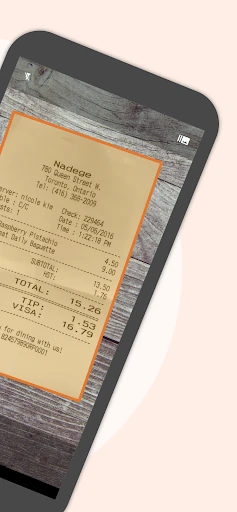
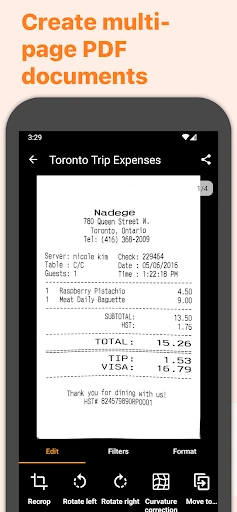
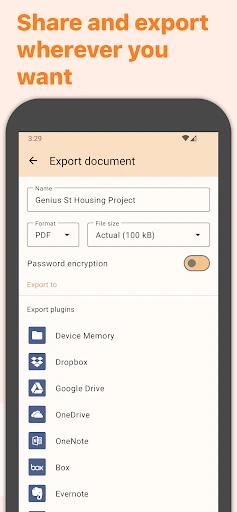
Analysis by Reviewed APKs
Genius Scan - PDF Scanner turns a phone into a practical tool for capturing paper documents, combining pages into PDFs, and sending files elsewhere. I see it fitting people who handle forms, receipts, notes, or work paperwork away from a desk. Its appeal is that scanning is only part of the job: it also offers cleanup, organization, text recognition, and export. That makes it more capable than a camera shortcut, though potentially more than occasional users need.
Paperwork On The Go
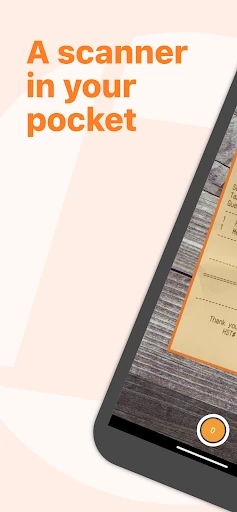
When I need to send a signed form from outside the office, the useful thing about a scanner app is being able to capture the page and make it readable without finding a desktop scanner. Genius Scan is built around that kind of errand: it detects documents, corrects distortion, and can remove shadows or background clutter. For a multipage form, its batch scanning and PDF creation can keep related pages together.
I can also picture using it after a meeting, when a few handwritten notes and printed handouts need to become one file rather than several loose images. Genius Scan supports combining scans into multi-page PDFs, then exporting them to another app or service. That gives the workflow a clear beginning and end: capture the paper, tidy the result, assemble the pages, and share the document where it needs to go.
More Than A Camera
A regular camera is fine when I only need a quick picture of a page. A dedicated scanner app makes more sense when the result needs to look like a document, include several pages, or be searchable later. Genius Scan adds detection and image correction, PDF merging and splitting, tags, and text recognition. Those features make it a more purposeful choice for recurring paperwork than simply keeping snapshots in a photo library.
It is not a full replacement for every office workflow, and it is not a general-purpose PDF editor or a filing system for every kind of file. Its job is narrower: capture paper, make scans usable, organize them, and export them. If I rarely scan anything, the extra tools may be unnecessary. If I regularly deal with forms or receipts on the move, the combination is easier to justify.
Small Workflow Improvements
A little consistency should make a scanner app more useful over time. I would tag documents as I go, rather than trusting myself to remember what each scan contains weeks later. Genius Scan supports document tagging and content or metadata search, so sensible labels can give a growing collection some structure. Its smart renaming feature, which supports custom templates, can also help keep filenames more informative than a string of dates.
For a packet of paperwork, I would scan all the pages in one sitting, check their order, then combine them into a single PDF before exporting. For documents that need to remain available across devices, the app includes backup and multi-device sync. Text extraction and searchable PDFs offer another practical habit: making important scans easier to find without opening each file and reading it page by page.
More From Our News Desk

Zoom Meetings, Google Meet, or Teams: Which Is Easiest to Join?

How I Build a Free Streaming Lineup With Tubi

Why Crunchyroll Is the Default Anime App for So Many Fans

YouTube TV: A Practical Guide to Cutting Cable

Rummikub and the Small Comfort of Phone Games

TeamViewer Remote Control or AnyDesk for Helping Family?
Who Will Get The Most From It
I would recommend Genius Scan to people who regularly handle paper away from a desk: students collecting handouts, freelancers sending signed documents, or anyone trying to keep household forms and receipts in order. It is especially appealing when a scan needs to become a multipage PDF or when search, tagging, and export matter as much as the camera capture itself.
It may be more app than someone needs if they only take the occasional photo of a page and do not care about cleanup or organization. People who need specialized editing beyond scanning and basic PDF assembly may also want another tool in their workflow. The key question is whether paper documents show up often enough in your routine to make these extra steps worthwhile.
Genius Scan - PDF Scanner is a Business app from The Grizzly Labs. Google Play shows over 10 million installs and a 4.9-star rating from around 622,000 ratings. It is rated Everyone. The app first appeared on August 26, 2013, and the current version is 7.44.0.
The app is free to download and contains no ads. It offers in-app purchases, with listed items ranging from $0.99 to $39.99 each. Its most recent update shown in the supplied app details is October 19, 2026. Check Google Play for the Android version requirement and current purchase details before installing.
A Scanner For Everyday Paperwork
Getting Started
My first impression is that Genius Scan treats scanning as a complete task rather than a camera trick. The feature set moves from detecting a page to correcting its appearance, then on to making a PDF or exporting it. That matters because a scan often is not finished when the shutter is pressed; it still needs a useful format and a sensible destination.
For a first use, I would start with one page that has a clear reason to be scanned, such as a form I need to send. The app supports document detection and background removal, with distortion correction and cleanup for shadows or defects. Those tools are aimed at making a photographed page more document-like, without requiring me to move to a desktop scanner.
The Daily Scanning Loop
The core routine is straightforward in concept: capture a paper document, review the scan, and decide whether it belongs on its own or with other pages. Genius Scan can batch-scan documents and create multi-page PDFs, which is useful when a form or packet arrives in sections. Merging and splitting support reorganizing those pages rather than leaving every capture as a separate file.
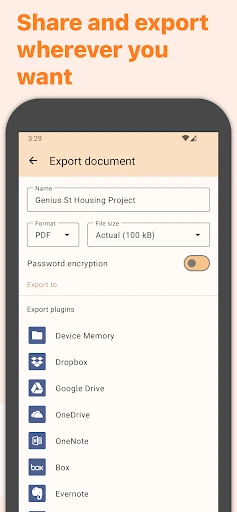
After scanning, the app can send documents by email or to supported services such as Google Drive, Dropbox, OneDrive, Box, Evernote, and Expensify. It also supports FTP and WebDAV. I like that export is part of the stated workflow, because a scan that stays trapped in an app is not much help when someone else needs the file.
Useful Standout Tools
Text recognition is one of the features that changes how a scan can be used later. Genius Scan can extract text from scans and create searchable PDFs, so the document is not limited to being an image of a page. That is handy for records I might need to find by their contents, rather than by trying to remember the filename or the day I scanned them.
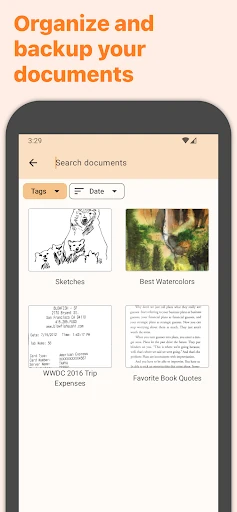
The organizational tools are similarly practical rather than flashy. The app supports tags, metadata and content search, and smart document renaming with custom templates. For documents that matter across devices, it also offers backup and multi-device sync. These features are most relevant when scanning becomes a regular habit and the collection grows beyond a handful of files.
A Simple Paperwork Routine
A useful routine might be to scan receipts or work documents as soon as they arrive, while their purpose is still fresh. I would group pages that belong together, create a PDF, and give the document a descriptive name or tag. Later, search can help locate it by text or metadata, instead of relying on a memory test or paging through unrelated camera photos.
For a document that needs to be shared, I would export it to the relevant destination after checking that the pages belong in the same file. For private material, Genius Scan describes on-device document processing and also supports biometric unlock and PDF encryption. Those are meaningful options to have in a document app, though they do not remove the need to choose carefully where a file is sent.
Limits To Keep In Mind
Genius Scan is focused on paper capture and document handling, not on replacing every specialized office or PDF tool. Its listed capabilities cover scanning, cleanup, PDF assembly, organization, recognition, and export. Someone needing a broader editing workflow should check whether those particular tools meet their needs before making it the center of their paperwork routine.
The app also makes most sense when there is enough scanning to benefit from tags, search, and document assembly. For a rare one-page snapshot, a phone camera may be quicker and simpler. Some features or purchase details may depend on the current offering, so it is worth checking Google Play for the latest information and the Android requirement for a specific device.
Genius Scan - PDF Scanner is a practical choice for turning loose paper into organized, shareable documents. I like that it connects capture with PDF creation, search, and export instead of stopping at a camera image. Its strongest case is a routine with recurring forms, receipts, or multipage paperwork.
I would try it if I often scan documents away from a desk and want more control than a basic camera provides. If I only photograph a page once in a while, I would keep things simpler. The extra organization and recognition tools earn their keep when scans accumulate.
Genius Scan Frequently Asked Questions
What is Genius Scan - PDF Scanner used for?
Genius Scan is used to capture paper documents with a phone, improve scan appearance, and create PDFs from one or more pages. It also supports document organization, text extraction, searchable PDFs, and exporting scans to other apps and services. It is designed for paperwork and document scanning rather than general photo editing.
Which devices can run Genius Scan - PDF Scanner?
Genius Scan is available on Android through Google Play. The Android version requirement can vary with the current app release and device, so check the Google Play store details for the requirement that applies to your phone or tablet.
Does Genius Scan - PDF Scanner cost money?
The app is free to download and contains no ads. It offers in-app purchases, with listed items ranging from $0.99 to $39.99 each. Purchase options can change, so check Google Play for the current details before deciding whether any paid option is useful to you.
Can Genius Scan - PDF Scanner make searchable PDFs?
Yes. The app description includes text extraction from scans and searchable PDF creation. It can also combine scans into multipage PDFs, split or merge documents, and export files to supported services. Those tools are useful when you want to retrieve or share paperwork after scanning it.
Who should use Genius Scan - PDF Scanner?
It is a good fit for people who regularly scan forms, notes, receipts, or other paper documents and want to organize or share them as PDFs. Someone who only needs an occasional quick picture may not need its broader features. The app is rated Everyone on Google Play.
Pros
- Combines document capture, cleanup, and multipage PDF creation in one workflow.
- Text recognition and searchable PDFs can make older scans easier to find.
- Supports tags, smart renaming, backup, and export to several services.
- On-device processing, biometric unlock, and PDF encryption are included features.
Cons
- Its organizational tools may be unnecessary for occasional one-page scans.
- It focuses on scanning and PDF workflows rather than broad document editing.
- In-app purchase options may require checking the current Google Play details.
- Category
- Business
- Version
- 7.44.0











