Freddy’s
- 29.46K
- 4.8
- Installs
- 1.00M
- Price
- Free

Screenshots
Analysis by Reviewed APKs
Freddy’s is a food-ordering app for finding nearby Freddy’s locations, customizing a meal, and ordering for carry-out, delivery, or dine-in. It also tracks rewards points on purchases made through the program. I found its appeal pretty straightforward: it can make a familiar order easier to repeat and gives regular customers a place to follow their points. It is most useful when Freddy’s is already part of your routine.
A smoother meal run
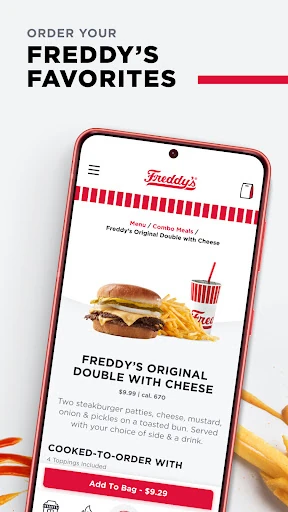
Picture the usual weekday squeeze: I have a short break, know what I want, and would rather not work through my order from scratch. Freddy’s lets me find a nearby location, choose a pickup or other available ordering option, and customize a meal before placing it. I can pick toppings, add a side and a drink, then save the finished order for next time. That makes it a practical companion for a regular stop, not just a digital menu.
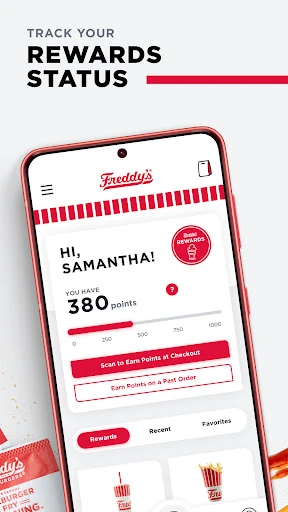
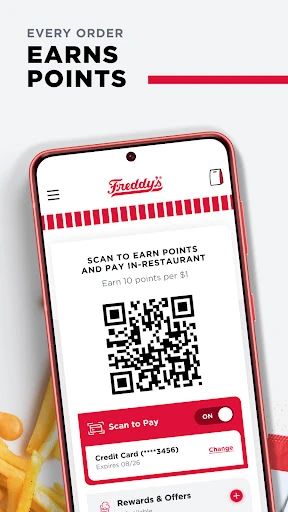
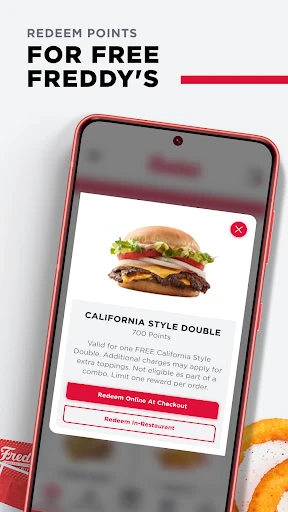
What makes the scenario feel useful is the combination of ordering and rewards in one place. Freddy’s says members earn 10 points for every dollar spent, and the app shows a point total, available rewards, and progress toward larger rewards. I can see how that might make a routine lunch feel a little more organized: place an order, keep track of points, and decide whether to redeem them now or save them.
Ordering, not meal planning
Compared with calling a restaurant or deciding at the counter, the app is geared toward choosing and customizing an order ahead of time. It also keeps recent and saved orders handy, which is useful if my usual combination does not change much. Carry-out, delivery, and dine-in are all included as ordering options, so the app can fit more than one kind of visit, depending on what is available at the location.
It is not a general restaurant discovery tool or a meal-planning app. Its purpose is to help people order from Freddy’s and manage Freddy’s Rewards, rather than compare a range of restaurants or organize meals for the week. I would not install it expecting broader dining recommendations. If Freddy’s is an occasional treat rather than a nearby regular option, the convenience may matter less than it does for someone who visits often.
Make repeat orders easier
A small habit that seems worthwhile is saving an order after getting the combination right. The next time I want the same steakburger, toppings, side, and drink, I can start from a favorite or recent order instead of reconstructing it. That is a modest time-saver, but small conveniences are usually what make an ordering app useful on a busy day. I would still check the customization before placing the order if I wanted to change anything.
I would also glance at the rewards area now and then rather than treating points as an afterthought. Freddy’s provides a point total, rewards available to redeem, and a view of how many more points are needed for larger rewards. That gives me a simple way to keep track without trying to remember progress. Saving payment information is another option for easier checkout, and the app supports credit cards and gift cards.
More From Our News Desk

Zoom Meetings, Google Meet, or Teams: Which Is Easiest to Join?

How I Build a Free Streaming Lineup With Tubi

Why Crunchyroll Is the Default Anime App for So Many Fans

YouTube TV: A Practical Guide to Cutting Cable

Rummikub and the Small Comfort of Phone Games

TeamViewer Remote Control or AnyDesk for Helping Family?
Who will get the most from it
I would recommend Freddy’s to people who already order from the chain and want a more convenient way to customize repeat meals. It is especially sensible for regular customers who like ordering ahead, want to save a favorite combination, or would rather check their rewards balance in the same place they place an order. The app’s main benefits are practical and closely tied to those everyday habits.
It may be less compelling if Freddy’s is not somewhere I visit, or if I want one app for ordering from many different restaurants. The rewards program is also most relevant to someone who expects to make purchases and use points over time. For a first-time customer, the app can still support an order, but its repeat-order and loyalty features have less room to shine until there is a familiar favorite to save.
Freddy’s is a free Food & Drink app from Freddy's LLC, available on Google Play. It has over 1 million installs and a 4.8-star rating from about 29,000 ratings. The app is rated Everyone. Google Play shows version 25.12.19, with a minimum requirement of Android 6.0.
The app is free to download, with no in-app purchases and no ads. It was released on June 25, 2019, and was last updated on December 19, 2025. The latest release notes mention bug fixes, core software updates, and user interface enhancements.
A practical shortcut for Freddy’s regulars
A clear first impression
When I first opened Freddy’s, the purpose was easy to understand: find a location, order food, and keep track of rewards. There is no need to think of it as a broad dining platform. Its value comes from making a specific restaurant routine a little more convenient, especially if I already know what I want and would like to place the order before arriving.
The first useful decision is what kind of order I need: carry-out, delivery, or dine-in. The app supports those options, alongside location finding. That gives it room to serve different plans, from picking up food on the way home to arranging an order around a meal out. The actual choice still depends on the location and the order I am placing.
The everyday ordering flow
The core experience is about assembling a meal without losing track of the details. I can choose toppings, add a side and a drink, and tailor Freddy’s favorites such as steakburgers and frozen custard. That kind of customization matters most when I have a particular combination in mind. It is more useful than a bare reorder button if I like to adjust an order from visit to visit.
Once I have placed an order I like, saved favorites and recent orders give me a shorter route back to it. I can imagine using that on a busy lunch break, when I want to spend less time repeating the same choices. The app also supports saving payment information for checkout with a credit card or gift card, another option aimed at reducing steps for a returning customer.
Rewards in the same app
The standout extra is Freddy’s Rewards. Members earn 10 points for every dollar spent, and the app lets them see their current points and rewards available to redeem. It also shows the remaining points needed to reach bigger rewards. I like that this is presented as a progress check rather than something I would have to remember from one visit to the next.
That said, the app keeps rewards tied to ordering at Freddy’s; it is not a general-purpose points wallet. For a regular customer, the link between purchases and progress is easy to understand. I would check the reward options before deciding whether to redeem or keep collecting, rather than assume the best choice is the same for every visit.
A simple weekly routine
A realistic routine would be to open Freddy’s when I know a visit is coming up, find the location, and choose the order type that fits the plan. I could customize the main item, add a side and drink, then review the order before checkout. After a successful visit, saving the combination would make the next order less repetitive. That is a modest workflow, but it is exactly where this app makes sense.
I would make a separate quick check of the rewards total every few visits. Seeing what is available and how far away a larger reward is can help me keep the program in perspective without making points the reason for every purchase. If I use a saved payment method, I would still review the final order and payment details before submitting. The app is a convenience, not a reason to rush.
Keep expectations grounded
The main limitation is its narrow focus: Freddy’s is built around one restaurant brand. If I want to browse many cuisines or compare restaurants, this is not the right tool. Its features are most valuable when a nearby Freddy’s is already in my plans. Even then, availability for a particular order type can depend on the location, so I would treat the app’s options as part of the ordering process rather than assume every choice works everywhere.
The rewards feature also has the most value for people who return often enough to care about accumulating points. Someone who visits rarely may find the ordering tools useful but have little reason to monitor progress. And while saved orders can speed up repeat visits, they do not replace checking customizations when my preferences change. The app is straightforward, but its convenience is tied to a fairly specific routine.
Freddy’s does a focused job: it brings location finding, customizable ordering, saved orders, payment options, and Freddy’s Rewards together. I like that the useful parts support an ordinary repeat visit rather than asking me to learn a complicated system. Its best moments are small ones, like reusing a favorite combination or checking points while planning an order.
I would try it if Freddy’s is already a regular stop and I want to order ahead or follow rewards progress. If I rarely visit the chain or want an all-purpose restaurant app, I would look elsewhere. For the right customer, Freddy’s is a sensible convenience, with its limits plainly tied to its single-brand focus.
Freddy’s Frequently Asked Questions
What is the Freddy’s app used for?
Freddy’s is used to find nearby Freddy’s locations and order for carry-out, delivery, or dine-in. It supports customizing menu items, saving favorite and recent orders, and tracking Freddy’s Rewards. Members earn 10 points for every dollar spent and can see their balance and available rewards in the app.
Which phones and devices support Freddy’s?
Freddy’s is available as an Android app on Google Play. The minimum Android requirement is Android 6.0. For a particular phone or device, compatibility can vary, so it is worth checking the Google Play store page before installing.
How much does the Freddy’s app cost?
Freddy’s is free to download and has no in-app purchases or ads. The app supports ordering and rewards, but charges for food are separate from downloading the app. For any current ordering details or changes, check the Google Play store page and the choices shown when placing an order.
What Android version does Freddy’s require?
The minimum requirement for Freddy’s is Android 6.0. The app’s current version is 25.12.19. Requirements and compatibility can change with future releases, so check the Google Play store page for the latest information for your device.
Is Freddy’s useful for occasional customers?
It can be useful for occasional customers who want to place or customize an order, but saved orders and rewards are naturally more valuable to people who return. The app focuses on Freddy’s rather than multiple restaurants. Ordering options may vary by location, so check the choices available for the visit you have in mind.
Pros
- Supports carry-out, delivery, and dine-in ordering through one Freddy’s-focused app.
- Lets customers customize meals and save favorite or recent orders for easier repeats.
- Shows rewards points, available rewards, and progress toward larger rewards.
- Free to download, with no in-app purchases or ads.
Cons
- Its usefulness depends on having a Freddy’s location that fits your routine.
- Rewards tracking matters less for people who visit the chain only occasionally.
- Saved orders still need a quick review when your preferences change.
- Category
- Food & Drink
- Version
- 25.12.19











