Crosshair X: Pro Aim v2
- 3.46K
- 4.6
- Installs
- —
- Price
- Free

Screenshots
Analysis by Reviewed APKs
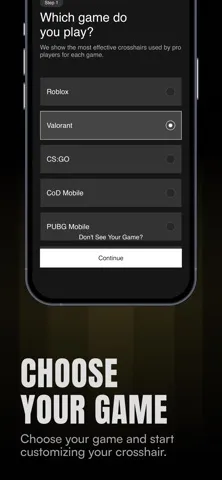
Crosshair X: Pro Aim v2 is an iOS companion for players who want to choose or build crosshairs for games including Valorant, Counter-Strike and Roblox. It brings adjustable designs, player-inspired presets and copyable crosshair codes into one place. I like the idea of having a focused tool for comparing options before changing game settings, though the subscription boundary matters if you want the full library or custom generator.
A Better Fit for Your Aim
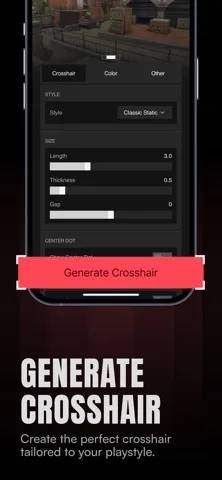
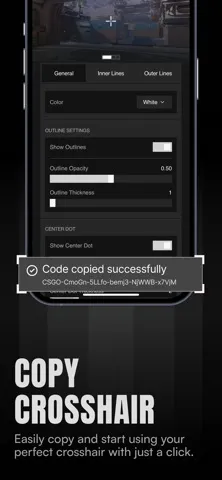
Picture a familiar evening routine: you sit down for a few matches, but your current crosshair feels too wide or blends into the action. Crosshair X gives you a place to browse alternatives or build a design by changing its color, length, thickness, gap, center dot and outline. A live preview helps you compare those choices, and the app can copy a crosshair code so you can enter it in the game.
I can see this being most useful between matches, when there is time to try a small change rather than fiddle with settings mid-round. A player might start with a simple, visible design, adjust one detail, then copy the code and test it in-game. The app also offers a free crosshair each day, which gives curious players a low-commitment way to try something different without building a setup from scratch.
A Companion, Not a Game
Crosshair X sits alongside the games it supports rather than replacing their own settings. Its job is to help you find, customize and copy a crosshair code; you still take that code to the game and decide whether the design works for you. Compared with manually guessing at settings, the generator and live preview offer a more deliberate starting point. Presets also suit players who would rather borrow an idea than tune every parameter.
This is not an aim trainer, a matchmaking service or a promise of better performance. It does not play Valorant, Counter-Strike or Roblox for you, and choosing a popular or pro-associated design is still a matter of preference. I would treat it as a crosshair discovery and organization tool. If you already know exactly what you want and rarely change settings, its library may be more than you need.
Small Habits That Help
A useful approach is to change one setting at a time. Start with a preset or a basic design, inspect the live preview, and adjust color, size or gap before moving on to another detail. That makes it easier to notice what you actually prefer. Once you find a promising setup, copying its code gives you a practical next step: try it in the matching game's settings rather than relying on memory.
I would also use the save-and-organize feature to keep a short collection of favorites instead of repeatedly browsing from zero. The description says saved crosshairs are available to everyone, as is the daily free option. For players who switch between supported games, keeping setups together could make comparisons easier. A quick revisit after a few sessions is more useful than changing several details after every rough match.
More From Our News Desk

Zoom Meetings, Google Meet, or Teams: Which Is Easiest to Join?

How I Build a Free Streaming Lineup With Tubi

Why Crunchyroll Is the Default Anime App for So Many Fans

YouTube TV: A Practical Guide to Cutting Cable

Rummikub and the Small Comfort of Phone Games

TeamViewer Remote Control or AnyDesk for Helping Family?
Who Will Get the Most From It
I would recommend Crosshair X to FPS players who enjoy experimenting with their setup, especially those playing Valorant, Counter-Strike or Roblox. It has room for both ends of the spectrum: players can explore presets associated with professional players and community picks, or use the generator to adjust individual design details. The daily free crosshair and saving feature also give people a way to try the app without immediately committing to Premium.
It may be less appealing if you prefer to leave your crosshair alone, want an app that directly improves aim, or expect every feature to be included at no cost. Premium is required for the full pro library, rank-based recommendations and custom generator, while free access includes saving and one daily crosshair. The app is for iOS, so it is not the right fit for someone specifically seeking an Android or desktop companion.
Crosshair X: Pro Aim v2 is an Entertainment app by Nergis Sadiklar for iPhone and other compatible iOS devices. On the App Store it has a 4.6-star rating from about 3,500 ratings. The app is free to download, and its age rating is 4+. It was released on March 5, 2025, and the current version is 3.0.
The minimum operating system requirement is iOS 16. The App Store records September 9, 2026 as the latest update date. Premium is a subscription that unlocks the full pro crosshair library, rank-based recommendations and custom generator; saving crosshairs and the daily free crosshair are available to everyone. Check the App Store for current subscription terms and any details that may vary.
How Crosshair X Fits Into a Match-Day Routine
A Focused First Look
When I first considered the app's role, what stood out was its narrow purpose: it is about crosshair choices, not a general gaming dashboard. The main appeal is the combination of a generator, a library of presets and a live preview. That gives a player more than a list of codes to copy; it offers a way to compare a design and make adjustments before taking it into a game.
The practical first step is choosing whether to browse or build. Someone who has a favorite player's setup in mind can look through the pro and popular options, while someone with a specific preference can use the generator. Either route leads to a code that can be copied to the clipboard. The description does not require a complicated workflow: the focus stays on choosing a design and applying it in game settings.
The Day-to-Day Loop
In ordinary use, I would expect the app to be a brief stop before or between gaming sessions. Browse a few options, check the preview, save anything worth testing, and copy a chosen code when ready. That is a tidy loop for players who like to refine their setup but do not want to keep a collection of settings in their head or hunt for old codes every time.
The daily free crosshair adds a small reason to return, although a new design each day is a prompt to explore, not a reason to change a setup that already feels right. Saving favorites helps keep experimentation manageable. The description also says users can switch between games, which is useful for people whose preferred crosshair style may differ across Valorant, Counter-Strike and Roblox.
Presets With Room to Tweak
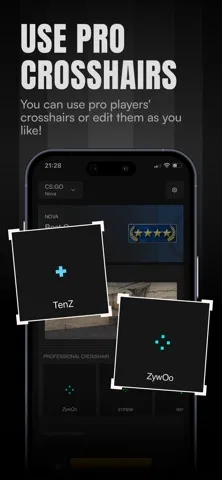
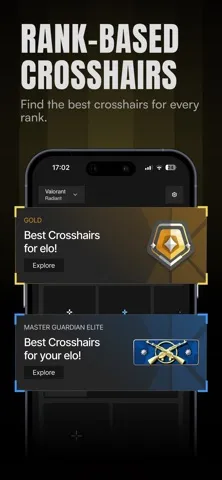
The strongest feature is the choice between ready-made designs and personal adjustments. The preset library includes crosshairs associated with professional players, popular community picks and playful troll designs. For someone who wants a starting point, those categories make browsing more approachable than inventing a design from a blank slate. Rank-based recommendations are another discovery route, covering ranks from Iron to Radiant and Silver to Global Elite.
For players who want more control, the custom generator covers color, length, thickness, gap, center dot and outlines, with a live preview. Roblox players also get more than 20 presets with rank tiers and one-tap code copying, according to the description. Those looking to keep things simple can save crosshairs and claim one free random preset each day without a subscription.
A Low-Fuss Testing Routine
A sensible routine would begin with a clear reason for changing something. If a crosshair feels hard to see, try a color or outline adjustment; if it feels crowded, compare a smaller size or a different gap. The preview offers a quick visual check, but the real test is still how the copied setup feels in the game. Making one change at a time keeps the comparison understandable.
After a few matches, save the designs that seem worth revisiting and set aside the rest. That is where the organization feature can help: a small shortlist is easier to compare than a fresh search every session. For players who rotate among supported games, keeping favorite setups together also makes it easier to pick the right code for the next game without starting the process over.
Keep Expectations Grounded
Crosshair X can help with selection and setup, but a crosshair is only one part of playing an FPS. A pro preset may not suit your preferences, and a live preview cannot tell you how a design will feel in every game or situation. I would use the app to make informed experiments, then keep the setup only if it is comfortable during actual play.
The other limit is access to the full feature set. The custom generator, rank-based recommendations and complete pro library sit behind Premium, while saving and the daily free crosshair remain available to everyone. That makes the free offering useful for casual browsing, but players who want all the customization tools should consider the subscription terms before building their routine around them.
Crosshair X: Pro Aim v2 is a focused utility for finding, adjusting and saving crosshair ideas, with support described for Valorant, Counter-Strike and Roblox. I like the mix of presets, preview and code copying, plus the small daily free option. Its appeal is strongest for players who enjoy tuning their setup rather than leaving it untouched.
I would try it if you regularly experiment with crosshairs and are comfortable taking a copied code into your game's settings. If you expect a training tool or want every customization feature free, this is a less natural fit. The free features make it easy to explore, while Premium is the route to the full library and generator.
Crosshair X Frequently Asked Questions
What is Crosshair X: Pro Aim v2 used for?
Crosshair X helps players browse and create crosshairs for games including Valorant, Counter-Strike and Roblox. It offers presets, a generator with adjustable design details, a live preview and code copying. Players can then use the code in their game's settings. It is a crosshair selection tool, rather than an aim trainer or a game itself.
Which devices can run Crosshair X: Pro Aim v2?
Crosshair X: Pro Aim v2 is an iOS app available through the Apple App Store, with iOS 16 as its minimum operating system requirement. The app description focuses on crosshair codes for Valorant, Counter-Strike and Roblox. Device compatibility can vary, so it is worth checking the App Store page for the requirements that apply to your particular device.
Does Crosshair X: Pro Aim v2 require Android?
No Android requirement is provided because Crosshair X: Pro Aim v2 is an iOS app. Its minimum requirement is iOS 16. If you are checking whether a particular iPhone or other iOS device can run it, consult the App Store page, where compatibility details may vary by device and operating system.
Is Crosshair X: Pro Aim v2 free?
The app is free to download. Its description says saving crosshairs and one free crosshair each day are available to everyone. Premium unlocks the full pro library, rank-based recommendations and custom generator. Subscription terms and prices can vary, so check the App Store before subscribing for the current details.
Who should use Crosshair X: Pro Aim v2?
It is suited to players who like to compare crosshair designs, try presets or fine-tune details for supported games such as Valorant, Counter-Strike and Roblox. It may not suit people who never change their crosshair or want an app that trains aim directly. The generator and full pro library require Premium, while some features are available free.
Pros
- Combines crosshair presets, a customizable generator and a live preview.
- Copies selected crosshair codes for use in game settings.
- Saving favorites and one daily free crosshair are available to everyone.
- Includes options and presets for Valorant, Counter-Strike and Roblox.
Cons
- The custom generator, rank recommendations and full pro library require Premium.
- A crosshair preview cannot replace testing a design in the game.
- It is an iOS companion, not an aim trainer or gameplay tool.
- Category
- Entertainment
- Version
- 3.0











