Calendly Mobile
Listed on Google Play as “Calendly: Meeting Scheduling”
- 19.52K
- 4.6
- Installs
- 1.00M
- Price
- Free

Screenshots
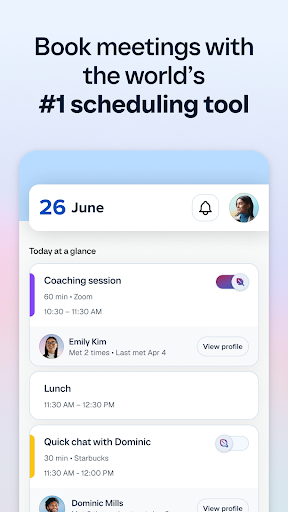
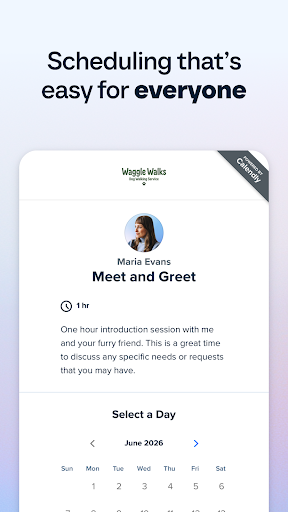

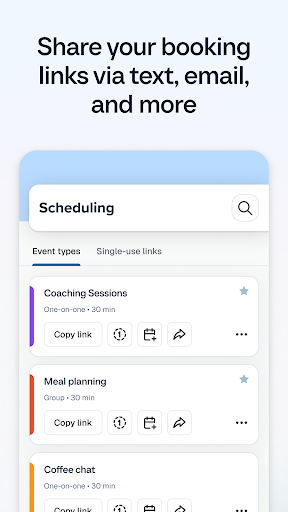
Analysis by Reviewed APKs
Calendly: Meeting Scheduling helps people arrange meetings without the usual back-and-forth over times. You set availability, share a link, and let someone choose a slot that works. I can see it fitting freelancers, client-facing workers, and busy teams who schedule often. Its appeal is practical rather than flashy: fewer messages to coordinate, with calendar connections and controls to help keep the day manageable.
A Faster Way to Book
Picture finishing a client call while walking between appointments. Instead of asking the client to suggest a few times, you can copy a Calendly link and send it in a text or email. They choose an available slot, and the event is added to your calendar. That simple handoff is the app’s central job: let people book around the availability rules you have set.
The same approach can help with an introductory chat, a recurring work conversation, or another meeting that would otherwise take several messages to arrange. Calendar connections are intended to help avoid double bookings, while time-zone detection helps keep invitees and hosts aligned. I like that the workflow starts with a clear decision—when am I available?—rather than turning every booking into a fresh negotiation.
Scheduling, Not a Full Calendar
Calendly makes the most sense alongside the calendar you already use. Google, Outlook, Office 365, and iCloud calendars are supported, and the app is focused on sharing booking availability rather than replacing your calendar as the place to review every part of your day. If you regularly coordinate meetings with other people, that narrower purpose can be a relief.
It is not a general-purpose task manager or a tool for planning every detail of a project. Its strength is the connection between your availability and someone else’s choice of time. People who rarely schedule meetings may find a shared link unnecessary; for them, a direct message or existing calendar invitation may be enough. Calendly is most useful when repeated scheduling friction is the thing you want to remove.
Small Habits That Help
A little setup makes the link more useful. Decide when you are genuinely willing to meet, then set availability preferences that reflect that routine. Buffer times can leave room between calls, and controls to prevent last-minute meetings can protect a busy day. These small boundaries matter more than simply having a link to send; they shape what other people can book.
I’d also keep the link handy in the places where scheduling conversations happen, such as email or text, since Calendly lets you copy it for use in other apps. If you use more than one calendar, connect the relevant one so availability takes existing commitments into account. For team scheduling, the app supports one-on-one, round-robin, and collective availability meetings, so it is worth choosing the format that matches the actual meeting.
More From Our News Desk

Zoom Meetings, Google Meet, or Teams: Which Is Easiest to Join?

How I Build a Free Streaming Lineup With Tubi

Why Crunchyroll Is the Default Anime App for So Many Fans

YouTube TV: A Practical Guide to Cutting Cable

Rummikub and the Small Comfort of Phone Games

TeamViewer Remote Control or AnyDesk for Helping Family?
Who Will Find It Useful
I’d recommend Calendly to people who repeatedly arrange meetings with clients, colleagues, or other contacts. Freelancers and professionals who work across time zones may especially appreciate letting invitees choose from available times instead of negotiating a slot manually. Teams can use supported round-robin or collective availability formats, while individuals can keep the setup simpler and share a personal booking link.
It may be more tool than someone needs if they only schedule an occasional meeting or prefer to handle every invitation directly in a calendar. Calendly also depends on defining availability and sharing a link, so it is not a passive fix for an unpredictable schedule. For people who want more control over when meetings land, though, its scheduling rules and calendar connections make it a practical option.
Calendly: Meeting Scheduling is a business app from Calendly LLC. On Google Play, it has over 1 million installs and a 4.6-star rating from about 19,500 ratings. The app is free to download, with no in-app purchases or ads. Its content rating is Everyone.
The current version is 4.7.0. Calendly was released on February 26, 2020, and its most recent update was October 23, 2026. The Android version requirement can vary by device and app release, so check the Google Play store entry for the requirement that applies to your phone.
How Calendly Fits a Busy Day
A Straightforward Start
When I first think through the setup, the key step is not sending a link; it is deciding what the link should offer. Calendly asks you to set availability preferences, then uses those rules to show bookable times. That gives the process a useful order: establish your boundaries first, then invite others to choose within them.
The mobile app is particularly handy when you are away from your computer and need to copy a link into a message. I can imagine handling a scheduling request between errands or after a call without recreating my availability in a long reply. The experience is built around getting that link into the conversation quickly.
The Everyday Booking Flow
The routine is easy to explain: set your rules, share a link, and let the other person pick a time. Once they choose, the event is added to your calendar. That removes the familiar exchange of proposed times and follow-up questions, especially when both people have changing schedules or work in different time zones.
The calendar integrations are important to that flow. Calendly works with Google, Outlook, Office 365, and iCloud calendars, helping prevent a booking from colliding with existing commitments. I would still treat the connected calendar as part of the setup rather than an afterthought; accurate availability is what makes a booking link useful instead of confusing.
Useful Scheduling Controls
The standout features are mostly about control. Buffer times can create breathing room between meetings, while the option to prevent last-minute meetings helps keep the day from being filled at short notice. Calendly also supports secret event types, which can be useful when a particular booking option should not be broadly shared.
Meeting formats add flexibility beyond a simple one-to-one slot. The app supports one-on-one, round-robin, and collective availability meetings, which gives individuals and teams different ways to offer times. Time-zone detection is another practical touch: invitees can see times in a way that helps keep everyone on the same page.
A Routine for Client Calls
For a client-facing routine, I’d start by setting a predictable window for introductory conversations and leaving buffers around it. When someone asks to talk, I could copy the relevant Calendly link into a reply instead of listing several possible times. The client picks an opening, and the meeting lands on the calendar connected to the setup.
That routine is most helpful when the same kind of request comes up repeatedly. It can also work across apps: share a link in an email or text, and connect supported meeting tools such as Zoom or Google Meet where appropriate. I would keep the message itself personal; the link handles the scheduling, not the human part of the conversation.
Where It Has Limits
Calendly’s usefulness depends on keeping availability rules sensible and calendars connected. If your schedule changes constantly or you do not want people choosing from preset openings, a booking link may not suit your working style. It shifts some control to the invitee, within the limits you set, rather than arranging every detail through a direct conversation.
The app is also specialized. It helps coordinate meetings, but it is not presented as a replacement for a full calendar or a broader work-planning system. Some integrations and meeting formats may matter more to teams than to individuals, so the range can feel like extra complexity if all you need is an occasional one-to-one appointment.
Calendly: Meeting Scheduling is a focused way to turn availability into a shareable booking link. Calendar integrations, time-zone handling, and controls such as buffers give it practical value beyond simply sending someone a list of open times. I’d consider it most worthwhile for people who schedule with others often enough to notice the back-and-forth.
If you manage client calls, recurring conversations, or team meetings, Calendly is worth trying as a scheduling companion to your existing calendar. If meetings are rare or you prefer to negotiate each time yourself, a direct invitation may be simpler. The app’s best use is clear: set boundaries once, then make booking easier for both sides.
Calendly Frequently Asked Questions
What is Calendly: Meeting Scheduling used for?
Calendly helps people arrange meetings by letting you set availability preferences and share a booking link. Invitees can choose a time, and the event is added to your calendar. It supports one-on-one, round-robin, and collective availability meetings, so it can serve individuals as well as teams that need to coordinate schedules.
Which devices can run Calendly: Meeting Scheduling?
Calendly: Meeting Scheduling is an Android app available through Google Play. It works with Google, Outlook, Office 365, and iCloud calendars, and it can share links for use in email, text, or other apps. Check the store entry for device compatibility and the Android version requirement that applies to your phone.
What Android version does Calendly require?
The Android version requirement may vary with the device and app release. Check Calendly: Meeting Scheduling in Google Play for the current compatibility information for your phone. The app is listed as version 4.7.0, but the store is the place to confirm whether your particular device can install the current release.
Does Calendly: Meeting Scheduling cost money?
Calendly: Meeting Scheduling is free to download on Google Play. The app facts show no in-app purchases and no ads. Store details can change over time, so it is sensible to check the Google Play entry for the current terms before installing.
Is Calendly: Meeting Scheduling right for me?
It may suit you if you often schedule client, colleague, or team meetings and want people to choose from your available times. Calendar connections and time-zone detection help with coordination, while availability controls let you set boundaries. If you only arrange meetings occasionally or prefer direct calendar invitations, the link-based approach may be more than you need.
Pros
- Shareable booking links reduce the back-and-forth over meeting times.
- Connects with Google, Outlook, Office 365, and iCloud calendars.
- Buffers and last-minute booking controls help shape availability.
- Supports one-on-one, round-robin, and collective meeting formats.
Cons
- Its link-based workflow may feel unnecessary for occasional meetings.
- Useful scheduling depends on maintaining accurate availability and calendar connections.
- A specialized meeting tool, not a replacement for a full calendar.
- Category
- Business
- Version
- 4.7.0











