Bose SoundTouch
- 119.19K
- 4.3
- Installs
- 5.00M
- Price
- Free

Screenshots
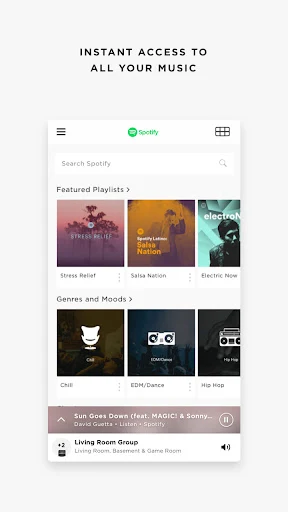
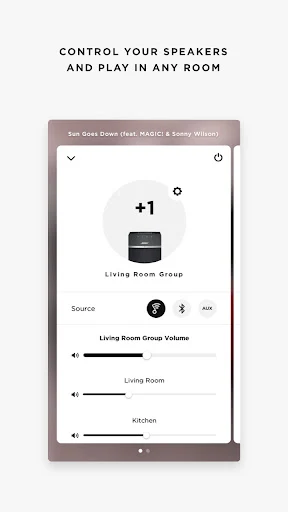
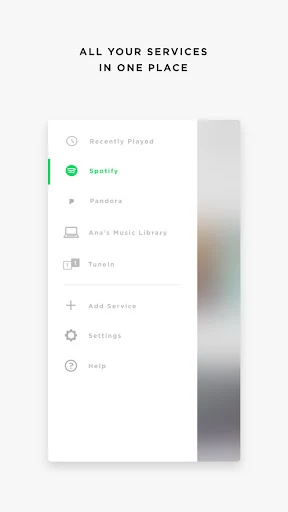
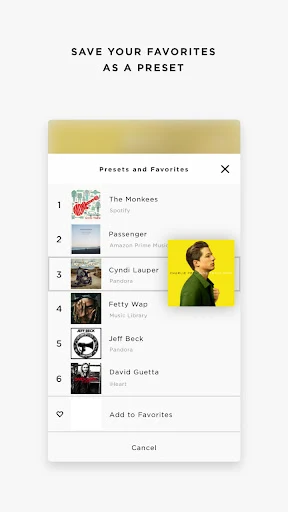
Analysis by Reviewed APKs
Bose SoundTouch is a companion app for controlling SoundTouch wireless speakers around the home. I see its appeal for people who want music in more than one room, quick access to radio and streaming services, or a way to play music from a personal library. After spending time with its feature set, my take is that it is most useful as a focused home-audio remote, rather than an all-purpose music player.
Music Through the House
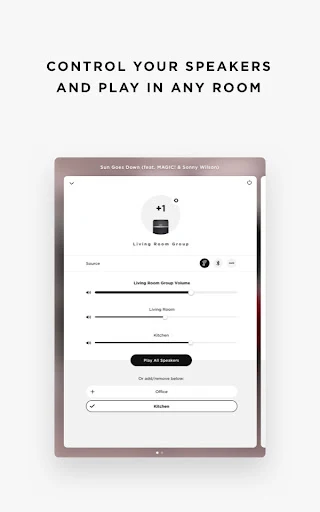
I can picture using SoundTouch on an ordinary morning: start a station in the kitchen, then send the same music to another SoundTouch speaker when I move into the living room. The app is built around choosing music and directing it to one or several speakers, so the job stays simple. Play Everywhere covers a whole-home session, while separate room playback suits a household where people want different things.
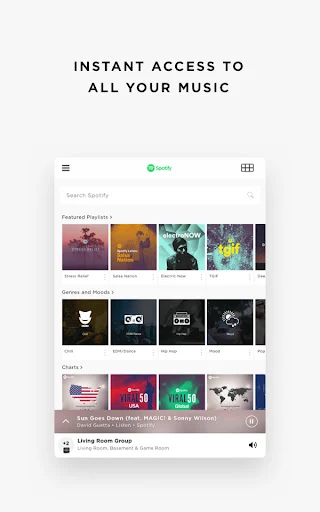
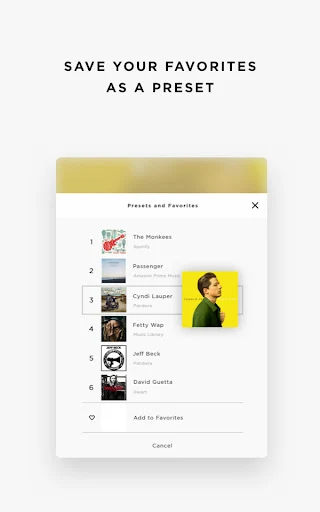
When I want something familiar, I can reach for a saved preset; when I want a change, I can browse supported music services or TuneIn radio. That makes the app useful for routines that don't call for picking a specific album every time. Presets can point to favorites such as a radio station or a Spotify discovery playlist, putting a regular morning soundtrack within easy reach.
A Home Speaker Companion
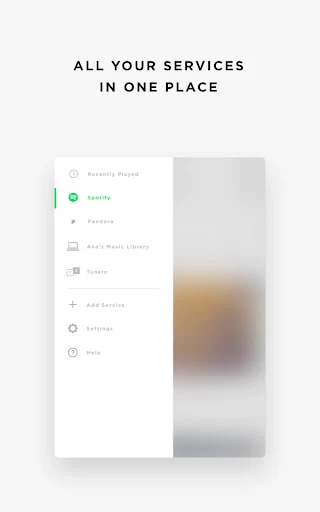
Compared with opening separate streaming apps, SoundTouch brings supported services and speaker control together in one place. It is especially relevant if SoundTouch speakers are already part of the home setup and the main task is choosing what plays where. TuneIn adds a broad radio option, while access to a stored music library offers another route for people with albums and artists they have kept over time.
This is not a general-purpose music service or a replacement for a speaker system: its purpose is to control SoundTouch speakers. If someone mainly listens through headphones, wants a standalone player, or does not have SoundTouch speakers, the central benefit is harder to use. Nor does the description position it as a tool for editing music or managing a portable listening collection. Its focus is playback across the home.
Make Presets Work for You
A small habit that seems worthwhile is saving a few stations or playlists as presets for different parts of the day. One can be a reliable morning choice, another a low-key evening option, and a third a discovery mix. The point is to cut down on browsing when I already know the sort of thing I want. The app's one-touch approach is designed to make those favorites easier to reach.
I would also think about which rooms should share audio before starting a session. Play Everywhere makes sense for moving around the house or having people together; individual speaker playback fits a quieter moment when rooms have different needs. Keeping a stored library available through a laptop or NAS drive can complement streaming, too. These simple choices help the app feel like a practical controller instead of another place to scroll.
More From Our News Desk

Zoom Meetings, Google Meet, or Teams: Which Is Easiest to Join?

How I Build a Free Streaming Lineup With Tubi

Why Crunchyroll Is the Default Anime App for So Many Fans

YouTube TV: A Practical Guide to Cutting Cable

Rummikub and the Small Comfort of Phone Games

TeamViewer Remote Control or AnyDesk for Helping Family?
Who May Enjoy SoundTouch
I would recommend Bose SoundTouch to people who own SoundTouch speakers and want a straightforward way to control music in different rooms. It suits households that move between radio, streaming services, and a personal music library, or anyone who likes having a few familiar choices ready as presets. The app's value is clearest when speaker selection and whole-home playback are part of everyday listening.
It may be a poor fit for someone who does not use SoundTouch speakers or simply wants a music app for headphones and commuting. People who prefer to do everything inside one streaming service may also find a dedicated service app more directly suited to that habit. SoundTouch's role is narrower: choosing music and controlling compatible speakers around the home, rather than replacing every part of a music setup.
Bose SoundTouch is developed by Bose Corporation and is available on Google Play. The store figures supplied for it show over 5 million installs and a 4.3-star rating from about 119,000 ratings. It is free to download, with no in-app purchases and no ads indicated in the supplied facts. Its content rating is Everyone.
The supplied app version is 27.0.2. It was released on October 8, 2013, and was last updated on October 24, 2023. A minimum Android version was not included in the available facts, so check the Google Play store entry for current device requirements before installing.
A Closer Look at Home Listening
A Focused First Impression
When I first opened the description of SoundTouch, the purpose was easy to grasp: it is a remote for music on SoundTouch speakers. The emphasis is on getting to playback quickly, with choices from supported services, radio, and a stored library. That clear job is a strength. I would not approach it expecting a general audio catalog; the speaker system is the center of the experience.
The material describes access to services from within the app and control of one or more speakers in the home. In practice, that means the experience depends on having SoundTouch speakers to control. I would start by deciding which speakers I want to use and which listening sources matter most, rather than treating setup as a search for a new music subscription.
Everyday Playback
The day-to-day appeal is the choice between a quick favorite and a fresh browse. If I know what I want, presets can bring a station or playlist forward; if I feel indecisive, the app offers services and TuneIn radio to explore. That mix is a sensible fit for background listening, where stopping to search through several separate apps can interrupt the moment.
Speaker control is the other half of the routine. I can direct the same selection around the home with Play Everywhere, or keep listening different in separate areas. This is more useful than a simple play button when household listening changes over the day. It also gives the app a clear purpose: managing where music goes as much as choosing what is playing.
Presets and Listening Sources
Presets are one of the more distinctive ideas because they turn a favorite into a quick, repeatable choice. The description gives examples such as Spotify's Discover Weekly and Pandora's Thumbprint Radio. I like the idea of treating them as living shortcuts rather than fixed tracks: a familiar tap can still lead to something new, without first hunting through a phone.
TuneIn broadens the options beyond music playlists. The app description says it offers access to more than 100,000 radio stations, alongside programming such as sports, concerts, news, and podcasts. That can make SoundTouch useful when I want voices or a live broadcast instead of an album. The precise options I can use still depend on the services available through the app.
There is also a route for a personal music collection: the description says a laptop or NAS drive can be connected to access stored libraries. That gives people with favorite albums and artists another source alongside streaming and radio. I appreciate that the app's listening choices are not limited to one kind of catalog, even though the central job remains speaker playback.
A Simple Listening Routine
For a practical routine, I would start with a preset for the part of the day when I most often want music without thinking about it. In the morning, that could be a station or discovery playlist; later, I could browse for something more specific. The routine uses the app's quick-access idea without requiring a long queue of choices before the music starts.
As the day moves between rooms, I would switch between Play Everywhere and individual speakers depending on who is listening. A shared selection makes sense while doing chores, while separate playback suits people with different plans. On another day, I might turn to TuneIn for a live program or use a stored library for an album I already own. The benefit is having these options under one speaker-control umbrella.
Keep the Scope in Mind
The main limitation is also the app's defining focus: SoundTouch is intended for SoundTouch speakers. Without that speaker setup, its multi-room controls and Play Everywhere use case do not have much to do. People looking for a standalone player or a broad music subscription should compare it with apps built specifically for those needs, rather than expecting this controller to cover them.
The listening sources described include services such as Spotify, Pandora, Amazon Music, TuneIn, SiriusXM, iHeartRadio, and Deezer, but their availability and usefulness can depend on what a person already uses. Someone who prefers a single service may find the collection of choices unnecessary. The strongest case is for a household that wants one place to select sources and direct them to SoundTouch speakers.
Finally, practical requirements can change, so it is worth checking the current Google Play entry for device compatibility and details before installing. The available facts do not give a minimum Android version. That does not alter the app's basic appeal, but compatibility is an easy thing to verify before making it part of a regular listening routine.
Bose SoundTouch has a clear, useful role: it brings music choices and multi-speaker control together for a home built around SoundTouch speakers. Presets, radio, streaming sources, and personal libraries give it several ways to support everyday listening without losing sight of that job.
I would recommend it to SoundTouch owners who want easy room-to-room playback and quick access to favorites. If the goal is a standalone player or a tool for headphones, I would look elsewhere. For the right speaker setup, its focused approach is the point.
Bose SoundTouch Frequently Asked Questions
What is Bose SoundTouch used for?
Bose SoundTouch is used to control SoundTouch wireless speakers and play music from supported services, TuneIn radio, or a stored music library. It can direct the same music to multiple speakers or let different areas play different music. It is a companion for home speaker playback, not a general-purpose music player.
Which devices can run Bose SoundTouch?
Bose SoundTouch is an Android app available through Google Play. The supplied facts do not give a minimum Android version, and device requirements may vary as the app and store information change. Check the Google Play entry for current compatibility details before installing.
Does Bose SoundTouch cost anything?
The app is free to download, and the supplied facts indicate no in-app purchases and no ads. Music services that the app can access may have their own terms, but the available information does not detail those. Check the relevant service and Google Play information for current details.
Does Bose SoundTouch work without speakers?
The app is designed to control SoundTouch speakers, including selecting music and directing playback to one or more rooms. Without SoundTouch speakers, its main purpose is limited. It is not presented as a standalone music player for general listening on a phone.
Who should try Bose SoundTouch?
It is best suited to people who have SoundTouch speakers and want to manage music throughout the home. The app offers presets, streaming sources, radio, and access to stored libraries. It may not suit listeners who only want a headphone music app or do not use SoundTouch speakers.
Pros
- Controls one or multiple SoundTouch speakers, with options for shared or separate room playback.
- Presets put favorite stations and playlists within quick reach.
- Offers streaming services, TuneIn radio, and access to stored music libraries.
- Free to download, with no ads or in-app purchases indicated in the supplied facts.
Cons
- Its main purpose depends on having SoundTouch speakers to control.
- The range of useful music sources depends on the services and libraries a listener uses.
- The minimum Android requirement should be checked in Google Play before installing.
- Category
- Music & Audio
- Version
- 27.0.2