Bose QC Earbuds
- 28.62K
- 4.7
- Installs
- 500.00K
- Price
- Free

Screenshots

Analysis by Reviewed APKs
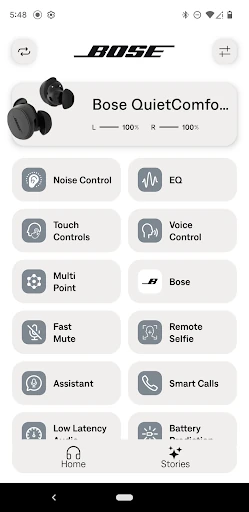
Bose QC Earbuds is a companion app for adjusting and managing Bose QuietComfort Earbuds, rather than a place to find or play music. I found its appeal in the small controls that make daily listening feel more personal: changing the sound balance, switching noise-control modes, checking battery life, and tailoring shortcuts. It suits people who already use compatible Bose earbuds and want their settings close at hand.
A commute, with fewer taps
Picture the familiar morning routine: I put in my earbuds, start a podcast, and head out the door. If the street noise feels intrusive, the app gives me a way to switch between Quiet, Aware, and noise cancelling off. On the train, I can check battery life without guessing how much listening time I have left. Those are practical checks I can imagine making between one stop and the next.
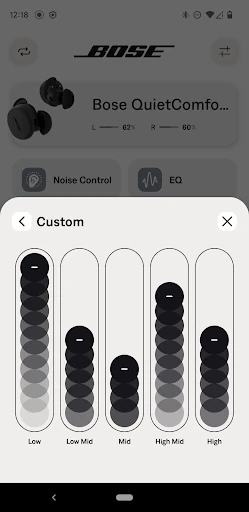
The sound controls are useful when my listening changes during the day. I might want more bass for a playlist, then pull it back for spoken audio. The five-band adjustable EQ lets me change bass, mids, and treble rather than settling for a single preset. I would make a small adjustment, listen for a while, and leave it alone if the difference is not worth another round of fiddling.
A companion, not a music player
I think of Bose QC Earbuds as a control panel for the earbuds, not an alternative to a music or podcast service. Its job is to help me personalize sound, choose an ANC setting, check battery life, and manage connections and shortcuts. That distinction matters: people looking for a library, streaming catalog, or general audio player are looking in the wrong place.
Compared with changing settings through whatever controls are available on the earbuds themselves, the app brings adjustments into one place. It is most relevant if you already own Bose QuietComfort Earbuds and expect to use their settings regularly. If you do not use compatible Bose earbuds, the app has little reason to become part of your routine. It is a companion utility, not a general-purpose audio tool.
Small tweaks that stick
I would start by setting the EQ for the kind of listening I do most, instead of trying to tune it for every track. A gentle change to bass or treble is easier to judge over a full commute than while flipping quickly between settings. Once I like the result, the app can stay in the background until I want a different sound for a particular situation.
Shortcuts are another place where a little setup can save repeated effort. I would choose button actions that match my habits, then use them consistently rather than reopening settings every time. Checking battery before leaving home is similarly simple: it turns a vague concern into a quick status check. These are modest routines, but they make a companion app more useful than a one-time setup screen.
More From Our News Desk

Zoom Meetings, Google Meet, or Teams: Which Is Easiest to Join?

How I Build a Free Streaming Lineup With Tubi

Why Crunchyroll Is the Default Anime App for So Many Fans

YouTube TV: A Practical Guide to Cutting Cable

Rummikub and the Small Comfort of Phone Games

TeamViewer Remote Control or AnyDesk for Helping Family?
Who may find it useful
I would recommend Bose QC Earbuds to someone who owns Bose QuietComfort Earbuds and likes having direct control over sound and listening modes. The adjustable EQ is a good reason to try it if you know you prefer a little more or less bass, or want to fine-tune mids and treble. Battery checks, connected-device management, and customizable shortcuts round out the everyday appeal.
It may not suit someone who wants an app for discovering music, managing a broad collection of headphones, or controlling audio equipment from other brands. The value here depends on using the Bose earbuds the app is designed to manage. If you are happy with your current sound and rarely change settings, you may only open it occasionally. That is not a flaw so much as a sign of its focused purpose.
Bose QC Earbuds is a free Android app from Bose Corporation in the Music & Audio category. On Google Play, it has more than 500,000 installs and a 4.7-star rating from 28,622 ratings. The app is listed for Everyone. Its practical role is to manage Bose QuietComfort Earbuds, including sound personalization, noise-control settings, battery checks, shortcuts, and connected devices.
The app is listed at version 3.0.4, released September 15, 2024, and last updated September 11, 2026. Google Play lists it as free, with no in-app purchases and no ads. The minimum Android version is not included in the available app details, so check the Google Play listing on your device for the current compatibility requirement before installing.
The useful details are in the controls
A focused first impression
When I first opened the app, the clearest idea was its narrow focus: it exists to help manage Bose QuietComfort Earbuds. That is a sensible starting point for a companion app. I would not expect to browse music or spend time learning a large suite of unrelated tools; the appeal is getting to the listening adjustments I might actually use.
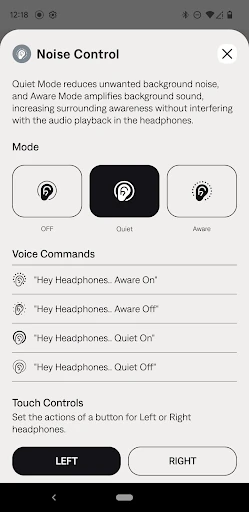
The first setup task I would prioritize is sound. Five EQ bands give me room to shape bass, mids, and treble, while the noise-control choices offer a straightforward set of modes: Quiet, Aware, and off. I like that these settings relate to familiar listening situations. I can make one adjustment, try it during a normal day, and decide whether it earns a permanent place in my routine.
Day-to-day control
The app’s daily usefulness comes from answering small questions quickly. How much battery is left? Do I want Quiet or Aware right now? Should I change a shortcut before I head out? These are not dramatic features, but they are the kinds of checks that can make a dedicated companion feel worthwhile when they are easy to reach.
I would expect to use the app in short visits rather than keep it open. A quick battery check before leaving home, a noise-mode change during a walk, or a shortcut adjustment after a week of use is a more natural pattern than constant tweaking. The app supports that kind of occasional maintenance without asking me to turn listening into a project.
Personal sound, practical controls
The five-band adjustable EQ is the most personal feature described here. It lets me adjust bass, mids, and treble instead of treating sound as a fixed setting. That is helpful if different kinds of audio call for different balances, though I would keep changes modest and judge them during real listening rather than chasing a perfect setting by ear in one sitting.
Noise control is another useful part of the package. I can choose between Quiet, Aware, and off, depending on whether I want less surrounding sound or a different listening experience. The app also supports checking battery life, customizing shortcuts, and managing connected devices. Together, these give it a clear role: it is a settings companion for earbuds, not a replacement for the audio apps I already use.
A routine that makes sense
A simple weekly routine would be enough for me. Before a busy day, I would check the battery and make sure my preferred shortcut actions still feel convenient. During a commute or walk, I would switch noise-control modes as needed rather than repeatedly changing the EQ. After a few listening sessions, I could revisit the sound balance if something consistently feels off.
That approach avoids one of the usual traps with customization: spending more time adjusting controls than enjoying the result. I would treat the EQ as a starting point, shortcuts as a convenience, and battery information as a quick check. If my habits stay the same, there is no need to keep reopening the app just because it offers several settings.
Keep its scope in mind
The app’s main limitation is also its defining choice: it is built around Bose QuietComfort Earbuds. That makes it a focused option for the right owner, but not a universal headphone manager. If you use earbuds from another brand or want one app to cover a wider audio setup, this narrow scope will matter more than the EQ or shortcut controls.
There is also a natural limit to what software controls can do. The app can help adjust the settings described, but it does not replace the earbuds themselves or the music service playing through them. I would install it for its practical controls, not expect it to add a streaming library or transform listening on its own. Its usefulness depends on whether those adjustments fit how I already listen.
Bose QC Earbuds makes the most sense as a quiet helper: it puts sound tuning, noise-control choices, battery checks, shortcuts, and connected-device management in one companion app. I like that its purpose is easy to understand. The best reason to keep it around is the convenience of making a few useful adjustments without turning them into a hobby.
I recommend it to Bose QuietComfort Earbuds owners who want more control over their listening routine, especially anyone who values EQ adjustments or quick access to noise modes. If you do not use those earbuds, or want a music player rather than a settings companion, this is an easy one to skip.
Bose QC Earbuds Frequently Asked Questions
What is Bose QC Earbuds used for?
Bose QC Earbuds is a companion app for managing Bose QuietComfort Earbuds. It lets users adjust bass, mids, and treble with a five-band EQ, switch among Quiet, Aware, and off noise-control settings, check battery life, customize shortcuts, and manage connected devices.
What devices and platforms support Bose QC Earbuds?
Bose QC Earbuds is an Android app intended to work with Bose QuietComfort Earbuds. The available app details do not specify a minimum Android version or a full compatibility list, so check the Google Play listing and the app’s device information to confirm it suits your phone and earbuds.
What Android version does Bose QC Earbuds require?
The minimum Android version is not included in the available app details. Requirements can vary as apps are updated, so check the Google Play listing from the Android device you plan to use before installing Bose QC Earbuds.
Does Bose QC Earbuds cost money?
Bose QC Earbuds is listed as free on Google Play, with no in-app purchases and no ads. Store details can change, so it is sensible to check the current Google Play listing before installing if you want the latest pricing information.
Who should use Bose QC Earbuds?
The app is best suited to people who use Bose QuietComfort Earbuds and want to adjust sound, switch noise-control modes, check battery life, or customize shortcuts. It is not a general music player or a universal headphone manager, so it may not be useful without the Bose earbuds it is designed to manage.
Pros
- Five-band EQ gives direct control over bass, mids, and treble.
- Quiet, Aware, and off modes cover the listed noise-control choices.
- Battery checks, shortcuts, and connected-device management add practical convenience.
- Free to download, with no in-app purchases or ads listed.
Cons
- Its usefulness depends on owning Bose QuietComfort Earbuds.
- It is a settings companion, not a music player or streaming service.
- The minimum Android requirement should be checked in Google Play.
- Category
- Music & Audio
- Version
- 3.0.4