Battle.net
- 143.91K
- 3.5
- Installs
- 10.00M
- Price
- Free

Screenshots
Analysis by Reviewed APKs
Battle.net is Blizzard Entertainment’s companion app for keeping up with friends, games, communities, account security and support while away from a computer. I see it as a practical sidekick for people who already spend time in Blizzard’s gaming community, rather than a game in its own right. Its mix of social and account tools is useful, though its appeal depends on how much of your gaming life runs through Battle.net.
Keeping Plans Moving
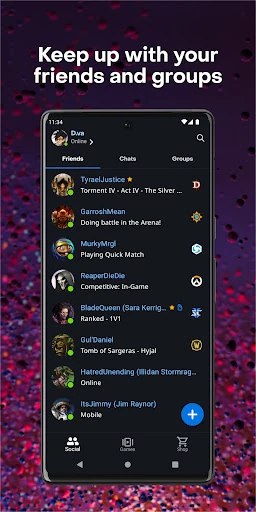
Picture a familiar evening: I’m away from my computer, a friend messages about playing later, and I want to coordinate before I’m back at my desk. Battle.net is built for that gap. I can check what friends are playing, talk with friends or groups, and settle on a time without needing to be in a game. It gives the social side of a Blizzard session somewhere to continue while I’m out.
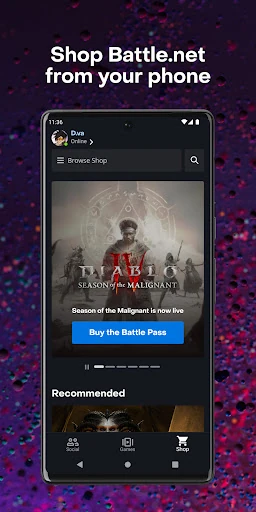
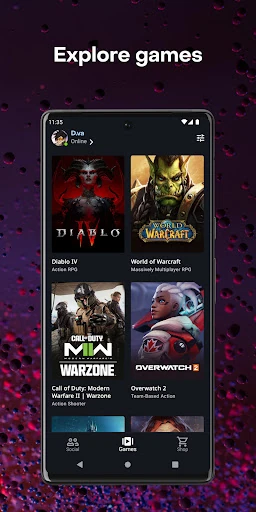
The same check-in can be useful when a group is discussing a strategy or deciding what to play next. Instead of treating the app as a replacement for the full gaming setup, I’d use it to keep the conversation going and catch up on community news. Patch notes and forums provide something to read between sessions, while the Shop and Games tabs offer a route to browse Blizzard’s games.
A Companion, Not a Game
Compared with opening a game, Battle.net serves a different purpose: it helps me stay connected around play, rather than providing the play itself. Its friend and group conversations, community forums, patch notes, account settings and support tools bring several Blizzard-related tasks together. That makes it a natural companion for someone already using Battle.net, especially when a quick check-in from a phone is more convenient than sitting down at a computer.
I wouldn’t choose it as a general chat app for every social circle or as a way to play games on my phone. The app’s stated focus is Battle.net friends, groups, games and account services. If I rarely use Blizzard games or communities, there may not be enough here to make it part of my routine. Its value comes from keeping those specific connections and tasks close at hand.
Small Habits That Help
A useful habit is to check friends and groups before planning a session, rather than discovering after I sit down that nobody is available. I can use the conversation tools to coordinate a time or talk through a strategy, then return to the game when it suits me. That keeps the app’s role simple: it helps organize the social part of play without asking me to turn every spare moment into a gaming session.
I’d also make occasional stops for patch notes and community discussions when I want context before returning to a game. For account upkeep, the account settings and Authenticator are worth knowing about before a login problem comes up. And if I need help, browsing support articles or following a ticket from the app could be more convenient than waiting until I’m back at my computer.
More From Our News Desk

Zoom Meetings, Google Meet, or Teams: Which Is Easiest to Join?

How I Build a Free Streaming Lineup With Tubi

Why Crunchyroll Is the Default Anime App for So Many Fans

YouTube TV: A Practical Guide to Cutting Cable

Rummikub and the Small Comfort of Phone Games

TeamViewer Remote Control or AnyDesk for Helping Family?
Who Will Get the Most From It
I’d recommend Battle.net to players who already use Blizzard games and want a phone-based way to keep up with friends, groups and community activity. It is especially relevant if you like coordinating play times, checking discussions or patch notes between sessions, or handling account and support tasks away from your computer. Those uses make the app a companion to an existing gaming routine, not something that needs to replace it.
It may be a poor fit if you’re looking for a mobile game, a broad social network, or a chat service for people outside your Battle.net circle. The app’s usefulness depends on having reasons to visit Blizzard’s gaming community in the first place. I’d also expect its appeal to be limited for someone who prefers to handle account matters and support only from a computer.
Battle.net is developed by Blizzard Entertainment, Inc. On Google Play it has over 10 million installs and a 3.5-star rating from around 144,000 ratings. The app is free to download, and the supplied store details say it contains no ads and offers no in-app purchases. Its content rating is Everyone.
The supplied app version is 1.32.2.45. The release date is September 26, 2017, and the listed last update is October 16, 2026. A minimum Android version is not included in the available details, so check Google Play for the requirement that applies to your device. The app requires an airtime or Wi-Fi connection.
A Useful Link Between Sessions
A Clear Starting Point
When I first open an app like this, I want to understand quickly whether it is for playing or for managing the parts around play. Battle.net is firmly the latter. Its purpose is to keep friends, groups, game information, account settings and support within reach. That framing helps set expectations: I’d come here for a quick check-in or a practical account task, then move to a game when I’m ready.
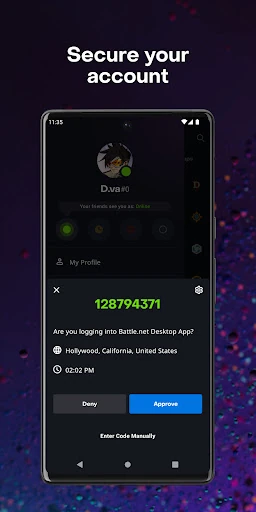
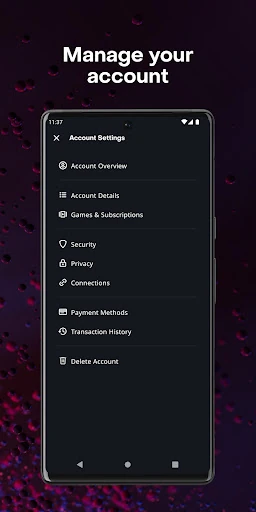
Getting set up also means thinking about the account side, not just the social side. Blizzard describes account settings and the option to attach a Battle.net Authenticator, which can approve or decline login attempts through a tap or notification. I like that this security tool sits alongside ordinary companion features, though I’d treat it as one part of account care rather than a reason to ignore other sensible precautions.
Everyday Connections
The friend and group features are the app’s most immediately useful idea. I can see what friends are playing, add friends, coordinate play time and talk about strategy or simply stay in touch. In practice, that gives the app a role during the small in-between moments: checking whether people are around, replying to a conversation, or making a plan before the next session.
What I appreciate about that arrangement is that it recognizes gaming as a social activity that doesn’t begin only when a game launches. A group can discuss plans or keep a conversation going while everyone is elsewhere. Still, the app’s stated job is to connect Battle.net users; it isn’t presented as a universal messaging service, and I wouldn’t expect it to replace whatever other ways my friends prefer to communicate.
News, Games and Support
The app reaches beyond conversations with patch notes, gaming communities and forums. That gives me a reason to check in even when I’m not arranging a session: I can read about changes or explore what people are discussing. The Shop and Games tabs also provide ways to browse Blizzard’s games and offerings. These are useful companion activities, though the description doesn’t make the app a substitute for playing a game.
Support is another practical inclusion. I can browse support articles, open a new ticket and reply to an ongoing one from the app. That may save a detour when I’m away from my computer and need to look for help. The Authenticator is notable for a different reason: it lets me approve or decline a login attempt with a tap or notification, connecting account protection to a quick mobile action.
A Simple Check-In Routine
My practical routine would be modest. Before an evening session, I’d check friends and groups, then use the conversation tools to find a time that works. If the group has a strategy to discuss, the app gives us a place to do that before jumping into a game. On a quieter day, I might instead read patch notes or browse community discussions, keeping the app useful without turning it into a constant distraction.
I’d save account and support tasks for moments when they actually come up. Knowing that I can reach account settings, connect an Authenticator, browse help articles or follow a ticket is more useful than repeatedly opening those sections without a reason. That small distinction matters: Battle.net works best as a convenient toolbox for particular needs, rather than an app I need to check every few minutes.
Keep Its Scope in Mind
Battle.net is most compelling when Blizzard’s games and communities are already part of my routine. Its features orbit that ecosystem, so a player who doesn’t use it may find little reason to return. The app also requires an airtime or Wi-Fi connection, which matters if I’m hoping to use it somewhere without connectivity. I’d treat it as an online companion, not an offline source of game information or communication.
The Google Play rating is 3.5 stars, a useful bit of context for anyone weighing the download, but it doesn’t tell me which features will matter most to an individual player. The supplied details also don’t give a minimum Android version, so I’d check the store before installing on an older device. Most importantly, I’d keep expectations aligned with its role: it supports the community and account around gaming, not the games themselves.
Battle.net makes sense as a practical companion for players who want their Blizzard social connections, game news, account tools and support options within reach on a phone. I like the range of tasks it brings together, especially coordinating sessions and handling a support conversation away from a computer. Its usefulness is focused rather than universal, which is also what keeps the app’s purpose clear.
I’d try it if Blizzard games are already part of my week and I want an easier way to stay connected between sessions. If I’m not involved in that ecosystem, I’d skip it rather than expect a general-purpose chat or mobile gaming app. For the right player, it’s a handy bridge between one session and the next.
Battle.net Frequently Asked Questions
What is the Battle.net app used for?
Battle.net helps users stay connected with friends and groups, coordinate play time, discuss strategies, read patch notes, explore gaming communities and browse games through its Shop and Games tabs. It also includes account settings, the option to attach a Battle.net Authenticator, and Blizzard support tools for browsing articles and managing tickets.
Which devices can run Battle.net?
The app is available for Android through Google Play. It requires an airtime or Wi-Fi connection to use. Check the Google Play entry for current device compatibility and the Android version required for your particular phone or tablet.
What Android version does Battle.net require?
The minimum Android version can vary by device and app release, so check Battle.net’s Google Play page for the requirement that applies to your phone or tablet. The supplied version detail is 1.32.2.45, but that does not specify a minimum operating system.
Does Battle.net cost money or include purchases?
Battle.net is free to download on Google Play. The supplied store details say it has no ads and no in-app purchases. Prices or availability of games and other offerings accessed through the app may vary, so check the store for current details.
Who is Battle.net best suited for?
It is best suited to people who use Blizzard games and want to keep up with friends, groups, community discussions, patch notes, account settings or support while away from a computer. It may not suit someone looking for a mobile game or a general-purpose social app outside the Battle.net community.
Pros
- Combines friend and group conversations with play-time coordination.
- Includes patch notes, forums, community browsing and game discovery.
- Offers account settings, Authenticator support and ticket replies.
- Free to download, with no ads or in-app purchases.
Cons
- Its usefulness depends on being part of the Blizzard gaming community.
- An airtime or Wi-Fi connection is required for use.
- It supports gaming around the edges rather than offering mobile gameplay.
- Category
- Entertainment
- Version
- 1.32.2.45











