AXS Tickets
- 155.24K
- 4.8
- Installs
- 10.00M
- Price
- Free

Screenshots

Analysis by Reviewed APKs
AXS Tickets is an event-finding and ticketing app for people who want to browse concerts, sports, comedy, and theater, then manage their plans from one place. I like the way it connects choosing seats with practical tasks such as showing tickets at the gate or sending them to friends. It suits regular eventgoers especially well, though it is most useful when the event and tickets are handled through AXS.
From plans to the gate
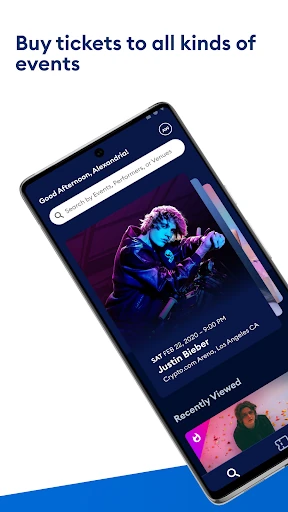
When I’m trying to turn a free evening into a real plan, I can use AXS to look for events by interest, check what is coming up, and see what is happening near me. If I find a show, interactive seating maps let me compare specific seats rather than choosing only a general section. That makes the app useful for the whole decision, from spotting an event to deciding where I would like to sit.
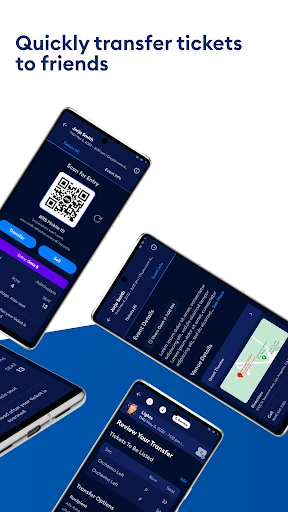
The day of the event is where the practical side matters most. AXS tickets can be opened in the app and scanned at the entrance, so there is no need to print a paper ticket. If friends are joining, I can transfer their tickets ahead of time instead of trying to meet everyone outside the venue. I appreciate that these steps connect directly to the plans I made when choosing the event.
A ticketing companion, not a planner
Compared with searching event pages one by one, AXS brings event discovery, seat selection, ticket access, and some ticket-management tasks together. The app also offers AXS Official Resale listings, along with Premium or VIP offers, so there can be more than one kind of ticket option to consider. I find that combination useful when I already have an artist, team, or type of event in mind and want to move from browsing toward a purchase.
AXS is not a general-purpose calendar, a social network for planning outings, or a guide to every event in every venue. Its role is narrower: help fans find events and handle tickets associated with AXS. That distinction matters if I am comparing events across ticket providers or want an all-purpose place to organize a group’s schedule. I would treat it as a focused ticketing tool, not the only source for every entertainment plan.
Small habits that help
I get more from the discovery side when I browse by interests instead of waiting for a particular event to come to mind. The app describes options ranging from basketball and rock to comedy and theater, which gives me a straightforward way to look beyond my usual picks. Checking what is happening soon can also turn a vague idea like “do something this weekend” into a shortlist of actual events.
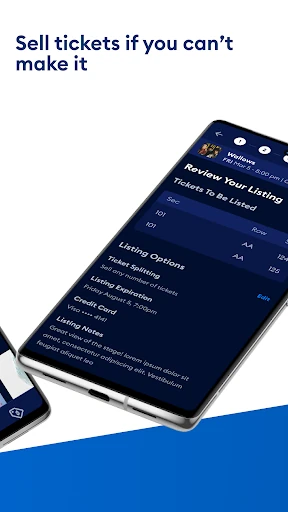
For a group outing, I would sort out ticket transfers before leaving for the venue. Sending tickets to friends in advance means they can head to their seats without waiting for the whole group to arrive together. If my plans change, AXS also lets me list eligible seats from my account for sale. Those are useful habits to keep in mind, although selling depends on having tickets from AXS and an event that supports the option.
More From Our News Desk

Zoom Meetings, Google Meet, or Teams: Which Is Easiest to Join?

How I Build a Free Streaming Lineup With Tubi

Why Crunchyroll Is the Default Anime App for So Many Fans

YouTube TV: A Practical Guide to Cutting Cable

Rummikub and the Small Comfort of Phone Games

TeamViewer Remote Control or AnyDesk for Helping Family?
Who will get the most from it
I’d recommend AXS to people who attend live events and want ticket discovery, seat selection, and event-day access in one app. It should be especially handy for fans who already use AXS for tickets, go out with friends, or sometimes need to transfer or sell seats when plans shift. The app’s mix of concerts, sports, comedy, and theater also makes it useful for someone who likes to browse rather than follow just one kind of event.
It may be less compelling if you rarely attend events, prefer to manage every ticket through a different provider, or are looking for a broad trip-planning or calendar app. The value depends on finding events and tickets that fit your plans through AXS. I would also keep in mind that the app’s ticket tools are not a substitute for checking the venue’s event details and entry requirements before heading out.
AXS Tickets is published by AXS, LLC and is available on Google Play for Android. The app is free to download, and Google Play shows over 10 million installs. It has a 4.8-star rating from around 155,000 ratings. The listed content rating is Everyone. These figures offer a useful snapshot of its reach and store feedback, though ratings can change over time.
The listed version is 6.32.1, with a release date of August 27, 2013, and a last update date of October 22, 2026. Google Play lists the app as free, with no in-app purchases and no ads. A minimum Android version is not included in the available facts, so check the Google Play entry on your device for current compatibility information.
How AXS Fits Into a Night Out
A clear event-first start
When I first opened the idea of using AXS, what stood out was how directly it connects entertainment discovery with tickets. I can browse events by interests such as sports, music, comedy, or theater, rather than treating the app only as a place to store something I have already bought. That makes it feel most useful before the event, when I am still deciding what to do.
Once I have found an event, the app’s ticket options are part of the same experience. Interactive maps let me look at exact seats, and AXS also presents resale, Premium, and VIP options. I like having those choices tied to the event itself; it is easier to weigh location and ticket type when I can see what I am choosing rather than relying on a vague section label.
Useful on event day
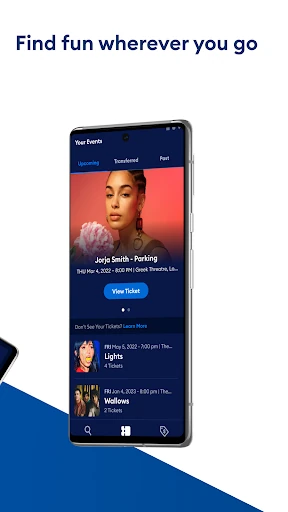
The everyday job is straightforward: open the app, pull up the ticket, and have it scanned at the gate. That removes the need to print a paper ticket, which is a small convenience that matters when I am already juggling travel, timing, and meeting friends. The mobile ticket is also connected to the same account used for buying, so there is less handoff between finding a ticket and getting ready to use it.
Transfers make the group side less awkward. I can send tickets to friends rather than waiting outside the venue for everyone to arrive together, then meet them at the seats. If a plan changes, listing seats from an AXS account is another option described by the app. These tools address common ticket logistics without turning the app into a full group-planning service.
Discovery and ticket choices
The event browsing is broader than a single genre: AXS highlights activities including basketball, rock, comedy, and theater. I find that range useful when I want to browse first and decide later, or when I am trying to come up with a different kind of outing. The ability to check what is happening soon gives the discovery side a practical angle, rather than making it only a catalog of events.
Seat selection is another feature I value because a ticket purchase can depend heavily on where I will sit. AXS uses interactive maps to let me choose specific seats, and it includes Official Resale as well as Premium or VIP offers. Those options give me more ways to consider an event, though they do not mean every event will have every ticket type available.
A simple outing routine
A routine I would use starts with a quick browse when I am looking for something to do in the coming weeks. I can narrow my attention by interests, open an event that appeals to me, and compare seats on its map. If I decide to go, I can buy through the app and keep the ticket there for entry. It is a tidy chain from idea to event, without needing a separate paper ticket.
For a shared outing, I would decide who is attending before the event day and transfer tickets to friends who need them. That reduces the chance of coordinating every person’s arrival at the entrance. I would also check the event details before setting off and make sure I can access the ticket in the app. If I can no longer attend, I can look into listing the AXS tickets for sale.
Keep its scope in mind
The main limitation is that AXS is most useful for events and tickets handled through its service. If I am trying to compare every show in town across multiple ticket providers, this app alone may not cover the whole search. Its features are also tied to the event: resale, Premium or VIP offers, and ticket transfers are options described by AXS, but they may not apply in every situation.
The app’s focus on event access is a strength, but it means I would not rely on it as my general calendar or as a complete guide to venue logistics. I still need to keep the actual event and entry details in mind. For someone who attends events only occasionally, the discovery and ticket-management tools may matter less than they do for a frequent concert or sports fan.
AXS Tickets makes the path from browsing an event to using a ticket feel connected. I especially like the practical touches: choosing seats on a map, opening a mobile ticket at the gate, and transferring tickets before meeting friends. Its event discovery and ticket options give regular attendees a useful reason to keep it on their phone.
I recommend it to Android users who find events and buy or manage tickets through AXS. It is less of an all-purpose event planner than a focused ticket companion, so occasional attendees may not need every feature. If AXS is already part of your live-event routine, the app brings several useful steps together in one place.
AXS Tickets Frequently Asked Questions
What is AXS Tickets used for?
AXS Tickets is used to browse events, choose tickets, and manage tickets for events handled through AXS. It supports mobile ticket access at the gate, transfers to friends, and listing AXS seats for sale when plans change. Event discovery covers interests such as sports, music, comedy, and theater.
Which devices can run AXS Tickets?
AXS Tickets is available on Google Play for Android devices. The minimum Android version can vary with app updates and device compatibility, so check the Google Play entry from the device you plan to use. The available information here does not establish support for other platforms.
Does AXS Tickets cost money?
The app is free to download on Google Play, and the store information says it has no in-app purchases and no ads. Individual event tickets and available options are separate from the app download; check the event details in AXS for current ticket information.
Can I transfer or sell tickets in AXS Tickets?
AXS describes tools for transferring tickets to friends and listing AXS tickets for sale if plans change. The app also includes AXS Official Resale options. Availability can depend on the event and the tickets involved, so check the event and ticket details in the app.
Who is AXS Tickets best suited for?
It is best suited to people who attend live events and want to discover events, choose seats, and access or manage AXS tickets from an Android phone. It may be less useful if you rarely go to events or want one app to organize tickets from many different providers.
Pros
- Connects event discovery, seat selection, mobile tickets, transfers, and resale options.
- Interactive seating maps let me compare specific seats before choosing.
- Ticket transfers can help friends avoid coordinating at the venue entrance.
- Covers a mix of music, sports, comedy, and theater.
Cons
- Most useful for events and tickets handled through AXS.
- Some ticket options may depend on the particular event.
- Not designed as a general calendar or complete outing planner.
- Category
- Entertainment
- Version
- 6.32.1











