AT&T Visual Voicemail
- 22.63K
- 3.1
- Installs
- 10.00M
- Price
- Free

Screenshots
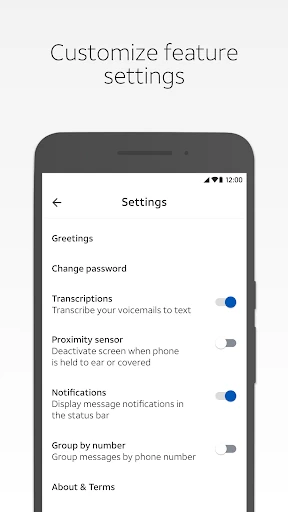
Analysis by Reviewed APKs
AT&T Visual Voicemail gives AT&T customers a way to review and manage voicemail messages on a supported Android phone without dialing into their mailbox. I like the practical idea: scan transcriptions, choose which message to hear first, and save or share messages when needed. It suits people who get useful calls but have little patience for listening through a mailbox in order. The catch is that it depends on the right AT&T plan and phone.
A Quicker Voicemail Check
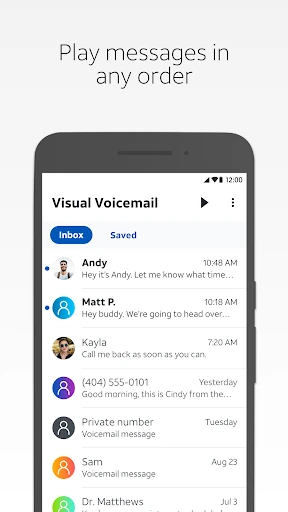
Picture a busy afternoon when you’ve missed a call from a school, a delivery driver, or someone arranging an appointment. Instead of dialing in and listening to every message in sequence, AT&T Visual Voicemail lets you review messages from your smartphone and play them in the order you choose. That makes it easier to get to the one that matters first, especially when you only have a minute between other tasks.
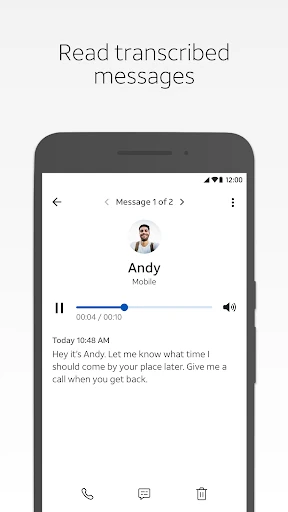
Transcriptions add another useful way to triage. I can see the appeal of reading a message while waiting in line or sitting somewhere it would be awkward to play audio. A transcript can help me decide whether to listen right away, save the message, or come back later. It doesn’t replace hearing the recording, but it can make a crowded voicemail box feel less like a queue I have to work through from the beginning.
A Companion, Not a Phone Replacement
The obvious alternative is dialing into voicemail and listening to messages one at a time. This app’s main advantage is that it brings message review onto the phone screen, with playback order, text transcription, saving, and sharing. That’s a focused improvement to voicemail, rather than a broader communications service. If you already prefer listening to every message by phone, the visual format may not change your routine much.
It is also not a general-purpose voicemail app for every Android user. AT&T says it needs a supported Android smartphone and an AT&T data plan that includes Visual Voicemail; non-AT&T variants may not be compatible. A cellular data or Wi-Fi Calling connection is required, so Wi-Fi alone won’t do. I’d treat it as an add-on to an eligible AT&T service, not a standalone tool for managing messages from any carrier.
Small Habits That Help
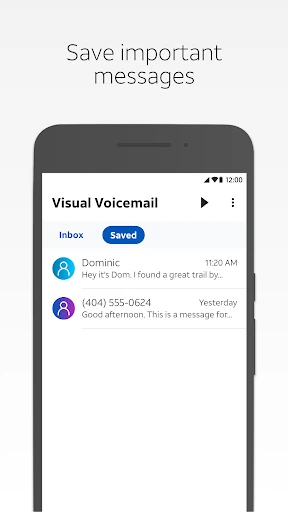
A useful habit is to scan the transcriptions before deciding what deserves a full listen. If a message contains information I may need later, saving it in the app can keep it from getting lost in a busy day. When a message needs to reach someone else, the app supports sharing by email, text, or a cloud drive. Those options make the mailbox more useful than a place I only visit to clear notifications.
I’d also make a point of checking the account and plan if setup goes sideways, rather than repeatedly reinstalling or guessing at the cause. AT&T recommends checking the account through its website or myAT&T app to confirm Visual Voicemail is included. For people who travel, it’s worth remembering that international data and messaging charges can apply when receiving, replying to, or forwarding messages while roaming.
More From Our News Desk

Zoom Meetings, Google Meet, or Teams: Which Is Easiest to Join?

How I Build a Free Streaming Lineup With Tubi

Why Crunchyroll Is the Default Anime App for So Many Fans

YouTube TV: A Practical Guide to Cutting Cable

Rummikub and the Small Comfort of Phone Games

TeamViewer Remote Control or AnyDesk for Helping Family?
Who Gets the Most From It
I’d recommend AT&T Visual Voicemail to AT&T customers who receive enough calls that finding the right message quickly matters. Transcriptions are handy when I want to scan first, and choosing playback order helps when a newer message is more urgent than older ones. Saving and sharing provide practical options for messages I need to keep or pass along. The best fit is someone with a supported Android phone and an eligible Visual Voicemail plan.
It may not suit someone who wants a voicemail app that works independently of a carrier plan, or someone whose phone variant isn’t supported. It also won’t work on a Wi-Fi-only connection, which is an important limitation for a phone without cellular service or Wi-Fi Calling. If you rarely receive voicemail, the convenience may not justify changing your habits. I’d check eligibility before relying on it for important messages.
AT&T Services, Inc. is the developer. Google Play shows over 10 million installs, with a 3.1-star rating from 22,625 ratings. The app is free to download, has no in-app purchases, and contains no ads. Its content rating is Everyone, making the store’s age classification straightforward, though the more important practical question for many users is whether their AT&T plan and phone are compatible.
The current version is 4.21.0.10247. The app was released on October 13, 2011, and its last update is dated November 2, 2026. It is an Android app, but the Android minimum version is not included in the available store facts. AT&T describes the requirements as a supported Android smartphone and an AT&T data plan that includes Visual Voicemail.
Voicemail That Fits the Workday
A Focused First Impression
When I first opened the idea of this app, its purpose felt refreshingly narrow: bring voicemail messages to the phone so I don’t have to dial into the mailbox. That focus is useful. The feature set centers on reviewing, playing, reading, saving, and sharing messages, rather than asking me to learn a new way to handle every kind of communication.
The first step is making sure the basics line up. AT&T requires a supported Android smartphone and a plan that includes Visual Voicemail. If setup is troublesome, the company points users to their account on att.com or the myAT&T app to check the plan. That’s a sensible place to start before assuming the app itself is the problem.
One connectivity detail is easy to overlook: the app needs cellular data or Wi-Fi Calling. It won’t work with a Wi-Fi-only connection. AT&T says receiving voicemail on the app while on its network does not count against the data plan allotment, while downloading the app or using transcription may involve data charges. That distinction is worth keeping in mind during setup.
The Daily Message Routine
Day to day, the benefit is having a choice about how to catch up. I can read a transcription when audio isn’t convenient, or play a message when I want to hear the caller’s words directly. The option to play messages in any order matters most when the mailbox has a mix of routine updates and something that needs attention sooner.
I spent an evening imagining the common catch-up routine: check what came in, scan the text, listen to the messages that need context, and save anything I may want to revisit. Each action is tied to a real voicemail task, so the app doesn’t need to become another place to maintain a complicated system. It makes the existing mailbox easier to approach.
There is still a natural limit to the convenience. A transcription is a text version of a message, not a substitute for every detail in the recording. If wording, tone, or context matters, playing the audio remains useful. I’d use the text as a quick filter and the recording as the final reference when a message is important.
Useful Message Options
The strongest features are the ones that shorten or simplify a familiar task. Playing messages in any order means I don’t have to work through them chronologically. Text transcriptions offer a quick scan, while saving messages gives me a way to keep ones I expect to need again. Together, those options make the app more than a shortcut for dialing into a mailbox.
Sharing is another practical touch. Messages can be sent by email, text, or to a cloud drive, which may help when a voicemail contains information someone else needs to hear. I’d use that selectively, since sharing a message is different from simply keeping it for myself. The important point is that the app provides several ways to handle a message after it arrives.
What surprised me was how much of the value comes from flexibility rather than a long list of tools. I can read, listen, save, or share according to the situation. I wouldn’t expect unrelated phone features from it; its job is specifically voicemail management. That clear boundary makes the feature set easy to understand before deciding whether it fits my routine.
A Practical Catch-Up Plan
For a simple routine, I’d check voicemail after a stretch of meetings or errands, rather than interrupting every task to answer a notification. First I’d scan the transcriptions to spot anything time-sensitive. Then I’d play those messages in the order that makes sense, rather than the order they arrived. It’s a small change, but it can turn a pile of missed calls into a manageable set of decisions.
If a message contains information I’ll need again, I’d save it in the app. If someone else needs the same information, the sharing options give me a way to pass it along by email, text, or cloud drive. I’d still keep the routine simple: act on the message, keep it if useful, and avoid treating every voicemail as something that needs long-term storage.
Travel calls for a little more care. AT&T notes that international data and messaging charges may apply to receiving, replying to, and forwarding voicemail while roaming internationally. Replies and forwards through SMS, MMS, or email can also count against data or messaging plan limits. I’d check the details of my plan before relying on those actions abroad.
Limits to Keep in View
Compatibility is the main gate. AT&T requires a supported Android smartphone and an AT&T data plan that includes Visual Voicemail, and it cautions that non-AT&T phone variants may not work. That makes this a service-specific choice, not a universal download-and-go voicemail organizer. I’d confirm my device and plan before building an important routine around it.
Connectivity is another boundary. The app requires cellular data or Wi-Fi Calling and does not work on Wi-Fi alone. Although receiving messages on the app while on the AT&T network does not count against the data allotment, AT&T says data charges may apply when downloading the app or using transcription. International roaming adds possible data and messaging charges for voicemail actions.
Finally, the Google Play rating is 3.1 stars from 22,625 ratings, so the overall response is mixed. That’s useful context, but it doesn’t tell me whether a particular phone and plan will work smoothly. I’d judge the app based on the core need—visual access to AT&T voicemail—and verify eligibility first, especially if a missed message could create a problem.
AT&T Visual Voicemail is a practical convenience for the right customer: it makes messages easier to scan, play in a chosen order, save, and share. I like that the benefit is clear and tied to everyday voicemail rather than a bundle of unrelated features. Its carrier and connectivity requirements are real constraints, though, and they matter more than the app’s modest scope.
I’d recommend trying it if you have a supported Android phone and an AT&T plan that includes Visual Voicemail. If you’re on another carrier, use a Wi-Fi-only phone, or rarely check voicemail, this probably won’t change much for you. Check eligibility first, then let the transcription and playback options save time where they genuinely help.
AT&T Visual Voicemail Frequently Asked Questions
What is AT&T Visual Voicemail used for?
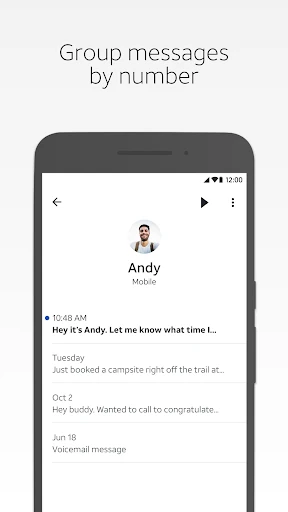
AT&T Visual Voicemail lets you review and manage voicemail on a smartphone without dialing into your mailbox. You can play messages in any order, read text transcriptions, save messages in the app, and share messages by email, text, or a cloud drive. It is focused on voicemail rather than general calling or messaging.
Which phones and connections work with AT&T Visual Voicemail?
The app is for Android and requires a supported Android smartphone plus an AT&T data plan that includes Visual Voicemail. AT&T notes that non-AT&T phone variants may not be compatible. A cellular data or Wi-Fi Calling connection is required; the app does not work on a Wi-Fi-only connection. Check the store and your account for compatibility details.
What Android version does AT&T Visual Voicemail require?
The Android minimum version can vary by device and app release, so check the Google Play store page for the current requirement before installing. AT&T’s stated requirements include a supported Android smartphone and an eligible plan. If you have trouble setting up the app, AT&T suggests confirming your plan through its website or the myAT&T app.
Does AT&T Visual Voicemail cost money?
The app is free to download, with no in-app purchases or ads. Access does require an AT&T data plan that includes Visual Voicemail, so check your plan for service details. AT&T also notes that data charges may apply when downloading the app or using transcription, and international data or messaging charges may apply while roaming.
Who should use AT&T Visual Voicemail?
It is best suited to AT&T customers with a compatible Android phone who want to scan, prioritize, save, or share voicemail messages. People who prefer dialing in, rarely receive voicemail, use an unsupported phone variant, or rely only on Wi-Fi may find it less useful. Confirm device and plan compatibility before depending on it.
Pros
- Lets you read transcriptions and choose which voicemail to play first.
- Messages can be saved in the app or shared by email, text, or cloud drive.
- Free to download, with no in-app purchases or ads.
- Keeps its focus on practical voicemail management instead of unrelated features.
Cons
- Requires an eligible AT&T plan and a supported Android smartphone.
- Does not work on a Wi-Fi-only connection.
- International roaming and some data use may incur charges.
- Category
- Communication
- Version
- 4.21.0.10247