Walmart MoneyCard®
- 7.46K
- 4.3
- Installs
- —
- Price
- Free

Screenshots



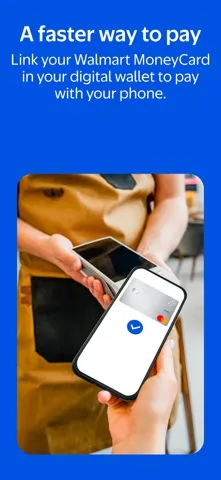
Analysis by Reviewed APKs
Walmart MoneyCard is a companion app for people who use the Walmart MoneyCard to receive money, make debit purchases, and set aside savings. I see it as a practical account tool, especially for someone who already shops at Walmart or wants a prepaid card rather than a traditional credit product. Its useful mix of deposit and savings options comes with fees and eligibility terms worth understanding first.
A payday and shopping companion
When I think about the app in everyday use, payday is the natural starting point. A cardholder can arrange direct deposit for pay or government benefits, then use the card for purchases wherever eligible Visa or Mastercard debit cards are accepted in the United States. Early access to a direct deposit may be available, but timing depends on the payor and other factors, so I would treat it as a possibility rather than a set schedule.
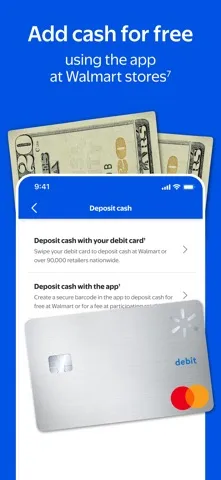
The Walmart angle becomes more relevant during an ordinary shopping week. The card offers cash back on purchases at Walmart and Walmart.com, and the app supports adding money through several routes, including a linked bank account, check deposit by smartphone, or cash reloads at Walmart stores. I like that this brings shopping and basic account access together, though the app is specifically useful to MoneyCard holders rather than a general Walmart shopping companion.
A card account, not a bank
Compared with a traditional bank app, Walmart MoneyCard is centered on a particular prepaid debit account. It offers ways to receive and add money, spend with the card, and move some funds into savings vaults. That can suit someone who wants a dedicated card account and is comfortable with its terms. It is not a broad financial dashboard or a substitute for comparing bank accounts, and the app's benefits depend on having the associated card.
It also differs from a credit card: the described product is a debit card, and the description says there is no credit check to get a card. That does not make it a fit for every situation. Some features have eligibility requirements, deposit methods can involve fees or limits, and overdraft protection requires opt-in and eligible direct deposits. I would compare the agreement and costs with other account options before making it my main place for money.
Small habits that help
The savings tools make more sense when tied to a routine. A user can create up to five savings vaults for different goals, then choose whether to round eligible debit purchases up to the next dollar and transfer the difference to a designated vault. I would keep the goal names simple and check the account regularly, since round-ups depend on having enough money in the debit account and an active, personalized card.
It is also worth making deposit timing part of a weekly check-in. Someone who receives pay or benefits by direct deposit can use the account for those funds, while occasional cash or checks can be added through the supported methods. Before relying on a particular route, I would review the applicable limits and fees. A little attention to the monthly fee waiver requirement can also prevent a small recurring charge from being a surprise.
More From Our News Desk

Zoom Meetings, Google Meet, or Teams: Which Is Easiest to Join?

How I Build a Free Streaming Lineup With Tubi

Why Crunchyroll Is the Default Anime App for So Many Fans

YouTube TV: A Practical Guide to Cutting Cable

Rummikub and the Small Comfort of Phone Games

TeamViewer Remote Control or AnyDesk for Helping Family?
Who may find it useful
I would recommend Walmart MoneyCard to adults who want to manage a Walmart MoneyCard from an iPhone and value having deposit, spending, and savings options in one account experience. It may be especially relevant to people who shop at Walmart, receive regular pay or government benefits by direct deposit, or like separating savings into a few named goals. Its appeal is practical rather than flashy: it connects a payment card with everyday account tasks.
It may be a weaker match for someone seeking a full-service banking relationship, a credit-building product, or an account with no conditions to check. The card requires identity verification and legal age in the user's state to activate, and some benefits have eligibility rules. I would also hesitate if fee terms or deposit limits do not fit a person's routine. The app works best when its associated card and features line up with how they already handle money.
Walmart MoneyCard is developed by Green Dot Corporation and is available for iPhone through the Apple App Store. The store gives it a 4.3 out of 5 rating from about 7,500 ratings. The app is free to download, and its listed content rating is 17+. The current version shown is 2.7.1; it was released on May 17, 2025, and last updated on September 8, 2026.
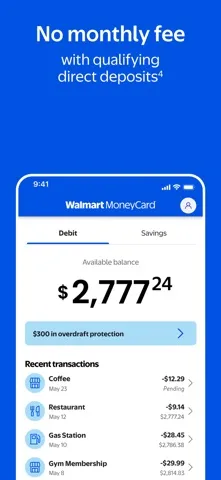
The minimum requirement is iOS 15.5. The account itself has costs and conditions separate from the app download: the monthly fee is waived when at least $500 is directly deposited during the previous monthly period; otherwise, the stated monthly fee is $5.94. Other fees and limits may apply to deposits and features. Overdraft protection requires opt-in and eligible direct deposits, and its terms may include fees.
How the MoneyCard Fits Daily Life
Getting started
My first impression is that this is an account companion, not an app that has much to offer without the card. The key setup step is opening and activating a Walmart MoneyCard account. The description says activation requires online access and identity verification, including an SSN, TIN, or select U.S. or foreign ID type. The user must also be the legal age in their state, which is 18 or older.
That makes the setup more involved than simply installing a shopping app. Mobile or email verification and the app are required to access all features, according to the product description. I would have the relevant identification and contact method ready before starting, then read the account agreement rather than tapping through every condition. That is especially sensible when the account may be used for pay deposits or other regular money needs.
The daily account routine
Once the account is in use, the app's described role is straightforward: help cardholders access account features and manage ways money reaches the card. Direct deposit can be set up for pay or government benefits, and money can also be added from a linked bank account. For a check, the app supports smartphone deposit. Those options give users more than one route, although the terms say deposit fees and limits may apply.
Spending happens through the associated debit card, which can be used where Visa or Mastercard debit cards are accepted in the U.S. I would think of the app and card as a pair: the card handles purchases, while the app provides access to the account's supported services. The product description also notes that funds from some deposit methods typically become available within 10 minutes, but that is not a reason to assume every deposit follows the same timing.
Savings and rewards
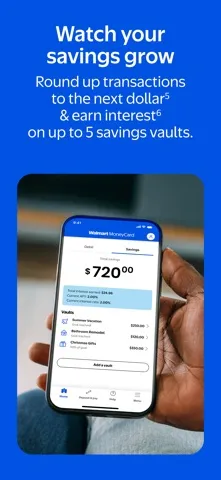
The savings setup is the feature I find most distinctive in the description. Users can keep money in as many as five savings vaults, each for a different goal. Eligible purchases can also be rounded up to the next dollar, with the difference transferred to a selected vault. This is a simple way to attach a small savings action to card spending, though it depends on the account having enough funds and meeting the stated enrollment conditions.
The card also offers cash back on purchases at Walmart and Walmart.com, plus interest on savings under the described terms. The interest is calculated and paid annually, and the description gives conditions and a balance cap for the calculation. These are benefits to read about carefully rather than assume will add up in a particular way. The product material says rewards have restrictions and exclusions, and fees on the primary account may reduce savings earnings.
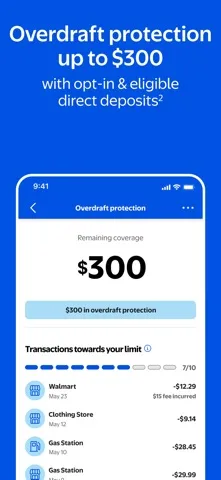
Overdraft protection is another option, but it is not a universal cushion. The description says it is available up to a specific limit with opt-in and eligible direct deposits, and overdrafts are paid at the issuer's discretion. Fees and conditions apply. I would regard it as a feature to understand in advance, not a substitute for keeping track of the account's available money.
A weekly money check-in
A useful routine could be to check the account around payday, confirm that a direct deposit has arrived, and decide how much to leave available for card purchases. If there is a savings goal, a user could review their vaults and whether round-ups suit their spending pattern. This is a modest rhythm, not a complicated budgeting system, and it works best when the card is already part of regular spending.
I would also make a monthly reminder to review the fee-waiver condition. The stated waiver requires $500 or more in direct deposits during the previous monthly period; otherwise, a $5.94 monthly fee applies. Someone with variable income should pay particular attention to that distinction. For cash reloads, bank transfers, or check deposits, checking the current fee and limit information before starting is a sensible habit.
Terms shape the experience
The main limitation is that the app's usefulness is tied to the MoneyCard account and its eligibility rules. Activation involves identity verification, and not every user will qualify for every feature. Early direct deposit availability can vary by payor, timing, payment instructions, and bank fraud-prevention measures. I would avoid building a bill schedule around an early arrival unless the money has actually posted.
There are also costs to keep in view. The monthly fee is waived only under the stated direct-deposit condition, and fees or limits may apply to deposits and other services. Overdraft protection requires opt-in and eligible direct deposits, and its availability is not automatic. Savings interest and round-ups have their own terms. The app may still be convenient, but its practical value depends on those details matching a person's habits.
Finally, this is a focused financial account app, not a general-purpose budgeting or banking suite. The provided description emphasizes card use, deposits, cash back, and savings features; it does not present it as a place to manage unrelated accounts. Someone who wants that broader view may prefer another tool alongside it. For a cardholder who wants access to these particular services, the focused scope is easier to understand.
Walmart MoneyCard has a clear job: give cardholders mobile access to a debit account with several deposit methods, Walmart-related cash back, and savings tools. I like the practical combination of vaults and optional round-ups, but the fee waiver, deposit limits, and eligibility conditions deserve a close read before relying on the account.
I would try it if I already planned to use the Walmart MoneyCard and its deposit options suit my routine. I would compare alternatives first if I wanted a broader bank app or fewer conditions to track. The app is free to download, but the associated account terms—not the download price—are what should guide the decision.
Walmart MoneyCard® Frequently Asked Questions
What is Walmart MoneyCard used for?
Walmart MoneyCard is a companion app for its associated debit card account. The product description covers direct deposit for pay or government benefits, adding money from a linked bank account, cash reloads at Walmart stores, and smartphone check deposits. It also describes Walmart cash back, savings vaults, purchase round-ups, and eligible overdraft protection.
Which devices support Walmart MoneyCard?
Walmart MoneyCard is available for iPhone through the Apple App Store and requires iOS 15.5 or later. The provided platform information is for iOS, so I would check the store for current device compatibility before installing. The description says mobile or email verification and the app are required to access all account features.
What are the requirements for Walmart MoneyCard?
The app requires iOS 15.5 or later. Activating a Walmart MoneyCard requires online access and identity verification, such as an SSN, TIN, or select U.S. or foreign ID type. The user must be the legal age in their state, stated as 18 or older. Check the store and account agreement for current details.
Does Walmart MoneyCard cost money?
The app is free to download. The associated account has a stated $5.94 monthly fee unless at least $500 is directly deposited during the previous monthly period. Fees and limits may also apply to deposits and other features. Because terms can vary or change, review the current Apple App Store information and account agreement.
Who should use Walmart MoneyCard?
It may suit adults who want to use a Walmart MoneyCard debit account and value its described deposit and savings options. It is less likely to fit someone looking for a broad banking app or an account without conditions to review. Eligibility and feature terms apply, so check the current store information and account agreement before deciding.
Pros
- Supports direct deposit, linked-bank transfers, cash reloads, and smartphone check deposits.
- Offers up to five savings vaults and optional round-ups on eligible purchases.
- Combines Walmart and Walmart.com cash back with card account access.
- Free to download on iPhone, with a clearly stated iOS 15.5 minimum.
Cons
- A $5.94 monthly fee applies unless the direct-deposit waiver condition is met.
- Deposits and features can involve eligibility rules, fees, or limits.
- Early direct deposit timing may vary from one payment to another.
- Category
- Finance
- Version
- 2.7.1











