U.S. Bank ReliaCard
- 73.16K
- 4.4
- Installs
- 1.00M
- Price
- Free
Screenshots
Analysis by Reviewed APKs
U.S. Bank ReliaCard is a companion app for people who already use a U.S. Bank ReliaCard and want to keep an eye on the card from a phone. It brings balances, recent transactions, alerts, and card controls together in one place. I like its practical focus: it is built for quick account checks and routine card management, rather than trying to be an all-purpose banking app.
A quick balance check
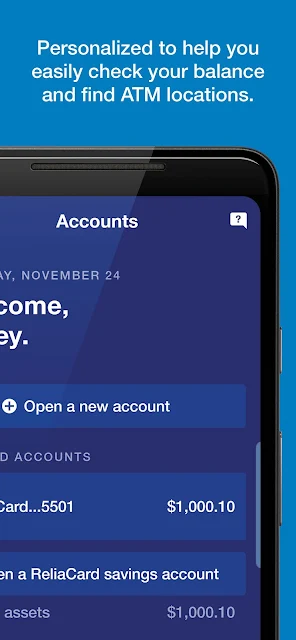
Picture a familiar errand-day moment: I am about to pay for groceries and want to check the card balance first. With ReliaCard, the dashboard is meant to surface that figure quickly, with recent transactions close at hand. That is the app’s central job, and it suits short visits between other tasks better than a long session spent exploring financial tools.
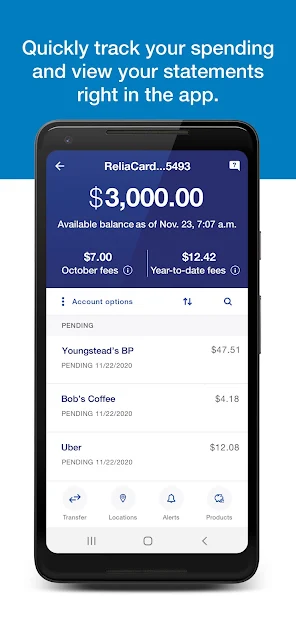
After a purchase, I can return to the app and tap into the transaction details to check what has posted. Monthly statements and enhanced transaction information add a broader view when I want to look back at spending. It is a straightforward routine: check the balance before heading out, then review activity later without needing to dig through a more general banking app.
A card companion, not a bank
ReliaCard is specifically for U.S. Bank ReliaCard users, so its narrow focus is both its main strength and its clearest boundary. If I only need card balance and activity, a dedicated dashboard can feel more direct than a full-service banking app with accounts and tools I do not use. The quick-action menu also keeps commonly used card functions within reach.
This is not a general-purpose banking hub for managing unrelated accounts, and I would not choose it as a replacement for a broader personal finance or budgeting service. Its budgeting and spending features center on reviewing card activity and monthly statements. The app’s value depends on having the supported ReliaCard; without one, its account-specific controls and information are not the point.
Small habits that help
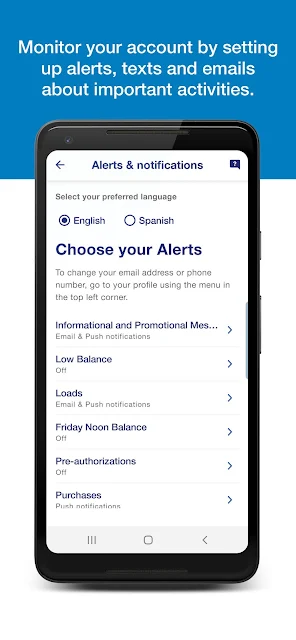
I would start by turning on the alerts that match how I use the card. The app describes notifications for charges, low balances, purchases, loads, and card mailings, so there are several ways to stay informed without opening the dashboard repeatedly. Picking a useful set matters more than enabling every alert; a notification should tell me something I will actually act on.
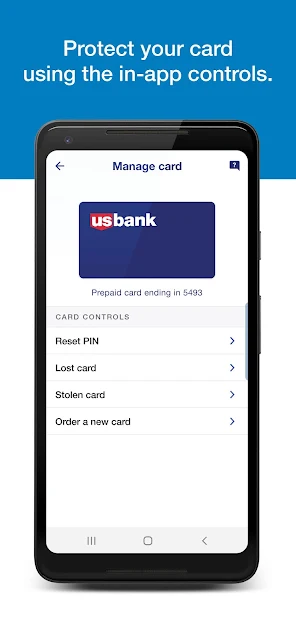
A simple weekly check can make the transaction view more useful. I can scan recent activity during a regular money-admin moment, then look at the monthly statement when I want a wider view of spending. I would also keep the Help Center in mind for common questions and use the card controls when I need to activate a card or change its PIN.
More From Our News Desk

Zoom Meetings, Google Meet, or Teams: Which Is Easiest to Join?

How I Build a Free Streaming Lineup With Tubi

Why Crunchyroll Is the Default Anime App for So Many Fans

YouTube TV: A Practical Guide to Cutting Cable

Rummikub and the Small Comfort of Phone Games

TeamViewer Remote Control or AnyDesk for Helping Family?
Who will find it useful
I would recommend U.S. Bank ReliaCard to people who use that card and want a convenient way to check its balance, review transactions, and receive account-related alerts. It makes the most sense for someone who likes handling small tasks on a phone: checking before a purchase, scanning activity afterward, or managing a card setting without reaching for another device.
It may be a poor fit for someone looking for a complete banking or money-management package, or for anyone who does not use a U.S. Bank ReliaCard. The app’s tools are centered on that card rather than on a broad view of all household finances. If you prefer to manage everything in one general-purpose service, this focused companion may feel limited by design.
U.S. Bank Mobile is the developer. On Google Play, U.S. Bank ReliaCard has more than one million installs and a 4.4-star rating from about 73,000 ratings. The app is free to download, with no in-app purchases or ads indicated in the supplied store details. Its content rating is Everyone.
The supplied app details identify version 7.1.51, a release date of July 23, 2014, and a last update of September 10, 2026. A minimum Android version was not provided in the available app details, so compatibility should be checked on Google Play for the device in question.
A Closer Look at Card Management
Opening and getting started
My first impression is that ReliaCard has a clear, specific purpose: help cardholders get to account information and common card tasks with less fuss. The dashboard is described as a simple place to check a balance and recent transactions, while a quick-action menu brings frequently used features forward. That kind of layout is useful when I have only a minute and do not want to hunt around.
Signing in uses a username and password, and the app also supports biometric login for a more convenient return visit. The description says enrollment is available in the app for people who do not yet have a bank account. Since the app is exclusively for ReliaCard use, the useful first step is having the relevant card account and setting up access to it.
The everyday account view
For day-to-day use, the combination of balance and recent transaction details is the part I would return to most. It gives me a quick read on the card without requiring a deep dive into menus. When I want more context than a single transaction line, the app also describes enhanced transaction details and monthly statements, which make a periodic review feel more manageable.
This is a practical rhythm rather than a complicated system: check the balance when planning a purchase, then look at activity when I have a few minutes. The app’s stated tools are focused on the ReliaCard account, which keeps the experience relevant for cardholders. I would not expect it to replace a separate service for tracking spending across multiple accounts.
Alerts and card controls
The standout feature set is the mix of customizable notifications and card controls. Alerts can cover charges, low balances, real-time purchase activity, loads, and new card mailings. I appreciate that these serve different needs: some help me notice card activity, while others can keep me aware of a balance or a card-related update.
The app also describes actions such as activating a card, changing a PIN, reporting a lost or stolen card, and ordering a replacement. Those are occasional tasks, but they matter when they come up. Having them listed alongside everyday account checks makes ReliaCard feel like a card-management tool, not simply a screen for looking at a number.
A useful weekly routine
A realistic routine would be to glance at the balance before a planned purchase, then check recent activity later in the week. If something needs a closer look, I can review the transaction details rather than relying only on a quick scan. At the end of the month, the statement view offers a natural moment to step back and review card spending.
I would tailor notifications to that routine instead of treating alerts as a substitute for checking the account. A low-balance alert may be useful to one person, while purchase or load notifications may be more relevant to another. The Help Center is there for common questions, so I would use it when I need guidance on the app’s supported card tasks.
Limits to keep in mind
ReliaCard’s focus is also its main limitation. It is explicitly for U.S. Bank ReliaCard users, and the described features revolve around that card. If I want a consolidated view of several banks, broad financial planning, or tools beyond card activity, I would need to look elsewhere. The app does not present itself as a substitute for every part of someone’s financial life.
Another practical point is that the experience depends on signing in to the appropriate card account. Biometric login can make returning easier, but the app still has an account-specific purpose. Before installing, I would check the Google Play compatibility information for my Android device, since the required Android version can vary and should be confirmed in the store.
U.S. Bank ReliaCard does a sensible job of bringing core card tasks into one phone app: balance checks, transaction review, alerts, and useful card controls. I like that it stays focused rather than pretending to be a complete financial dashboard. For an eligible cardholder, that focus can make routine account checks feel simpler.
I would recommend it to U.S. Bank ReliaCard users who want quick access to card information and settings. If you do not use that card, or want to manage a wider range of accounts and financial goals, this is unlikely to be the right fit. Its usefulness is clearest when its narrow purpose matches your everyday needs.
U.S. Bank ReliaCard Frequently Asked Questions
What is U.S. Bank ReliaCard used for?
U.S. Bank ReliaCard is a companion app for managing a U.S. Bank ReliaCard account. It supports balance checks, recent transaction details, monthly statements, alerts, and card actions such as activation or changing a PIN. It is designed around that card rather than as a general banking app.
Which devices can use U.S. Bank ReliaCard?
The supplied store information places U.S. Bank ReliaCard on Google Play for Android devices. Check the Google Play page for compatibility with your particular phone or tablet. Store availability and device support can vary, so the current store information is the best place to confirm before installing.
What Android version does U.S. Bank ReliaCard require?
The minimum Android version can vary with the app and device, so check the current Google Play page for the requirement shown for your phone or tablet. The app is version 7.1.51 in the supplied details, but that does not by itself determine compatibility with every Android device.
Does U.S. Bank ReliaCard cost money?
The app is free to download on Google Play. The supplied details indicate no in-app purchases and no ads. Those details describe the app itself; check the store page for current information before downloading, since store details can change.
Who is U.S. Bank ReliaCard best suited for?
It is best suited to people who use a U.S. Bank ReliaCard and want to check balances, review card activity, receive alerts, or manage supported card settings from a phone. It may not suit someone seeking a general-purpose banking service or a single app for managing several unrelated financial accounts.
Pros
- Puts balance checks and recent card transactions together in a focused dashboard.
- Offers customizable alerts for purchases, low balances, loads, and card mailings.
- Includes practical card controls such as activation and PIN changes.
- Biometric login is available alongside username-and-password access.
Cons
- Designed exclusively for U.S. Bank ReliaCard users.
- Not a broad financial dashboard for managing unrelated accounts.
- Android compatibility should be checked for the specific device.
- Category
- Finance
- Version
- 7.1.51











