Toyota Financial Services
- 114.86K
- 4.7
- Installs
- 1.00M
- Price
- Free

Screenshots
Analysis by Reviewed APKs
Toyota Financial Services is an account-management app for people with a Toyota lease or auto loan. It focuses on practical tasks such as checking account details and making payments, rather than shopping for a car or comparing financing. I like the idea of having a quick account snapshot and flexible recurring-payment choices in one place. It looks most useful for existing customers who want a simpler way to keep track of their payment routine.
A payment-day check-in
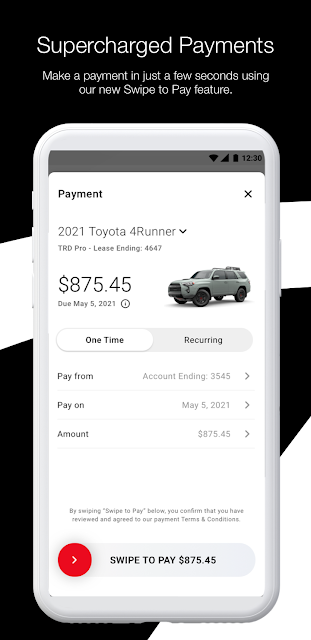
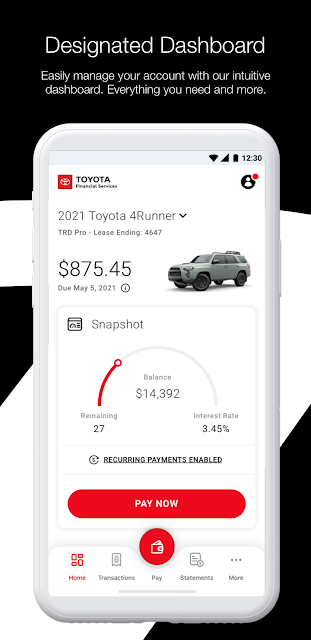
Picture a regular payment week: I open Toyota Financial Services to check the account before deciding whether I need to take action. The Snapshot view is designed to show a current balance and other lease or loan details, giving me a quick starting point instead of making me hunt through the app. If a payment is due, the app also offers a Swipe to Pay option, keeping the main task close at hand.
After paying, I can save a screenshot of the payment confirmation to my photos. That small detail is handy when I want a record close by without reopening the app just to find the confirmation screen. The app also supports recurring payments on weekly, biweekly, or monthly schedules. In everyday terms, it is aimed at reducing the number of steps between checking an auto account and handling its payment.
Account tool, not car shopping
The clearest comparison is with a bank or card app: Toyota Financial Services has a narrower job, centered on a Toyota vehicle lease or loan rather than a broad set of everyday finances. Its Snapshot, account navigation, and payment actions are relevant when I want to keep tabs on that particular obligation. For customers already using Toyota Financial Services, that focus can make the app feel more direct than a general-purpose money tool.
It is not a vehicle-shopping guide, a loan-comparison service, or a general budgeting app based on the available description. I would not choose it to manage unrelated bills or build a household spending plan. Its usefulness depends on having the relevant Toyota Financial Services account to manage. If I simply want information about a car or help arranging service, those are different needs from the account and payment tasks this app emphasizes.
Make the routine easier
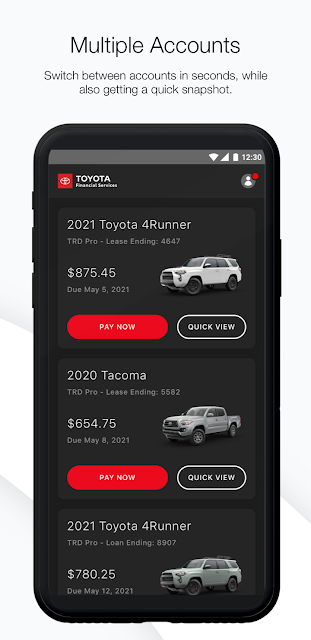
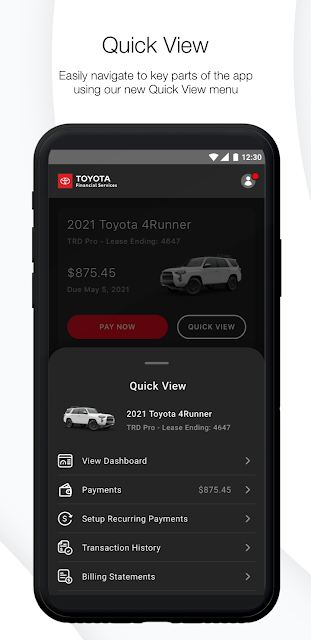
A useful habit is to open the app for a quick Snapshot check when reviewing upcoming household tasks. The point is not to spend time exploring every screen; it is to see the account details that matter and decide whether anything needs attention. The Quick View multi-account view is intended to help people with more than one account move between them and reach important app features without starting over each time.
If a payment schedule suits my routine, setting up a recurring option may reduce the need to remember each individual payment action. The app offers weekly, biweekly, and monthly choices, so I would consider which cadence fits my account and personal schedule. After a one-off payment, saving the confirmation screenshot gives me a simple reference. These are modest habits, but together they make an account app easier to use consistently.
More From Our News Desk

Zoom Meetings, Google Meet, or Teams: Which Is Easiest to Join?

How I Build a Free Streaming Lineup With Tubi

Why Crunchyroll Is the Default Anime App for So Many Fans

YouTube TV: A Practical Guide to Cutting Cable

Rummikub and the Small Comfort of Phone Games

TeamViewer Remote Control or AnyDesk for Helping Family?
Who may find it useful
I would recommend Toyota Financial Services to customers who already have a Toyota lease or loan with the company and want a phone-based way to check account details and make payments. The Snapshot and Quick View features suit someone who prefers a fast account check over navigating a larger financial dashboard. Recurring payment options may also appeal to people who like to build a payment task into a regular weekly, biweekly, or monthly routine.
It may be less useful if you do not have a Toyota Financial Services account, or if you want one app to manage finances beyond that vehicle account. I would also look elsewhere for car research, loan comparisons, general budgeting, or unrelated bill payments. The app’s strength is its focused account-management role; that same narrow scope is a limitation for anyone expecting a broad financial toolkit.
Toyota Financial Services is developed by Toyota Motor Credit Corporation. On Google Play, it has over one million installs and a 4.7-star rating from around 115,000 ratings. The app is free to download, and the provided store facts say it has no in-app purchases and contains no ads. Its content rating is Everyone.
The provided facts give version 13.5 and a release date of November 14, 2012. The most recent update date supplied is October 23, 2026. A minimum Android version is not included in the available facts, so it is best to check Google Play for the requirement that applies to a particular device.
A Closer Look at Account Management
A focused first impression
The app’s first impression is shaped by a redesigned interface and a clear emphasis on account tasks. Rather than presenting itself as a general finance hub, it puts the lease or loan relationship at the center. That makes the purpose easy to understand: open it when I want a look at my Toyota Financial Services account or need to handle a payment.
I would start by getting oriented around the Snapshot and the navigation controls, then check which account details are available for my lease or loan. The description highlights a bottom navigation bar and a Quick View multi-account screen, both intended to make movement through the app straightforward. The actual account information depends on the customer’s own account, but the design direction is clearly about quick access.
Everyday account checks
The day-to-day experience revolves around checking account information and acting when needed. Snapshot provides a real-time view of the current balance and other lease or loan details, so it is the natural place to begin a quick check. For someone who only opens a finance app occasionally, a compact overview can be more useful than a long list of options competing for attention.
When it is time to pay, the app’s Swipe to Pay feature is designed to make that action readily accessible. I appreciate that the confirmation can be saved as a screenshot in photos, especially for a person who likes keeping a simple record after completing a task. The app describes these actions, but the exact experience can depend on the account and the steps available to its owner.
Small features with purpose
Recurring payments are one of the more practical features for someone who wants a regular schedule. The listed choices are weekly, biweekly, and monthly. That flexibility gives customers several cadences to consider rather than limiting the feature to one interval. I would treat the schedule as a convenience to set thoughtfully, not as a reason to stop checking account details from time to time.
Quick View is intended for navigating across multiple accounts and reaching important app features. That could matter to a household or customer who manages more than one relevant account through the service. Meanwhile, the redesigned bottom navigation aims to make common actions easier to reach. These features do not turn the app into a full financial planner; they make its core account and payment tasks easier to find.
A simple monthly routine
One sensible routine would be to check Snapshot when I review the month’s household tasks, then decide whether a payment needs attention. If I prefer automation, I can consider one of the available recurring schedules. The app’s stated options cover weekly, biweekly, and monthly payments, so the choice can reflect a routine that already works for me rather than adding a new one to remember.
Once a payment is made, saving its confirmation screenshot offers a quick way to keep a record in my photos. If I have several accounts, Quick View is meant to make switching among them less cumbersome. This is not an elaborate workflow, and that is the appeal: check the relevant details, take the needed payment action, and keep the confirmation if it is useful.
Keep its scope in mind
The app’s narrow focus is also its main limitation. It is built around Toyota Financial Services lease and loan management, so it will not replace an everyday bank app or a general budgeting tool. Someone hoping to track spending across multiple financial institutions should not assume those capabilities are part of this product. The described features concentrate on the Toyota account, payment choices, navigation, and payment confirmation.
The available description does not set out every account detail or explain how every payment situation works. I would use the app for the tasks it is designed to support and check the store or account information for details relevant to my own circumstances. In particular, a Snapshot is a convenient view, not a substitute for understanding the account’s terms or checking information when a decision matters.
Toyota Financial Services is a focused companion for customers managing a Toyota lease or loan. Its Snapshot, recurring payment choices, Quick View, and saved payment confirmation address practical tasks without trying to be a broad finance platform. I like that clear purpose, even if it naturally limits the app’s appeal beyond existing account holders.
If you already use Toyota Financial Services and want account checks and payment actions on your phone, it is worth considering. If you need budgeting, general banking, or car-shopping tools, this is not the app I would reach for. Its value comes from making a specific account routine easier to handle.
Toyota Financial Services Frequently Asked Questions
What is Toyota Financial Services used for?
Toyota Financial Services is for managing a Toyota Financial Services auto lease or loan. Its described features include a Snapshot view of current balance and other account details, payment actions, recurring payment options, and navigation across multiple accounts. It is focused on those account tasks, rather than serving as a general budgeting or car-shopping app.
Which devices can run Toyota Financial Services?
The facts provided describe an Android app available through Google Play. The minimum Android version is not included in the supplied details, and device requirements can vary. Check the Google Play store page for the current requirement and compatibility information for your particular device.
Does Toyota Financial Services cost anything?
The app is free to download according to the provided Google Play facts, with no in-app purchases and no ads reported there. Those details can change over time, so it is sensible to check the store page for current information before installing or using the app.
Can Toyota Financial Services set recurring payments?
Yes. The app description says customers can set up recurring payments with weekly, biweekly, and monthly options. It also describes a Swipe to Pay feature for payments and the ability to save a screenshot of a payment confirmation. Available account actions may depend on the customer’s account.
Who should use Toyota Financial Services?
It is best suited to people who have a Toyota Financial Services lease or loan and want a convenient way to check account details or make payments. It may not suit someone seeking a general finance manager, household budgeting tool, or car-shopping service, since its described purpose is centered on managing the Toyota account.
Pros
- Snapshot puts current balance and lease or loan details in a quick account view.
- Recurring payment choices include weekly, biweekly, and monthly schedules.
- Quick View supports easier navigation across multiple accounts.
- Payment confirmation screenshots can be saved to photos for reference.
Cons
- Its focused account-management role offers little appeal without a Toyota Financial Services account.
- It is not a general budgeting, banking, or car-shopping app.
- The minimum Android requirement should be checked in Google Play.
- Category
- Finance
- Version
- 13.5











