Tactacam REVEAL
- 26.33K
- 4.8
- Installs
- 500.00K
- Price
- Free
Screenshots
Analysis by Reviewed APKs
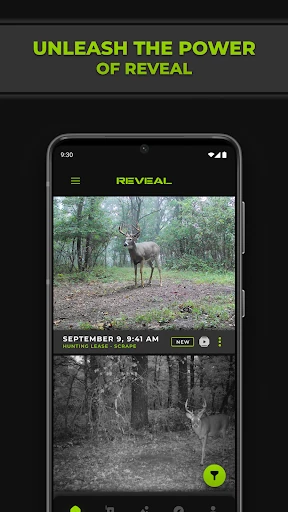
Tactacam REVEAL is a companion app for managing compatible REVEAL cellular cameras, from connecting a camera to checking its photos, settings, and status remotely. I see it fitting hunters and outdoor watchers who want to keep an eye on a monitoring location without making every check in person. Its appeal is practical rather than flashy: it brings camera galleries and management tools together, though it depends on having a REVEAL camera to use.
Checking a Camera From Home
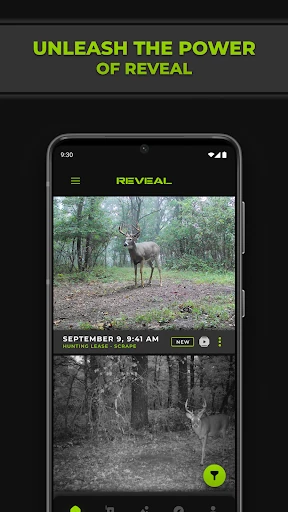
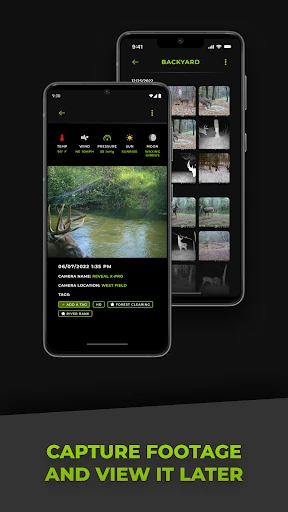
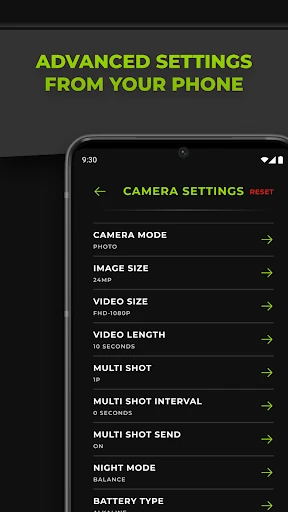
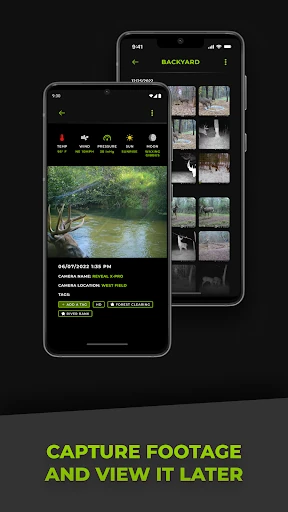
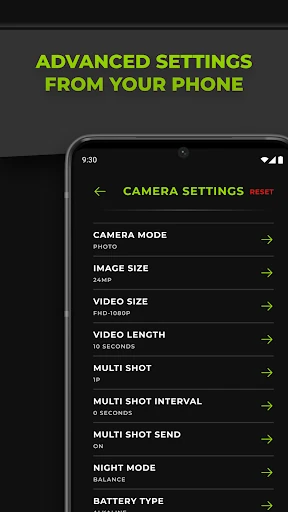
Imagine you have placed a cellular camera at a spot you monitor and want to review what it has captured without heading back out. REVEAL gives you a place to view and organize the camera’s photo and video galleries, check camera health and stats, and adjust settings remotely. I like that this makes the app useful between trips, when a quick look at the gallery or status can help you decide whether a visit is needed.
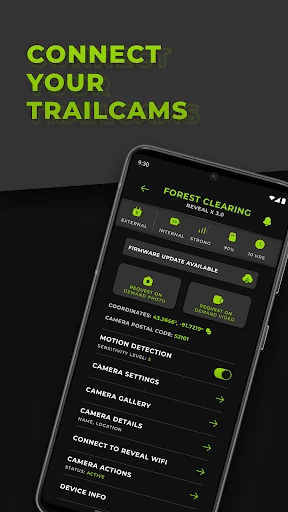
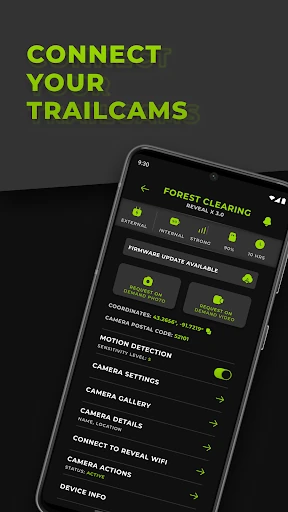
The setup follows a specific sequence: create an account, follow the prompts to set up a data plan, scan the camera’s QR code, and then place the camera at its monitoring location. Once connected, the app supports remote management of multiple cameras. On-demand photo capture is another option when you want a current image rather than waiting for the next one to arrive through the camera’s normal use.
A Camera Companion, Not a Camera
REVEAL is best understood as a control and viewing companion for Tactacam REVEAL cellular cameras, not as a general-purpose photography app. It is built around remote camera management, transmitted images, camera stats, and sharing feeds. If you already use a compatible camera, the app gives those tasks a central place; if you are looking for tools to take or edit phone photos, this is aimed at a different job.
It also occupies a different role from checking a camera in person. The app can help you view available galleries and manage settings from home, but the core experience still depends on a REVEAL camera being connected and placed where you want to monitor. The setup includes a data-plan step, so it is worth thinking of the app as part of a camera-and-connectivity setup rather than a standalone service.
Small Habits That Help
I would make a habit of checking the gallery and camera health together, rather than looking only at new images. That way, the app’s photo and video views sit alongside the stats that help you keep tabs on the camera itself. When managing more than one camera, a regular check-in can also make it easier to keep track of separate monitoring locations without treating each one as an isolated setup.
Sharing feeds can be useful when another person should be able to see the images too. I would set that up as part of a deliberate routine, then use on-demand capture when a specific check would be helpful. The app also provides billing history, which gives you a place to review that information alongside camera management. These are modest workflow touches, but they make the app more than a gallery viewer.
More From Our News Desk

Zoom Meetings, Google Meet, or Teams: Which Is Easiest to Join?

How I Build a Free Streaming Lineup With Tubi

Why Crunchyroll Is the Default Anime App for So Many Fans

YouTube TV: A Practical Guide to Cutting Cable

Rummikub and the Small Comfort of Phone Games

TeamViewer Remote Control or AnyDesk for Helping Family?
Who Will Get the Most From It
I would recommend Tactacam REVEAL to people who own or plan to use a compatible REVEAL cellular camera and want to handle routine checks remotely. It is especially suited to anyone who values having galleries, camera settings, status information, and feed sharing in one app. The support for multiple cameras is a practical fit for users who monitor more than one location.
It may not suit someone who wants a photography app for taking pictures with a phone, or someone without a REVEAL camera. The connection process also involves setting up a data plan, so the app is not the whole setup by itself. If your main interest is simply browsing images without managing a remote camera, many of its central tools may be beside the point.
Tactacam REVEAL is developed by Deer Management Systems and is in the Photography category on Google Play. It has over 500,000 installs and a 4.8-star rating from around 26,000 ratings. The app is free to download, with no in-app purchases or ads. Its content rating is Everyone.
The current version is 5.12.0. The app was released on May 28, 2020, and its last update was September 30, 2026. The minimum Android version is not included in the available app details, so check Google Play for device compatibility before installing.
A Closer Look at Remote Camera Control
Getting Connected
The first impression is that this app has a clear, specific purpose: connect a REVEAL cellular camera and make its information accessible through a phone. The described setup starts with an account, moves through data-plan setup, and uses the camera’s QR code for activation and connection. That sequence gives new users a straightforward path to follow, rather than leaving the camera connection as an unexplained extra step.
After connection, the camera is placed at its monitoring location and the app becomes the remote point of contact. I appreciate that the setup instructions make the camera part of the process from the start. This is not an app that becomes useful through browsing on its own; its first meaningful task is pairing it with the equipment it is designed to manage.
The Everyday Experience
Day to day, the main draw is being able to review photos and videos without visiting the camera. Galleries can be viewed and organized, while camera settings and health stats can be managed or checked remotely. That gives the app a practical rhythm: check what arrived, look at the camera’s status, and make any settings changes that fit the situation.
I also like that the app is described as supporting multiple cameras. For someone with several monitoring points, that makes remote management more relevant than a single-camera gallery alone. The app’s value will naturally depend on how often you use those cameras and how useful remote access is in your routine, but the tools are centered on that everyday need.
Useful Extras Beyond Galleries
The standout features extend beyond viewing images. REVEAL supports sharing and receiving photo feeds, which can make camera images accessible to others, and it includes on-demand photo capture for a requested view. Those options add flexibility to the core gallery experience: one is about sharing what the camera captures, while the other is about asking for an image when you want one.
Billing history and camera health stats round out the management side. I would not call these flashy features, but they make sense in an app that is meant to support connected cameras over time. Having camera information and billing history available in the same companion app can reduce the need to keep those routine checks separate from gallery review.
A Simple Check-In Routine
A useful routine could be to open the app at a regular time, review each camera’s gallery, and check its health stats before deciding whether anything needs attention. If you monitor multiple cameras, working through them in the same order can help make the review feel manageable. The app’s organization and remote access are most helpful when they become part of a repeatable check rather than an occasional scramble.
If someone else should see the feed, sharing is available as part of the app’s feature set. For a specific moment when you want a fresh look, on-demand capture provides another route. I would keep those actions tied to a clear purpose, then return to the regular gallery and status check. That approach uses the app’s available tools without making every visit to it a complicated project.
Keep the Setup in Mind
The main limitation is also the app’s defining boundary: it is made for REVEAL cellular cameras. Without that camera, there is no gallery or remote camera setup for the app to manage. It also includes a data-plan setup step, so users should account for that part of getting a camera connected rather than assuming the app alone provides the complete service.
The experience is focused on camera management, not broad photo editing or general outdoor planning. That focus is a benefit if remote camera access is what you need, but it narrows the audience. The app’s usefulness will also depend on having a connected camera in a suitable monitoring location. For the right equipment and routine, the feature set is coherent; outside that use, it has little reason to be on your phone.
Tactacam REVEAL makes a sensible companion for people who want to review and manage compatible cellular cameras remotely. Galleries, camera stats, settings, feed sharing, and on-demand capture all support that focused job. I especially like the way the app brings routine camera checks together instead of treating image viewing as its only purpose.
I would recommend it to REVEAL camera users who want a more convenient way to keep up with their monitoring locations. I would skip it if you do not use the compatible camera system or want a general photography tool. Its value is tied closely to the equipment, but within that lane, the app offers a practical set of remote controls and checks.
Tactacam REVEAL Frequently Asked Questions
What is Tactacam REVEAL used for?
Tactacam REVEAL is a companion app for connecting to and managing REVEAL cellular cameras. It lets users view and organize photo and video galleries, adjust camera settings, check camera health and stats, share and receive photo feeds, review billing history, and request an on-demand photo capture.
Which devices and platforms support Tactacam REVEAL?
Tactacam REVEAL is available on Android through Google Play. The app is designed to connect with REVEAL cellular cameras; the setup instructions include scanning a camera QR code. Check Google Play for current device compatibility and the app’s system requirements, which may vary by device.
What Android version does Tactacam REVEAL require?
The minimum Android version can vary with the app and device, so check the Tactacam REVEAL page on Google Play for the current requirement before installing. The app’s setup also involves a compatible REVEAL cellular camera and a data-plan setup step.
Does Tactacam REVEAL cost money?
The app is free to download on Google Play and has no in-app purchases or ads. Its camera connection process includes setting up a data plan. Details related to plans or other costs may vary, so check the store information and the relevant camera service details before getting started.
Is Tactacam REVEAL right for someone without a camera?
Probably not. The app is built to connect to and manage REVEAL cellular cameras, so its galleries, remote settings, camera stats, and capture tools depend on that use. It may suit owners who want remote camera checks, but it is not a general phone photography app.
Pros
- Combines camera galleries, settings, and health stats in one remote management app.
- Supports managing multiple cameras and sharing photo feeds with others.
- Offers on-demand photo capture for a requested camera image.
- Free to download, with no in-app purchases or ads.
Cons
- Its core features depend on having a compatible REVEAL cellular camera.
- Connecting a camera includes a data-plan setup step.
- The focused camera tools may not appeal to general photography users.
- Category
- Photography
- Version
- 5.12.0











