Symbolab: AI Math Solver
- 149.46K
- 4.3
- Installs
- 10.00M
- Price
- Free

Screenshots


Analysis by Reviewed APKs
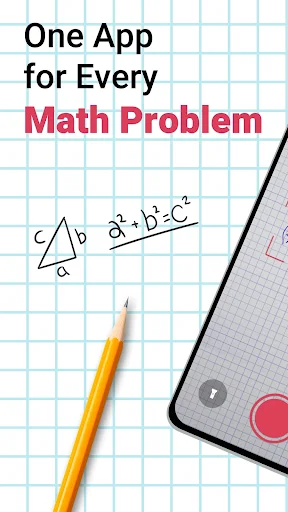
Symbolab: AI Math Solver is a study companion for working through problems from pre-algebra to calculus. I found its main appeal in the combination of quick answers and guided steps: you can type a problem or take a picture, then use the solution to follow the method. It suits students who want help checking their work or understanding a calculation, though it is not a substitute for practicing on your own.
A homework check that teaches
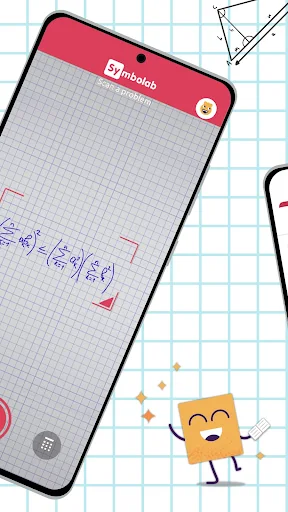
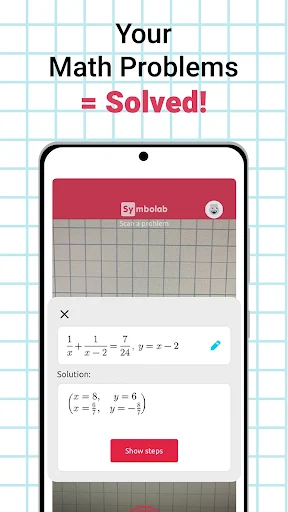
When I first opened Symbolab, I pictured the familiar late-evening homework moment: a problem has taken longer than expected, and I want to know where my work went off track. I could enter the expression or take a picture of it, then look at the result and its steps. That makes the app useful not just for getting an answer, but for comparing the route it took with my own.
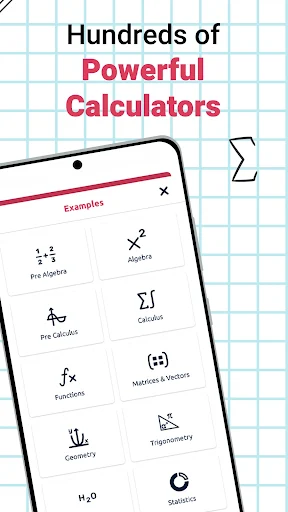
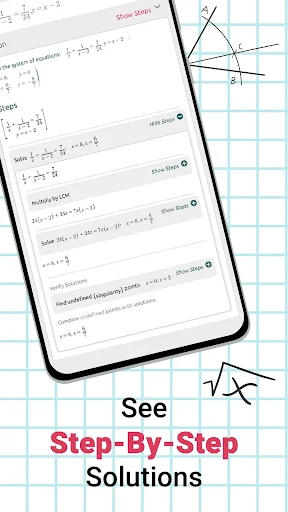
The range matters in that situation. Symbolab covers topics from pre-algebra through calculus, with tools for areas such as fractions, equations, trigonometry, matrices, derivatives, and integrals. I can imagine using it to check a fraction calculation one day and a limit problem the next. The step-by-step format is the part I would return to: a final number alone rarely tells me what to fix.
A solver, not a full course
Compared with a textbook, Symbolab is quicker when I already have a specific problem in front of me. Compared with searching the web, it is focused on entering a math expression and seeing a worked solution. Its calculators cover many common areas, and the option to photograph a problem gives me another way to get it into the app when typing feels awkward.
I would not treat it as a complete replacement for a class, a tutor, or doing practice problems myself. It is built around solving and explaining submitted questions, rather than providing a full course plan. The description mentions personalized assessments, but the everyday strength I can rely on is the problem-solving toolkit. If I need broader instruction or feedback on my overall progress, I would pair it with other learning materials.
Make the steps do the work
I get more value from a solver when I pause before opening the answer. I would try the problem first, then use Symbolab to check the result and compare the steps. If the approaches differ, that gives me a useful place to slow down and inspect a sign, an exponent, or a transformation rather than simply copying the final line.
A small routine helps too: keep the original problem handy, enter it carefully, and read the solution from the first step instead of jumping to the end. For a topic I am revising, I would use the relevant calculator repeatedly on problems I have already attempted. Free solutions include basic steps; a subscription unlocks more advanced steps and explanations, so I would check whether those are needed for my use.
More From Our News Desk

Zoom Meetings, Google Meet, or Teams: Which Is Easiest to Join?

How I Build a Free Streaming Lineup With Tubi

Why Crunchyroll Is the Default Anime App for So Many Fans

YouTube TV: A Practical Guide to Cutting Cable

Rummikub and the Small Comfort of Phone Games

TeamViewer Remote Control or AnyDesk for Helping Family?
Who will get the most from it
I would recommend Symbolab to students who want a practical way to check calculations and see how a solution can be built. It is especially handy for people moving between different math topics, since the app includes a broad set of calculators rather than focusing on just one kind of problem. Someone studying independently may also appreciate being able to enter a question and work through the available steps at their own pace.
It may be less suitable for someone who wants a structured course, a teacher’s feedback, or a reason to avoid working through the material. The app can show a route to an answer, but the learning still depends on taking time to understand it. I would also keep the subscription distinction in mind: basic steps are free, while more advanced explanations require a subscription.
Symbolab: AI Math Solver is an Education app from Symbolab - Math. Google Play shows over 10 million installs and a 4.3-star rating from around 149,000 ratings. The app is free to download and contains no ads. It offers in-app purchases, with listed items ranging from $0.99 to $39.99.
The app has an Everyone content rating. Its current version is 12.1.0; it was released on January 14, 2015, and the recorded last update is July 29, 2026. The supplied app details do not give a minimum Android version, so check the Google Play page on your device for compatibility.
A closer look at solving with Symbolab
Starting with a problem
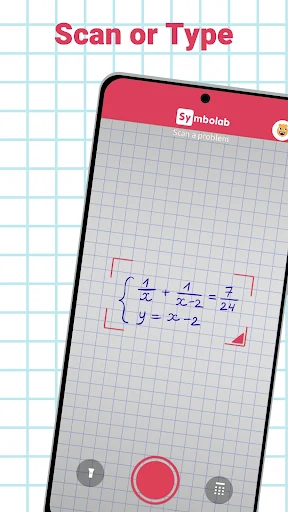
My first impression is that Symbolab is designed around the question already in front of you. Rather than asking me to choose a long lesson first, it lets me type a math problem or take a picture. That is a sensible starting point for homework: I can move directly from a confusing expression to a solution I can inspect.
The app spans a wide range, from pre-algebra to calculus, so the same basic approach applies across quite different assignments. The practical setup is simple in concept: bring a problem, enter it, and review the result. I would still take a moment to check that the problem was captured or typed as intended before trusting the steps.
The everyday solving loop
Day to day, the most useful loop is attempt, check, and understand. I would work through a question in my notebook, enter it in Symbolab, and compare the answer with my own. When they disagree, the worked solution can help me trace the difference one step at a time instead of leaving me with a bare right-or-wrong result.
That approach keeps the app in a supporting role. It can make a stuck moment less frustrating, but the value comes from reading the method and applying it to the next problem. The description says free solutions include basic steps, with more advanced steps and explanations available through a subscription. That distinction is worth considering if detailed guidance is central to your routine.
A broad calculator toolkit
Symbolab brings together more than 500 calculators, according to its description. The named tools include equation, fraction, graphing, derivative, integral, limit, inequality, trigonometry, matrix, function, series, ordinary differential equation, and Laplace transform calculators. That breadth is a real convenience when assignments move between topics and I do not want to hunt for a separate tool each time.
The ability to work from a picture is another useful option, particularly for a printed or handwritten question that would be tedious to enter. Symbolab also describes its solutions as step by step and says it can handle word problems. Those features make it more than a basic calculator, though I would still check the entered problem and read the reasoning rather than treating any output as something to copy blindly.
A useful study routine
For a regular study session, I would start with the problems I have already tried and use Symbolab as a check rather than an answer key. If a solution differs from mine, I would find the first step where the work diverges. That turns a mistake into a specific question: did I simplify incorrectly, or did I choose the wrong operation?
I would also use the app when switching topics, choosing the calculator that fits the problem at hand. A calculus assignment can call for a derivative or integral tool, while an algebra question may fit the equation or inequality calculator. Keeping the original work beside the displayed solution makes it easier to compare methods and remember the process after closing the app.
Keep its role in perspective
The main limitation is one of learning habits: a fast solution can become a shortcut if I skip the explanation. Symbolab is most useful when I use it to check and understand work, not when I rely on it to do every question for me. It also does not replace a complete course or personal instruction for someone who needs a broader learning plan.
There is also a difference between the free basic steps and the more advanced steps and explanations offered by subscription. If you need detailed help regularly, that could affect whether the app fits your budget. I would try the free experience with the kinds of problems I actually study, then decide whether the additional explanation is worth paying for.
Symbolab: AI Math Solver is a capable problem-solving companion with a broad collection of math calculators and a helpful emphasis on showing steps. I like it best as a way to check my own work, investigate a sticking point, and see another route through a calculation.
I would recommend it to students who want fast, practical help across several math subjects and are willing to read the reasoning. If you want a full course or plan to use a solver without practicing, it is a less natural fit. Start with the free basic steps and see whether they meet your needs.
Symbolab Frequently Asked Questions
What is Symbolab: AI Math Solver used for?
Symbolab is used to solve and review math problems, with step-by-step solutions for topics ranging from pre-algebra to calculus. You can type in a problem or take a picture. Its calculators include tools for equations, fractions, graphing, derivatives, integrals, and other areas of math.
Which devices can run Symbolab: AI Math Solver?
Symbolab: AI Math Solver is an Android app available through Google Play. The app details provided do not specify a minimum Android version, so compatibility can vary by device and system version. Check the Google Play page on your device for the current requirements.
Is Symbolab: AI Math Solver free?
The app is free to download and includes solutions with basic steps. It also offers in-app purchases, with listed items ranging from $0.99 to $39.99. A subscription provides access to more advanced steps and explanations, so check Google Play for the current purchase options.
Does Symbolab: AI Math Solver show how answers are reached?
Yes. Symbolab provides step-by-step solutions for math problems, with basic steps available for free and more advanced steps and explanations offered through a subscription. The app covers a range of subjects, including algebra, trigonometry, and calculus. Reading the steps is useful for checking your method, not just the final answer.
Who should use Symbolab: AI Math Solver?
It may suit students and independent learners who want to check calculations or follow a worked solution across different math topics. It is less suited to someone looking for a full course or a replacement for practice. The app can help with individual problems, but understanding still depends on working through the steps.
Pros
- Covers math from pre-algebra through calculus with a wide range of calculators.
- Lets users type problems or take a picture for solving.
- Provides basic step-by-step solutions without requiring a subscription.
- No ads, according to the app details.
Cons
- More advanced solution steps and explanations require a subscription.
- Works best as a problem-solving aid, not a complete course.
- The minimum Android version is not provided in the app details.
- Category
- Education
- Version
- 12.1.0











