Moodle
- 214.49K
- 4.5
- Installs
- 50.00M
- Price
- Free

Screenshots
Analysis by Reviewed APKs
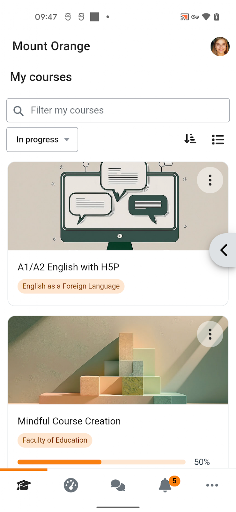
Moodle is a mobile companion for courses hosted on a Moodle learning management system. I’d recommend it to students who want to check course materials, keep up with messages and notifications, and handle quizzes or assignments away from a computer. After spending time with its mix of course access and practical study tools, my take is that it works best as a handy extension of a course—not as a replacement for the course itself.
A Course Within Reach
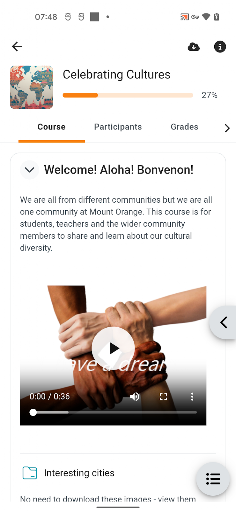
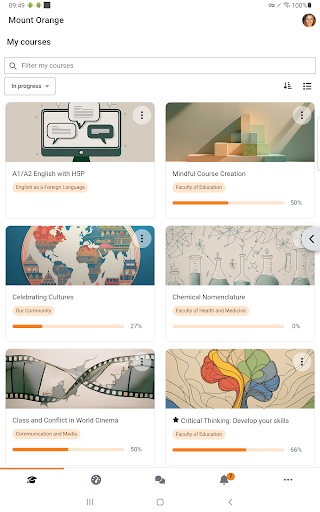
Picture a student heading home after class and realizing there’s a short quiz due later that evening. With Moodle, the useful first step is having the course on hand: browse its content, check what’s happening, and take quizzes or submit assignments through the app. I like that the course doesn’t have to wait for a laptop session. It makes small study tasks easier to fit between the ordinary parts of a day.
Offline access is especially useful when I’m somewhere with an unreliable connection. Moodle can let me browse course content offline, so I can use a quiet stretch of travel to review material already available to me. That doesn’t mean every course activity will work without a connection, but it gives the app a practical role beyond simply opening a course page. I can check material when the moment presents itself, rather than planning every review around Wi-Fi.
A Companion, Not a Classroom
Moodle makes the most sense when a course already uses Moodle’s learning management system. It brings course content, communication, quizzes, assignments, grades, and activity into a mobile setting. Compared with relying on a browser or waiting until I’m back at a computer, that can make quick checks and short tasks feel more convenient. The value depends on having a Moodle course to access; the app is built around that course relationship.
I wouldn’t treat Moodle as a general study library or a standalone way to find classes. Its job is to connect learners with courses and participants in the Moodle system, not to supply a course catalog or replace the decisions an instructor makes about course materials. It also isn’t just a messaging app: communication is one part of a broader course workflow. If someone’s classes don’t use Moodle, there may be little reason for them to install it.
Small Habits, Smoother Study
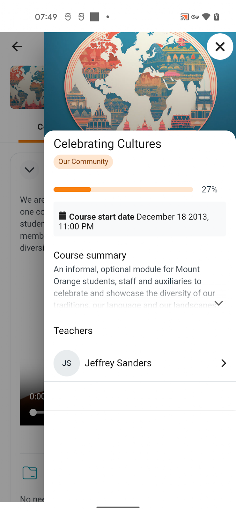
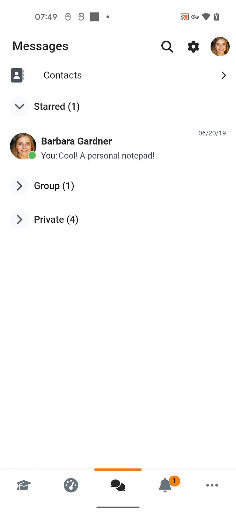
A useful way to work Moodle into a routine is to check it at natural transition points: after class, before a study session, or when settling in for the evening. I can look at course activity and grades, then decide whether there’s a quiz or assignment that needs attention. Notifications can help me notice course updates, while messages give me a way to connect with other participants without separating communication from the course context.
For offline study, I’d make a habit of browsing relevant course content while I have a connection, then use an offline window for review. That’s a modest workflow, but it helps the app serve a real purpose on a commute or during a break. I’d still return to the course when I’m ready for activities that require connectivity. The app is most helpful when I use it for brief, regular check-ins rather than expecting it to organize my entire academic life.
More From Our News Desk

Zoom Meetings, Google Meet, or Teams: Which Is Easiest to Join?

How I Build a Free Streaming Lineup With Tubi

Why Crunchyroll Is the Default Anime App for So Many Fans

YouTube TV: A Practical Guide to Cutting Cable

Rummikub and the Small Comfort of Phone Games

TeamViewer Remote Control or AnyDesk for Helping Family?
Who Moodle Suits
I’d recommend Moodle to students whose courses use Moodle and who want a convenient way to stay involved away from a computer. It is a good fit for checking course content, seeing grades or activity, keeping up with notifications, messaging participants, and handling quizzes or assignment submissions. Learners who have small pockets of time between other commitments may particularly appreciate being able to access course materials from a mobile device.
It may be less useful to someone whose school or instructor uses a different learning management system, since the app is specifically for Moodle courses. People who prefer doing all coursework on a larger screen may also find the mobile format better for quick checks than long sessions. I’d think of it as a flexible companion for course participation, not a substitute for instructor guidance, a computer-based workflow, or the course’s own requirements.
Moodle is an Education app from Moodle Pty Ltd. On Google Play, it has over 50 million installs and a 4.5-star rating from about 214,000 ratings. The app is marked Everyone for its content rating. Its Android version requirement can vary with the release and device, so I’d check the Google Play details for the version currently available to my phone.
Moodle is free to download, with no in-app purchases or ads shown in the provided Google Play facts. The supplied app version is 5.2.1. Its release date is March 6, 2013, and the recorded last update is July 10, 2026. Store details can change over time, so I’d check Google Play for the current version and any device-specific requirements before installing.
How Moodle Fits Into Study
Starting With a Course
My first impression is that Moodle has a clear, practical purpose: it gives mobile access to courses that already live in the Moodle learning management system. That focus is helpful. Rather than presenting itself as a general-purpose education destination, it centers the learner’s existing course work and the things they may need to check or do while away from a computer.
Getting value from the app depends on having a Moodle course to use. Once that’s the case, the main possibilities are easy to understand from the app’s stated role: browse course content, participate, communicate, and keep an eye on grades and activity. I appreciate a tool that has a defined job. It makes it easier to judge whether it belongs in my routine before I rely on it for a particular task.
The Everyday Course Check
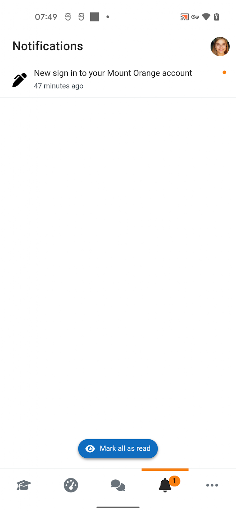
Day to day, Moodle is suited to short visits as well as coursework. I can imagine opening it to see what has changed in a course, check a grade, or read a message from another participant. Notifications add another way to keep up with activity. Those small interactions matter because they help me stay connected to a class without turning every update into a reason to sit down at a computer.
The app also supports more active participation. Students can take quizzes and submit assignments, so it is not limited to viewing course materials. I’d still consider the nature of the task before choosing a phone: a quick quiz may fit comfortably into a mobile session, while a longer piece of work could be easier to handle elsewhere. Moodle gives me options, but the course and task determine which one makes sense.
Useful Course Tools
The feature that stands out most to me is the combination of course access and action. Browsing content, taking quizzes, and submitting assignments all belong to the same course experience, alongside checking grades and activity. That can reduce the friction of keeping up with a class on the go. I don’t have to think of the app only as a place to read; it also supports participation.
Communication is another practical part of the mix. Moodle can provide instant notifications and let me message and connect with other course participants. I like that these tools sit alongside course materials and activity, since a question or update often comes up while I’m already checking a class. Offline browsing is also a useful feature, though I’d treat it as a way to access course content rather than assume every interactive task works without a connection.
A Practical Study Routine
For a straightforward routine, I’d use Moodle for a brief course check after class and another look before the next study session. I could review available course content, notice activity, and check grades or messages. If an assignment or quiz is ready, I can decide whether it’s appropriate to handle on my phone or better saved for a longer session. That keeps the app useful without making it another demanding daily obligation.
When I know I’ll have limited connectivity, I’d browse the course content I want to revisit while I’m online. Later, I can use an offline stretch to review that material. I’d keep the distinction clear: offline access is a convenience for browsing content, not a promise that every course task will be available. This simple habit makes Moodle more useful during travel or other gaps in the day.
Limits to Keep in Mind
Moodle’s usefulness depends on the course environment. It is designed to access Moodle learning management system courses, so it won’t serve as a universal home for classes hosted elsewhere. That’s the main thing I’d check before installing it. A capable app still needs a relevant course behind it, and not every student will have that connection through their school or instructor.
The mobile format is convenient, but a phone is not automatically the best place for every part of a course. Moodle supports quizzes and assignment submissions, yet the amount of work involved can vary from one task to another. Offline browsing helps with course content, while interactive participation may call for a connection. I’d use the app to make coursework more accessible, while keeping expectations tied to the task and the course.
Moodle earns its place on my phone by making an existing course easier to reach in small, useful moments. I like the mix of content browsing, communication, grades, activity, and participation, with offline browsing as a welcome extra. Its focus is also its limit: the app is most useful when my courses already use Moodle.
I’d recommend it to Moodle learners who want a practical mobile companion for staying current and handling some course tasks on the go. If your classes use another system, or you prefer doing all coursework on a computer, it may not add much. For the right student, though, it makes course access feel more flexible.
Moodle Frequently Asked Questions
What is Moodle used for?
Moodle is a mobile app for accessing courses hosted on the Moodle learning management system. It lets learners browse course content, participate in courses, take quizzes, submit assignments, receive notifications, message participants, and view grades and activity. Its usefulness depends on having a Moodle course to access; it is not a general course-finding app.
Which devices can run Moodle?
The supplied app information describes Moodle as an Android app available through Google Play. The minimum Android version is worth checking on the Google Play page, since device requirements can vary by release. I’d also check the store details for compatibility with a particular phone or tablet before installing.
Does Moodle cost anything?
The provided Google Play facts show Moodle as free to download, with no in-app purchases and no ads. Store details can change, so it’s sensible to check Google Play for the current terms before installing. Accessing course materials also depends on having a course in a Moodle learning management system.
What Android version does Moodle require?
The minimum Android version is not specified in the supplied app facts. Requirements may vary by release and device, so check the Google Play page for the current compatibility details for your phone or tablet. The listed version is 5.2.1, but that does not by itself establish a minimum Android requirement.
Who should use the Moodle app?
Moodle is best suited to learners whose courses use Moodle and who want mobile access to course content, messages, grades, activity, quizzes, or assignment submissions. It may not be useful to people whose classes use another system. Those who prefer longer coursework sessions on a computer can still use the app for quick checks and course updates.
Pros
- Combines course content, grades, activity, messaging, and participation in one mobile companion.
- Supports browsing course content offline for more flexible review.
- Lets learners take quizzes and submit assignments through the app.
- Free to download, with no ads or in-app purchases in the provided facts.
Cons
- Only useful when a learner has courses in the Moodle learning management system.
- Offline browsing does not mean every interactive course task is available without a connection.
- Some coursework may be more comfortable to complete on a larger screen.
- Category
- Education
- Version
- 5.2.1