Coursera: Grow your career
- 306.73K
- 4.5
- Installs
- 10.00M
- Price
- Free

Screenshots
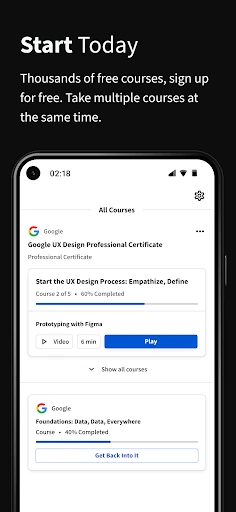
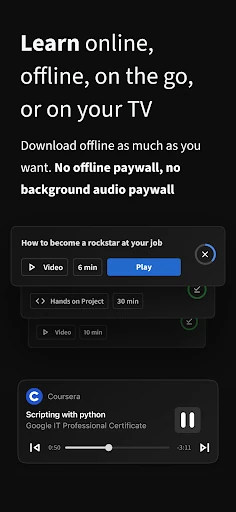
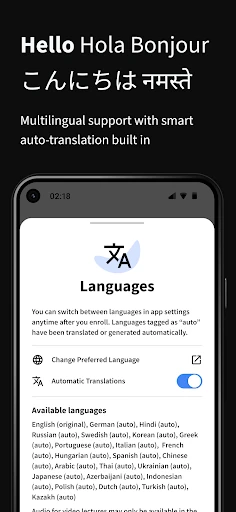
Analysis by Reviewed APKs
Coursera: Grow your career is a mobile learning app for taking online courses, building job skills, and exploring certificates or degree programs. I see it suiting people who want structured learning they can fit around work, school, or family life. Its range is a real strength, and the app’s offline video and cross-device coursework make it practical; the main trade-off is that many learning options have a cost.
A Course for the Commute
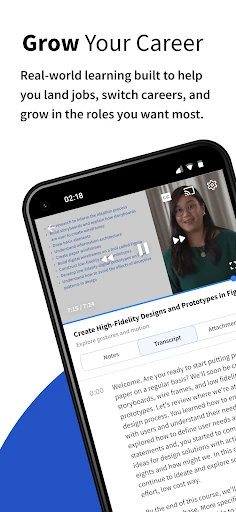
When I first opened Coursera, I pictured the kind of learning session that can fit between the rest of the day: watch a lesson on the bus, then return to the same coursework later on a larger screen. The app supports on-demand courses, downloadable videos, and saved coursework across mobile and desktop. That makes it easier to turn a spare half hour into a small, defined step rather than waiting for a clear afternoon.
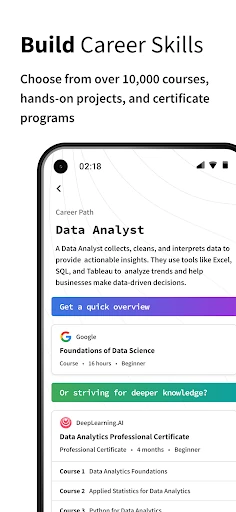
Say I want to get more comfortable with data analysis without immediately signing up for a long program. I can explore courses in that area, follow lessons at my own pace, and use quizzes or projects where a course offers them. If I know my connection will be unreliable, downloaded videos can help with viewing offline. Coursera is designed for learning in short windows, though making progress still takes regular attention.
More Than Short Lessons
Compared with a quick reference video or a handful of informal tutorials, Coursera is built around courses and longer learning paths. Its offerings include hands-on projects, Professional Certificates, Specializations, and degrees, with topics ranging from programming and data science to business and IT. That breadth is useful when I want a more organized route through a subject, rather than just an answer to one immediate question.
It is not the same as a live classroom or a personal tutor, and I would not treat browsing a course catalog as a substitute for doing the coursework. The app also offers options that may involve a substantial purchase, so it is worth checking the terms for a particular course or program before committing. For a one-off fact, a search may be quicker; Coursera makes more sense when I want sustained study.
Small Habits, Steadier Progress
I get more from a course when I choose a small, repeatable study slot instead of waiting for a free weekend. A short lesson after breakfast or during a quiet commute is easier to protect than a vague plan to study later. Coursera’s on-demand format supports that approach, and saved coursework means I can pick up across mobile and desktop without treating each device as a separate learning space.
I’d also decide what I want to learn before browsing too widely. The catalog spans many fields and formats, which is helpful but can make casual browsing expand into an evening of comparisons. Picking one topic, then checking whether a course includes projects, quizzes, or a certificate path gives the search more purpose. Downloading videos ahead of a trip is another practical habit when offline viewing would be useful.
More From Our News Desk

Zoom Meetings, Google Meet, or Teams: Which Is Easiest to Join?

How I Build a Free Streaming Lineup With Tubi

Why Crunchyroll Is the Default Anime App for So Many Fans

YouTube TV: A Practical Guide to Cutting Cable

Rummikub and the Small Comfort of Phone Games

TeamViewer Remote Control or AnyDesk for Helping Family?
Who will get the most from it
I’d recommend Coursera to people who like learning in a structured way but need control over when they study. It can suit someone exploring a new career area, refreshing a skill, or working through a longer certificate or degree program. The combination of mobile access, downloadable videos, and coursework saved across devices is especially handy if study time is scattered through the week.
It may be less appealing if you want instant answers, a fully personal teaching experience, or a course with no cost beyond downloading the app. Coursera includes free access to the app, but in-app purchases are available and individual learning options can have their own terms. I’d browse with a clear goal and check the details of a specific course before deciding whether its format and price fit.
Coursera, Inc. develops Coursera: Grow your career, an education app for Android. Google Play shows over 10 million installs and a 4.5-star rating from about 307,000 ratings. The app is rated Everyone, contains no ads, and requires Android 10 or later. Its current listed version is 5.48.1.
The app is free to install, with in-app purchases available. Google Play lists in-app item prices from $0.99 to $799.99, so the cost depends on what you choose. Coursera was released on March 27, 2014, and its most recent listed update was February 6, 2026. Check the store for current purchase details.
How Coursera Fits Into Real Life
Opening the Learning Shelf
My first impression is of an app aimed at a big range of learning goals rather than one narrow subject. The catalog covers areas such as computer science, data science, business, and information technology, alongside certificate programs and degrees. That makes it easy to imagine returning for different reasons over time, although the range also means it helps to arrive with at least a rough idea of what you want.
Getting started is less about setting aside a whole day than deciding what kind of commitment feels manageable. A single course, a specialization, and a degree are very different undertakings. I’d look at the course description and format before settling in, then use the app’s on-demand access to find a first session that fits my schedule.
Learning in Small Sessions
Day to day, Coursera’s strongest practical quality is flexibility. Courses are on demand, and the app supports mobile-friendly learning. When a lesson fits into a commute or a quiet break, I can make progress without needing to arrange my day around a fixed class time. That does not make the learning effortless; it simply makes the study time easier to place.
I also like that coursework can be saved across mobile and desktop. I might watch a video on my phone, then continue coursework on a computer when that suits the task. The app supports quizzes and projects as part of saved coursework, so the experience is not limited to watching. How much of that is involved depends on the course I choose.
Formats Beyond Video
Downloadable videos are one of the features I would reach for before a flight, train ride, or other stretch when a reliable connection may be a problem. The app also supports audio-only learning for some courses, which can make a walk or routine chore a chance to listen rather than watch. Those options give the same broad learning habit a few different shapes.
The catalog’s range of formats is another point of difference. Alongside individual courses, Coursera offers hands-on projects, Specializations, Professional Certificates, and bachelor’s or master’s degrees. Subtitles are available in several languages, including Arabic, French, German, Japanese, and Spanish. These choices are useful for different learning needs, but the exact experience depends on the course rather than every item having every feature.
A Weeknight Study Routine
A realistic routine for me would be to pick one course tied to a specific goal, then set aside a few short sessions during the week. I might download a lesson before leaving home, listen to supported audio during a walk, and return to the saved coursework on a larger screen later. That plan uses the app’s flexibility without assuming I’ll suddenly find several uninterrupted hours.
At the end of each session, I’d make a simple note of where I stopped and what I want to do next. The app supports quizzes and projects in coursework, which gives a session a useful endpoint when the course includes them. Keeping the next step small makes it easier to return, especially when work or other commitments interrupt a study plan.
Keep the Commitment in View
The biggest limit is not a lack of topics; it is choosing among them and following through. With courses, specializations, certificates, and degrees all available, a quick browse can become a detour. I’d narrow the search to a skill or career area first, then compare the actual course details instead of assuming every option has the same structure.
Cost is another reason to look before enrolling. The app is free to install, but in-app purchases range from $0.99 to $799.99 per item on Google Play. That broad range is a reminder to check the terms for the specific learning option. Coursera is most useful when I am ready to invest time, and possibly money, in a defined course of study.
Coursera brings a wide selection of structured learning to a format that can fit around ordinary routines. I especially value the option to download videos, use audio-only lessons where supported, and continue saved coursework across devices. It feels most worthwhile when I have a clear subject in mind and can return to it consistently.
I’d recommend it to curious learners and career-focused students who want more structure than scattered tutorials can offer. I’d be more cautious if I only need a quick answer or have not checked the cost of a particular program. The app makes learning more flexible, but progress still depends on choosing a goal and showing up.
Coursera Frequently Asked Questions
What is Coursera: Grow your career used for?
Coursera is used for taking online courses and exploring hands-on projects, Specializations, Professional Certificates, and degree programs. Its subjects include areas such as computer science, data science, business, and information technology. The app supports on-demand study, downloadable video, audio-only learning for supported courses, and coursework saved across mobile and desktop.
Which devices can run Coursera: Grow your career?
Coursera: Grow your career is an Android app available through Google Play. It requires Android 10 or later. The app also supports coursework saved across mobile and desktop, so you can continue learning on different device types. Check Google Play for current compatibility details for your particular device.
How much does Coursera: Grow your career cost?
The app is free to install and offers in-app purchases. Google Play lists item prices from $0.99 to $799.99, and the cost depends on the learning option you choose. Check the store and the details for a particular course or program for current pricing and purchase terms.
Does Coursera: Grow your career work offline?
Coursera supports downloading videos for offline viewing, which can be useful when you expect to have limited connectivity. The app also offers audio-only learning for supported courses. Since support can depend on the course, check its details in the app or store before planning around a particular format.
Is Coursera: Grow your career a good fit for beginners?
It can suit beginners who want to explore a subject through a structured course and can make time for regular study. Coursera covers many fields and offers several learning formats, but the right starting point depends on your goal. If you prefer instant answers or personal tutoring, this course-based app may not be your best fit.
Pros
- Courses cover a broad range of career and academic subjects.
- Downloaded videos and supported audio-only lessons offer flexible ways to study.
- Saved coursework can continue across mobile and desktop devices.
- Options range from individual courses to certificates and degree programs.
Cons
- The breadth of the catalog can make choosing a starting point feel daunting.
- In-app purchase prices vary widely, so course costs need checking.
- Progress still requires steady time and follow-through.
- Category
- Education
- Version
- 5.48.1