Sunrun
- 1.09K
- 3.8
- Installs
- 100.00K
- Price
- Free

Screenshots
Analysis by Reviewed APKs
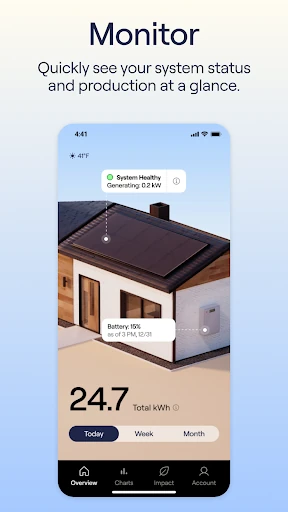
Sunrun is a companion app for customers who want to keep an eye on their solar system, check energy production, manage bills, and find support in one place. I see it as a practical account tool rather than a general energy dashboard: its value is clearest when you already have a Sunrun system and account. The darker redesign and English and Spanish language choices make the app feel more considered, though its usefulness depends on your relationship with Sunrun.
A quick solar check-in
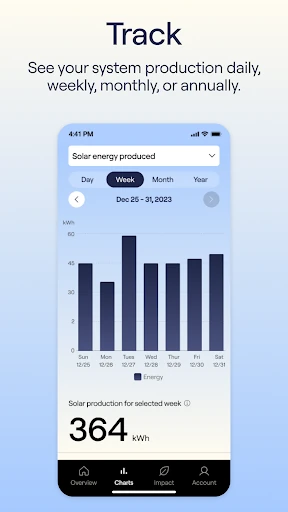
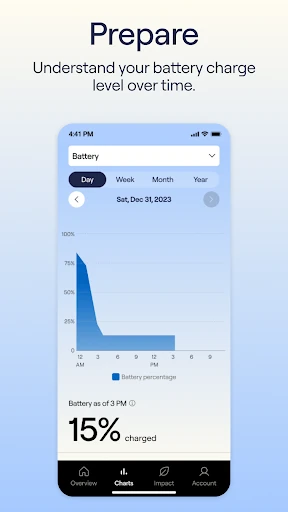
Picture checking your phone over breakfast to see how your home’s solar system is doing, then taking a moment to review a bill before the day gets busy. Sunrun brings those customer tasks together: the app lets you monitor your system and energy production, access billing information, pay bills, and look for help. That makes it a natural place to start when you want a quick account check without hunting through separate web pages.
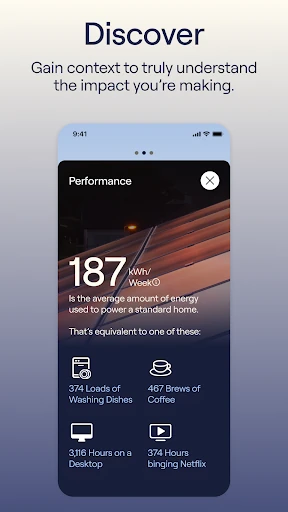
When I think about the app in a normal week, the appeal is less about spending a long time in it and more about having a reliable place to return to. You might open it after noticing a bill, when you are curious about production, or when a question comes up about your solar setup. The app also provides system-based environmental insights, adding context to the production figures rather than making the experience only about account chores.
A customer tool, not a solar guide
Compared with a general utility app, Sunrun is focused on the systems and customer account it is designed to support. Its combination of system data, production tracking, billing, payment history, and support gives existing customers a broader account hub than a simple bill-payment screen. I like that mix for routine follow-ups: one visit can answer a production question and make it easier to find billing details without switching between unrelated tools.
That focus also defines what the app is not. It is not a general-purpose tool for comparing solar providers, planning a new installation, or tracking energy use across any home. The available description centers on Sunrun customers and their systems, so someone without that customer relationship may find little reason to keep it installed. It is best judged as a service companion, not as an independent solar research or home-energy platform.
Small habits that help
A useful habit is to check the system data when you already have a reason to open the app, rather than turning every production change into a project. For example, a quick look during a regular account review can help you stay familiar with the information Sunrun provides. If a bill needs attention, the billing reports and payment history give you a place to review the account before deciding what to do next.
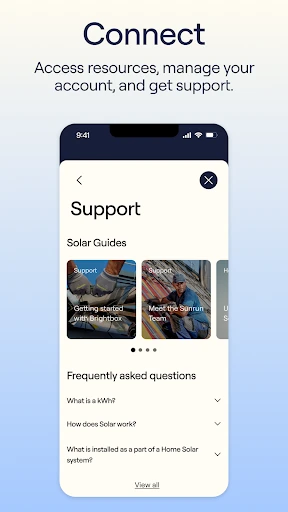
I would also make the support page part of the routine when a question is basic or account-related. It is described as a place for help with getting started and solar fundamentals, which can save time when you need an orientation rather than a deep technical explanation. The app’s English and Spanish settings are another simple quality-of-life option; choose the language that makes account details easiest for you to review.
More From Our News Desk

Zoom Meetings, Google Meet, or Teams: Which Is Easiest to Join?

How I Build a Free Streaming Lineup With Tubi

Why Crunchyroll Is the Default Anime App for So Many Fans

YouTube TV: A Practical Guide to Cutting Cable

Rummikub and the Small Comfort of Phone Games

TeamViewer Remote Control or AnyDesk for Helping Family?
Who will get the most from it
I would recommend Sunrun to existing customers who want a convenient mobile way to keep up with their system, energy production, bills, and support options. It is especially suited to people who prefer checking account information on a phone instead of returning to a desktop browser. The environmental insights may also appeal to customers who like seeing a little more context around what their solar system is producing.
It may be a poor fit if you are looking for a broad energy-management app, detailed tools for researching solar before choosing a provider, or features unrelated to a Sunrun account. The app’s described role is fairly focused, which is a strength for customers who need those tasks but a limitation for everyone else. If you rarely manage your solar account on mobile, its convenience may not be enough to make it part of your routine.
Sunrun is developed by Sunrun, Inc and is available on Google Play for Android. The app has over 100,000 installs and a 3.8-star rating from around 1,100 ratings. It is free to download, with no in-app purchases or ads. Its content rating is Everyone, and the listed minimum Android requirement is Android 7.0.
The listed version is 3.0.0. Sunrun was released on May 16, 2023, and its most recent update is dated January 8, 2026. The update notes describe a darker visual theme, smart cards that highlight important items, and a choice of English or Spanish independent of the device’s language settings.
A More Useful Solar Account Routine
A calmer first impression
The first thing that stands out in the latest update is the darker theme. Sunrun describes the redesign as easier on the eyes, and it gives the app a more deliberate feel than a bare account portal. Smart cards are intended to bring important items forward, which suits a service app where the main goal is usually to find a relevant account detail quickly, not browse for its own sake.
Setup and account access are part of the customer experience, so I would approach the app with my Sunrun account details ready. Once inside, the premise is straightforward: system information, billing, and support are gathered in one place. The language setting is a thoughtful practical touch, too. Being able to choose English or Spanish independently of the phone’s system language gives customers control over how they read the app.
Useful for the routine checks
Day to day, Sunrun’s main job is helping customers keep tabs on the system and its energy production. I can imagine opening it briefly when I want to check the account, then returning to whatever I was doing. That quick-check role is a better fit than treating the app as something to watch constantly. It brings the information within reach, while leaving the customer to decide when a check is useful.
The billing area rounds out that everyday role. Sunrun describes access to billing reports and payment history, along with options to pay bills and set up automated payments. Those are practical tasks that often get postponed when they require a separate login or a search through old messages. Having them beside system information makes the app more useful as an account hub, even for customers who only open it occasionally.
System data with context
The app is not limited to displaying production figures. Sunrun says it uses system data to provide insights into environmental impact, giving customers another way to understand what their choices contribute to. I like the idea of that context because raw output can be hard to interpret if you only glance at a number. The description does not promise a particular calculation or format, so I would treat these insights as added perspective rather than a substitute for detailed analysis.
Support is another feature that makes sense in this kind of companion app. The support page is intended to help with getting started and questions about solar fundamentals, so it can serve as a first stop when a customer needs orientation. Paired with the account tools, that means the app can help with both routine management and basic questions. It is a modest but sensible feature set, aimed at keeping common needs close at hand.
A simple monthly rhythm
A practical way to use Sunrun is to make it part of a monthly household-account check. I would review the billing information and payment history when I am already handling other bills, then take a quick look at system production while the app is open. That keeps the app tied to useful tasks instead of encouraging constant checking. If automated payments suit your account, the app also provides an option to set them up.
For a new customer, the support page can be a companion to those early account checks. I would use it to find answers to introductory questions, then return to the system data as I become more familiar with what the app presents. The language choice can be set to match the person reviewing the account, rather than relying on the phone setting. These small habits make a focused app feel more integrated into home administration.
Keep its scope in mind
Sunrun’s usefulness is tied to having a Sunrun customer account and system to manage. That is the main limitation to keep in view: people looking for general solar comparisons, broad home-energy controls, or a tool for a different provider should not expect this app to cover those needs. The available feature set centers on monitoring, billing, support, and environmental context for Sunrun customers.
The app also works best as an at-a-glance account companion, not as a replacement for every kind of technical explanation or energy analysis. Its described support covers getting started and solar fundamentals, while its core screens focus on system data and account tasks. If you want to understand a particular production figure or account detail, the app gives you a starting point; more involved questions may call for the support options available through Sunrun.
Sunrun makes the most sense as a focused mobile companion for people who already use Sunrun’s solar service. I like the practical mix of system monitoring, production, billing, payment history, support, and environmental context, along with the updated theme and language choice. It is built around useful check-ins, not endless browsing.
If you are a Sunrun customer who wants those account tasks on your phone, I would give it a try. If you need a provider-neutral energy tool or solar research app, this is not the right fit. The scope is narrow, but for the intended customer it brings several everyday needs together.
Sunrun Frequently Asked Questions
What is the Sunrun app used for?
Sunrun is a mobile account companion for Sunrun customers. It can be used to monitor a solar system and its energy production, review billing reports and payment history, pay bills, and find support. It also provides contextual insights about environmental impact based on system data. Its described purpose is customer account management rather than general solar research.
Which phones and platforms support Sunrun?
Sunrun is available on Android through Google Play. The listed minimum requirement is Android 7.0. The app’s update notes also describe English and Spanish language choices. For the latest device compatibility details, check the Google Play store entry for Sunrun, since availability and requirements can vary.
What Android version does Sunrun require?
The listed minimum requirement for Sunrun is Android 7.0. Your experience can also depend on your specific device and software configuration, so it is worth checking the Google Play store entry before installing if you are unsure whether your phone is compatible.
Does Sunrun cost money or include purchases?
Sunrun is free to download on Google Play. The app facts show no in-app purchases and no ads. Features are described for Sunrun customers managing their systems and accounts. Store details can change, so check the current Google Play entry for the latest information about cost and availability.
Is Sunrun useful if I am not a customer?
The app is designed for Sunrun customers to monitor their systems, check production, manage billing, and get support. If you do not have a Sunrun system or account, its described features may not be useful to you. It is not presented as a provider-neutral solar research tool, so check the store description if your needs are different.
Pros
- Combines system monitoring, energy production, billing, and support in one customer app.
- Includes billing reports, payment history, bill payment, and automated payment options.
- Environmental insights add context to system data, with English and Spanish language choices.
Cons
- Its features are focused on Sunrun customers rather than general solar users.
- The app is an account companion, not a broad energy analysis or comparison tool.
- Category
- House & Home
- Version
- 3.0.0