Rachio
- 18.52K
- 4.8
- Installs
- 500.00K
- Price
- Free

Screenshots
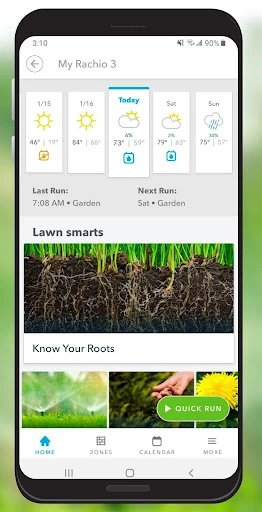
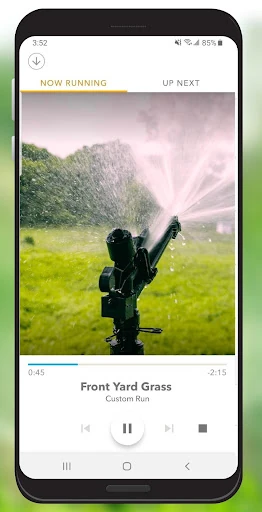
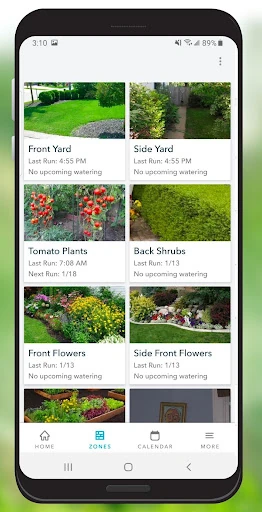
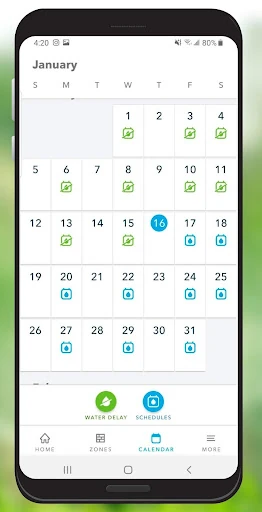
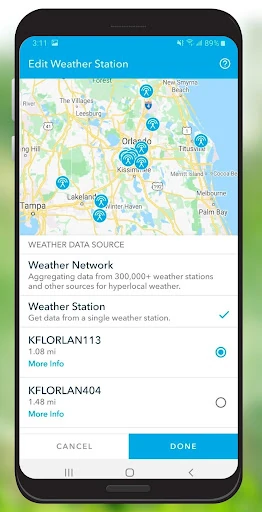
Analysis by Reviewed APKs
Rachio is a companion app for the Rachio Smart Sprinkler Controller, meant to make running a home sprinkler system easier and more convenient. I’d look at it if I already had a compatible controller and wanted to manage watering from my phone rather than rely only on a fixed routine. Its appeal is practical: an automatic schedule plus remote access, without pretending to be a complete lawn-care service.
A yard on autopilot
When I picture Rachio earning its place in a normal week, it’s the quiet background job of keeping a sprinkler routine moving. You set up the controller and let the app create a watering schedule, then use your phone to access the system when plans change. That could be handy on a busy morning when you realize watering is due, or while you’re away and want to check in without going outside.
The useful distinction is that the app is tied to a physical Rachio Smart Sprinkler Controller. It isn’t a standalone timer that can operate any sprinkler system by itself. Once that controller is part of the setup, the app becomes a more convenient way to manage watering and gives you access from anywhere. That makes the core idea easy to understand: connect the controller, use the app to manage the system, and let its schedule handle the routine.
A controller companion, not a lawn guide
Compared with walking to a sprinkler timer to manage a system, Rachio puts access to a Rachio controller in a mobile app. That’s the meaningful comparison here: it can make an existing compatible setup easier to reach and help automate its watering schedule. The app’s role is operational rather than decorative. It is about running sprinklers, not about turning every part of yard care into a phone-based project.
I wouldn’t choose it as a substitute for a controller, a general gardening reference, or a broad home-maintenance planner. The description presents it as the companion to Rachio’s Smart Sprinkler Controller, so the hardware is central to the experience. If you don’t have that controller, the app’s main purpose may not apply. If you do, the ability to access the sprinkler system remotely is more relevant than a long list of unrelated yard tools.
Make the schedule work for you
I’d treat the automatic schedule as a starting point for a low-effort routine rather than something to forget about forever. After setting up the controller, take a moment to understand when the system is due to run and keep the app within easy reach for occasions when you want to access it. That simple habit makes the remote-control angle useful in daily life, instead of something you remember only when you’re already standing by the timer.
A second practical habit is to check in when your plans or expectations change. If you’re heading away from home or adjusting how you manage the yard, remote access means you don’t have to be beside the sprinkler system to use the app. I’d avoid making assumptions about features beyond the automatic schedule and system access described for Rachio. A straightforward routine keeps the benefits clear: let the app support the controller, and use it when convenience matters.
More From Our News Desk

Zoom Meetings, Google Meet, or Teams: Which Is Easiest to Join?

How I Build a Free Streaming Lineup With Tubi

Why Crunchyroll Is the Default Anime App for So Many Fans

YouTube TV: A Practical Guide to Cutting Cable

Rummikub and the Small Comfort of Phone Games

TeamViewer Remote Control or AnyDesk for Helping Family?
Who will get the most from it
I’d recommend Rachio to someone who owns, or is considering, a Rachio Smart Sprinkler Controller and wants a phone-based way to access the system. It suits a homeowner who values an automatic watering schedule and would rather not make every adjustment at a physical timer. The app’s practical appeal is strongest when sprinkler control is a recurring household task and remote access would make that task easier.
It may not suit someone looking for a general lawn-care app or a sprinkler controller that works without Rachio hardware. The app’s purpose is focused, which is a plus if you want to manage this particular system but a limitation if you expect a broader gardening toolkit. I’d also be cautious about choosing it before checking that the controller setup fits your yard and needs. For the right hardware owner, the focused job makes sense.
Rachio is a free Android app from developer Rachio, in the House & Home category. Google Play shows more than 500,000 installs and a 4.8-star rating from 18,523 ratings. The app is rated Everyone. Those figures give a quick sense of its reach and store feedback, while the most relevant practical point remains that it is a companion app for the Rachio Smart Sprinkler Controller.
The Android requirement is version 8.0 or later, and the current version listed in the supplied app details is 4.21.14. Rachio was released on May 14, 2014, and its most recent listed update is January 14, 2026, with bug fixes and performance enhancements noted. The app is free to install, contains no ads, and offers in-app purchases priced from $29.99 to $49.99 per item.
A closer look at everyday sprinkler control
Starting with the setup
My first impression of Rachio is that its purpose is unusually easy to pin down: it is the mobile companion for a smart sprinkler controller. There’s no need to imagine a complicated yard-management dashboard to understand the draw. The app is there to make running the sprinkler system more convenient and to provide access from a phone, including when you aren’t at home.
The important first step is having the Rachio Smart Sprinkler Controller that the app accompanies. I’d check that the controller is appropriate for my yard before expecting the app to do much on its own. Once that hardware relationship is clear, the app’s automatic schedule is the natural place to start. The description doesn’t spell out every setup screen, so I’d take the process as it comes rather than assume a particular sequence.
The everyday experience
Day to day, the central promise is less about constant interaction and more about making a routine easier to manage. An automatic watering schedule can take some of the repeated decision-making off your plate, while mobile access gives you a way to reach the sprinkler system when you need it. For a household where the sprinkler timer is easy to forget, that combination is a sensible quality-of-life improvement.
I like that the app’s job stays tied to a concrete household task. You don’t need to open it just to browse a collection of lawn tips; its purpose is to help run the sprinkler system. That focus can also mean it feels quiet when everything is working as expected. The best measure of value is whether the controller and schedule make watering less of a chore, not how often you tap the app.
The useful distinction
The feature that stands out in the supplied description is the automatic creation of a watering schedule. That shifts the experience beyond merely putting a timer on a phone: Rachio is intended to help make sprinkler operation convenient while keeping a schedule in place. The app also gives access to the system from anywhere, which is especially practical when you’re not at home but still want to manage your setup.
The controller is described as suitable for nearly any size of yard and compatible with smart-home platforms. That broadens the potential fit without changing the basic idea: Rachio is still a sprinkler-system companion. I wouldn’t read those points as a promise that every individual setup is identical. They’re reasons to consider the ecosystem, then check that the specific controller and household arrangement are a match.
A simple weekly routine
For a practical routine, I’d begin by letting the automatic schedule take care of the regular planning, then use the app as the place to reach the system when a change in circumstances makes that useful. Maybe you’re away for a few days, or you simply don’t want to walk out to the controller. Remote access is most valuable in those small moments, when a household task would otherwise interrupt the day.
I’d also make a habit of remembering that the app and controller work together. If the sprinkler system is the thing you need to manage, open Rachio with that specific task in mind. That keeps the experience straightforward and avoids expecting the app to replace other parts of yard care. A focused routine is likely to be more useful than checking in constantly: let the schedule do its job, and use the app when access matters.
Keep the limits in view
The biggest limitation is also the clearest boundary: Rachio is the companion to a Rachio Smart Sprinkler Controller. It isn’t presented as a universal remote for every brand of sprinkler timer, and the app alone isn’t the whole system. That makes the choice less compelling if you don’t own the matching controller or have no interest in using one.
The other consideration is that this is a focused utility, not an all-purpose garden companion. Its described value centers on sprinkler access and automatic scheduling. If that is what you need, a narrow purpose can be a strength. If you want a much broader set of yard-planning tools, this app may not cover that expectation. I’d keep the decision grounded in the controller and the watering task.
Rachio makes the most sense as a convenience layer for a Rachio Smart Sprinkler Controller. Automatic scheduling and remote access address a real household routine, and the app’s focused role is easy to understand. The hardware requirement matters, though, so this is not a universal sprinkler solution or a general gardening app.
I’d recommend it to Rachio controller owners who want to manage watering from their phone and make the schedule less hands-on. If you’re still choosing a setup, check the controller’s fit for your yard before deciding. For the right system, Rachio looks like a practical companion rather than an app you need to fuss over every day.
Rachio Frequently Asked Questions
What is the Rachio app used for?
Rachio is a companion app for the Rachio Smart Sprinkler Controller. It is intended to make running the sprinkler system more convenient, provide mobile access to it, and automatically create a watering schedule. Its role is focused on managing that controller, rather than offering general gardening advice or replacing the sprinkler hardware.
Which phones and devices can use Rachio?
Rachio is available on Android through Google Play, and the supplied requirement is Android 8.0 or later. The app accompanies the Rachio Smart Sprinkler Controller, so a compatible phone is only one part of the setup. For current device compatibility or other platform availability, check the store information and controller details.
What Android version does Rachio require?
The supplied app details give Android 8.0 as the minimum version. If you are unsure which Android version your phone runs, check its system settings before installing. Store requirements and device compatibility can vary over time, so the Google Play information is worth checking before you download.
Does Rachio cost money or include purchases?
Rachio is free to install and contains no ads, according to the supplied Google Play details. It offers in-app purchases, with listed items priced from $29.99 to $49.99 each. Prices and purchase options can change, so check the current Google Play details for the latest information.
Is Rachio a good fit for every yard owner?
It may suit yard owners who have a Rachio Smart Sprinkler Controller and want an automatic watering schedule plus remote access to their system. It is less suitable if you want a general lawn-care app or an app that works independently of Rachio hardware. Check whether the controller fits your setup before relying on the companion app.
Pros
- Automatic watering schedules can reduce the need to manage every run manually.
- Remote access is convenient when you are away from the sprinkler system.
- A focused companion app keeps its main household job easy to understand.
- Free to install, with no ads according to the supplied store details.
Cons
- Its main purpose depends on having a Rachio Smart Sprinkler Controller.
- The focused sprinkler-management role may not suit people seeking broad lawn-care tools.
- In-app purchases are available, so some items may involve additional costs.
- Category
- House & Home
- Version
- 4.21.14