Projector
- 389
- 2.6
- Installs
- 100.00K
- Price
- Free

Screenshots
Analysis by Reviewed APKs
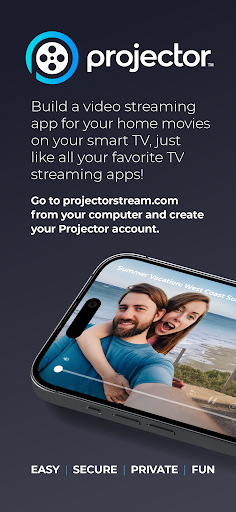
Projector is a way to collect your own home movies and watch them on a TV through a streaming service built around your family’s videos. I see it suiting people who have recordings scattered across phones and computers and want to bring them together for shared viewing. The idea is appealingly focused, though the setup depends on using a computer and a TV streaming device as well as the Android app.
Bring Home Movies Together
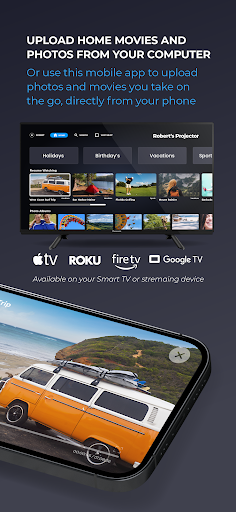
Picture a quiet evening when relatives are visiting and someone asks to see an old birthday video. Instead of passing a phone around, Projector is intended to put your home movies on the TV, where everyone can watch together. The service starts with creating an account on a computer and uploading videos there; once the TV streaming device is set up, the mobile app can add more content from your phone.
That makes Projector less of a casual player for a clip you just recorded and more of a place to gather personal videos for repeat viewing. I’d use it for family gatherings, travel footage, or recordings I want relatives to see on a larger screen. The central promise is straightforward: treat your own videos more like a shared streaming collection than a folder that lives on one device.
A Family Video Alternative
The obvious alternatives are watching a video directly on a phone or using a general video streaming service. Projector takes a narrower route: it is for your own home movies, rather than a catalog of films or shows. Its TV-focused setup may make sense when the point is to watch personal footage together, but it involves more preparation than simply opening a clip on the device where it already lives.
It is also worth keeping the app’s role clear. The description presents Projector as part of a service that includes a computer account and a Smart TV app on a TV streaming device; the Android app is used to upload additional content from a phone. It is not described as a projector-control tool, a slide-making app, or a general-purpose way to cast anything on your phone.
Make Uploading a Habit
A little routine can help keep a personal video collection useful. After a family event or trip, I’d set aside time to upload the recordings I want to preserve and share, rather than waiting until the next gathering to hunt through a camera roll. Projector’s description specifically supports adding content directly from a phone, so the mobile app has a practical role after the initial computer-based setup.
I’d also think about the viewing occasion before uploading: a few short clips for a visit from relatives may be easier to enjoy together than a long, uncurated batch. That is a general organizing habit, not a special feature claim. The useful payoff here comes from having videos ready on the TV when people are together, rather than having to interrupt the moment to find and move files.
More From Our News Desk

Zoom Meetings, Google Meet, or Teams: Which Is Easiest to Join?

How I Build a Free Streaming Lineup With Tubi

Why Crunchyroll Is the Default Anime App for So Many Fans

YouTube TV: A Practical Guide to Cutting Cable

Rummikub and the Small Comfort of Phone Games

TeamViewer Remote Control or AnyDesk for Helping Family?
Who Might Enjoy Projector
I’d recommend Projector to households that have home movies worth revisiting and are comfortable setting up an account on a computer alongside a TV streaming device. It has a clear purpose for families who would rather watch their own footage together on a TV than crowd around a phone. The mobile app’s upload role is particularly relevant if new videos tend to accumulate on phones after gatherings or trips.
It may be a poor fit if you want an app that plays movies from a public catalog, handles every kind of phone-to-TV sharing, or works as a standalone mobile video player. The setup also asks for more than a single tap: account creation and uploading begin on a computer, and TV viewing requires the service’s Smart TV app on a streaming device. That extra process is worthwhile only if shared home-video viewing is the goal.
Projector is developed by Projector Stream and is listed on Google Play in the House & Home category. It has over 100,000 installs and a 2.6-star rating from 389 ratings. Those figures suggest a modest audience and mixed user feedback, so I would treat the service’s fit for your household as more important than the headline concept alone.
The app is free to download, with no in-app purchases or ads. Google Play gives it an Everyone content rating. The current version is 2.1.41; it was released on March 26, 2022, and last updated on May 14, 2026. The minimum Android version is not included in the available app details, so check Google Play for compatibility with your device.
A Closer Look at Family Video Streaming
Getting Started
My first impression is that Projector’s name can sound like a hardware tool, but its purpose is a video streaming service for personal home movies. The setup described begins on a computer: create an account at the service’s website and upload your videos. That starting point is important, because this Android app is not presented as the only place to establish a collection from scratch.
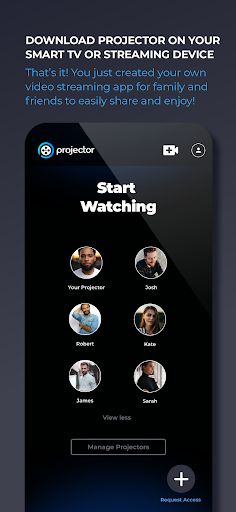
The next part is getting the Smart TV app on a TV streaming device and logging in. Only after that does the mobile app’s role become especially clear: it can upload additional content directly from a phone. I like that the intended path is easy to understand, but it does mean users should be ready to work across a computer, a phone, and a TV device.
Everyday Viewing
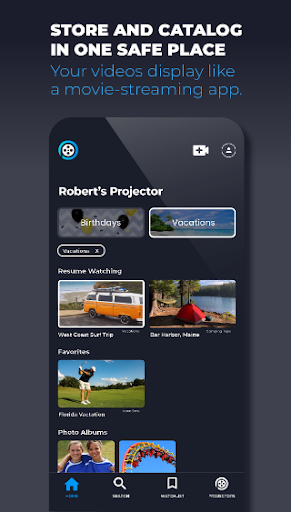
The day-to-day appeal is the change in where personal videos are watched. Phone recordings are easy to take and easy to forget; putting them on the TV makes them more available for a shared viewing session. Projector is aimed at that household use, where a video is something to revisit with other people rather than just another item in a personal camera roll.
I can imagine using it when relatives are over and someone wants to see footage from a recent trip or family occasion. The TV is the natural gathering point, and a collection made ahead of time avoids making one person scroll through a phone while everyone waits. The experience depends on having uploaded videos and the TV app ready, so it is best approached as preparation for viewing rather than an instant shortcut.
What Stands Out
The distinctive idea is making a family’s own videos feel like a dedicated streaming collection. Instead of supplying entertainment from a public library, Projector centers on home movies that users upload to their account. That focus gives it a specific job, and it is the reason I would consider it for family footage rather than treating it as another all-purpose media app.
The mobile app adds a convenient second route for building that collection: the description says users can upload additional content directly from a phone. The computer is still part of the initial account and upload process, while the Smart TV app handles viewing on a TV streaming device. Those pieces work toward one use case, without implying features such as editing, presentation templates, or wireless projection.
A Simple Family Routine
For a practical routine, I’d start by creating the account on a computer and uploading a first batch of home movies that I know I’d want to watch again. Then I’d install the Smart TV app on the streaming device and log in before inviting anyone over. Doing that ahead of time keeps the actual viewing session focused on the videos, not account setup.
After a trip or family event, I’d use the phone app to add a few recordings I want to share. I would not treat every clip as automatically worth uploading; choosing a manageable group makes it easier to have a relaxed viewing session later. The app’s stated purpose is to add and watch personal videos, so a little curation is a sensible habit even without any special sorting tools.
Keep the Limits in Mind
Projector’s biggest limitation is also its defining focus: it is for watching your own home movies, not for browsing a general entertainment catalog. If what you need is a quick way to play one clip on your phone, the computer-account and TV-device setup may feel like unnecessary work. The service makes more sense when you expect to return to a collection and watch it with other people.
The process spans several devices, and the available description does not explain every detail of how uploading or TV playback works. That means it is sensible to check the service’s current information before building a large collection around it. Google Play shows a 2.6-star rating from 389 ratings, so I would also weigh the app’s purpose against the feedback rather than assuming the idea will suit everyone.
Projector has a clear, appealing niche: helping people put their own home movies on a TV for shared viewing. I like that the phone app can add new videos after the initial computer-based account setup, but this is a small multi-device system rather than a one-step player. The modest rating is a reason to approach it with realistic expectations.
I’d try Projector if family videos are something you genuinely want to revisit together and you already have a TV streaming device ready for its Smart TV app. If you only need occasional playback or want a broad streaming library, I’d look elsewhere. Its value depends on whether a dedicated home-video collection fits your family’s routine.
Projector Frequently Asked Questions
What is Projector used for?
Projector is a streaming service for watching your own home movies and videos on a TV. The service’s setup begins with creating an account and uploading videos on a computer. A Smart TV app on a TV streaming device is used for viewing, and the Android app can upload additional content from a phone.
Which devices can I use Projector on?
The app is available on Android through Google Play. The described service also uses a computer for account creation and initial uploads, plus a Smart TV app on a TV streaming device for viewing. The available details do not specify every supported device model, so check Google Play and the service information for compatibility.
What Android version does Projector require?
The minimum Android version is not included in the available app details. Requirements can vary as the app changes, so check Projector’s Google Play page before installing it, especially if your phone is older. The service’s computer and TV streaming-device requirements should also be checked before setting everything up.
Does Projector cost money?
Projector is free to download on Google Play. The available app details say it contains no ads and offers no in-app purchases. If you want to know whether any other part of the service has separate terms or costs, check the current information on Google Play and the service before creating an account.
Is Projector a good fit for my household?
It may suit households that want to watch their own home movies together on a TV and are comfortable using a computer, a phone, and a TV streaming device as part of setup. It is less suited to people looking for a public movie catalog or a simple standalone phone player. The app has a 2.6-star rating from 389 ratings on Google Play.
Pros
- Focused on watching personal home movies together on a TV.
- Phone app can add additional videos directly from a phone.
- Free to download, with no ads or in-app purchases.
- A computer-based account and TV app support a shared viewing setup.
Cons
- Initial account creation and uploads begin on a computer.
- TV viewing requires a Smart TV app on a streaming device.
- A 2.6-star Google Play rating suggests a mixed reception.
- Category
- House & Home
- Version
- 2.1.41