Sunbit
- 1.53K
- 4.1
- Installs
- 500.00K
- Price
- Free

Screenshots
Analysis by Reviewed APKs
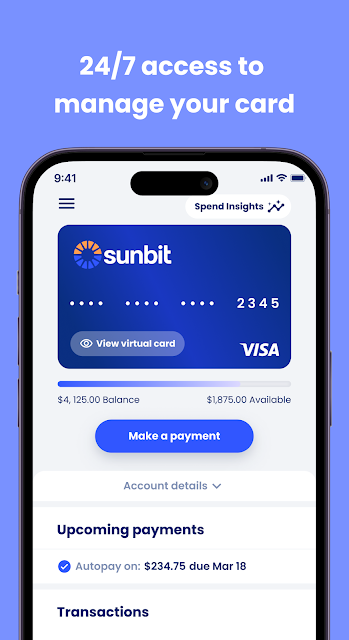
Sunbit is a finance app for customers who already have a Sunbit Card or payment plan and want to keep tabs on it from a phone. I see its main appeal as practical account management: checking balances, reviewing installments, and making payments without hunting for a statement. It is not a general shopping or budgeting app, but it puts the important details of an existing Sunbit account in one place.
A Quick Account Check
When I imagine using Sunbit during an ordinary week, the most useful moment is a quick account check between other errands. I can open the app to see a card balance, minimum payment due, or recent transactions, then make a payment if I need to. For a payment plan, the same basic check covers purchases, installments, and what is due. It is a focused way to answer, “Where does this account stand?”
I would also use it on a quieter evening to look over the month’s activity or pull up a statement. The app lets customers view or download monthly statements, check payment history, and contact customer support. That makes it more useful than a single-purpose payment button, though it still centers on Sunbit accounts. The routine is straightforward: check the details, take the available action, and get back to the rest of the day.
An Account Tool, Not a Wallet
Sunbit sits between a card-management app and a payment-plan companion. It helps existing customers manage a Sunbit Card or monitor a Sunbit payment plan; it is not presented as a broad digital wallet for unrelated cards or a general-purpose budget tracker. If I only wanted to record spending across several banks, this would not replace that kind of tool. Its value is narrower: it brings Sunbit account details and payment actions together.
The distinction matters before downloading. The description frames the app as being for Sunbit customers, and some features depend on eligible customers and accounts. It does not promise that opening the app alone creates access to every payment option. Sunbit’s financing is available at participating locations, while the app’s role is managing the account or plan. I would treat it as a companion to an existing Sunbit relationship, not as a standalone shopping destination.
Small Habits That Help
A useful habit is to check payment dates and balances on a regular day each week rather than waiting until a reminder becomes urgent. Sunbit provides payment-due information for card accounts and plans, plus payment history, so a brief review can help me keep the account’s activity in view. I would also look at transactions after using the card, especially if I want to connect a purchase with the balance I see.
There are a couple of practical housekeeping tasks worth doing when needed. Customers can update the default debit or bank account for the card, and update a default payment method for payment plans. I would make such changes deliberately and then check the account details again. Downloading a monthly statement is another sensible occasional step if I want a saved record, rather than relying only on quick in-app checks.
More From Our News Desk

Zoom Meetings, Google Meet, or Teams: Which Is Easiest to Join?

How I Build a Free Streaming Lineup With Tubi

Why Crunchyroll Is the Default Anime App for So Many Fans

YouTube TV: A Practical Guide to Cutting Cable

Rummikub and the Small Comfort of Phone Games

TeamViewer Remote Control or AnyDesk for Helping Family?
Who May Find It Useful
I would recommend Sunbit to people who already have a Sunbit Card or payment plan and want a direct way to monitor it. The combination of balances, due amounts, transaction activity, statements, and payment controls covers the basic account chores many people prefer to handle on a phone. It may be especially convenient for someone who wants to check a plan’s installments or make a payment without switching to a desktop routine.
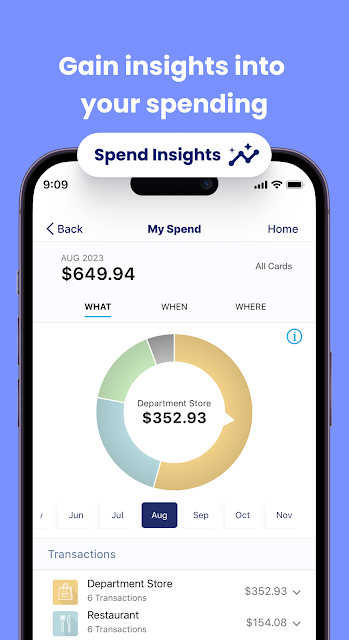
It is less likely to suit someone looking for a complete finance dashboard, spending categories, or tools for accounts from many providers. Access also depends on having Sunbit customer credentials, and some features are limited to eligible accounts. If you do not use Sunbit, there is little reason to expect the app to function as a general finance service. I would check that the account type and features you need are available before relying on it.
Sunbit is developed by Sunbit and is available on Google Play as a free finance app. The store figures provided show over 500,000 installs and a 4.1-star rating from 1,532 ratings. It is rated Everyone. The app does not contain ads or offer in-app purchases, according to the supplied app details.
The supplied version is 2.6.44, with a release date of May 23, 2021, and a last update date of October 21, 2026. An Android minimum version is not included in the provided details, so I would check Google Play for device compatibility. Mobile carrier message and data rates may apply when using the app.
The Everyday Work of Managing Sunbit
A Focused First Look
When I first opened Sunbit, I would expect the app to make most sense with a Sunbit account already in hand. The description says customers log in with a user ID and password or create one in the app. That sets a clear expectation: this is an account companion, not a browsing experience that needs no customer details.
The main setup question is whether I am managing a card or a payment plan, since the app supports both. Once signed in, the useful starting point is the relevant account information: balance and minimum due for the card, or purchases and installment payments for a plan. I like that the stated purpose is specific; it helps set expectations before I spend time looking for unrelated tools.
The Daily Account Routine
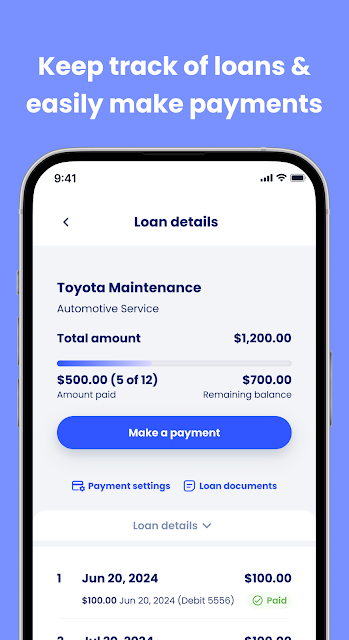
Day to day, the app’s core value is reducing the effort involved in checking and acting on an account. I can view card transactions and balances, see the minimum payment due, and make payments. Plan customers can review purchases, installments, payment history, and upcoming amounts, as well as make payments. Those are concrete tasks, rather than an attempt to turn every financial chore into one oversized dashboard.
I would still want to read the figures carefully before submitting a payment or changing account details. The app describes payment actions and account information, but it does not replace understanding the terms of a particular credit product. For a quick check while out or a more deliberate review at home, the feature set appears practical. The small frustration is simply that its usefulness depends on having a supported Sunbit account.
Useful Account Controls
A few features stand out because they cover the follow-through after a purchase. For card users, Sunbit provides access to account details, transactions, balances, minimum payment due, and monthly statements. The option to download a statement is particularly handy when I want a copy for my own records instead of only checking a current balance.
For payment-plan customers, the app brings together purchase details and installment tracking. It also supports viewing activity, payment history, and amounts due, with options to make payments or pay off a plan early. Customers can change the default payment method. These tools make Sunbit more than a read-only account viewer, while keeping the scope centered on managing the Sunbit product.
A Simple Weekly Check-In
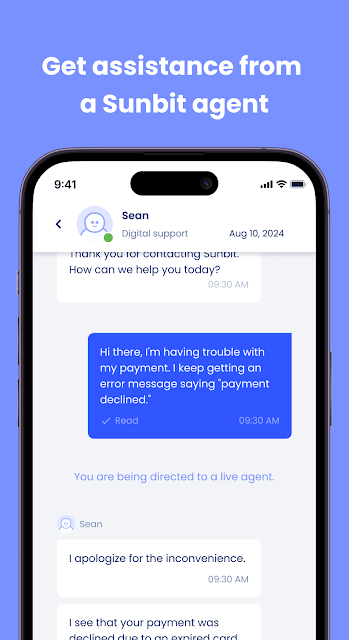
One routine I can see working well is a brief weekly check-in. I would open the app, review the card’s recent transactions or a plan’s activity, and note the next payment due. If something needs attention, I can use the available payment option or contact customer support. The point is not to check constantly; it is to make account details easy to revisit when I have a few minutes.
At the end of a billing period, I would take a little more time to look at the monthly statement or payment history. If my default bank or debit account has changed, the app provides a way to update card payment information, and plan customers can update their default payment method. I would avoid making account changes in a rush, then confirm the details I need are reflected in the account.
Keep the Scope in Mind
The biggest limitation is also the app’s defining boundary: it is for Sunbit customers. It does not claim to combine unrelated accounts or offer broad budgeting features, so people seeking those tools should look elsewhere. Access also depends on having login credentials, and the description notes that some features are only available for eligible customers and accounts. That makes the experience dependent on the product and account a person already has.
I would keep the credit terms themselves separate from the convenience of the app. Sunbit says loans are made by and the card is issued by Transportation Alliance Bank, Inc., doing business as TAB Bank, which determines qualifications and credit terms. The app can help customers manage payments and account information, but it is not a substitute for reviewing the terms that apply to an account. Carrier message and data rates may also apply.
Sunbit looks most useful when I treat it as a practical control panel for an existing Sunbit Card or payment plan. It covers the everyday checks and actions that matter: balances, due amounts, activity, statements, and payments. The focus is welcome, even if it means the app has little to offer people outside the Sunbit customer base.
If you already use Sunbit, I would give the app a try for keeping account tasks within reach. If you want one app to manage all your finances or track spending across providers, this is not that product. Its strongest case is simple, convenient access to the Sunbit account you already have.
Sunbit Frequently Asked Questions
What is the Sunbit app used for?
Sunbit is used by Sunbit customers to manage a Sunbit Card or payment plan. The app can show card balances, transactions, minimum payment due, and monthly statements. Plan customers can review purchases, installments, payment history, and amounts due, as well as make payments. Some features are available only for eligible customers and accounts.
Which phones and devices support Sunbit?
Sunbit is an Android app available through Google Play. The provided app details do not specify a minimum Android version, so check the Google Play store page on your device for current compatibility information. The app description also notes that mobile carrier message and data rates may apply when using it.
Does the Sunbit app cost money?
The Sunbit app is free to download, and the supplied details show no in-app purchases or ads. Carrier message and data rates may apply. The app manages Sunbit accounts and payment plans; the costs and terms associated with a particular credit product are separate from the app download and should be checked with the relevant account information.
Do I need a Sunbit account to use Sunbit?
Yes, the app is described as being for Sunbit customers. Customers can log in with a user ID and password or create one in the app. Some features depend on account eligibility, so what you can access may vary by customer and account. Check the Google Play description or your account details for current information.
Is Sunbit a good fit for general budgeting?
Sunbit is focused on managing a Sunbit Card or payment plan, including balances, payment activity, statements, and payments. It is not described as a general budgeting app for tracking accounts from multiple providers. I would recommend it to existing Sunbit customers who want account access on a phone, rather than someone looking for an all-in-one finance tracker.
Pros
- Combines Sunbit Card balances, transactions, due amounts, and statements in one place.
- Payment-plan customers can monitor installments and view payment history.
- Supports making payments and updating default payment details.
- Free to use, with no ads or in-app purchases listed.
Cons
- Its account tools are intended for Sunbit customers, not general finance management.
- Some features depend on customer and account eligibility.
- Minimum Android compatibility should be checked on Google Play.
- Category
- Finance
- Version
- 2.6.44











