State Farm®
- 1.26M
- 4.8
- Installs
- —
- Price
- Free

Screenshots
Analysis by Reviewed APKs
State Farm® is an iPhone app for keeping insurance details, bills and claims close at hand. It suits State Farm customers who would rather check a policy card on their phone than hunt through a folder, and drivers who want to request roadside help or follow a claim. After looking through its features, my take is that it’s a useful account companion, especially when you already have State Farm policies.
When a Claim Needs Attention
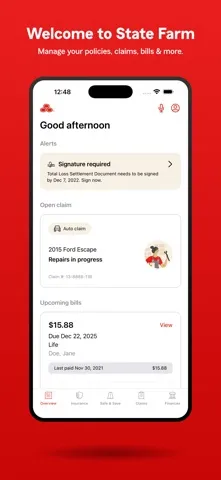
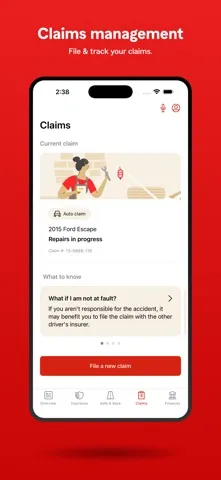
Picture a routine drive interrupted by a minor collision. Once things are settled, the app gives a State Farm customer a place to file a vehicle claim and follow its status, rather than relying only on paper notes or a series of calls. Notifications can flag claim updates, while the app also offers repair-shop search. It won’t make a stressful day pleasant, but having these tasks gathered in one place can make the next steps easier to keep track of.
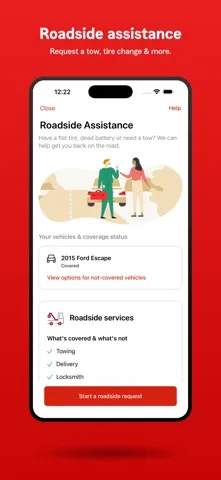
I can also see the value on a less dramatic day: checking an insurance card before a trip, confirming coverage details, or paying a bill during a spare minute. If the car won’t start, roadside assistance is available for issues such as a dead battery or tire change. These are specific, practical jobs, not features I’d expect to use every day. Their appeal is that the app puts them within reach when the timing is inconvenient.
An Account Tool, Not a Broker
The obvious alternative is keeping policy documents in a drawer, using a web account, or calling for help. State Farm’s app is most useful for customers who want quick mobile access to their existing insurance information and account tasks. It combines policy viewing, bill payment, claims, roadside assistance and repair-shop search, so I’d think of it as a service companion rather than a single-purpose claims tracker.
It is not a general insurance comparison app, and the supplied features don’t describe quote shopping or a way to compare other insurers. Nor does it replace a conversation when you need a fuller explanation of coverage. The app does include help topics and a messaging feature for technical assistance, but its central job is managing State Farm products. If you don’t have a reason to access those products, much of its usefulness disappears.
Small Habits That Help
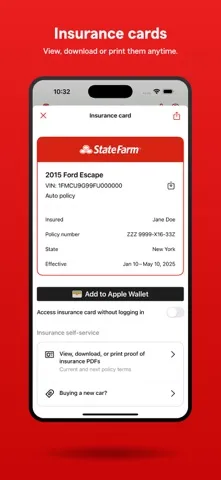
I’d start by signing in and checking that the policy details and insurance card are easy to find before I actually need them. The card can be added to Apple Wallet, which makes it handy to keep alongside other everyday passes. A quick check after a policy change or before a road trip is a sensible habit; it’s easier to notice a detail that needs attention when you’re not standing beside a roadside shoulder.
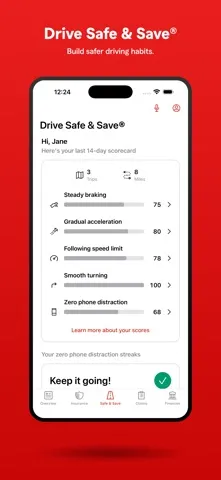
For a claim, I’d use the app to file and then return to its status updates rather than repeatedly trying to remember what happened last. Personalized reminders and notifications can help with account tasks, while the app’s help topics are there when I need a basic pointer. Customers enrolled in Drive Safe & Save can also access program details through the State Farm app, subject to the program’s setup and permissions.
More From Our News Desk

Zoom Meetings, Google Meet, or Teams: Which Is Easiest to Join?

How I Build a Free Streaming Lineup With Tubi

Why Crunchyroll Is the Default Anime App for So Many Fans

YouTube TV: A Practical Guide to Cutting Cable

Rummikub and the Small Comfort of Phone Games

TeamViewer Remote Control or AnyDesk for Helping Family?
Who Gets the Most From It
I’d recommend State Farm® to customers who already hold State Farm insurance and want a convenient mobile place for policy details, bill payment and claims. Drivers are likely to get the broadest use: they can view an insurance card, request roadside assistance, look for repair shops and follow vehicle claims. People with property coverage may also appreciate being able to file and track a property claim through the same app.
It may be less compelling if you rarely use a phone for account management, prefer handling insurance by phone or web, or don’t have State Farm products to manage. I also wouldn’t choose it as a tool for comparing insurance providers. Some features, such as Drive Safe & Save, are relevant only to customers enrolled in that program and using the required permissions. The app’s value depends on your relationship with State Farm.
State Farm® is developed by State Farm Mutual Automobile Insurance Company and is available for iPhone through the Apple App Store. It is free to download. The App Store shows a 4.8 rating from about 1.3 million ratings. The app is rated 12+, and its listed minimum requirement is iOS 17.0.
The listed version is 10.169.0. The app was released on June 10, 2009, and its last update is dated October 23, 2026. The supplied store details do not include an install count, so I’ve left that figure out. State Farm’s app description covers insurance policy management, payments, claims, roadside assistance and other account features.
A Closer Look at Everyday Use
A Practical First Impression
When I first opened the app, the clearest reason to keep it installed was straightforward: insurance tasks tend to matter at awkward moments. A digital card, claim access and bill payment are useful when I’m away from a filing cabinet or desktop. The app is built around State Farm products, so its first impression is less about discovering a new service and more about putting familiar account jobs on the phone.
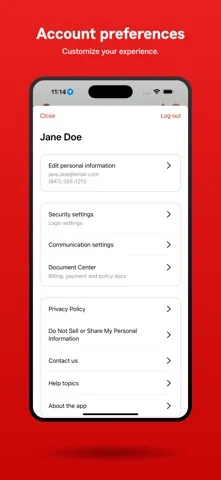
For setup, the main consideration is access to the right account and the device requirements. State Farm also offers sign-in with Touch ID, Face ID or a PIN. That gives customers several supported ways to access the app, rather than requiring one particular biometric method. I’d take a few minutes to get comfortable with the policy and claim sections before an urgent errand makes me wish I had.
Useful Between Emergencies
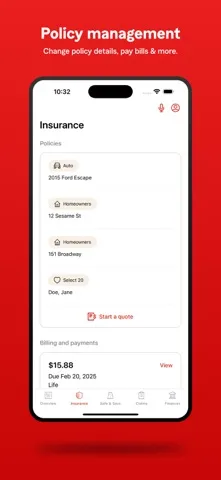
The day-to-day appeal is that routine and unexpected tasks live side by side. I might open the app to pay an insurance bill, then use the same account to check coverage details or find the insurance card. When a claim is active, tracking its progress and receiving claim-status notifications can make it easier to stay oriented without treating every quiet day as a reason to contact someone.
That mix makes more sense than an app devoted only to emergencies. There are ordinary account needs to handle, plus help for a roadside problem or claim when one arises. The app also includes reminders and help topics. I wouldn’t expect to spend much time browsing it for entertainment; it’s a utility I’d dip into for a particular task and then put away.
Features With Everyday Value
The digital insurance card is one of the easiest features to understand. Customers can view it in the app and add it to Apple Wallet, which may make it quicker to reach during an ordinary errand. Bill payment is another practical inclusion, with Apple Pay offered as a payment option. These details don’t transform insurance, but they can reduce the small bits of account friction that build up over time.
Claims support is the other substantial part of the package. The app supports filing vehicle, property and vehicle-glass claims, then tracking a claim’s status and receiving notifications. For drivers, it can also arrange roadside assistance for situations including tire changes, dead batteries and stuck vehicles, and provide repair-shop search. I appreciate that these are clearly tied to real tasks, rather than a long list of vague extras.
A Routine for Staying Ready
My simple routine would be to check the insurance card and coverage details whenever I’m preparing for a trip, and to use reminders as prompts for account tasks. If a bill is due, I can handle payment from the same app instead of setting aside a separate session at a computer. That’s not a dramatic change in how I manage insurance; it’s just a way to make the basic chores easier to fit into a busy day.
If something happens, I’d use the claim tools to file the relevant claim and then return to the status information as updates arrive. For a vehicle problem, roadside assistance and repair-shop search are the features I’d look for. Customers enrolled in Drive Safe & Save can access the program details in the State Farm app. The description says precise location data terms apply to enrolled customers who enable specific permissions, so that program deserves a deliberate setup check.
Keep Its Scope in Mind
This is a State Farm account app, so its usefulness is tied to having State Farm products. It does not present itself as a place to compare insurance providers, and the described features focus on managing existing policies and services. Customers who want to discuss a complicated coverage question may still prefer a direct conversation; the app’s help topics are helpful for basic guidance, not a substitute for every kind of support.
A few conveniences also depend on the customer’s situation. Roadside assistance is aimed at specific vehicle problems, while Drive Safe & Save only applies to people enrolled in that program. The app’s minimum requirement is iOS 17.0, so owners of older iPhones may need to check compatibility before planning around it. These limits don’t undermine its main purpose, but they help set realistic expectations.
State Farm® makes the most sense as a practical companion for people who already manage insurance through State Farm. Its strongest everyday benefits are quick access to policy information and an insurance card, plus bill payment, claim tracking and roadside assistance when needed. It keeps those jobs together without pretending to be an all-purpose insurance marketplace.
I’d recommend it to State Farm customers who like handling routine account tasks on an iPhone and want claims or roadside help within reach. If you don’t have State Farm products, or prefer to manage insurance another way, there’s less reason to install it. For the right customer, it’s a useful convenience rather than a must-have.
State Farm® Frequently Asked Questions
What is the State Farm® app used for?
State Farm® lets customers view and manage insurance policies, pay bills, access an insurance card, and file or track claims. It also offers roadside assistance, repair-shop search, claim notifications, help topics and details about other State Farm financial products. Some features, including Drive Safe & Save, are intended for customers enrolled in that program.
Which devices can run the State Farm® app?
The app is available for iPhone through the Apple App Store and requires iOS 17.0 or later according to its listed minimum requirement. The supplied details do not specify support for other device types. Requirements and compatibility can change, so it’s worth checking the App Store entry for your particular device before downloading.
Does the State Farm® app cost anything?
The State Farm® app is free to download in the Apple App Store. The supplied details do not give information about in-app purchases, so check the store entry for current purchase details. Using particular insurance services or products may depend on your State Farm account and eligibility; the app itself is designed to manage State Farm products.
What iOS version does State Farm® require?
The listed minimum requirement for State Farm® is iOS 17.0. If your iPhone runs an older version, check the app’s current App Store compatibility details before relying on it. Requirements can change with updates, and availability may vary by device or region, so the store entry is the best place to verify current support.
Is State Farm® useful if I’m not a customer?
The app’s main features are for viewing and managing State Farm policies and products, paying bills, filing claims and getting related assistance. That makes it most useful to existing State Farm customers. If you don’t have State Farm products, many of its account features may not apply, and it is not described as an insurance comparison app.
Pros
- Combines policy details, bill payment and an insurance card in one place.
- Supports filing and tracking vehicle, property and vehicle-glass claims.
- Includes roadside assistance and repair-shop search for drivers.
- Offers Face ID, Touch ID or PIN sign-in.
Cons
- Most useful features depend on having State Farm products.
- Requires iOS 17.0 or later.
- Drive Safe & Save applies only to enrolled customers and uses specified permissions.
- Category
- Finance
- Version
- 10.169.0











