Sound Booster・Increase Volume
- 422.93K
- 4.8
- Installs
- 10.00M
- Price
- Free
Screenshots


Analysis by Reviewed APKs
Sound Booster・Increase Volume is an Android audio tool for people who want more control over how loud music, videos, calls, and other sounds play through their device or connected audio gear. I see its appeal for everyday listening when a phone speaker feels a little too quiet. It combines a one-tap volume boost with equalizer adjustments, though it’s best approached as an optional audio tweak rather than a fix for every sound problem.
A Louder Listening Break
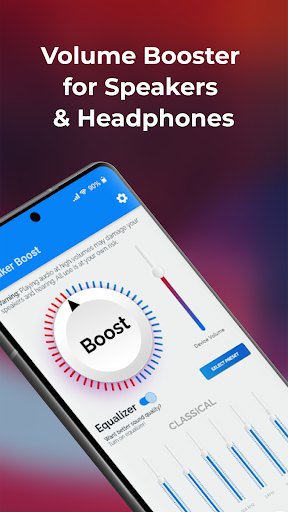
When I picture using Sound Booster・Increase Volume, it’s during an ordinary evening: I’m watching a clip on my phone while making dinner, and the built-in speaker sounds a little thin from across the room. The app is designed to make audio louder with a tap, so the idea is to adjust the sound without stopping to dig through a complicated audio setup. That straightforward job is the main reason to try it.
The same approach could suit a commute with headphones or a quiet moment when a video’s dialogue is hard to hear. The description also says the booster can be used with Bluetooth speakers and headphones, as well as for music, movies, games, ringtones, alarms, and calls. I’d start with a modest adjustment and listen for whether the change actually helps, rather than turning everything up automatically.
An Audio Tweak, Not a Player
Compared with opening a music player or streaming app, Sound Booster・Increase Volume has a different role: it’s presented as a tool for adjusting amplification and equalizer sound, not as a place to browse or organize a library. Its description mentions applying audio effects while using music and streaming apps, so the intended use is alongside the listening apps already in a person’s routine.
That distinction also sets expectations. This is not described as a recording studio, a full media library, or a way to repair poor-quality audio files. It focuses on louder playback and sound shaping, including bass and several frequency controls. If the source is muffled or the speaker itself is struggling, boosting may not make the result clearer; in some situations, it may simply make the unwanted parts louder too.
Small Habits, Better Control
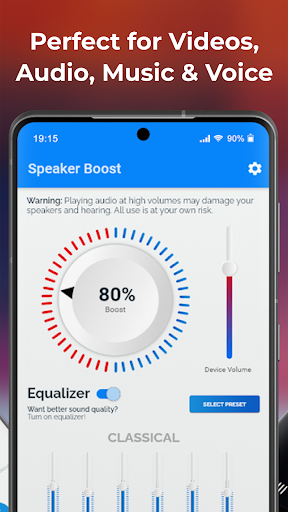
I’d treat the boost as something to adjust for each listening situation. A level that seems useful for a video across the room may be too much for headphones, while music and spoken dialogue can benefit from different equalizer choices. The app describes controls for several frequency points and custom settings, which gives listeners a way to experiment instead of relying only on maximum volume.
A useful routine is to check the result with a familiar song or clip, make one change at a time, and then decide whether the sound is more comfortable. I’d also remember to revisit the setting when switching between the phone speaker and connected audio equipment. That keeps the app’s main convenience—quick adjustment—from turning into a habit of leaving every sound at its loudest.
More From Our News Desk

Zoom Meetings, Google Meet, or Teams: Which Is Easiest to Join?

How I Build a Free Streaming Lineup With Tubi

Why Crunchyroll Is the Default Anime App for So Many Fans

YouTube TV: A Practical Guide to Cutting Cable

Rummikub and the Small Comfort of Phone Games

TeamViewer Remote Control or AnyDesk for Helping Family?
Who Might Find It Useful
I’d recommend Sound Booster・Increase Volume to Android users who sometimes wish their device audio had a little more presence, especially for casual music, videos, games, or calls. People who like tweaking bass and other parts of the sound may also appreciate having equalizer adjustments alongside the volume boost. Its described one-tap approach should appeal to anyone who wants a simple audio utility rather than a long setup process.
It may be less appealing if you’re already happy with your device’s sound or want a dedicated music player with library management. I’d also be cautious about expecting a louder setting to improve every speaker or headphone setup. The app’s purpose is amplification and sound adjustment; it can’t change the physical capabilities of the hardware or the quality of the original recording.
Sound Booster・Increase Volume is a Music & Audio app from Prometheus Interactive LLC. On Google Play, it has over 10 million installs and a 4.8-star rating from about 423,000 ratings. The app is free to install and contains ads. Google Play also lists optional in-app purchases, with items priced from $0.99 to $99.99.
The app has an Everyone content rating. Its current listed version is 3.7.4. It was released on June 12, 2012, and the listed last update is October 8, 2026. The provided app details do not specify a minimum Android version, so checking compatibility for a particular device in Google Play is the practical next step.
What It’s Like to Boost Everyday Audio
A Simple Starting Point
The first impression suggested by Sound Booster・Increase Volume is uncomplicated: it centers on getting more level from audio and offers equalizer adjustments for people who want to shape the result. I like that the basic idea is easy to understand. If a video sounds quiet, a quick boost is more appealing than navigating several unrelated settings before deciding whether louder playback helps.
The description presents it as a lightweight tool that works without rooting the device. It also says a tap can increase volume on a smartphone, tablet, MP3 player, Bluetooth speaker, headphones, and other audio hardware. In practice, I’d approach those broad use cases one device at a time, since different speakers and headphones can respond differently to amplification.
Day-to-Day Listening
For routine use, the value is in having an adjustment available when the usual volume feels short of what a particular moment needs. A podcast or video playing while I tidy up is a different situation from headphones during a quiet break, and an adjustable booster gives me a way to respond without changing the content itself. The description also mentions music, games, movies, ringtones, alarms, and voice calls.
That range makes the app feel more like a general audio companion than a tool for one specific type of media. Still, I’d keep expectations practical: a boost can change the playback level, but “louder” and “clearer” are not always the same thing. If turning the sound up makes it harsh or distorted, backing off is likely a better listening choice than pushing it further.
Equalizer and File Support
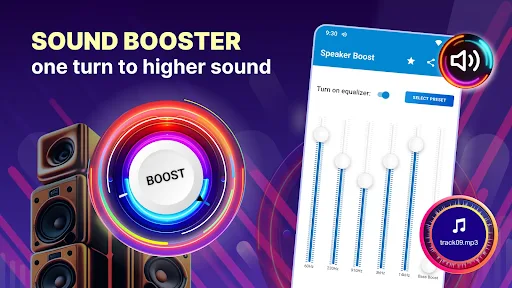
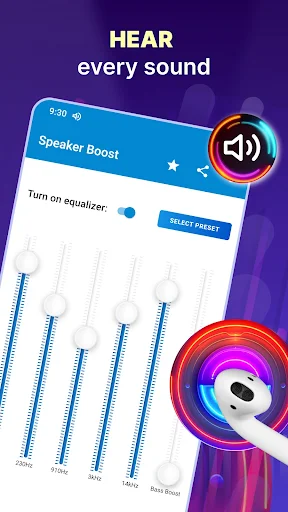
The equalizer is one of the more distinctive parts of the description. It names adjustment points at 60Hz, 230Hz, 910Hz, 3kHz, and 14kHz, alongside custom settings and bass-focused controls. That gives curious listeners a little more to explore than a single volume slider, especially if they want to emphasize bass or change the balance of music to suit headphones or speakers.
The app description also says it supports playback of Hi-Res audio files in formats including AIFF, FLAC, ALAC, WAV, and DSF, and mentions 3D playback. It describes applying audio effects and equalizer presets while using music and streaming apps as well. I’d regard these as useful capabilities for exploring sound, not as a promise that every file or app will sound dramatically different.
A Practical Listening Routine
A sensible everyday routine would be to begin with the device’s usual volume, open the booster when a particular clip or song sounds too quiet, and adjust gradually. I’d use a familiar track as a reference before changing equalizer settings, since a well-known recording makes shifts in bass or overall balance easier to notice. When switching from the phone speaker to headphones, I’d reassess instead of assuming one setting suits both.
This kind of small check is especially useful when moving between spoken content and music. Dialogue may benefit from a different balance than a bass-heavy song, and a level that seems comfortable in a quiet room might feel excessive somewhere noisier. The app’s described controls are there for adjustment, so I’d use them to suit the moment rather than leaving the sound boosted by default.
Keep Expectations Grounded
The main limitation is inherent to the job: amplification can raise the sound, but it cannot make every source sound clean or restore detail that is missing from a recording. Increasing bass or overall level can also make audio less comfortable if the device or headphones don’t handle the change well. I’d listen for distortion or harshness and lower the setting if either becomes noticeable.
The app is also supported by ads and offers in-app purchases, so the free download does not mean the experience is entirely without commercial elements. And while the description covers a wide range of audio gear and playback situations, results can depend on the device, connected equipment, and the sound source. Those are good reasons to treat it as a handy option, not an essential part of every listening setup.
Sound Booster・Increase Volume makes sense as a practical add-on for Android users who occasionally want more playback level or enjoy adjusting an equalizer. I like the combination of a quick boost and more detailed frequency controls, along with its stated support for common audio uses from music and video to calls.
I’d try it if quiet playback is a recurring annoyance and you’re comfortable making small, careful adjustments. If your current audio setup already sounds good, or you’re looking for a full music player, it may not add much. My recommendation is to use it selectively, compare the result with your normal sound, and keep comfort ahead of maximum volume.
Sound Booster Frequently Asked Questions
What is Sound Booster・Increase Volume used for?
Sound Booster・Increase Volume is an Android audio tool for boosting playback volume and adjusting sound with equalizer controls. Its description covers music, movies, games, calls, ringtones, alarms, headphones, phone speakers, and Bluetooth speakers. It is intended to work alongside everyday listening, rather than serving as a music library or a general-purpose audio editing studio.
Which devices can use Sound Booster・Increase Volume?
The app is for Android. Its description refers to smartphones and tablets, as well as headphones, Bluetooth speakers, MP3 players, and other audio hardware. How the boost sounds can vary with the device and connected equipment. For a particular phone or tablet, check the Google Play page for current compatibility information.
What Android version does Sound Booster・Increase Volume require?
The minimum Android version is not specified in the provided app details. Requirements can vary as the app and devices change, so check Sound Booster・Increase Volume’s Google Play page before installing it on a specific device. The listed version is 3.7.4, but that does not by itself indicate which Android releases it supports.
Does Sound Booster・Increase Volume cost money?
Sound Booster・Increase Volume is free to install and contains ads. It also offers in-app purchases, with listed items ranging from $0.99 to $99.99. Prices and available purchase options can vary by region or change over time, so the current Google Play page is the place to check before making a purchase.
Is Sound Booster・Increase Volume a good fit for me?
It may suit Android users who want an occasional volume boost or like adjusting bass and other equalizer settings for music, videos, games, and calls. It may be less useful if you already like your device’s sound or want a dedicated player with library features. A louder setting will not necessarily make every recording clearer.
Pros
- Pairs a quick volume boost with equalizer controls for more hands-on sound adjustment.
- Describes use with music, videos, games, calls, alarms, headphones, and Bluetooth speakers.
- Supports several named audio file formats, including FLAC, WAV, AIFF, ALAC, and DSF.
- Free to install, with a straightforward purpose for occasional audio adjustments.
Cons
- Boosting playback can make some audio harsh or distorted rather than clearer.
- Contains ads and offers in-app purchases, with a wide listed price range.
- Sound results can differ across devices, headphones, speakers, and audio sources.
- Category
- Music & Audio
- Version
- 3.7.4











