SMART tag™ Parent App
- 393
- 3.6
- Installs
- 100.00K
- Price
- Free
Screenshots
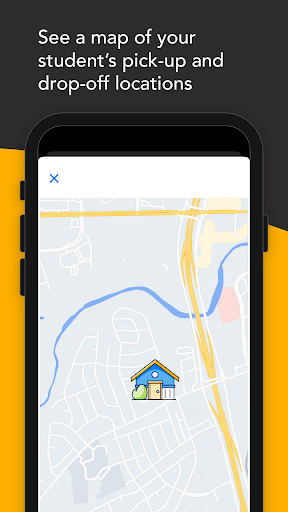
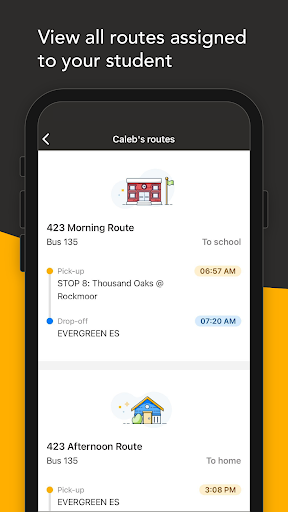
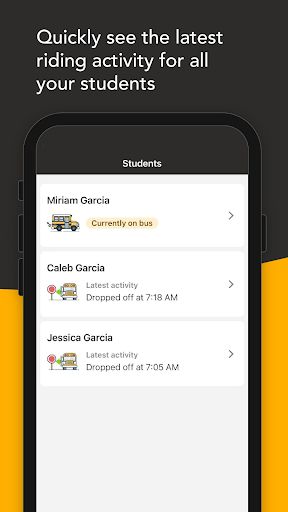
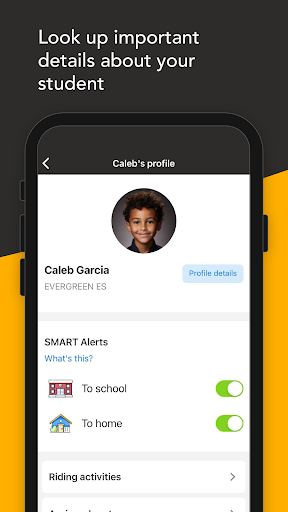
Analysis by Reviewed APKs
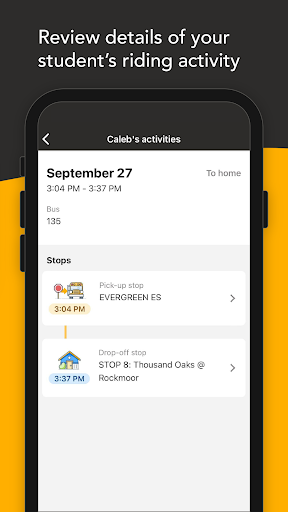
SMART tag™ Parent App is for parents whose school district uses SMART tag™ to manage student transportation. It focuses on bus-related updates, including alerts when a bus is approaching a student’s home stop and notices about delays or route changes. I see it as a practical school-day companion rather than a general child-tracking app. Its usefulness depends on whether your district uses the service.
A calmer school pickup
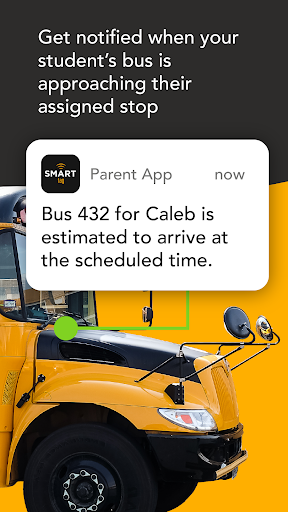
On a busy afternoon, I can picture checking this app while finishing work or getting dinner started, rather than repeatedly wondering whether the school bus is close. The app is designed to notify parents when a student’s bus is on its way to the home stop for pickup or drop-off. That gives the transportation part of the day a clearer place in the family routine.
The value is most obvious when plans depend on the bus arriving: a parent might be ready to meet a child at the stop, or simply want to know when to expect the return home. I’d treat the notifications as useful updates, not a reason to stop paying attention to other school communications. The app is centered on riding activity and transportation information, not every part of a student’s day.
A focused school tool
SMART tag™ Parent App sits in a different lane from broad family-location apps, school portals, and messaging tools. Its stated purpose is to keep parents informed about student transportation in districts using SMART tag™. That narrower focus could be a benefit: instead of trying to cover every school task, it concentrates on bus alerts, transportation changes, and district contact information.
It is not presented as a general map for tracking a child everywhere, a classroom communication platform, or a replacement for contacting the school. I would not install it expecting features such as location zones or direct emergency messages from a student. The practical question is whether your district uses SMART tag™; without that connection, its specific transportation updates may not fit your needs.
Make alerts part of routine
I’d make a small habit of checking that the app is available before the school week gets hectic, then keep its transportation notifications in mind during the usual pickup and drop-off windows. If a bus is delayed or a route changes, an alert can help explain why the day is running differently. The app also offers access to district contact information and FAQs for follow-up.
For a household with more than one person handling school runs, it may help to agree on who is watching for updates and who will meet the bus. That is a simple routine, not a special feature. I’d also keep the district’s usual communication channels handy, since the app’s role is to provide transportation notices rather than answer every school question.
More From Our News Desk

Zoom Meetings, Google Meet, or Teams: Which Is Easiest to Join?

How I Build a Free Streaming Lineup With Tubi

Why Crunchyroll Is the Default Anime App for So Many Fans

YouTube TV: A Practical Guide to Cutting Cable

Rummikub and the Small Comfort of Phone Games

TeamViewer Remote Control or AnyDesk for Helping Family?
Who may find it useful
I’d recommend SMART tag™ Parent App to parents and caregivers in a school district that uses SMART tag™ and who want transportation updates in one place. It should suit people whose schedules make bus timing important, especially when they need to plan around a home-stop pickup or drop-off. The alerts about delays and route alterations can also make unexpected changes easier to follow.
It may not suit families whose district does not use the service, or anyone looking for broad child-location tracking, schoolwork tools, or a way for students to send emergency messages. The app’s scope is specific, and that is worth understanding before making it part of a routine. For families who need exactly these bus updates, that focus is more useful than a long list of unrelated features.
SMART tag™ Parent App is an Education app from SMART tag. Google Play shows more than 100,000 installs and a 3.6-star rating from 393 ratings. It is free to download, with no in-app purchases and no ads. Its content rating is Everyone, making the store’s age classification suitable for a general audience.
The current version shown is 1.5.1. The app was released on October 16, 2023, and was last updated on February 14, 2026. An Android minimum version is not included in the available app details, so check Google Play for device compatibility before installing.
A closer look at bus updates
Getting started
When I first opened the idea of this app, what stood out was its specific audience: parents connected to a school district using SMART tag™. That context matters more than a broad feature list. The app’s purpose is to keep families informed about student riding activity, so it makes most sense as a companion to the district’s transportation setup.
The description points to a straightforward, parent-oriented experience, with alerts and access to district contact details and FAQs. I’d begin by checking that the school district uses SMART tag™ and then use the app for the transportation updates it is designed to provide. There is little reason to approach it as a general-purpose school app.
The day-to-day experience
In everyday use, the main draw is receiving a heads-up when a bus is on its way to a student’s home stop. That can be helpful during the bookends of a school day, when a parent might be occupied with work, errands, or getting another family member out the door. A timely notification gives the bus journey a little more visibility without turning the app into a constant activity feed.
The other useful day-to-day role is keeping parents informed when transportation does not go to plan. Delays and route alterations are among the updates the app describes, along with emergency-related notices. I’d still use the district’s normal channels when a situation needs a personal answer, but having transportation notices gathered in a parent-focused app is a sensible convenience.
Useful transportation features
The standout features are practical rather than elaborate: alerts for a bus approaching a home stop, updates about delays or route changes, and notifications related to transportation emergencies. Those are the kinds of details that can affect when a parent leaves home or expects a student to arrive. The app keeps its attention on the bus journey instead of presenting itself as a complete family organizer.
I also like that the described app includes district contact information and FAQs. When an alert raises a question, having a route to the district’s details can be more useful than a vague promise of support. The FAQs may help with common questions, while more specific concerns can be taken to the district using its contact information.
A simple school-day routine
A realistic routine would be to keep the app in mind around the times a student is picked up or dropped off at the home stop. I’d check for an update if the bus seems late, then use any delay or route-change notice to adjust expectations. That is a small addition to the day, not something that needs to be monitored constantly.
For caregivers sharing responsibilities, a quick agreement can prevent two people from assuming the other has seen an update. One person can keep an eye on the transportation notifications, while the household continues to use its normal school contacts for other matters. The app is most helpful when it supplements that routine rather than becoming the only source of information.
Keep the scope in mind
The biggest limitation is also the clearest boundary: the app is intended for parents in districts using SMART tag™. Its benefits depend on that district connection, so families should not expect it to work as a universal bus-information service. It is also focused on transportation, which means it should not be mistaken for a complete school portal or an all-purpose child safety tool.
I would be careful not to read more into the alerts than the app describes. It offers bus-related notices and information about transportation changes; the description does not present it as a way to follow a student everywhere or contact them directly. Families who need those broader functions will want other tools alongside it, while keeping this app for the specific job it handles.
SMART tag™ Parent App has a clear purpose: help parents in participating districts stay informed about student bus activity and transportation changes. I appreciate that its focus is easy to understand, and that district contact details and FAQs sit alongside the alerts.
I’d recommend giving it a try if your district uses SMART tag™ and bus timing affects your day. If you want general child tracking or a full school communication suite, this is not that app. Its best role is a focused helper for the journey to and from school.
SMART tag™ Parent Frequently Asked Questions
What is SMART tag™ Parent App used for?
SMART tag™ Parent App is for parents in school districts using SMART tag™. It provides updates about student bus activity, including alerts when a bus is approaching the home stop and notices about delays, route alterations, or transportation emergencies. It also provides district contact information and FAQs.
Which devices can run SMART tag™ Parent App?
SMART tag™ Parent App is an Android app available through Google Play. The minimum Android version is not included in the app details here, so check the Google Play store entry for current device requirements and compatibility.
Does SMART tag™ Parent App cost anything?
The app is free to download, and the available details say it has no in-app purchases and no ads. Store information can change over time, so it is worth checking Google Play for the current cost and app details before installing.
What Android version does SMART tag™ Parent App require?
The minimum Android requirement is not provided in the app details used for this review. Check the Google Play store entry on your device for the latest compatibility information, since requirements can vary with app updates and device software.
Is SMART tag™ Parent App right for every family?
It is best suited to parents and caregivers whose school district uses SMART tag™ and who want bus-related updates. It may not suit families looking for general child-location tracking, schoolwork tools, or a broad school communication app. Its usefulness depends on the district’s use of the service.
Pros
- Focused alerts cover bus arrivals, delays, route alterations, and transportation emergencies.
- District contact information and FAQs offer a useful place to start with questions.
- Free to download, with no in-app purchases or ads.
- A narrow transportation focus keeps its purpose easy to understand.
Cons
- Useful only for families in districts that use SMART tag™.
- Does not serve as a general child-tracking or full school communication app.
- Google Play shows a 3.6-star rating from 393 ratings.
- Category
- Education
- Version
- 1.5.1











