Rocket Money - Bills & Budgets
- 141.51K
- 4.5
- Installs
- 10.00M
- Price
- Free

Screenshots
Analysis by Reviewed APKs
Rocket Money - Bills & Budgets brings subscription management, spending tracking, budgeting, and bill-lowering help into one personal finance app. I can see it suiting people who want a clearer view of recurring charges and monthly spending without juggling several tools. Its range is appealing, though some services are paid and linking financial accounts is a meaningful trade-off. My overall take: useful for getting an overview, especially if subscriptions are easy to lose track of.
A clearer monthly money picture
When I think about a realistic use for Rocket Money, it is the quiet Sunday check-in before a new month starts. I want to see which subscriptions are still active, how spending is shaping up by category, and whether a budget needs adjusting. Rocket Money is designed to bring those jobs together: link accounts, review tracked activity, and use the resulting picture to make a few practical decisions.
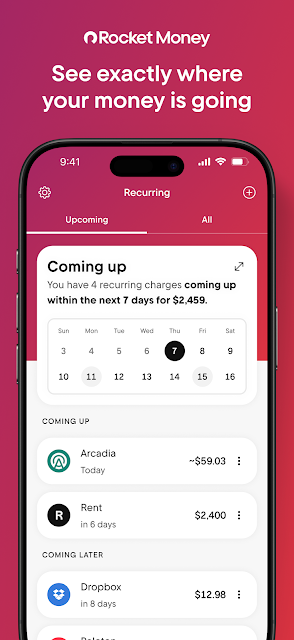
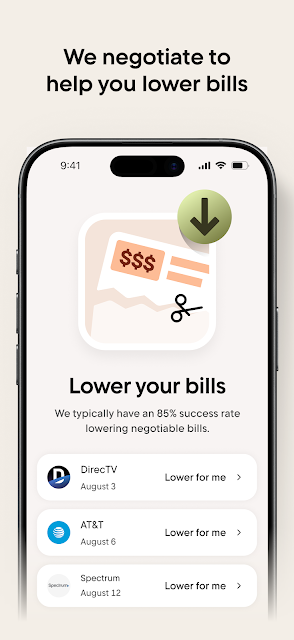
The subscription view is particularly relevant when charges arrive on different days and are easy to forget. The app says it can find and track subscriptions, then help users cancel them within the app. For bills that might be lowered, it also offers a concierge service that negotiates on a user's behalf. That makes the app more than a basic ledger, though the important part is still deciding which charges and spending patterns deserve attention.
More than a simple budget
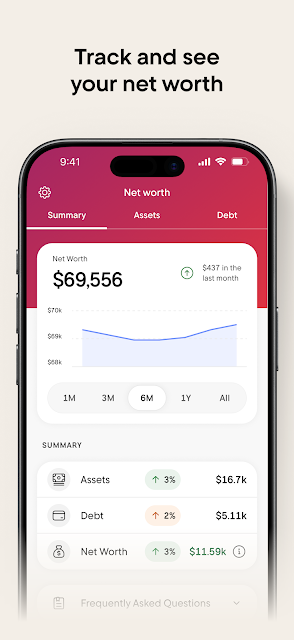
Compared with a spreadsheet or a basic category-based budget tool, Rocket Money aims to do more of the organizing automatically. It can track expenses across linked accounts, categorize spending, and show subscriptions together. It also offers bill negotiation and subscription cancellation help. That breadth is handy for someone who wants one place to review several parts of their finances, rather than manually maintaining a separate list of every recurring payment.
It is not a replacement for a bank account, nor does the description present it as a way to pay bills directly. I would also avoid treating any budgeting app as a substitute for personal judgment: categories and summaries can help spot patterns, but they do not make decisions for you. If you only want a simple manual budget, the account-linking and additional services may feel like more than you need.
Small habits that help
I would get the most from Rocket Money by giving it a regular, modest review rather than expecting one setup session to solve everything. A monthly pass through subscriptions can help distinguish services I still use from charges I no longer recognize. Checking spending by category alongside that list gives the review some context: recurring costs are one piece of the month, while everyday purchases make up another.
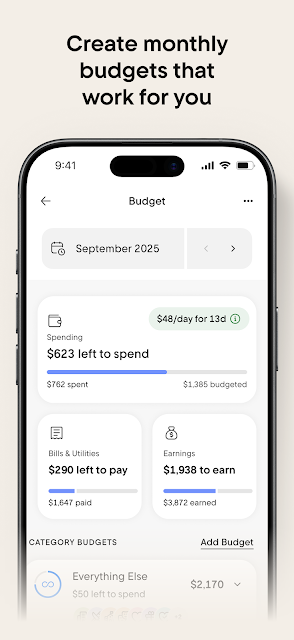
Budgets are more useful when they reflect real routines, so I would start with categories that matter to my household and adjust them as actual spending becomes clearer. Rocket Money supports custom spending limits and alerts when a user is close to going over budget. Those features can make a quick mid-month check worthwhile. I would also review account activity and flagged changes instead of assuming an automated summary tells the whole story.
More From Our News Desk

Zoom Meetings, Google Meet, or Teams: Which Is Easiest to Join?

How I Build a Free Streaming Lineup With Tubi

Why Crunchyroll Is the Default Anime App for So Many Fans

YouTube TV: A Practical Guide to Cutting Cable

Rummikub and the Small Comfort of Phone Games

TeamViewer Remote Control or AnyDesk for Helping Family?
Who may find it useful
I would recommend Rocket Money to people who want to bring subscription tracking and everyday budgeting into the same routine. It looks especially useful for anyone who has several recurring charges, wants spending grouped by category, or would rather have help reviewing bills than negotiate each one alone. The free budgeting features give people a way to start with expense tracking and a monthly budget before deciding whether additional services fit.
It may be a poor match for someone who prefers to keep financial accounts separate from third-party apps, or who wants a purely manual system with no account linking. People who only need a bare-bones spending log may find the broader set of services unnecessary. Bill negotiation and other paid features also deserve a careful look before signing up; I would compare what is included with what I actually expect to use.
Rocket Money - Bills & Budgets is a finance app from Rocket Money - Bills & Budgets. On Google Play it has over 10 million installs and a 4.5-star rating from about 142,000 ratings. The app is free to download, contains in-app purchases priced from $0.99 to $59.99 per item, and does not contain ads. Its content rating is Everyone.
The supplied app details give version 17.0.0, a release date of July 14, 2016, and a last update date of October 30, 2026. A minimum Android version is not provided in those details, so check Google Play for the requirement that applies to a particular device. The description says free budgeting features are available, while Rowan is included with Premium+.
Making the Money Check-In More Manageable
A practical first impression
When I first opened the idea of Rocket Money, what stood out was its combined scope. This is not just a place to enter a few purchases: the app brings together budgets, categorized expenses, recurring subscriptions, and bill-lowering help. That range could make an initial review feel more useful, since the same monthly picture can show both routine charges and broader spending.
Getting started is described as linking accounts once so the app can track activity across them. That is convenient in principle, but it is also a choice to make deliberately. I would take time to understand what accounts I want included and review the information the app brings together. The experience will be most useful when the connected activity reflects the parts of my finances I actually want to monitor.
The everyday tracking loop
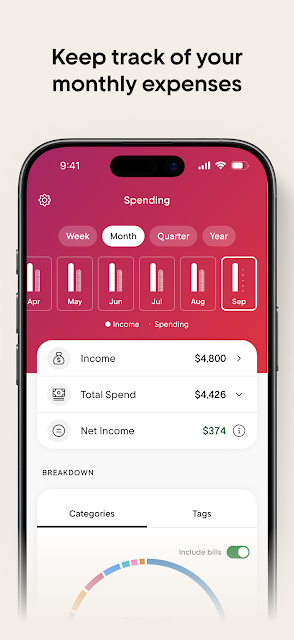
The core day-to-day promise is that Rocket Money tracks transactions and organizes expenses by category, helping users see where money is going. Instead of building a spending log line by line, I could use a budget to set limits and then check how activity is progressing. The app says it can alert users when they are close to exceeding a limit, which gives a budget a practical role between monthly reviews.
I would treat that tracking as a prompt to look closer, not as a reason to stop paying attention. A category total can reveal a pattern, but a person still has to decide whether the spending is expected and whether a limit makes sense. The app's value is in making a recurring check easier to do, rather than turning budgeting into something that runs entirely on autopilot.
Subscriptions and bill help
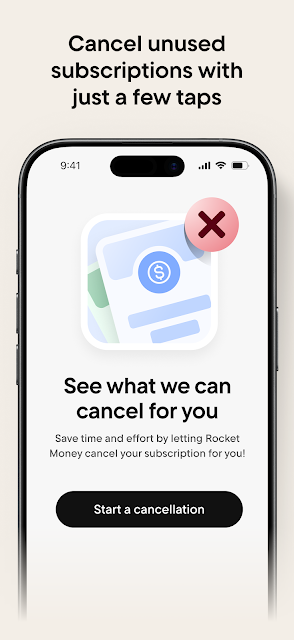
Subscription management is one of the more distinctive parts of the product. Rocket Money says it can identify and track subscriptions and help users cancel them within the app. That is a useful answer to a familiar annoyance: a recurring charge may be small enough to ignore individually but easy to forget when several are spread across a month. Having them gathered for review could make the cancellation decision less of a scavenger hunt.
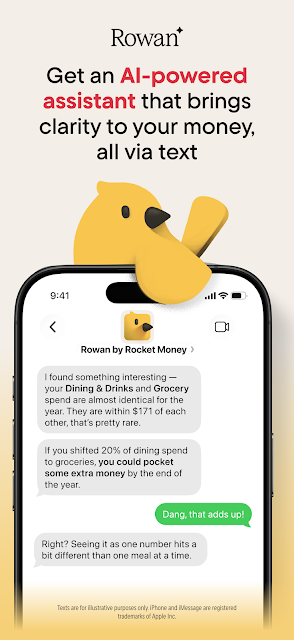
The app also offers help lowering bills through a concierge service that negotiates on the user's behalf. Rowan, its AI-powered financial assistant, is described as able to help with budgeting, summaries, and spotting items such as price increases or new subscriptions. Rowan is included with Premium+. These services go beyond a simple tracker, so I would check the relevant terms and costs and make sure the added help suits my preferences.
A monthly review routine
A practical routine could begin with a short review at the start of each month: check recurring subscriptions, scan category spending, and set or revise limits for the month ahead. This makes the app's main tools work together instead of treating subscription cleanup and budgeting as unrelated chores. I would keep the first pass simple, focusing on a few categories and charges that are genuinely worth examining.
Then, halfway through the month, I would check whether spending is approaching any limits and look at changes that need attention. Rocket Money describes alerts for being close to a budget limit and monitoring for certain account changes through Rowan. That kind of check can be brief and useful, but I would still confirm anything important against the original account or bill before acting.
Keep expectations grounded
The main trade-off is that the app's broader view depends on linking accounts. That may be worthwhile for someone who wants consolidated tracking, but it will not suit everyone. I would consider comfort with account connections and review the app's privacy information before setting things up. More automation can save routine effort, yet it also means users should remain attentive to what is being tracked and how they use the results.
There is also a distinction between free budgeting tools and paid services. The app is free to download and offers free budgeting features, but in-app purchases are available, and Rowan is tied to Premium+. The range of features can sound extensive, but not every user needs bill negotiation, subscription help, or an AI assistant. I would compare the available options with my own priorities rather than assuming every feature is part of the free experience.
Finally, automated categories and account summaries are best treated as a starting point. A useful overview can help me notice a recurring cost or an approaching budget limit, but I still need to decide what action makes sense. Rocket Money works best as a support for regular attention to spending, not as a promise that money management can be left unattended.
Rocket Money brings together several chores that often get scattered across banking apps, notes, and calendar reminders. I like the combination of subscription tracking, categorized spending, budgets, and optional bill-lowering help. The free budgeting features make it approachable, while paid options mean it is worth checking the details before relying on the extras.
I would try it if I wanted a broader monthly money check-in and felt comfortable linking accounts. If I wanted only a manual budget or preferred to keep financial activity separate, I would choose a simpler approach. For the right person, Rocket Money can make recurring charges and spending patterns easier to review without pretending to make the decisions for them.
Rocket Money Frequently Asked Questions
What is Rocket Money - Bills & Budgets used for?
Rocket Money is a personal finance app for tracking expenses, creating monthly budgets, and reviewing spending by category. It can also find and track subscriptions and help users cancel them. The app offers bill-lowering help, and Rowan, its AI-powered assistant, provides additional support as part of Premium+. It is intended to bring several routine money-management tasks together.
Which phones and devices support Rocket Money?
Rocket Money - Bills & Budgets is available for Android through Google Play. The supplied details do not specify a minimum Android version, and compatibility can vary by device. Check the Google Play store page for the current requirements for your phone or tablet before installing.
Does Rocket Money cost money to use?
The app is free to download and includes free budgeting features such as expense tracking and creating a budget. It also offers in-app purchases, with listed item prices ranging from $0.99 to $59.99. Rowan is included with Premium+. Available plans and prices can vary, so check Google Play for current purchase details.
Does Rocket Money require linking bank accounts?
The app describes account linking as the way to track activity across accounts, so connecting accounts is central to its consolidated tracking approach. If you prefer not to connect financial accounts, you may not get the same overview from those features. Review the app's privacy information and its Google Play details before deciding what to connect.
Who is Rocket Money best suited for?
It may suit people who want help keeping track of subscriptions, budgets, and categorized expenses in one app, especially if they value account-based tracking. It may be less appealing to someone who wants only a simple manual budget or does not want to link accounts. Paid services are optional considerations, so check the store details to see what fits your needs.
Pros
- Combines subscription tracking, categorized expenses, and monthly budgets in one app.
- Free budgeting features offer a way to begin tracking spending.
- Can help users review recurring charges and seek bill-lowering assistance.
- Budget limits and alerts can support regular mid-month check-ins.
Cons
- Consolidated tracking relies on linking financial accounts.
- Some services, including Rowan, are associated with paid options.
- Automated summaries still require users to review and judge the results.
- Category
- Finance
- Version
- 17.0.0











