Remote Control for Vizio TV
- 5.55K
- 3.5
- Installs
- 1.00M
- Price
- Free
Screenshots
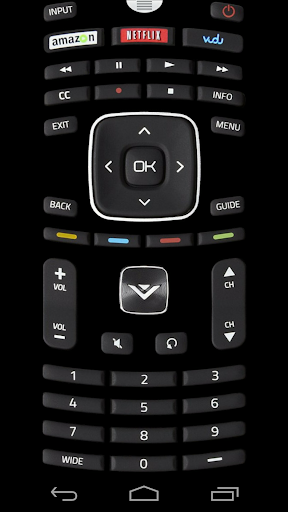
Analysis by Reviewed APKs
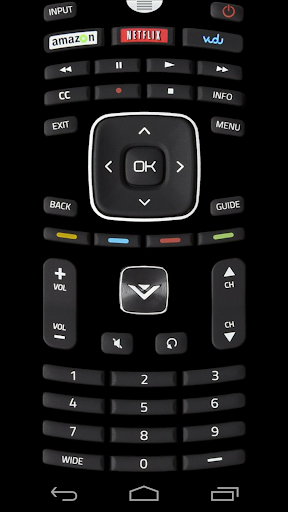
Remote Control for Vizio TV turns a compatible Android phone or tablet with an infrared blaster into a basic remote for a Vizio television. It suits people who have misplaced the original remote and happen to own the right kind of device. My overall take is straightforward: the idea is handy, but the built-in IR requirement makes compatibility the first thing to check, not an afterthought.
A Spare Remote at Home
When I first considered how I would use this, I pictured the familiar couch moment: the TV is on, the remote has slipped between cushions, and I want to adjust the volume without getting up. With a compatible phone, this app can serve as a spare control for the television. The important detail is that commands travel through infrared, so the phone needs an IR blaster and a clear line toward the TV.
That makes the app most useful as a backup kept ready for ordinary viewing, rather than a remote that works from anywhere in the room. The description gives a usual range of about three to ten feet and says to point the phone directly at the television. I would keep that in mind before settling in: if the phone is aimed away or blocked, the convenience can disappear at exactly the wrong moment.
A Different Kind of Remote
The obvious alternative is the physical remote that came with the TV. This app has a narrower advantage: it can be useful when that remote is missing or out of reach, provided the phone has the required hardware. It is not a general TV-control solution for every smartphone, and it does not replace the need to aim an infrared transmitter at the set.
It is also worth separating this from the Wi-Fi-based control experience some people may expect from a phone app. The described method is infrared, with no extra hardware required beyond a compatible device’s built-in blaster. That is a simple setup in one sense, but it limits who can use it. If your device lacks an IR blaster, the central requirement is not met.
Small Habits That Help
I would start by checking whether the phone or tablet has a built-in IR blaster, then test the app while standing close enough to point it steadily at the television. The listed working range is about three to ten feet, so there is no need to stretch that distance in the first test. A clear view between the device and TV is the practical habit that matters most.
Tablet owners may need to pay particular attention to where the transmitter sits. The description calls out some Samsung Tab 3 and Tab 4 sizes because their IR transmitter can be on the side rather than the top. In portrait orientation, I would make sure that edge is aimed at the TV. That small check can save a confusing first attempt that looks like a failed setup.
More From Our News Desk

Zoom Meetings, Google Meet, or Teams: Which Is Easiest to Join?

How I Build a Free Streaming Lineup With Tubi

Why Crunchyroll Is the Default Anime App for So Many Fans

YouTube TV: A Practical Guide to Cutting Cable

Rummikub and the Small Comfort of Phone Games

TeamViewer Remote Control or AnyDesk for Helping Family?
Who May Find It Useful
I would recommend Remote Control for Vizio TV to someone who owns a Vizio television and a phone or tablet with a built-in IR blaster. It makes the most sense as a convenient backup for basic viewing routines, especially if the household remote regularly goes missing. The app is free, so trying it does not require a purchase, though ads are present.
It may not suit people using newer phones or tablets without infrared hardware, or anyone who expects control to work without pointing the device at the TV. Those are not small caveats; they define the app’s basic method. If you cannot confirm your device has an IR blaster, I would check compatibility before relying on this as a replacement remote.
Remote Control for Vizio TV is developed by npe and is categorized under Video Players & Editors. On Google Play it has over one million installs and a 3.5-star rating from about 5,600 ratings. It is free to download, contains ads, and has no in-app purchases. Its content rating is Everyone.
The app’s current version is 1.4.0. It was released on August 13, 2014, and was last updated on December 31, 2025. The Android minimum requirement is not included in the available app details, so check Google Play for the requirement shown for your device.
The Details of Infrared Control
First Check: The Hardware
My first impression is that compatibility matters more than anything about the interface. This app depends on the phone or tablet’s built-in infrared LED, also called an IR blaster. The description names examples including certain HTC One, LG, Lenovo, Alcatel, and Samsung Galaxy devices, but the list is not a promise that every model in those families will work.
Before trying to use it as a daily remote, I would verify that the exact device has an IR blaster. The app does not require additional hardware, which keeps the setup concept simple, but that does not make an ordinary phone infrared-capable. It is an old-school, direct-control approach rather than a universal connection method.
Once the hardware question is settled, the physical positioning is easy to understand: point the transmitter at the TV. That straightforward instruction also explains the main source of friction. If the phone is held at an awkward angle or the transmitter is on a different edge than expected, a command may not reach the set.
Everyday TV Control
In daily use, the appeal is having a control option on a device that is already nearby. If I am watching a show and want to make a basic adjustment, I can reach for the phone instead of searching the room for the original remote. The app is designed to control a Vizio TV, so it has a focused job rather than trying to manage every device in a living room.
The infrared connection means the phone needs to face the television, and the stated usual range is three to ten feet. I would treat that as a practical boundary when using it from the couch. This is less about tapping from another room and more about keeping a usable spare within reach and aimed in the right direction.
That distinction is worth understanding before installing. When an infrared remote works, it feels familiar and immediate; when it does not, checking distance and direction is a sensible first step. The method is simple, but it depends on the physical setup in a way that a network-connected control app would not.
What Stands Out
The defining feature is not a long list of smart extras; it is the use of a phone’s built-in IR blaster to send commands to the TV. That keeps the app’s purpose clear. There is no additional accessory required according to the description, which is useful if the compatible phone is already in hand.
I also appreciate that the instructions call out the direction of the transmitter rather than assuming every device places it in the same spot. The note for certain Tab 3 and Tab 4 tablets is especially practical: the transmitter may be on a side edge, so holding the tablet upright does not automatically point it at the television.
The app is specifically presented as a remote for Vizio TVs, and the description makes clear it is not affiliated with or endorsed by Vizio. I would view it as a third-party control option, not an official Vizio service or a broader smart-home hub.
A Simple Backup Routine
A sensible routine would be to keep the app on the compatible device you usually have in the living room, then test it while the physical remote is still available. That way, I can check whether the transmitter is aimed correctly and whether the TV responds before I actually need a backup. A quick test at a few feet is more useful than discovering a problem during a movie.
If the app does not seem to work, I would first bring the device within the stated range and point its IR LED directly at the TV. On a tablet, I would check which edge contains the transmitter and adjust my grip accordingly. These are small steps, but they follow the app’s actual operating method rather than guessing at a network or pairing issue.
For a household where the remote often wanders, this can be a practical fallback. I would still keep the original remote around, since the app depends on one compatible device and a direct infrared path. Think of it as another way to control the television, not a reason to discard the hardware that came with it.
Limits to Keep in Mind
The biggest limitation is device compatibility. Many phones do not have a built-in IR blaster, and this app’s described method depends on one. The examples in the description can help narrow the search, but I would confirm the exact phone or tablet rather than assume a model family is enough.
The second limitation is line of sight and range. The phone must be pointed directly at the TV, with a usual working distance of about three to ten feet. That may feel less flexible than a remote that works through a network, and it makes phone placement and orientation part of the experience.
Finally, the app contains ads, and its store rating is 3.5 stars. Those facts are worth weighing alongside the narrow, practical purpose. If the required hardware is present and a spare remote is all you need, the idea is easy to understand; without that hardware, the app is unlikely to solve the problem.
Remote Control for Vizio TV is a focused utility with a clear condition attached: the Android device needs a built-in IR blaster, and you need to aim it at the television. I like the practicality of turning a compatible phone into a backup, but this is not a universal remote app that will work on any handset.
I would try it if I owned a compatible device and wanted a free spare for a Vizio TV. I would skip it if my phone lacked infrared or if I expected control from anywhere without pointing at the set. Check the device requirement first, then judge it as a simple, ad-supported backup.
Remote Control for Vizio TV Frequently Asked Questions
What is Remote Control for Vizio TV used for?
Remote Control for Vizio TV is an Android app intended to control a Vizio television using the phone or tablet’s built-in infrared blaster. You need to point that transmitter directly at the TV; the described usual working range is about three to ten feet. It is most relevant as a spare control option for compatible devices.
Which devices can run Remote Control for Vizio TV?
The app is for Android phones and tablets with a built-in IR blaster. Its description gives examples from several HTC, LG, Lenovo, Alcatel, and Samsung device lines, but compatibility can depend on the exact model. Check the device details in Google Play and confirm that your device has infrared hardware before relying on it.
What Android version does Remote Control for Vizio TV require?
The minimum Android version can vary by device and app availability. Check the Google Play store page for the requirement currently shown for your phone or tablet. Regardless of Android version, the app’s described control method requires a built-in IR blaster and a direct aim toward the television.
Does Remote Control for Vizio TV cost money?
The app is free to download and has no in-app purchases. It contains ads. Store details can change, so Google Play is the best place to check the current availability and any terms shown for your device before installing.
Is Remote Control for Vizio TV suitable for every Vizio owner?
It may suit Vizio TV owners who have a compatible Android device with an IR blaster and want a backup remote. It is not a fit for a phone without that hardware, and you must point the transmitter at the TV. Check your device’s compatibility first; the app is not affiliated with or endorsed by Vizio.
Pros
- Uses a compatible device’s built-in IR blaster, so no additional hardware is needed.
- Free to download, with no in-app purchases.
- Clear range and aiming guidance helps set realistic expectations.
- Useful as a backup when the physical remote is misplaced.
Cons
- Requires an Android phone or tablet with a built-in IR blaster.
- Needs direct aiming at the TV, with a usual range of three to ten feet.
- Contains ads, and compatibility depends on the exact device.
- Category
- Video Players & Editors
- Version
- 1.4.0











