RØDE Central Mobile
- 1.23K
- 2.3
- Installs
- 100.00K
- Price
- Free
Screenshots
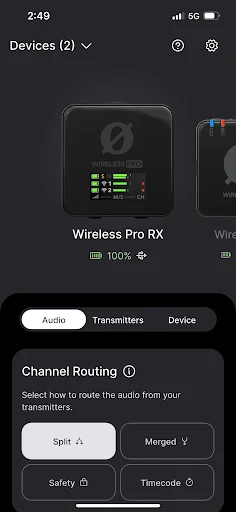
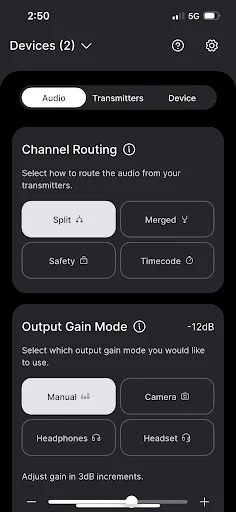
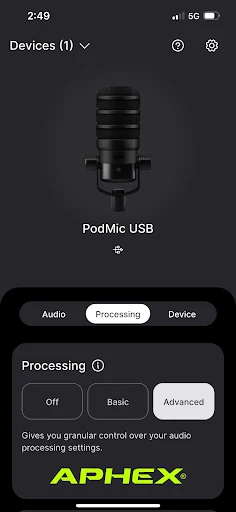
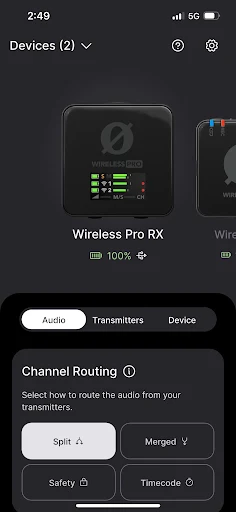
Analysis by Reviewed APKs
RØDE Central Mobile is a companion app for changing settings on compatible RØDE microphones, checking device information and updating firmware. I’d recommend it to people who already use supported RØDE gear and want to adjust it from a phone rather than reach for a computer. Its purpose is specific, and that focus is useful: this is a control and configuration tool, not a general recording studio or audio library.
Before The Recording Starts
When I first opened RØDE Central Mobile, I pictured using it in the few minutes before a recording: check the microphone, set the input behavior, then get on with the interview or video. That is the app’s central job. Depending on the connected product, I can adjust options such as gain, routing, filtering or monitoring, and check information like battery level and firmware version.
That kind of preparation matters when I’m setting up away from my desk. For a conversation recorded on location, I might want to check that a Wireless ME is configured the way I expect, or adjust a VideoMic GO II’s input gain and high-pass filter. The available controls depend on the microphone, so the app is best understood as a companion for supported RØDE hardware rather than a universal audio remote.
A Companion, Not A Studio
Compared with opening desktop configuration software, the mobile app is appealing when I want to make a quick adjustment without sitting down at a computer. It also gives supported devices access to onboard processing and firmware updates. That makes it a practical extra in a mobile recording kit, especially when a setting needs changing between takes or before a session begins.
It is not a general-purpose audio recorder, editor or podcast production suite. The controls are tied to compatible RØDE products, and the app’s job is to configure those devices rather than replace the microphone or capture workflow. There is also an important distinction for Wireless GO II owners: accessing its onboard recordings requires the desktop version of RØDE Central, not this mobile companion.
Make Checks A Habit
I’d get the most from the app by making a short pre-session check part of my routine. Confirm the device information, look over battery levels where available, and verify the settings that matter for the particular microphone. That small pause can be more useful than changing several controls in a rush once someone is already speaking.
It also helps to treat settings as device-specific rather than expecting every RØDE microphone to offer the same choices. A Wireless PRO has routing and timecode options, while the NT-USB+ includes processing controls such as a noise gate and compressor. I’d note which adjustments I actually use, then revisit only those when a recording setup changes.
More From Our News Desk

Zoom Meetings, Google Meet, or Teams: Which Is Easiest to Join?

How I Build a Free Streaming Lineup With Tubi

Why Crunchyroll Is the Default Anime App for So Many Fans

YouTube TV: A Practical Guide to Cutting Cable

Rummikub and the Small Comfort of Phone Games

TeamViewer Remote Control or AnyDesk for Helping Family?
Who Will Find It Useful
I’d recommend RØDE Central Mobile to RØDE microphone owners who regularly record interviews, voiceovers, podcasts or video away from a fixed studio. It is especially useful if the supported device has settings you want to adjust on the spot, or if you want to check device details and handle firmware updates from a mobile companion app.
It may not suit someone looking for an app to record, edit or organize audio files, or someone without compatible RØDE equipment. The available options vary by microphone, so the experience is more tailored than a broad audio utility. Wireless GO II users should also keep in mind that onboard recordings are accessed through the desktop version of RØDE Central.
RØDE Central Mobile is published by RØDE Microphones and is in the Music & Audio category on Google Play. It has over 100,000 installs and a 2.3-star rating from 1,229 ratings. The app is rated Everyone. Those figures give a sense of its reach and store feedback, but the app’s usefulness depends most on whether you own a microphone it supports.
The app is free to download, with no in-app purchases or ads. The supplied version is 2.1.2, released July 18, 2021, and last updated October 25, 2026. No minimum Android version is included in the available app details, so it is worth checking the Google Play store page for current device compatibility before installing.
A Closer Look At The Controls
First Setup Impressions
My first impression is that RØDE Central Mobile has a focused role: it connects the phone to compatible RØDE microphone settings and device information. Rather than treating the app as a destination for making recordings, I’d open it when I need to prepare or manage a microphone. That narrower purpose makes it easier to understand what it is for, as long as the hardware is part of my setup.
The useful first step is identifying which microphone I’m configuring, because the controls differ across the supported range. The app covers products including Wireless ME, Wireless GO II, VideoMic GO II, AI-Micro, NT-USB+, Wireless PRO and PodMic USB. Once I know which one I have, I can focus on the settings relevant to that device instead of expecting every menu or control to apply universally.
Day-To-Day Adjustments
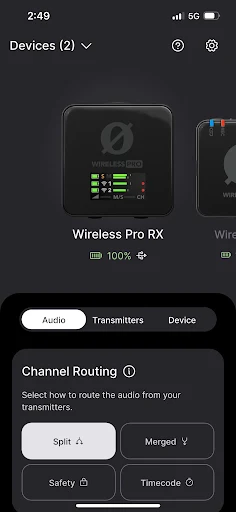
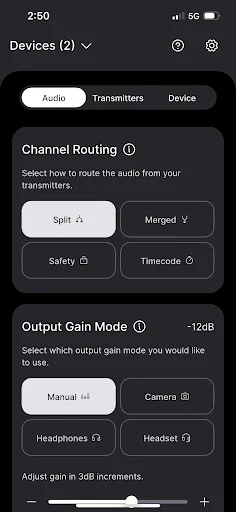
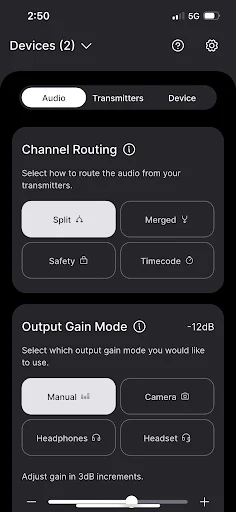
In everyday use, I’d reach for the app when the recording conditions change. A different room or speaking distance might call for an input adjustment, while a new setup could make split or merged routing more appropriate on a supported wireless microphone. Other available controls include monitoring, output gain and filtering. The exact choices depend on the device, but the overall value is having those configuration options in a mobile companion.
Device information is another practical part of the routine. Checking details such as battery levels, clock and firmware version can help me understand the state of a supported microphone before a session. Firmware updates are available through the app as well. I would still make time to check settings deliberately; having controls nearby is convenient, but it does not remove the need to choose settings that suit the particular recording.
Processing And Device Controls
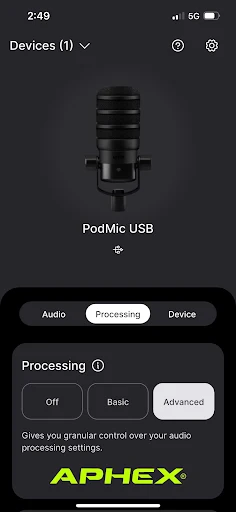
The processing options are among the more distinctive parts of the supported feature set. On the NT-USB+, for example, the app can control a high-pass filter, noise gate and compressor, along with Aphex Aural Exciter and Big Bottom processing. It can also save settings to that microphone so they persist. That is more than a simple status screen, though these controls remain tied to the compatible hardware.
Other microphones have their own useful specifics. The VideoMic GO II offers high-frequency boost, a pad and direct monitoring controls, while the AI-Micro includes input modes and gain controls for its two inputs. Wireless PRO settings include routing choices, timecode and frame-rate options. I like that the app’s role can extend beyond basic setup, while remembering that a feature available for one model may not appear for another.
A Simple Preflight Routine
For a practical workflow, I’d open the app before packing up or starting a recording, select the microphone I’m using, and check its relevant settings. On a wireless setup, that could mean confirming routing or gain mode. With a USB microphone, I might look at gain and processing. I’d also check device information and firmware, then close the app and concentrate on the recording itself.
If I change microphones or move between recording situations, I’d repeat the check rather than assume yesterday’s setup is right. A few options can affect how the device behaves, and the available controls vary by product. That habit keeps the app useful without turning it into a distraction: it is there to prepare and configure compatible gear, not to be open throughout every recording.
Limits To Keep In Mind
The biggest limitation is the app’s dependence on supported RØDE microphones. Without compatible hardware, there is little reason to install it, and owners of different models will see different controls. It also does not take the place of a broader recording or editing app. I would not choose it expecting a complete audio production workflow on my phone.
Wireless GO II users should pay special attention to the distinction between settings and recordings. RØDE Central Mobile can configure supported device options, but access to Wireless GO II onboard recordings requires desktop RØDE Central. That is an easy detail to overlook if I’m trying to manage everything from a phone. Checking the store page for device compatibility and requirements before installing is sensible, too.
RØDE Central Mobile makes sense as a focused companion for people already using compatible RØDE microphones. Its device settings, information and firmware tools can make a mobile recording setup easier to manage, and some models get access to substantial processing controls. It is not a recorder or editor, and its value depends on the microphone in your bag.
I’d recommend it to RØDE owners who want to configure their gear from a phone and are comfortable checking model-specific options. If you need an all-in-one audio app, or want Wireless GO II onboard recordings on mobile, this is not the right tool for that job.
RØDE Central Mobile Frequently Asked Questions
What is RØDE Central Mobile used for?
RØDE Central Mobile is a companion app for configuring compatible RØDE microphones. Depending on the device, it can adjust settings and processing, show device information and update firmware. It is not a general audio recorder or editor. Wireless GO II onboard recordings require the desktop version of RØDE Central.
Which devices can I use RØDE Central Mobile on?
The supplied details describe the Android app on Google Play. It supports a range of RØDE products, including Wireless ME, Wireless GO II, VideoMic GO II, AI-Micro, NT-USB+, Wireless PRO and PodMic USB. Device compatibility and the available controls can vary, so check the Google Play store page for current details.
What Android version does RØDE Central Mobile require?
The app details provided do not include a minimum Android version. Requirements can vary as the app and devices are updated, so check the Google Play store page for the current compatibility information before installing.
Does RØDE Central Mobile cost money?
RØDE Central Mobile is free to download on Google Play. The supplied details say it has no in-app purchases and contains no ads. Store information can change, so it is worth checking the current Google Play page before downloading.
Is RØDE Central Mobile right for every audio user?
It is best suited to people who own a compatible RØDE microphone and want to configure it from a phone, check device information or update firmware. It may not suit users looking for recording and editing tools or people without supported hardware. The available features depend on the microphone model.
Pros
- Provides mobile access to settings for a range of compatible RØDE microphones.
- Includes device information and firmware updates alongside configuration controls.
- Offers processing options on supported models, including filtering and compression.
Cons
- Its usefulness depends on owning a compatible RØDE microphone.
- Available controls differ by device, so not every feature applies to every owner.
- Wireless GO II onboard recordings require the desktop version of RØDE Central.
- Category
- Music & Audio
- Version
- 2.1.2











