Rap Fame - Rap Music Studio
- 172.57K
- 4.7
- Installs
- 10.00M
- Price
- Free

Screenshots
Analysis by Reviewed APKs
Rap Fame - Rap Music Studio is for people who want to record rap vocals over beats and share the results with a hip-hop community. It combines a phone-based recording studio with profiles, charts, contests, chat, and collaboration features. I like that it gives a new rapper somewhere to start without requiring a separate beat library and social app, though its community side may be more than a solo hobbyist needs.
From lyric idea to track
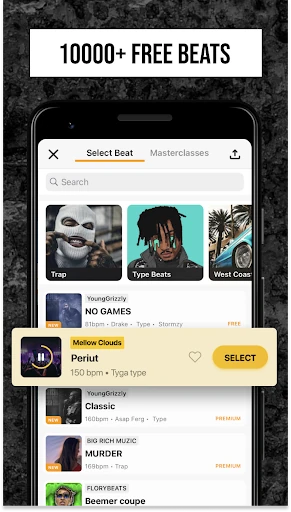
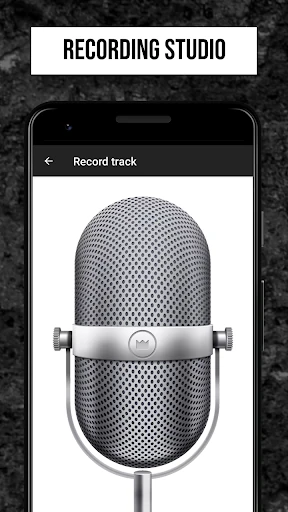
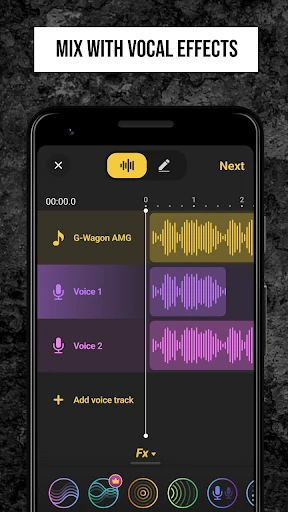
Imagine getting a verse idea while you have a few minutes at home and want to hear it over a beat. In Rap Fame, I can choose from the free beat library, record a rap, and work with vocal effects, an equalizer, or pitch changing. That makes the app feel geared toward trying out a complete performance, rather than simply capturing a voice memo with no musical backing.
The appeal is that recording and sharing sit alongside one another. After making a track, a rapper can showcase music on a profile and connect with listeners or other artists in the app. I can see that being useful when I want a reaction to a new verse, or when I am looking for someone to collaborate with. It gives the act of recording a social next step.
Studio and community, together
The obvious alternative is to use one app for recording and another place to share music or meet collaborators. Rap Fame brings those jobs into the same hip-hop-focused space: it has recording tools, a beat library, profiles, a feed, charts, chat, and contests. That concentration is its strongest distinction. It gives aspiring rappers a place to make tracks and find an audience without treating the community as an afterthought.
I would not mistake it for a general-purpose music workstation or a broad social network. Its stated tools and community are aimed at rap and hip-hop, and the app’s studio centers on recording over beats with vocal effects. If I only want to edit a non-rap project, or just record a private voice note, the community and performance features may be beside the point. Its best fit is someone who wants to make and share rap.
Make the most of a session
A useful habit is to begin with a beat that suits the mood of the verse, then focus on the vocal take before spending time on effects. The equalizer, pitch changer, and other audio effects give me options to shape the sound afterward. Keeping the first pass simple can make it easier to judge whether the words and delivery work before I start adjusting the vocal treatment.
The community tools can also become part of a creative routine. I might share a track on my profile, listen to music in the HOT Feed, or look for a collaborator through the hip-hop community and chat. Charts and weekly contests offer other ways to put work in front of people. Those features are most useful when I am comfortable sharing; someone who prefers to keep every draft private may get less from them.
More From Our News Desk

Zoom Meetings, Google Meet, or Teams: Which Is Easiest to Join?

How I Build a Free Streaming Lineup With Tubi

Why Crunchyroll Is the Default Anime App for So Many Fans

YouTube TV: A Practical Guide to Cutting Cable

Rummikub and the Small Comfort of Phone Games

TeamViewer Remote Control or AnyDesk for Helping Family?
Who might enjoy it
I would recommend Rap Fame to an aspiring rapper who wants a straightforward place to record over beats, experiment with vocal effects, and share tracks with people who care about hip-hop. It also makes sense for listeners who want to discover underground rap and for beat makers interested in submitting custom beats to the public library. The combination is appealing if making music and finding a community are both part of the goal.
It may be a weaker match for someone seeking a private, focused recording tool with no social dimension, or a broader studio for music outside rap. The app puts profiles, charts, a feed, contests, chat, and collaboration alongside recording, so there is plenty to explore beyond making a take. I would also keep in mind that some offerings involve subscriptions or in-app purchases, rather than assuming every option is included at no cost.
Rap Fame - Rap Music Studio is developed by Rap Tech Studios and is listed in the Music & Audio category on Google Play. It has over 10 million installs and a 4.7-star rating from around 173,000 ratings. The app is free to download and is rated Teen. These figures give a useful sense of its reach, although ratings and install totals can change over time.
The app requires Android 7.0 or later, and the current version in the supplied store details is 3.77.0. It was released on May 20, 2015, and last updated on February 9, 2026. Google Play indicates in-app purchases, with listed items ranging from $0.99 to $400.00 each. It does not contain ads, according to the supplied app facts.
A Rap Studio With a Social Side
A focused first impression
When I first open Rap Fame, the premise is easy to understand: this is a place for making rap, not just listening to it. The beat library gives a new user a starting point, while the recording studio’s vocal effects, equalizer, and pitch changer point toward shaping a performance. I appreciate that the app’s identity is specific. It does not present itself as a catch-all tool for every kind of music.
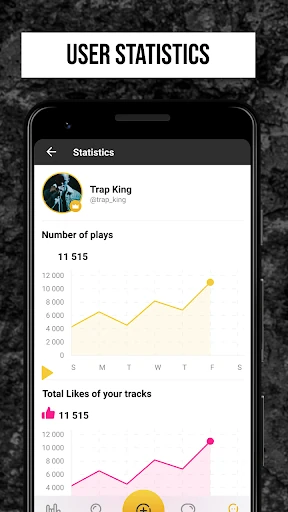
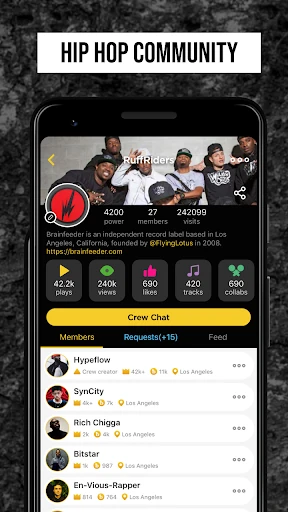
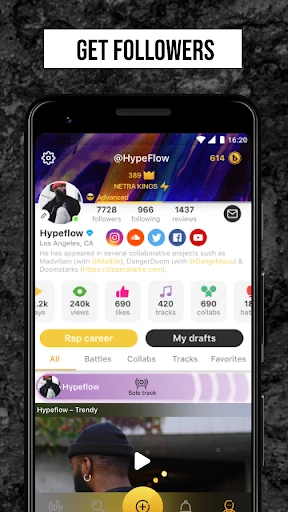
Getting into the broader experience means thinking about what I want from the app. I can approach it as a studio for trying out lyrics, or as a community where I can post tracks and connect with other rappers. Profiles can showcase tracks, social links, and stats, so sharing is built into the idea of using the app. That combination sets expectations early: recording is central, but it is not the only reason to return.
Recording day to day
The core activity is recording a rap over a beat. I can browse the free beat library, choose a backing track, and work on a vocal performance with the available audio effects. The equalizer and pitch changer give the recording side more character than a basic capture tool. I would treat these as creative options for experimenting with a take, rather than assuming an effect will make every recording sound polished.
That workflow suits short creative windows. If I have a verse ready, I can focus on laying it down over a beat and then decide whether to refine the vocal sound or share it. Rap Fame’s description also emphasizes freestyle recording, so it can suit spontaneous ideas as well as more considered tracks. The experience is most compelling when I want to make something in a rap context, not simply store audio.
Tools beyond the beat
The standout feature set is the combination of a beat library and vocal processing. Rap Fame describes audio effects, an equalizer, and pitch changing, including an auto-tune option for tuning vocals to a scale. That gives a rapper several ways to experiment with how a voice sits against a beat. I like that the app makes this creative layer part of its main purpose instead of treating recording as an isolated function.
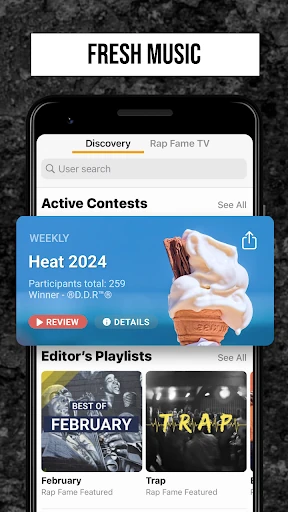
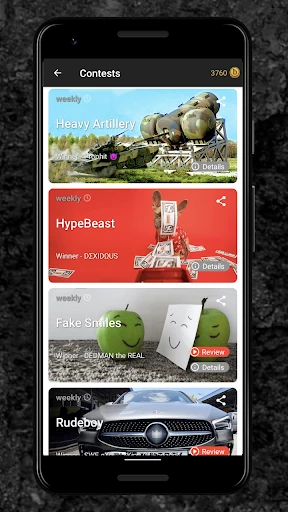
The other notable tools are about putting music in front of people. A profile can showcase tracks, links, and stats; the HOT Feed highlights tracks, collaborations, and videos; and top-chart placement is tied to likes, plays, and comments. The app also offers weekly rapping contests and direct chat with other community members. Taken together, those features make the app feel like a music-making space with an audience built around it.
A simple creative routine
For a low-pressure session, I would start by picking a free beat and recording a rough take before worrying about presentation. Then I could revisit the vocal with the equalizer or pitch tools, listen to the result, and decide whether the track is ready to share. This keeps the process focused on the performance first. It also gives me a reason to use the studio tools as part of a repeatable habit.
When I want feedback or company, I can move from recording into the community side. Sharing a track on a profile, browsing the HOT Feed, chatting with other rappers, or looking for a collaboration are all described uses. A contest is another possible outlet for a finished performance. I would approach those options as ways to participate and connect, not as promises of attention or a particular outcome.
Keep expectations grounded
Rap Fame’s range is a strength, but it can also make the app feel less focused if all I want is a quiet recording space. The feed, charts, contests, profiles, and chat are substantial parts of the concept. A rapper who enjoys sharing work may see that as extra creative motivation; someone who wants to record privately may prefer to ignore much of the social layer.
I would also keep the distinction between free access and paid options in mind. The app is free to download, but Google Play lists in-app purchases, and the description mentions a subscription for rapping over custom beats. The free beat library is a useful starting point, but I would check the store details before committing to any purchase. The studio is rap-focused, so it is not an obvious fit for every music-making project.
Finally, community features are only as useful as the kind of participation I want. Charts, comments, contests, and collaboration invite me to share and interact; they are not essential to simply trying a verse over a beat. That makes Rap Fame easier to assess by starting with one goal, such as recording a track, and exploring the social tools only if they suit my style.
Rap Fame - Rap Music Studio brings together the basics of making a rap track and the community around sharing one. I like its clear focus, free beat library, and mix of recording tools with profiles, chat, and collaboration. The main trade-off is that it is as social as it is creative, and some options involve purchases.
I would try it if I wanted to record rap on Android and was curious about sharing work with other hip-hop fans. It is less compelling if I only need a private recorder or a general music studio. For the right user, it offers a practical place to experiment, make a track, and see where the community side leads.
Rap Fame Frequently Asked Questions
What is Rap Fame - Rap Music Studio used for?
Rap Fame is for recording rap over beats, shaping vocals with audio effects, an equalizer, and pitch changing, and sharing tracks with a hip-hop community. It also includes profiles, a feed, charts, contests, chat, and collaboration features. That makes it useful for people who want both a place to make rap and a way to connect around it.
Which devices can run Rap Fame - Rap Music Studio?
Rap Fame - Rap Music Studio is an Android app available through Google Play. The supplied requirements specify Android 7.0 or later. If you are checking compatibility for a particular phone or tablet, it is worth reviewing the Google Play store entry for the device you plan to use, since availability can vary.
What Android version does Rap Fame require?
The listed minimum requirement for Rap Fame - Rap Music Studio is Android 7.0. Devices running an older version may not meet that requirement. The current app version in the supplied details is 3.77.0, and checking Google Play is a sensible way to confirm compatibility and the latest version for your device.
Is Rap Fame - Rap Music Studio free?
Rap Fame is free to download and does not contain ads, according to the supplied Google Play details. It does offer in-app purchases, with listed prices ranging from $0.99 to $400.00 per item. The description also mentions a subscription for using custom beats, so check the store for current purchase details before choosing paid options.
Who is Rap Fame - Rap Music Studio best for?
It is best suited to aspiring rappers, beat makers, and hip-hop listeners who want recording tools and a community for sharing or discovering tracks. People who want to collaborate, chat, or enter rapping contests may also appreciate its social side. If you only want private recording or a general-purpose music studio, its rap focus may be less suitable.
Pros
- Combines a rap recording studio with a beat library and vocal effects.
- Profiles, chat, collaboration, and a feed support a hip-hop community.
- Free to download and does not contain ads.
- Includes charts and weekly rapping contests for sharing performances.
Cons
- Its social features may distract users who only want private recording.
- Some options involve in-app purchases, including a subscription for custom beats.
- The studio and community are specifically focused on rap and hip-hop.
- Category
- Music & Audio
- Version
- 3.77.0











