PREMIER Credit Card
- 252.81K
- 4.6
- Installs
- 1.00M
- Price
- Free
Screenshots
Analysis by Reviewed APKs
PREMIER Credit Card is a companion app for managing a PREMIER Bankcard credit card: checking balances and transactions, making payments, and handling a few account settings. I found its appeal in the everyday basics rather than a broad financial toolkit. It should suit cardholders who want a quick way to keep an eye on their account, though it is not a general-purpose budgeting or credit-comparison app.
A quick account check
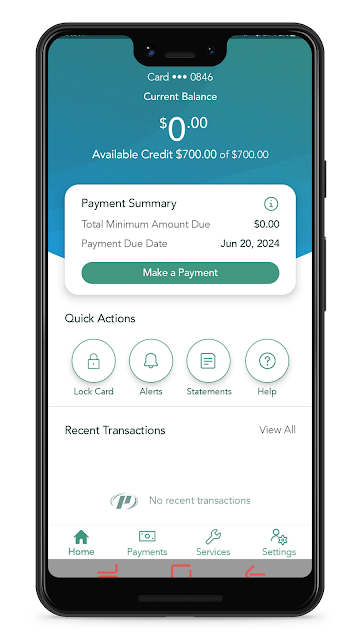
Picture the usual moment: I’m about to buy groceries and want to check what has recently gone onto my card. PREMIER Credit Card brings the account balance and recent transactions into one place, so I can take a look before paying. That simple check is the app’s central job. It keeps the focus on the card rather than making me sort through a broader set of banking or money-management tools.
After the purchase, I can check the transaction list again and get a clearer view of activity on the account. If the monthly payment is coming up, the app also lets me make a payment. I like that these basic tasks sit together: checking, reviewing, and paying are the reasons I’d open a card-management app in the first place. The experience is most useful when I need a direct account update, not a full financial overview.
A card tool, not a budget
Compared with a general budgeting app, PREMIER Credit Card has a much narrower purpose. It is built around a PREMIER Bankcard account, with account balances, recent transactions, payments, card locking, statements, and profile updates. That focus can be a plus if I want to handle card tasks without extra features competing for attention. It also means the app is not a place to manage a household budget or bring together accounts from different providers.
It is also not a credit-card comparison service or a general guide to choosing financial products. The useful question here is whether I already have a PREMIER Bankcard account and want to manage it from my phone. If I do, the app covers several routine account tasks. If I’m looking for wider spending analysis or information about other cards, this is not the tool I’d reach for.
Small habits that help
I’d get the most from the app by making a short account check part of an existing routine, such as reviewing transactions after a shopping trip. Looking at recent activity while the purchase is still fresh makes it easier to recognize what I’m seeing. The app’s balance view gives that check useful context, while the payment option is there when it is time to take care of the monthly bill.
Paperless access is another practical habit if I prefer to keep account documents on my phone. The app lets users view statements and letters, so I can check those alongside the account rather than treating them as a separate task. I’d also keep my profile current and use the lock or unlock control when I need to manage card access. These are simple uses, but they fit the app’s focused design.
More From Our News Desk

Zoom Meetings, Google Meet, or Teams: Which Is Easiest to Join?

How I Build a Free Streaming Lineup With Tubi

Why Crunchyroll Is the Default Anime App for So Many Fans

YouTube TV: A Practical Guide to Cutting Cable

Rummikub and the Small Comfort of Phone Games

TeamViewer Remote Control or AnyDesk for Helping Family?
Who will find it useful
I’d recommend PREMIER Credit Card to existing PREMIER Bankcard cardholders who want a straightforward mobile route to their account. It makes sense for someone who checks a balance, reviews recent transactions, pays a monthly bill, or wants to view statements and letters without relying only on a computer. The ability to lock or unlock the card and update profile details adds a few useful account controls to that everyday mix.
It may not suit people who want one app for all their finances, detailed budgeting, or comparisons between credit cards. Its usefulness depends on having a PREMIER Bankcard account to access, and its features stay centered on that account. I’d also be cautious about expecting tools beyond the stated basics: this is best approached as a practical card-management companion, not as a complete personal-finance service.
PREMIER Credit Card is developed by PREMIER Bankcard and is available on Google Play for free. The app has over one million installs and a 4.6-star rating from about 253,000 ratings. It is marked Everyone on Google Play. There are no in-app purchases or ads listed in the provided app details.
The supplied app details give version 3.19.6, a release date of September 16, 2019, and a last update date of August 26, 2026. To access an account, users can sign in with an existing MyPremierCreditCard.com username and password, or create credentials through the app. The minimum Android version is worth checking on Google Play for the device you plan to use.
The everyday account tasks that matter
Getting started
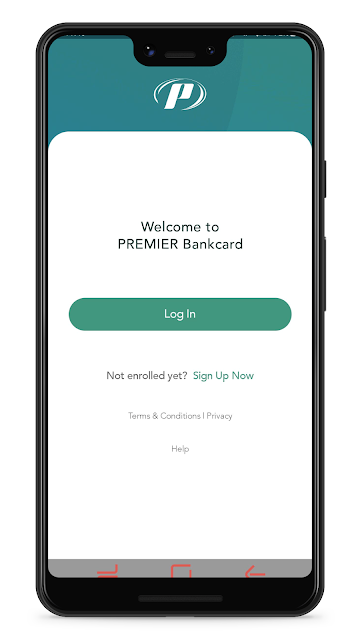
My first impression is that this app has a clear audience: people who already use a PREMIER Bankcard credit card. Account access uses the same username and password as MyPremierCreditCard.com. If I haven’t created an account login yet, the app offers a way to create one. That keeps the first step tied to the existing card relationship rather than asking me to learn a separate financial service.
Once I’m in, the main reasons to return are easy to understand: check the balance, look at recent transactions, or handle a payment. I appreciate that kind of clarity in a utility app. It also sets expectations early. I’m not opening it to explore a dashboard of unrelated services; I’m opening it because I want to do something with this card account.
The daily account check
The day-to-day value comes from being able to check account information when it is convenient. Before making a purchase, I can review the balance; afterward, recent transactions give me a way to revisit account activity. Those are small checks, but they can make the app useful between monthly payments, rather than something I install and only remember when a bill is due.
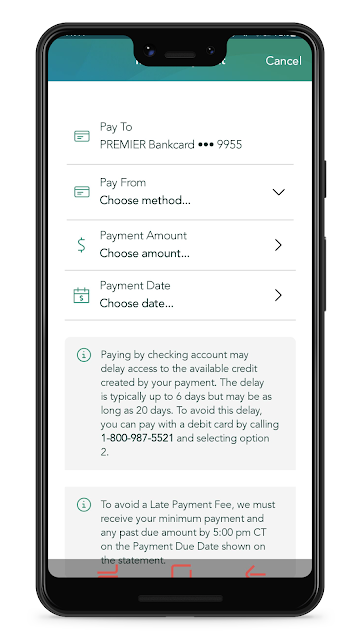
Payment access is the other core part of the routine. When it is time to make a monthly payment, I can do that through the app instead of treating payment as a separate task elsewhere. I’d still think of this as a focused account utility, not a substitute for keeping track of my broader finances. Its strength is getting the listed card tasks into one mobile destination.
Useful account controls
The lock and unlock control is a notable addition to the basic balance-and-payment set. It gives cardholders a way to manage whether the card is locked or unlocked from the app. I like seeing a practical control alongside account information, though I’d keep my expectations precise: the feature described is locking and unlocking, not a promise of additional security tools or alerts.
Paperless access is useful for a different reason. Users can view statements and letters in the app, which can make account documents easier to revisit during an ordinary account check. Profile updates round out the feature set. Taken together, these options make the app more than a balance viewer, while keeping it firmly within the bounds of managing one card account.
A monthly routine
A simple routine might start with checking recent transactions once after a week of errands, then looking at the balance to see where the account stands. When the monthly payment is due, I can return to make it. I’d also take a moment to review a statement or letter if I need an account document. That is not an elaborate system, but it gives the app a predictable place in my monthly habits.
For me, the key is to use the app for the tasks it actually supports rather than expecting it to organize every part of my money. A quick transaction review and a payment check are manageable on their own. Keeping profile information current is another occasional task, while locking or unlocking the card is a control to use when needed. The app works best as a compact companion to those routines.
Keep the scope in mind
The main limitation is its narrow focus. This is an account app for PREMIER Bankcard cardholders, not a general-purpose banking hub. The described features cover balances, payments, recent transactions, card locking, paperless documents, and profile updates. That is a useful list for routine card management, but it does not give me grounds to expect budgeting tools, spending charts, credit-score features, or card-shopping options.
There is also a practical dependency on account access: users need an existing MyPremierCreditCard.com login or have to create one through the app. Anyone considering installation should check Google Play for the Android requirement that applies to their device. Those caveats don’t undermine the basic use case, but they help set sensible expectations before making the app part of a regular routine.
PREMIER Credit Card does a focused job for people who already have the relevant account. I like that its core tasks are easy to identify: check the balance, review activity, make a payment, and access account controls or documents. It is a practical companion, not a broad financial organizer.
If you’re a PREMIER Bankcard cardholder and want those account tasks on your phone, I’d give it a try. If you need budgeting, multi-account tracking, or card comparisons, I’d look elsewhere for those needs. The app’s best quality is also its clearest boundary: it sticks to managing this card.
PREMIER Credit Card Frequently Asked Questions
What is PREMIER Credit Card used for?
PREMIER Credit Card is for managing a PREMIER Bankcard credit card account. The app lets users check balances, review recent transactions, make monthly payments, lock or unlock the card, view statements and letters, and update profile details. Access uses an existing MyPremierCreditCard.com username and password, or users can create credentials through the app.
Which phones can run PREMIER Credit Card?
The supplied app details identify PREMIER Credit Card as an Android app on Google Play. The minimum Android version may vary with the app and device, so check the Google Play store entry before installing. The provided information does not describe an iOS or desktop version.
Does PREMIER Credit Card cost anything?
The app is listed as free on Google Play, with no in-app purchases or ads in the supplied details. Your card account may have its own terms or costs, which are separate from the app’s listed price. For current app availability and store details, check its Google Play entry.
Do I need a PREMIER Bankcard account to use the app?
The app is designed to provide access to a PREMIER Bankcard credit card account. You can sign in with an existing MyPremierCreditCard.com username and password, or create one through the app. It is not described as a general finance app for managing unrelated accounts.
Is PREMIER Credit Card a good fit for budgeting?
It may suit cardholders who want to check their balance and recent transactions, make payments, and access account documents or controls. Its described features are centered on one card account, so I wouldn’t choose it as a budgeting or multi-account finance tool. If your needs are broader, look for an app designed for those tasks.
Pros
- Combines balance checks, recent transactions, and monthly payments for PREMIER Bankcard users.
- Includes card lock and unlock controls alongside routine account tasks.
- Offers paperless access to statements and letters.
- Free to download, with no in-app purchases or ads listed.
Cons
- Focused on PREMIER Bankcard accounts rather than broader financial management.
- Requires an account login or creating credentials through the app.
- Minimum Android requirement should be checked against your device on Google Play.
- Category
- Finance
- Version
- 3.19.6











