Poweramp Equalizer
- 23.59K
- 4.4
- Installs
- 5.00M
- Price
- Free

Screenshots
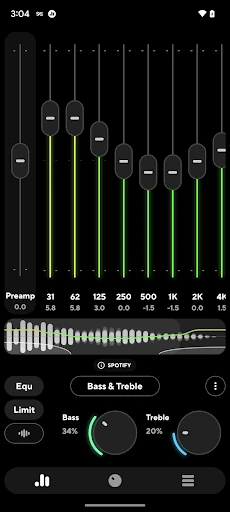
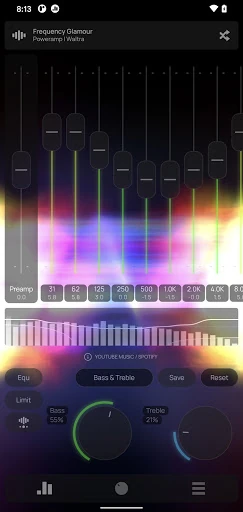
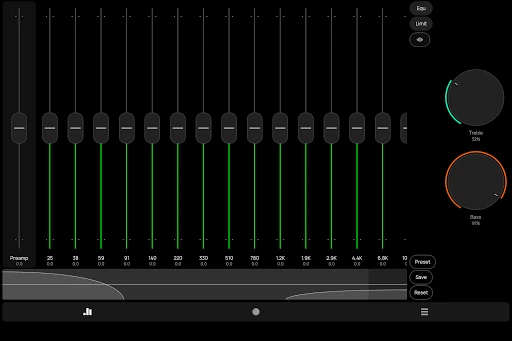
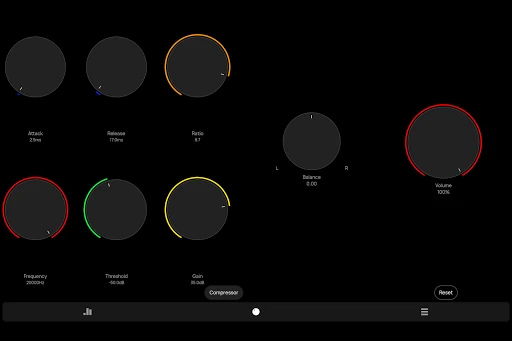
Analysis by Reviewed APKs
Poweramp Equalizer is an Android audio tool for adjusting how music and other supported audio apps sound. It suits listeners who want more control than a player’s built-in settings provide, whether that means a little more bass or carefully tuned frequency bands. I like the range of adjustments on offer, but this is a sound-shaping utility, not a music player, and getting it working can depend on the app playing your audio.
A Small Sound Tweak
When I want to make a familiar playlist feel a little less thin through headphones, an equalizer is the sort of tool I reach for before changing players or buying different gear. Poweramp Equalizer lets me adjust bass and treble, choose a preset, or build a custom sound profile. That makes it useful for ordinary listening, not just for someone who wants to spend an evening studying audio settings.
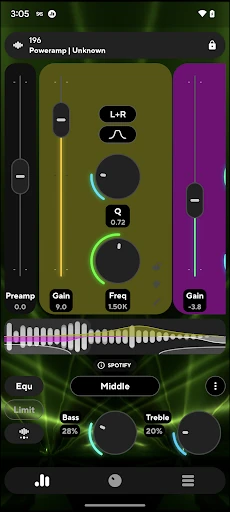
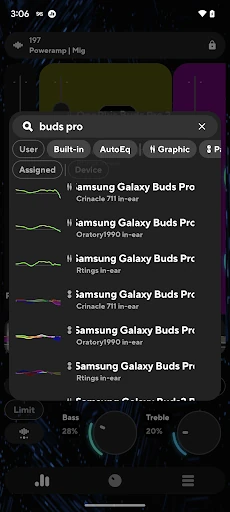
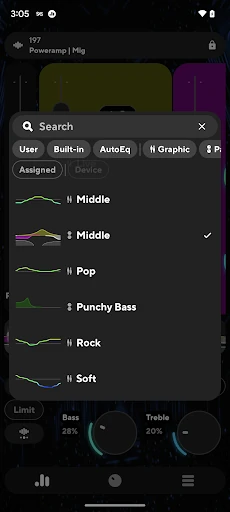
A practical session might start with music in a third-party player, then a quick switch to Poweramp Equalizer to try a preset or adjust the bands. AutoEQ presets are tuned for a device, while the equalizer also offers bass and treble controls and more detailed options. The aim is to shape playback to personal taste; the app does not provide music or replace the service or player supplying it.
A Companion, Not a Player
The obvious alternative is using the sound controls already built into a music player or streaming app. Those may be easier if I only want a quick adjustment in one place. Poweramp Equalizer is more appealing when I want configurable band counts, saved custom settings, or sound adjustments across supported third-party players. Its description says most third-party player and streaming apps are supported, though some players need their own equalizer setting enabled.
This is not a catalog, streaming subscription, or a general-purpose audio editor. It works on Android and is intended to affect playback from compatible apps. Advanced Player Tracking can extend equalization to almost any player, but it requires additional permissions. So I would not treat broad compatibility as automatic: the player, its settings, and the mode used can all matter to the experience.
Make Adjustments Deliberately
I get more from an equalizer when I change one thing at a time. I might start with a preset, listen to a few familiar tracks, and then make a small bass or treble adjustment rather than moving every band at once. Poweramp Equalizer supports both pre-made and custom settings, which gives me a low-effort starting point without giving up the option to refine the result later.
It also helps to check the player connection before deciding a setting has made no difference. If a third-party app needs its equalizer option enabled, that can be the missing step; Advanced Player Tracking is another route, with extra permissions. For a regular routine, I would keep a preferred setup for everyday headphones and use AutoEQ where its device-tuned presets fit the listening setup.
More From Our News Desk

Zoom Meetings, Google Meet, or Teams: Which Is Easiest to Join?

How I Build a Free Streaming Lineup With Tubi

Why Crunchyroll Is the Default Anime App for So Many Fans

YouTube TV: A Practical Guide to Cutting Cable

Rummikub and the Small Comfort of Phone Games

TeamViewer Remote Control or AnyDesk for Helping Family?
Who will enjoy the control
I would recommend Poweramp Equalizer to Android listeners who already have a preferred music or streaming app and want more say over its sound. It has a simple entry point in presets and bass or treble boosts, alongside deeper options such as configurable bands, parametric equalization, a limiter, and a compressor. That range makes it workable for casual experimentation as well as more deliberate fine-tuning.
It may not suit someone who wants music playback, a library, or a one-tap fix that works identically in every app. Compatibility depends in part on the player, and some setups call for an extra setting or permission. If you are happy with your player’s existing sound controls, this may be more adjustment than you need. But for listeners who enjoy tailoring playback, the flexibility is the point.
Poweramp Software Design (Max MP) develops Poweramp Equalizer, a Music & Audio app for Android. Google Play shows more than five million installs and a 4.4-star rating from about 23,600 ratings. It is free to install, with in-app purchases priced at $6.99 per item, and it contains no ads.
The app has an Everyone content rating. Its listed version is build-1033-bundle-play, with a release date of March 9, 2021, and a last update date of October 16, 2026. The supplied app details do not give a minimum Android version, so check Google Play for device compatibility before installing.
How Poweramp Equalizer Shapes Listening
First Setup and Impressions
My first impression is that Poweramp Equalizer has two audiences in mind: people who want to tap a preset and move on, and people who want to get into the details. Presets and bass or treble adjustment make the basic idea approachable. Under that, configurable bands and a parametric mode offer more control than I would expect from a simple tone slider.
The first practical step is choosing what I want to listen through and checking whether the player passes audio to the equalizer. The app says most third-party players and streaming apps are supported, but some require enabling their own equalizer setting. That is worth checking early, especially if the controls appear to have no effect; it is not necessarily a reason to start changing every sound setting.
Everyday Listening
Day to day, the appeal is being able to tailor playback without abandoning the music app I already use. I can choose a preset or adjust frequency bands, and the controls include a preamp, balance, limiter, and compressor as well as bass and treble. That breadth gives the app room to handle a quick preference change or a more considered setup for a particular listening routine.
The feature list also includes DVC, or Direct Volume Control, described as a way to improve dynamic range and clarity. I would treat that as one more option to explore rather than a promise that every device and player will sound the same. The result is still shaped by the audio app and listening setup, so a little listening and comparison matters more than chasing a single setting.
Useful Extra Controls
AutoEQ stands out because its presets are tuned for a device, giving listeners an alternative to building every adjustment by ear. The equalizer also lets users configure the number of bands from five to 32 and set their frequency ranges. For someone who likes precision, a parametric equalizer mode allows individual bands to be configured separately.
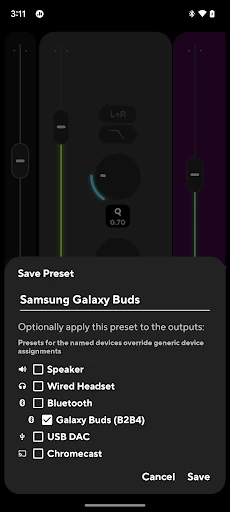
There are practical extras beyond frequency adjustments. Customizable themes, light and dark skins, and a visualizer give the interface some flexibility, while .milk presets and spectrums and Poweramp third-party preset packs are supported. The app can also resume automatically when a headset or Bluetooth connection is made, and volume-key controls can handle resume, pause, or track changes, with extra permission required for track changes.
A Repeatable Listening Routine
A sensible routine is to begin with a song or playlist I know well, pick a preset, and listen before making another change. If I want a different tonal balance, I can try the bass and treble controls first, then move to the configurable bands for finer adjustments. Familiar tracks make it easier to judge whether a tweak is actually useful rather than simply different.
For Bluetooth listening, I would check the setup with the same device I normally use and consider the auto-resume option if I want playback to respond to a headset or Bluetooth connection. If sound changes do not carry through from a third-party player, I would check that player’s equalizer setting. Advanced Player Tracking is available for broader player support, but it calls for additional permissions.
Compatibility Has Conditions
The biggest practical limitation is that “most” third-party players does not mean every player behaves the same way. Some need their own equalizer setting turned on, and the advanced tracking mode asks for extra permissions. I would check compatibility with my usual player before building a complicated setup around the app, especially if I mainly listen through one particular streaming service.
The number of controls can also be more than a casual listener wants. Presets offer a simpler path, but bands, preamp, limiter, compressor, and other options invite experimentation. That is useful if sound adjustment is part of the fun; it may feel like unnecessary work if I only want a music app with a fixed, straightforward playback experience.
Poweramp Equalizer is a capable Android companion for listeners who want more control over sound from compatible players. Its mix of presets, AutoEQ, adjustable bands, and optional deeper processing gives it room to serve both quick tweaks and careful tuning. The main caveat is that player compatibility and setup can vary.
I would try it if I already have a player I like and want to shape its sound, especially if I enjoy comparing small adjustments. If I want an all-in-one music player or never touch equalizer settings, I would stick with simpler built-in controls. Poweramp Equalizer earns its place for flexibility, provided its extra setup feels worthwhile.
Poweramp Equalizer Frequently Asked Questions
What is Poweramp Equalizer used for?
Poweramp Equalizer adjusts sound from supported Android music and streaming apps. It offers presets, bass and treble controls, configurable frequency bands, AutoEQ presets tuned for a device, and additional audio controls. It is an equalizer utility rather than a music catalog or standalone music player.
Which devices can run Poweramp Equalizer?
Poweramp Equalizer is an Android app. The minimum Android version is not provided in the app details available here, and compatibility can depend on the device and audio player. Check the Google Play store page for the current requirements and device compatibility before installing.
Does Poweramp Equalizer cost money?
Poweramp Equalizer is free to install and offers in-app purchases priced at $6.99 per item. It contains no ads. For the current purchase details, it is worth checking the Google Play store page, since store information and availability can vary.
Does Poweramp Equalizer work with every music app?
The app says it supports most third-party players and streaming apps, but some may need their equalizer setting enabled. Advanced Player Tracking can extend support to almost any player and requires additional permissions. Check Google Play and your player’s settings if compatibility is important to your setup.
Who should use Poweramp Equalizer?
It suits Android listeners who want to adjust playback from compatible apps, from choosing a preset to configuring individual bands. It may be less appealing if you want a music player rather than an equalizer, or prefer not to spend time checking player settings and experimenting with sound.
Pros
- Offers quick presets as well as configurable five-to-32-band equalization.
- AutoEQ presets are tuned for a device, offering a useful starting point.
- Includes practical playback options such as headset and Bluetooth auto-resume.
- Works with most third-party players, with additional tracking available.
Cons
- Some third-party players need their own equalizer setting enabled.
- Advanced Player Tracking requires additional permissions.
- The many adjustment options may overwhelm listeners who want a simple player.
- Category
- Music & Audio
- Version
- build-1033-bundle-play