Offline Music Player - Mixtube
- 96.13K
- 4.4
- Installs
- 10.00M
- Price
- Free

Screenshots

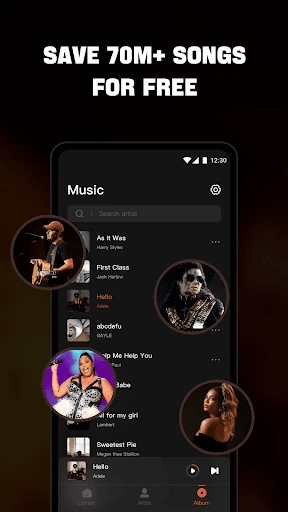
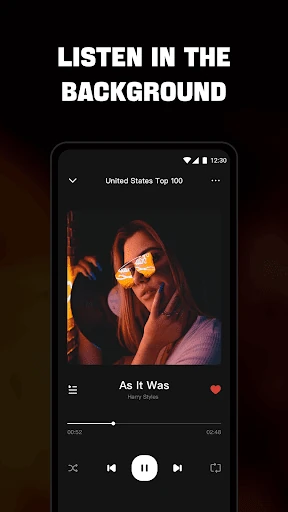
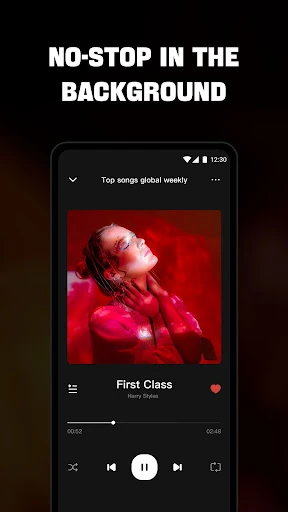
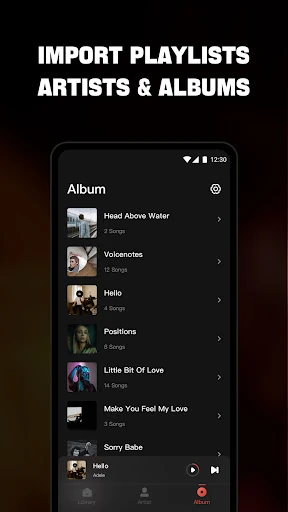
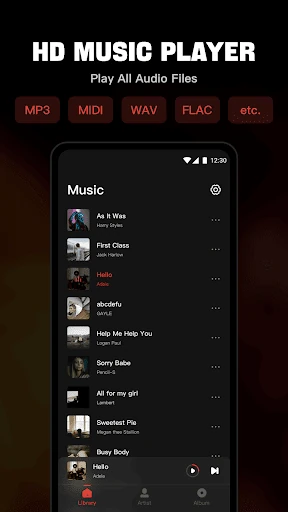
Analysis by Reviewed APKs
Offline Music Player - Mixtube is for playing audio files already saved on your Android device, with library browsing, playlists, favorites and background playback. I like the straightforward focus: it is a local music player, not a streaming service or a place to download songs. It suits people who keep their own music collection and want handy playback controls, though ads and a little setup may come with the territory.
Music for an Offline Day
When I first opened Mixtube, I thought about the ordinary moments when I want music but do not want to rely on a connection: folding laundry, taking a train through a patchy-signal area or settling in to study. The app is built around audio files on the device, so the useful first step is importing music you already have. Once that collection is available, I can browse it and start a track without treating the app like a streaming catalog.
The everyday appeal is that playback can continue while I move on to something else. I can listen in the background during housework or work, then use the notification bar or lock-screen controls rather than reopening the player every time. For a commute, I would prepare a playlist from local tracks beforehand. That makes Mixtube a practical companion for a personal collection, not a shortcut to finding new music online.
A Player, Not a Streamer
The clearest comparison is with a music streaming service. Those services are generally where I would go to explore a broad online catalog; Mixtube is for organizing and playing files I already have. It offers views by songs, artists, albums, folders and playlists, which helps when my music is arranged differently from one album to the next. That local-library focus is also why offline playback is central rather than an extra mode.
It is important not to mistake the app for a music downloader or online radio service. Its description specifically says it does not support downloading songs or music streaming. That makes it a poor fit if I expect to search for a track I do not own and play it instantly. I would choose it instead when I have audio files on hand and want a dedicated player with library views and playback controls.
Small Library Habits
A little organization can make Mixtube easier to use day to day. I would start by checking that the music I want is on the device, then browse by folder if I remember where I saved an album or by artist and album when I want a more familiar view. Favorites are useful for marking dependable picks, while custom playlists can separate a study session from a walk or a longer trip.
I would also take advantage of the controls that keep listening low-friction. Lock-screen and notification-bar playback mean I do not have to return to the app just to manage a track, and the supported widget gives another way to access music. The built-in equalizer is worth exploring when a track sounds different through headphones than through another listening setup. These are small touches, but together they make a local collection feel easier to reach.
More From Our News Desk

Zoom Meetings, Google Meet, or Teams: Which Is Easiest to Join?

How I Build a Free Streaming Lineup With Tubi

Why Crunchyroll Is the Default Anime App for So Many Fans

YouTube TV: A Practical Guide to Cutting Cable

Rummikub and the Small Comfort of Phone Games

TeamViewer Remote Control or AnyDesk for Helping Family?
Who Might Enjoy Mixtube
I would recommend Mixtube to Android users who already keep music or other audio files on their devices and want one place to play them. It makes sense for someone who listens while studying, doing chores or commuting, especially if sorting tracks by folders, albums or artists matters. Playlist and favorite options help turn a collection into something more convenient than tapping through files one by one.
It may not suit someone looking for a streaming catalog, online music discovery or a way to download songs through the app. The experience depends on having audio files available to import, and ads are part of the free offering. If that trade-off is acceptable, Mixtube has a focused job. If the main goal is finding unfamiliar music online, a different kind of music app will be a better match.
On Google Play, Offline Music Player - Mixtube is published by Mixtube Music player and has over 10 million installs. Its rating is 4.4 out of 5 from around 96,000 ratings. The app is free to download, contains ads and offers in-app purchases. Google Play gives its in-app purchase range as $2.99 to $19.99 per item. The content rating is Everyone.
Mixtube requires Android 7.0 or later. The current version provided is 4.7.0. It was released on May 30, 2022, and its most recent update was October 21, 2025. These details are useful context for checking compatibility and deciding whether the free, ad-supported player fits your needs before installing.
A Closer Look at Local Playback
Getting Started
My first impression is that Mixtube makes more sense once I think of it as a player for a collection I already own. The setup is less about creating an account or browsing a catalog and more about making local audio available to the app. I would begin with a few albums or folders I listen to often, then see whether the library views make them easy to find.
The promise of support for a range of audio formats is useful if a device holds more than standard MP3 files. The description names MP3, MIDI, WAV, FLAC, AAC and APE among the supported formats. That breadth could save me from keeping a separate player for different kinds of files. It also gives the app a clear role: a general audio player for an existing library.
Everyday Listening
In a normal listening routine, the best feature is often the one that stops me from needing to think about the app. Mixtube can keep playing in the background while I switch to another app or do something away from the screen. I can use the notification bar or lock-screen controls to manage playback, so a quick pause or track change does not require reopening the full player.
The library can be viewed by song, artist, album, folder or playlist. I like having those different routes because I do not always remember a track title; sometimes I remember the album, or I know which folder I saved it in. For someone with a growing local collection, the choice of views makes the player feel more flexible than a simple file list.
Useful Player Extras
Mixtube includes a built-in equalizer, which gives listeners a way to adjust the sound experience rather than relying only on the default output. I would treat it as a personal listening control, not a promise that every track will suddenly sound better. A few minutes of careful adjustment is more useful than changing settings constantly, especially if I mostly listen through the same headphones.
Favorites and custom playlists are the other standouts for practical use. I can keep a short list of reliable tracks close at hand or group songs for a particular activity. The app also supports a widget, alongside lock-screen and notification controls. Those options matter most when I want to start or manage music quickly without making the player the focus of whatever else I am doing.
A Simple Listening Routine
For a commute, I would make a playlist from music already stored on my phone before leaving home. I could sort through the library by album or folder, add favorites and then start playback. Once the phone is locked, the lock-screen controls give me a convenient way to handle playback. Because the app is an offline player, this routine is about preparing my own library, not downloading tracks for the ride.
At home, the same setup works for study or chores. I can start a playlist, let it run in the background and use the notification controls if I need to pause. If I find myself returning to a particular set of songs, saving them as a custom playlist reduces the effort next time. That is a modest workflow, but it is the kind of repeatable convenience a local player should provide.
Keep the Boundaries Clear
The biggest limitation is also the app's defining boundary: it plays local audio and does not provide online streaming or song downloads. If my library is empty, Mixtube cannot fill it with a searchable online collection. I need to bring the audio files myself, which makes the app less immediately useful for someone accustomed to tapping a song and expecting a streaming service to supply it.
The free version contains ads, so interruptions may be part of the experience. Mixtube offers in-app purchases, including a premium option described as removing ads, but the Google Play purchase range is broad. I would weigh that against how often I listen and how much ads bother me. The app's many playback options are helpful, but they do not change its local-player focus.
Mixtube does a useful, specific job: it organizes and plays audio files already on an Android device, with playlists, favorites, an equalizer and convenient playback controls. I appreciate that focus more than I would a confusing mix of local playback and online discovery. The trade-off is straightforward: bring your own music, and expect ads in the free app.
I would try it if I wanted a flexible player for a personal collection and needed background listening or lock-screen controls. I would skip it if I wanted music streaming or in-app downloads. For the right listener, Mixtube looks like a practical everyday player rather than a source of new music.
Offline Music Player Frequently Asked Questions
What is Offline Music Player - Mixtube used for?
Mixtube is used to play audio files stored on your device. It can organize music by songs, artists, albums, folders and playlists, and it supports favorites, background playback, a built-in equalizer, a widget, and lock-screen and notification controls. It does not support online music streaming or downloading songs, so you need audio files available to play.
Which devices can run Offline Music Player - Mixtube?
Mixtube is an Android app, and the provided requirement is Android 7.0 or later. The app description presents it as a player for music and audio files on the device. Compatibility can depend on your device and software, so check the Google Play page for the latest requirements before installing.
Is Offline Music Player - Mixtube free?
Mixtube is free to download, but it contains ads and offers in-app purchases. Google Play gives the purchase range as $2.99 to $19.99 per item. The app description says its premium version removes ads. Prices and available purchase options may vary, so check the Google Play page for current details.
Does Offline Music Player - Mixtube stream or download songs?
No. Mixtube is described as an offline music player, and it does not support online music streaming or downloading songs. Its purpose is to import and play audio files that are already available on your device. If you want to discover or stream music from an online catalog, you will need a different kind of music app.
Who is Offline Music Player - Mixtube best for?
Mixtube is a good fit for Android users who keep music or other audio files on their devices and want library browsing, playlists, favorites and convenient playback controls. It may not suit listeners who expect an online catalog or song downloads. Since the free version contains ads, that is also worth considering before you choose it.
Pros
- Plays a wide range of audio formats, including MP3, FLAC, WAV and AAC.
- Offers library views by song, artist, album, folder and playlist.
- Background playback, lock-screen controls and notification controls keep listening convenient.
- Favorites, custom playlists, a widget and an equalizer add useful flexibility.
Cons
- Does not stream music online or download songs, so you need your own audio files.
- The free app contains ads, with premium purchases offered to remove them.
- Less useful for listeners who want an online catalog or music discovery.
- Category
- Music & Audio
- Version
- 4.7.0











