NASA
- 117.88K
- 4.3
- Installs
- 10.00M
- Price
- Free
Screenshots
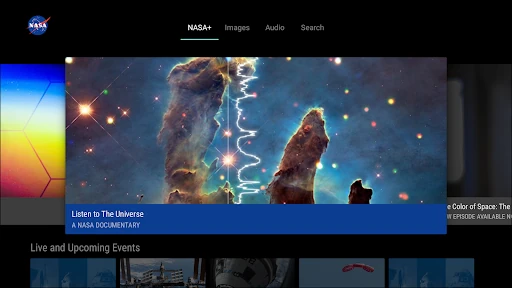
Analysis by Reviewed APKs
NASA is a space-focused app for following missions, browsing images, watching video, and dipping into news and podcasts. It suits curious readers, families, and anyone who likes a little space exploration in an ordinary day. After spending time with its mix of quick updates and deeper material, I see it as a welcoming way to keep up with NASA rather than a technical astronomy tool.
A Space Break in the Day
When I first opened NASA, I imagined using it for a quick check-in between other things, and that is where its range makes sense. I could browse striking space images, read a short news item, or watch a NASA+ program when I had more time. The app gives me several ways to follow the same broad subject, so I can choose according to whether I have a minute or an evening.
A practical routine might start with a glance at mission updates over breakfast, then move to a podcast during a walk or a video at home. Image browsing is an easy entry point when I do not want to commit to a long article. For a more personal reminder of what is happening above us, I could set an alert for an International Space Station pass over my location.
More Than a Space Feed
Compared with a general news app, NASA is deliberately focused: its material centers on NASA news, missions, imagery, podcasts, and video. That focus is useful when I want to follow subjects such as Artemis or the James Webb Space Telescope without sorting through unrelated headlines. It also makes the app a different proposition from a dedicated astronomy tool aimed at observing the night sky.
I would not treat it as a replacement for a textbook, a research database, or a full planetarium experience. Its appeal is approachable exploration and updates from NASA, not a structured course or an exhaustive guide to every space organization. If I want a quick visual browse or a mission-related video, it fits well; if I need technical depth or a broader view, I would look elsewhere too.
Small Ways to Explore
I get more from the app when I follow a thread instead of opening it at random. A mission update can lead me to a related image gallery, then to a video or podcast for a longer explanation. The app also lets users rate images and explore the highest-rated ones, which offers a simple way to find popular visuals when I am not sure where to start.
Another low-effort habit is letting the wallpaper feature bring NASA images to the home and lock screens automatically each day. I would also set an ISS flyover alert if I wanted a reason to step outside at the right time. These options make the app more useful between active browsing sessions, while keeping the core experience flexible rather than demanding a daily routine.
More From Our News Desk

Zoom Meetings, Google Meet, or Teams: Which Is Easiest to Join?

How I Build a Free Streaming Lineup With Tubi

Why Crunchyroll Is the Default Anime App for So Many Fans

YouTube TV: A Practical Guide to Cutting Cable

Rummikub and the Small Comfort of Phone Games

TeamViewer Remote Control or AnyDesk for Helping Family?
Who Will Enjoy NASA
I would recommend NASA to anyone who enjoys space but does not want to hunt across several sources for images, mission stories, and video. It is especially approachable for casual readers and families who want material to explore together, since the app offers a mix of formats rather than relying only on long articles. People who already follow NASA closely can also use it as a convenient place to check updates.
It may be less satisfying for someone looking for a formal learning path, detailed scientific reference material, or a broad catalog of astronomy beyond NASA’s own coverage. The selection is varied, but the subject remains focused on NASA and its work. I would also keep expectations sensible: this is a content and exploration app, not a substitute for hands-on telescope software or an advanced research resource.
NASA is developed by NASA and is free to install on Android. On Google Play it has over 10 million installs and a 4.3-star rating from about 118,000 ratings. The app contains no ads and offers no in-app purchases, so there is no listed purchase tier to distinguish from the free download.
Google Play gives the app an Everyone content rating. Its release date is July 7, 2011, and it was last updated on August 8, 2025. Android compatibility and the app version can vary as updates arrive, so it is worth checking the current Google Play details for the requirements that apply to a particular device.
A Broad Window Into NASA
Opening the App
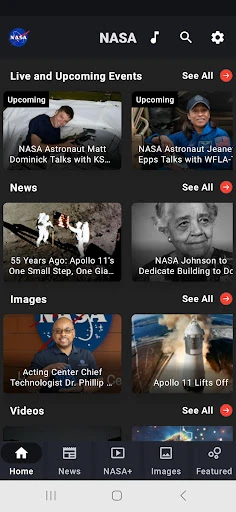
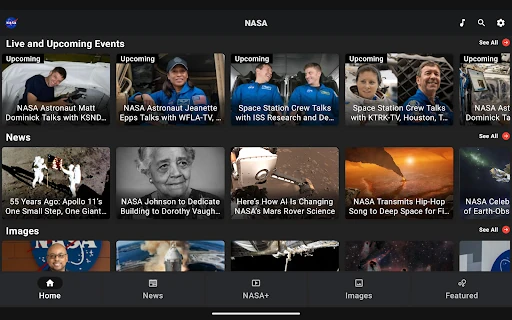
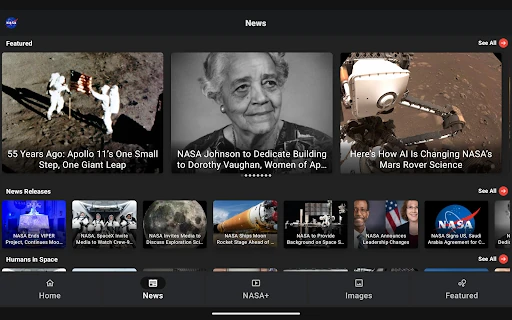
My first impression was that NASA is built around browsing rather than a single task. The range is immediately clear from the subjects it brings together: news, mission information, images, podcasts, video, and augmented reality experiences. That makes the app easy to dip into, even when I arrive without a specific question or mission in mind.
The most useful way to get started is to pick one format that suits the moment. I might begin with images when I have a spare minute, or choose a video when I have time to sit and watch. The app also offers material tied to named missions, so following a topic that already interests me is a natural first step.
A Flexible Daily Read
Day to day, the app works best as a flexible space-news companion. I can scan the latest news and feature articles when I want context, then spend longer with a video or podcast. That range matters because not every update deserves the same amount of attention. A quick image browse can be a satisfying visit on its own, while a longer session can turn into a tour through a mission or subject.
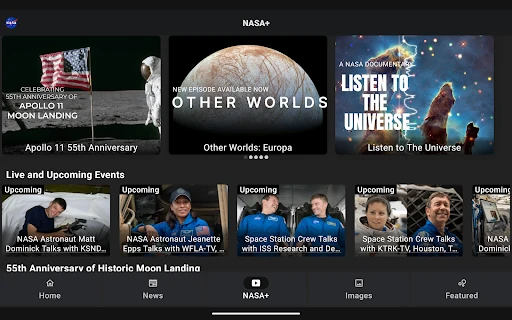
The NASA+ section adds live coverage and on-demand video series without requiring a subscription, according to the app description. That gives the app a viewing option alongside its reading and listening material. I would use it when I want NASA-related programming in one place, while remembering that the app’s overall focus is NASA content rather than general entertainment.
Images, Missions, and More
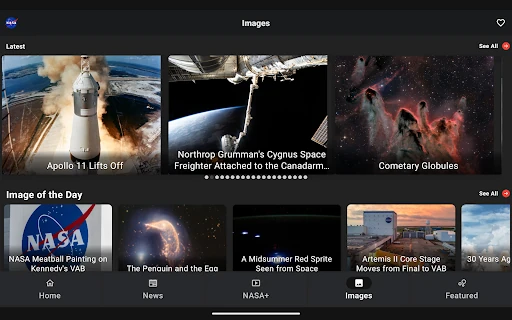
The image collection is a standout for casual browsing. The description says users can view more than 21,000 NASA images, rate them, and explore the highest-rated selections. I like that this can work as a lightweight activity: I can look through visuals without needing to understand a mission in advance, then follow up on the ones that catch my attention.
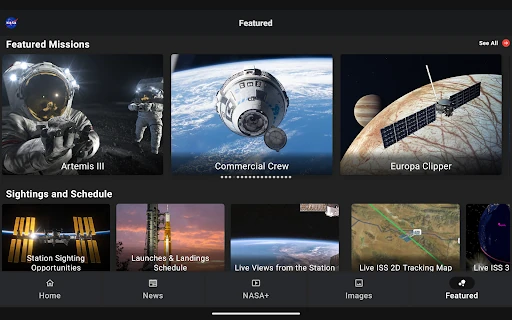
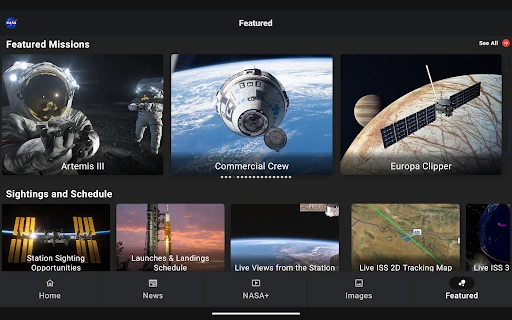
Mission updates give that visual side some context. NASA highlights subjects including Artemis and the James Webb Space Telescope, while the news and feature articles provide another route into current topics. Podcasts featuring astronauts and experts round out the mix for people who prefer listening. These are useful differences from an app that offers only headlines or only a gallery.
There are also features for taking NASA content beyond the app screen. Users can set NASA images to change automatically as home and lock screen wallpaper, and augmented reality experiences bring rovers and rockets into a closer view. The ISS flyover alert adds a location-related option for people who want to know when the station will pass overhead.
A Simple Weekly Routine
For a manageable routine, I would check the app once or twice a week rather than trying to follow everything. I could read a few recent articles, pick one mission that interests me, and save the longer viewing or listening for a quieter moment. The image collection makes a good entry point when I have only a few minutes and want something more visual than a news feed.
If I were particularly interested in a pass of the International Space Station, I would set the available alert for my location and use it as a prompt to look up. At home, automatic wallpaper changes could keep the app present without requiring me to open it daily. The point is to use the features that match my habits, not to turn space exploration into another checklist.
Keep the Scope in Mind
NASA’s main limitation is also part of its identity: it is centered on NASA. That gives the app a clear editorial focus, but it is not meant to cover every space agency, astronomy discovery, or observing activity. A user seeking a comprehensive scientific reference or a structured course may find the content more varied and browsable than systematic.
The app brings together several types of content, so the experience will depend on what I choose to open and how much time I have. A quick visit may be only an image or headline; a deeper one can involve an article, video, or podcast. I would approach it as a convenient hub for NASA material, rather than expecting every visit to deliver the same kind of depth.
NASA makes it easy to move between space images, mission updates, articles, podcasts, video, and a few interactive features. I appreciate that it can serve both a brief browse and a longer evening of watching or listening, without charging for the download or video access described in the app.
I would recommend it to curious space fans, casual learners, and families who want NASA material in one place. It is not a technical reference or a complete astronomy toolkit, but as a welcoming way to keep up with NASA and explore its content, it earns a place on my phone.
NASA Frequently Asked Questions
What is the NASA app used for?
The NASA app brings together NASA news and feature articles, mission information, images, podcasts, NASA+ video, and augmented reality experiences. It also offers image ratings, automatic NASA wallpaper changes, and alerts for International Space Station flyovers over a user's location. It is designed for exploring NASA content, rather than serving as a general astronomy reference.
Which devices can run the NASA app?
The app described here is the Android version, available through Google Play. Compatibility can depend on the device and current app requirements, so check the Google Play details for the version of Android supported by the current release. The listed Android requirement may vary as the app is updated.
What Android version does NASA require?
The Android requirement can vary with the current release and device. I would check the NASA app's Google Play page before installing to see the requirement that applies at that time. The store is also the best place to confirm whether a particular Android phone or tablet can run the latest version.
Does the NASA app cost money?
NASA is free to install on Google Play, and the app facts show no in-app purchases or ads. The app description also says NASA+ video is available without a subscription. Store details can change, so it is worth checking Google Play for current information before downloading.
Is the NASA app suitable for beginners?
Yes, it should suit people who are curious about space but want approachable ways to explore, such as images, articles, podcasts, and video. It is also useful for following NASA missions. Someone seeking an advanced scientific reference, formal course, or broad coverage beyond NASA may prefer a more specialized resource.
Pros
- Combines NASA news, mission information, images, podcasts, and video in one app.
- Offers NASA+ video without a subscription, according to the app description.
- Includes useful extras such as wallpaper changes and ISS flyover alerts.
- Free to install, with no ads or in-app purchases listed.
Cons
- Its subject matter is focused on NASA rather than all space organizations.
- It is not a structured course or advanced astronomy reference.
- Android compatibility can vary, so device requirements are worth checking.
- Category
- Education
- Version
- VARY











