Music : Cloud Music Streaming
- 22.13K
- 4.6
- Installs
- —
- Price
- Free

Screenshots
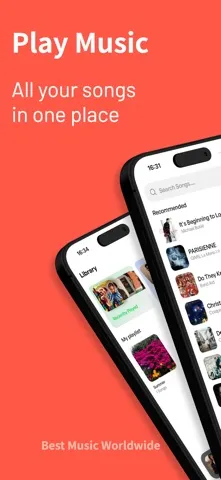
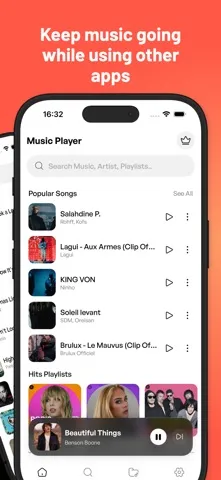
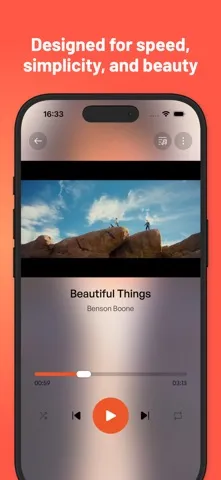
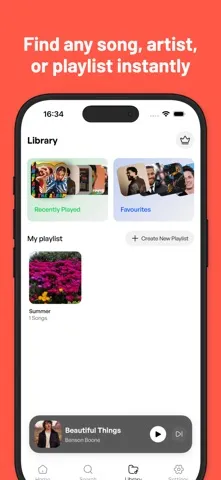
Analysis by Reviewed APKs
Music : Cloud Music Streaming is a straightforward music player for people who want to browse a library, make playlists and keep playback controls close at hand. I like the emphasis on everyday listening rather than a crowded set of tools. Its appeal is clearest if you value a clean interface and simple playback; it is not presented as a broad music-discovery service or an all-purpose audio platform.
A Simple Listening Routine
When I first opened Music, I pictured using it during the ordinary gaps in a day: picking something from my library before heading out, then letting it play while I make breakfast or settle into a task. The app is built around browsing music, choosing a track and keeping the listening experience uncomplicated. That focus matters when all I want is to get from opening the player to hearing music without fuss.
Playlists give that routine a little structure. I can imagine keeping one collection for a commute and another for a quieter evening, then returning to whichever fits the moment. The description also calls out background playback and lock-screen controls, so listening does not have to stop being convenient when I switch to another app or lock the screen. It is a modest set of essentials, aimed at repeated, everyday use.
A Player, Not a Music World
Compared with a music service built around recommendations, new releases or a large browsable catalog, Music reads more like a focused player for managing and listening to a library. Its stated strengths are browsing, playlists and playback controls, not discovery features. That distinction sets expectations: I would choose it for a direct route to music I already keep track of, rather than expecting it to introduce me to a steady stream of unfamiliar artists.
It is also not described as a radio app, a podcast hub or a tool for downloading tracks for offline listening. Those may be important needs for some listeners, but they are not part of the stated feature set. The word “Cloud” in the name might suggest a particular streaming catalog, yet the practical description centers on a music player and library. I would judge it by that simpler job, not assume more.
Small Habits That Help
A little playlist housekeeping can make a simple player feel more personal. I would start by grouping music around situations I actually encounter: a short walk, focused work or winding down at home. Keeping those collections purposeful makes them easier to pick from when I have only a minute. The app supports creating and managing playlists, so this kind of organization fits its core use without needing an elaborate setup.
I would also make a habit of checking playback controls on the lock screen once music is playing. That is a small convenience, but it can save repeated trips back into the app when I need to pause or move through a listening session. And when I am switching between activities, background playback lets the music continue while I use other apps. Together, those basics make the player feel less like another task to manage.
More From Our News Desk

Zoom Meetings, Google Meet, or Teams: Which Is Easiest to Join?

How I Build a Free Streaming Lineup With Tubi

Why Crunchyroll Is the Default Anime App for So Many Fans

YouTube TV: A Practical Guide to Cutting Cable

Rummikub and the Small Comfort of Phone Games

TeamViewer Remote Control or AnyDesk for Helping Family?
Who May Enjoy It
I would recommend Music to iPhone and iPad listeners who want a clean, uncomplicated place to browse their music and organize playlists. It sounds especially suitable for people who already know what they want to hear and prefer a player that keeps attention on playback. The combination of background listening and lock-screen controls also suits routines where the phone is in a pocket, on a desk or being used for something else.
It may be a weaker fit if your main reason for opening a music app is finding new artists, listening to radio or relying on offline downloads. Those features are not described, so I would not pick it on the assumption that they are included. Listeners seeking a specialized audio workspace may want more control than this simple approach promises. For someone who values clarity over a long feature list, though, that restraint can be a plus.
Music : Cloud Music Streaming is a Music & Audio app from Kyriakos Adamou for iOS. On the App Store it has a 4.6 rating from 22,128 ratings. It is free to download, and its content rating is 4+. The available version is 1.0, with a minimum requirement of iOS 15.8.
The app was released on December 29, 2025, and its last update is dated December 29, 2025. The practical feature set is centered on browsing a music library, creating and managing playlists, background playback and lock-screen controls. Those details make it easier to assess the app as a player, rather than assuming its name implies a particular catalog or extra listening features.
The Everyday Details of Listening
A Clear First Impression
When I first opened the app, the main idea I took away was that it wants to keep music in the foreground and interface complexity in the background. Its description emphasizes clarity, performance and ease of use, which is a sensible starting point for a player I might reach for several times a day. I appreciate that the stated purpose is easy to understand: browse a library, make playlists and listen.
Getting started should feel most natural for someone who already has a music library to browse. The app’s focus is not explained as a guided tour of a streaming catalog, so I would go in expecting a player experience rather than a discovery-first setup. That expectation is useful: it keeps the first impression grounded in what the app actually describes instead of what the word “streaming” might lead me to imagine.
Playback in the Background
The day-to-day appeal is in being able to start music and then get on with something else. Background playback means a listening session can continue while I check a message or move to another app, rather than demanding that the player remain open. For a commute, a tidy-up at home or a stretch of desk work, that is the kind of basic behavior I want from a music app.
Lock-screen controls make that routine more convenient. I can picture pausing music when someone speaks to me or returning to playback without unlocking the phone and hunting through an app. Those controls do not transform the player into something elaborate, and that is fine. They support the simple, repeated actions that make the difference between a tool I tolerate and one I can comfortably use every day.
Playlists and Library Browsing
Playlist creation and management are the clearest ways to shape the experience around personal habits. A library can be easier to use when I do not have to browse every time I want a familiar mood or activity. I would keep names practical and collections focused, so choosing a playlist remains quick. This is a useful kind of control without suggesting that the app automatically curates music for me.
Browsing the library is another central part of the app’s stated purpose. It suits listeners who prefer finding music they already recognize rather than relying on recommendations to decide what comes next. I like that distinction because it describes a real preference, not a missing substitute for a different kind of service. If my favorite part of listening is exploring unfamiliar music, though, the described features may feel limited.
A Practical Daily Pattern
A routine I would use is to choose a playlist before leaving home, start playback, and then keep the phone tucked away. The music can continue in the background, while lock-screen controls stay available for the moments when I need to pause. That flow asks little of me once listening has started. It is especially appealing on days when I want music alongside a task, not another screen to keep checking.
At home, I would use the same idea in a different way: pick a playlist for a particular stretch of work or a relaxed evening, then let it run while moving between tasks. Over time, a handful of useful playlists can reduce the small decision-making overhead of choosing music. Music supports the creation and management of those collections, so the habit grows from the features it actually describes.
Keep Expectations Grounded
The biggest limitation is also the clearest boundary: the described feature set is compact. It covers library browsing, playlists and convenient playback, but does not describe recommendations, radio, offline downloads or a specific on-demand catalog. I would not treat those extras as part of the package without checking the App Store details. That matters because listeners often use “music app” to mean very different things.
The name includes “Cloud Music Streaming,” while the description presents a modern music player. I would focus on the concrete functions rather than infer a source of music or a broader streaming service from the title alone. That is not a problem if a simple library player is what I need, but it may be disappointing if I expect an extensive catalog or discovery tools. A clear sense of that distinction makes the app easier to evaluate.
Music : Cloud Music Streaming makes the most sense as a tidy, everyday player for browsing a library, arranging playlists and listening while the phone is doing other things. Its background playback and lock-screen controls are practical touches, and its restrained approach should appeal to listeners who do not want a complicated interface.
I would give it a look if you use an iPhone or iPad and want straightforward playback rather than a discovery-heavy service. If you need radio, recommendations or offline listening, check the App Store information carefully before deciding. For simple listening habits, the app’s focused approach is its main reason to try it.
Music Frequently Asked Questions
What is Music : Cloud Music Streaming used for?
Music : Cloud Music Streaming is a music player for browsing a library, creating and managing playlists, and listening with background playback. It also supports lock-screen controls. Its description focuses on those player functions, so I would not assume it includes a particular catalog, radio, recommendations or offline downloads without checking the App Store details.
Which devices can run Music : Cloud Music Streaming?
Music : Cloud Music Streaming is an iOS app available through the App Store. It requires iOS 15.8 or later. For the exact compatibility of a particular iPhone or iPad, check the App Store page on that device, since supported devices and requirements can vary with store information and software updates.
Does Music : Cloud Music Streaming cost money?
Music : Cloud Music Streaming is free to download on the App Store. For any current in-app purchase details or other charges, check its App Store page before installing, since store information can change. The free download price alone does not establish whether every possible feature or service has additional costs.
What iOS version does Music : Cloud Music Streaming need?
The stated minimum requirement for Music : Cloud Music Streaming is iOS 15.8. If you are unsure whether your device can install it, check the App Store page from that device for the latest compatibility information. Store requirements can change as app versions and operating systems are updated.
Who is Music : Cloud Music Streaming best for?
It may suit listeners who want a straightforward way to browse music, manage playlists and keep playback going in the background. It may be less suitable if you mainly want discovery tools, radio or offline downloads, which are not among the features described. I would check the App Store details if any of those are essential to your listening routine.
Pros
- Keeps the focus on straightforward library browsing and everyday music playback.
- Playlist creation and management support practical, personal listening routines.
- Background playback and lock-screen controls make listening easier while multitasking.
- A clear, uncluttered approach should suit people who prefer simple players.
Cons
- The described feature set does not include recommendations or music discovery tools.
- Radio and offline listening are not among the stated capabilities.
- The app’s name may suggest a broader streaming catalog than its description explains.
- Category
- Music & Audio
- Version
- 1.0











