MuseScore: sheet music
- 149.89K
- 3.8
- Installs
- 10.00M
- Price
- Free

Screenshots





Analysis by Reviewed APKs
MuseScore: sheet music is a mobile library for finding scores, following along with playback, and practicing pieces on the go. It suits players who want music for a particular instrument or genre without sorting through paper books, as well as curious musicians looking for something new. I like how much the app brings together, though it feels more like a score browser and practice companion than a tool for composing music.
A score for tonight’s practice
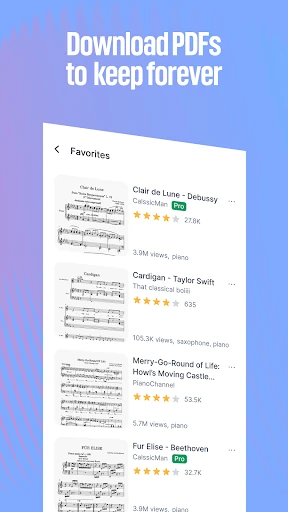
When I want to work on a piece after dinner, I can search MuseScore for the title, browse by instrument, or explore a genre and save a score to Favorites. The range is useful when I have a specific tune in mind, but also when I just want fresh material. Piano, guitar, violin, flute, trumpet, and other instruments are represented, with scores spanning classical music, pop, film soundtracks, anime, and games.
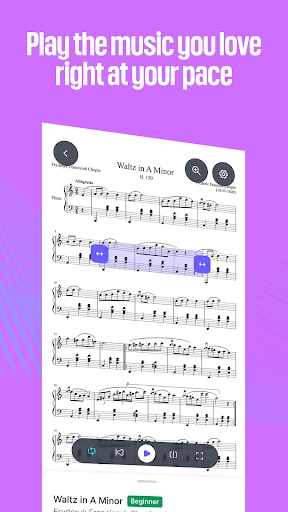
Once I find something promising, I can open the score, zoom in, and listen to its playback while following the notation. Tempo controls and looping make it easier to revisit a tricky passage rather than starting over each time. I found that combination handy for an at-home practice session: the app gives me both the written part and a way to hear how it goes, without needing to switch between separate score and audio apps.
A library, not a notation studio
The obvious alternative is a physical music book or a folder of saved scores. MuseScore is more flexible for browsing across instruments and styles, and the searchable catalog helps when I do not already know where a piece lives. It also connects score reading with interactive playback and practice tools, so it can be useful when I am learning rather than simply collecting sheet music.
That focus has boundaries. This mobile app is presented as a place to find, view, and practice scores, not as a full music-notation editor for writing original arrangements. If my main goal is composing or editing notation from scratch, I would look for a dedicated notation program instead. MuseScore’s appeal is its extensive catalog and practice-oriented score viewing, not a promise to replace every part of a musician’s setup.
Small habits that help
I get more out of the app when I save useful scores as Favorites as I browse. That turns an open-ended search into a more manageable shortlist for the next practice session. I can also narrow my exploration by instrument or by whether a score is for solo, band, ensemble, or orchestra, which is more practical than scrolling a huge catalog without a direction.
For a passage I am still learning, I would start playback, set a comfortable tempo, and loop the section I need to hear again. Zooming in can make the notation easier to follow on a phone screen. With a MuseScore PRO plan, the app also describes offline score access and tools such as transposition, instrument controls, and export, so those workflows may suit people who practice regularly.
More From Our News Desk

Zoom Meetings, Google Meet, or Teams: Which Is Easiest to Join?

How I Build a Free Streaming Lineup With Tubi

Why Crunchyroll Is the Default Anime App for So Many Fans

YouTube TV: A Practical Guide to Cutting Cable

Rummikub and the Small Comfort of Phone Games

TeamViewer Remote Control or AnyDesk for Helping Family?
Who will enjoy MuseScore
I would recommend MuseScore to musicians who often look for new repertoire, want a broad mix of styles, or like hearing a score played while they read it. It can be especially useful for keeping a few pieces close at hand and revisiting them in short practice sessions. Players of many instruments have options to explore, and the catalog ranges from familiar composers to contemporary and screen music.
It may be less satisfying for someone who wants a simple, fully offline paper-score replacement without a subscription, since offline keeping is described as a PRO benefit. It is also not the right fit if the priority is composing and editing original notation. New learners may appreciate the separate course offering, but anyone expecting a complete music education program should check that the available lessons match their instrument and level.
On Google Play, MuseScore: sheet music is published by Musescore Limited and has over 10 million installs. It holds a 3.8-star rating from about 150,000 ratings. The app is free to install, contains in-app purchases, and has no ads. Listed in-app item prices range from $1.99 to $214.99, so the cost of a particular plan or purchase depends on what you choose.
The app is rated Teen and requires Android 7.0 or later. The listed version is 2.14.13, released August 13, 2014, with its most recent update dated February 4, 2026. The latest update notes bug fixes and stability improvements. These details give a useful snapshot of the Android app, while individual purchase options are best checked in Google Play.
A closer look at score practice
Opening the catalog
My first impression is that MuseScore has a clear central purpose: get me from a musical idea to a score I can look at. The catalog can be browsed by instrument, and searching makes it possible to look for a particular piece instead of treating the app as a random collection. Genre options also give me a way to wander when I am not sure what I want to play next.
There is a lot to take in because the library covers many kinds of music and arrangements. I found it helps to begin with a practical filter—my instrument, a composer, or a style—rather than trying to survey everything at once. Favorites are worth using early, since a promising find is easier to return to when it is saved instead of left buried in browsing history.
Reading and listening
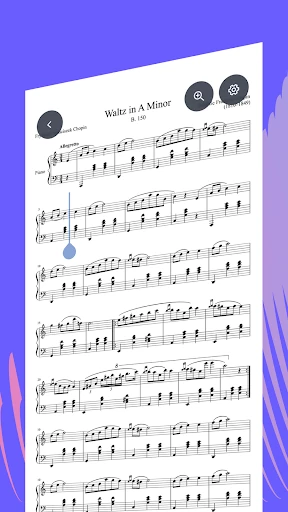
The core experience is viewing a score and making sense of it on a portable screen. Zoom is a simple but important part of that: it lets me focus on the notation when the full page feels too small to read comfortably. For practice, the interactive player adds sound to the page, which can help me connect what I see with how a passage is meant to go.
I like being able to adjust tempo and loop a section, since those controls suit the stop-and-repeat rhythm of real practice. I can listen again, follow the notation, and spend more time on a difficult bit without restarting the whole piece. It is a focused kind of help rather than a replacement for playing my instrument, but it makes the app more useful than a static score viewer.
Tools beyond browsing
MuseScore’s practice features go further for subscribers. The described Practice Mode works through a score note by note, while PRO adds options such as changing the volume and visibility of instruments and transposing a score into another key. An on-screen keyboard with highlighted keys is another aid for locating notes. These options make the app more adaptable to different practice needs.
Other PRO features include auto-scrolling, a metronome, and exporting sheet music as PDF, MIDI, or MP3. The app also offers MuseScore LEARN video courses and reading materials through a dedicated subscription, with instruction covering instruments and topics such as music theory, composition, and ear training. Those are useful additions for people who want more than a searchable score archive, though they are separate from simply browsing music.
A routine for one piece
A practical way I would use MuseScore is to pick one piece at the start of a week, save its score to Favorites, and open it when I have a short window to practice. I can zoom to the section I am working on, listen once to get oriented, then slow the tempo and loop a passage before trying it on my instrument.
As I become more comfortable, I can return to the score at a more natural pace and use playback as a reference rather than a constant guide. If I am studying a larger ensemble score, adjusting instrument visibility is available with PRO, which could help focus attention on a part. The routine stays simple: find, save, listen, work on a section, and come back later.
Limits to keep in mind
The breadth of the catalog is a strength, but a large archive can also make discovery feel like work if I arrive without a piece or instrument in mind. Browsing by category and saving Favorites help, yet the app is most rewarding when I use those tools deliberately. A huge selection does not automatically mean every search will lead straight to the exact arrangement I want.
Some of the most useful practice options sit behind MuseScore PRO, and offline score access is also described as a PRO benefit. Courses use a separate MuseScore LEARN subscription, with a bundle option mentioned through MuseScore ONE. That means the free app is a good place to explore, but anyone who expects every advanced tool or lesson to be included should review the available plans and purchases first.
MuseScore: sheet music is a capable companion for finding scores and making practice more interactive. I especially like the combination of a wide-ranging catalog, Favorites, zoom, playback, tempo control, and looping. It is not a notation-writing studio, but it makes the everyday job of locating and working through music more convenient.
I would try it if I play an instrument and want a steady source of repertoire or a portable way to follow scores. The free access makes browsing easy to start, while subscriptions add more tools for committed practice. If I need offline access or advanced controls, I would check the purchase options before building my routine around them.
MuseScore Frequently Asked Questions
What is MuseScore: sheet music used for?
MuseScore: sheet music is used to search and browse scores for different instruments and musical styles, save scores to Favorites, and view notation on a mobile device. It also offers playback, tempo adjustment, looping, zoom, and a dedicated Practice Mode. Additional score controls and learning courses are available through subscription options.
Which devices can run MuseScore: sheet music?
The app is available for Android through Google Play. The listed minimum requirement is Android 7.0. Device compatibility can depend on the particular device and current store requirements, so it is worth checking the Google Play page for the latest details before installing.
Is MuseScore: sheet music free?
MuseScore: sheet music is free to install and contains in-app purchases. Google Play lists item prices from $1.99 to $214.99. The app describes PRO features for offline score access and additional practice tools, as well as separate course subscription options. Specific plans and prices may vary, so check Google Play for current purchase details.
Does MuseScore: sheet music work offline?
The app describes downloading and keeping scores offline as a MuseScore PRO benefit. Without that plan, offline access may be limited or may vary with the score and current app options. If offline practice is important to you, check the current subscription details in Google Play before relying on it.
Who should use MuseScore: sheet music?
It is suited to musicians who want to discover scores, read them on the go, and practice with playback and looping. Players across a range of instruments and genres can browse the catalog. It may be less suitable if you want a dedicated notation editor or expect all advanced practice features and courses to be included without a subscription.
Pros
- Broad score catalog spanning instruments, genres, composers, and soundtracks.
- Playback, tempo adjustment, looping, and zoom support focused practice.
- Favorites make useful scores easier to find again.
- Optional courses and advanced practice tools add depth for subscribers.
Cons
- Some practice tools and offline score access require MuseScore PRO.
- The large catalog can take effort to search without a clear starting point.
- It is for finding and practicing scores, not composing notation from scratch.
- Category
- Music & Audio
- Version
- 2.14.13











