Monarch: Budget & Track Money
- 26.41K
- 4.8
- Installs
- 1.00M
- Price
- Free

Screenshots



Analysis by Reviewed APKs
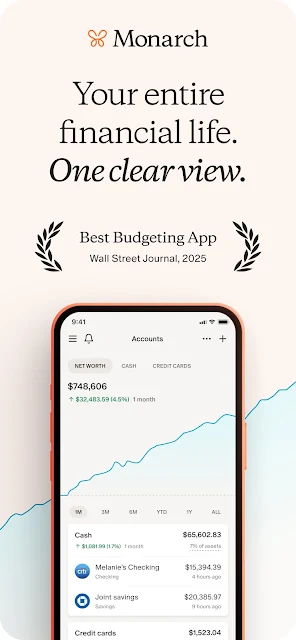
Monarch: Budget & Track Money brings account tracking, budgets, spending reports, bills, investments, and financial goals into one dashboard. I see it as a fit for people who want a broader view of their household finances than a single bank app provides, especially couples who want to coordinate. Its approach is practical and comprehensive, though you’ll need to connect accounts and commit to a paid membership after the trial.
A Clearer Money Check-In
When I first opened Monarch, I pictured using it during a weekly money check-in rather than constantly monitoring every purchase. The idea is to connect accounts, then see transactions, balances, budget progress, investments, and upcoming expenses together. That can turn a scattered routine—checking a bank app, a card app, then a bill reminder—into one place to review what has changed.
For example, after a grocery run and a monthly bill payment, I’d want to know whether those transactions appeared in the right categories and how the spending affects my budget. Monarch auto-categorizes finances, while its dashboard can show recent activity and progress at a glance. It’s a useful setup for noticing patterns, not a substitute for deciding what to do with your money.
More Than a Budget
A basic bank app is usually best for checking one institution’s accounts, while a simple expense tracker may focus on recording purchases. Monarch aims for a wider view: connect accounts, search transactions across them, follow net worth, review reports, and track bills and subscriptions. Its two budgeting styles—Flex and Category—also give you a choice between a looser overview and more detailed categories.
That breadth makes it better suited to people who want a household finance hub than to someone who only needs a quick calculator or a place to jot down cash spending. It isn’t presented as a way to move money; the description says the platform is read-only. Nor is it a replacement for professional judgment, even though you can invite a financial professional to collaborate.
Small Habits That Help
I’d start by checking transactions regularly and correcting categories that don’t match how I want to understand my spending. Custom groups and categories can make reports more useful over time, while a quick glance at the dashboard can keep a budget from becoming something I only revisit at month’s end. Searching across accounts is handy when I’m trying to find a charge or refund.
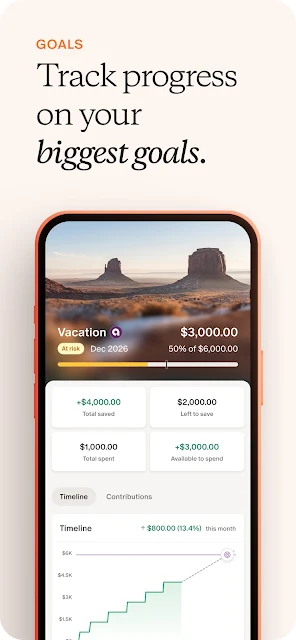
A second helpful habit is to keep upcoming bills and subscriptions in view, then review whether a recurring service is still worth keeping. For longer-range plans, Monarch lets you set goals and tie contributions to a monthly budget. Those routines work best when the account connections and categories stay reasonably current, rather than expecting one initial setup to do all the thinking.
More From Our News Desk

Zoom Meetings, Google Meet, or Teams: Which Is Easiest to Join?

How I Build a Free Streaming Lineup With Tubi

Why Crunchyroll Is the Default Anime App for So Many Fans

YouTube TV: A Practical Guide to Cutting Cable

Rummikub and the Small Comfort of Phone Games

TeamViewer Remote Control or AnyDesk for Helping Family?
Who May Find It Useful
I’d recommend Monarch to people who want a consolidated view of several financial accounts and are willing to spend a little time maintaining a budget. It looks especially useful for couples or households that want to coordinate without relying on joint bank accounts, since the description says members can invite household members at no extra cost. Goal tracking and reporting also suit people who like to review progress over time.
It may be less appealing if you only want a free, lightweight way to record a few expenses, or if you don’t want to connect financial accounts to a tracking service. The membership becomes paid after a seven-day trial, so the ongoing cost is part of the decision. People who prefer every budget detail to be entered and managed manually may also find the connected-account approach unnecessary.
Monarch: Budget & Track Money is developed by Monarch Money and is listed on Google Play as a free app with in-app purchases. The store shows more than 1,000,000 installs and a 4.8-star rating from about 26,000 ratings. It contains no ads and has an Everyone content rating. The listed version is 2.0.128, and the release date is January 21, 2021.
The listed last update date is November 4, 2026. In-app purchase prices range from $14.99 to $199.99 per item. The description says Monarch is free to try for seven days, then charges a membership fee monthly or annually according to the selected plan. The available facts do not include a minimum Android version, so check Google Play for the device requirements that apply to your phone.
Making a Money Dashboard Work
A Broad First View
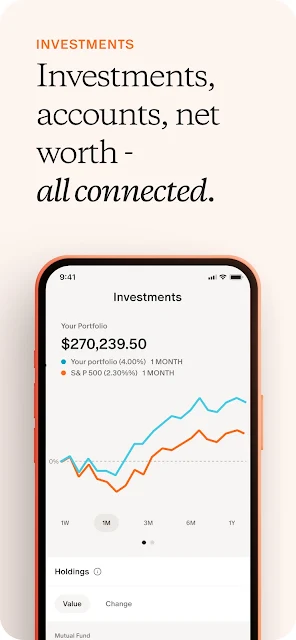
My first impression is that Monarch is meant to be a home base, not just a monthly budget sheet. Its dashboard can be customized to surface net worth, recent transactions, budget progress, investment performance, and upcoming expenses. That gives the first check-in a useful shape: look at the overall picture, then decide which detail deserves attention instead of hopping between separate apps.
Getting started centers on connecting accounts. Monarch says it can then automatically categorize finances and provide insights, which may save some repetitive sorting. I’d still treat those categories as a starting point and review them as I go. A dashboard is only as helpful as the information it presents, and the app’s value depends on bringing the accounts I care about into the same view.
The Weekly Review
Day to day, I’d use Monarch less like a live ticker and more like a place to check in. Recent transactions help answer what has happened, while budget progress bars offer a quick sense of how the month is going. If I’m looking for a particular charge, searching across connected accounts is more direct than remembering which bank or card app to open.
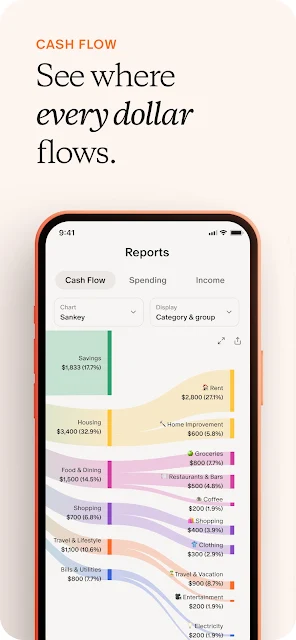
Reports add a slower, reflective layer. The description says users can customize reports to review spending by groups and categories and see trends over time. That makes the app useful both for a quick glance and for a more deliberate end-of-month review. I’d expect the best routine to be regular but not obsessive: catch obvious categorization issues, notice trends, and move on.
Budgets, Bills, and Goals
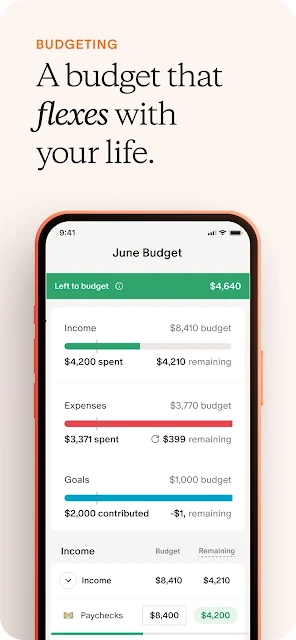
The choice between Flex Budgeting and Category Budgeting is one of Monarch’s more practical distinctions. One approach can suit someone who wants room to work with a broader budget, while the other offers category-level structure. The app also lets users customize groups, categories, and notifications, so there’s some room to shape the system around a household’s preferred level of detail.
The calendar or list view for bills and subscriptions adds a forward-looking side to the dashboard. Monarch says it can track subscriptions and bills and send notifications, and it can show statement balances and minimum payments due for connected cards and loans. Goals extend that planning further: users can track progress and set contributions within a monthly budget. These are useful planning views, not guarantees about future finances.
A Household Money Routine
For a couple, I can imagine a Sunday evening check-in: review recent transactions, see whether the shared budget is on track, and look ahead at bills coming up. Monarch supports adding a partner or other household members, whether or not they use joint bank accounts. That could make a conversation more grounded in the same information instead of comparing separate snapshots from different apps.
The same collaborative setup can include an advisor, coach, tax professional, or estate planning attorney, according to the description. I’d see that as a way to make relevant financial information easier to share, not as a reason to hand over decisions. For personal planning, a monthly goal contribution and a quick look at progress can turn a vague intention into something visible in the budget.
The Trade-Offs to Consider
The biggest practical consideration is the membership. Monarch offers a seven-day free trial, then bills monthly or annually depending on the plan, and the store shows in-app purchase prices from $14.99 to $199.99 per item. That positions it as a paid finance tool after the trial, so it makes sense to decide whether its combined tracking and planning features are worth keeping before the trial ends.
A second consideration is that the connected-account model may not suit everyone. People who prefer not to link accounts, or who only need a simple manual spending log, may not get enough from the broader dashboard to justify the setup. The description characterizes the platform as read-only, but I’d still approach any account-connected financial service thoughtfully and check the details that matter to me.
Monarch’s strongest case is the way it brings budgeting, account tracking, reports, bills, goals, and collaboration into one place. I like that it offers different budgeting styles and makes room for both quick dashboard checks and more considered reviews. The trade-off is a paid membership after the trial and a setup that depends on connecting accounts.
I’d try Monarch if I wanted a shared or multi-account view and planned to use its reports and goals regularly. If I only needed a bare-bones expense log, I’d look for something simpler. For the right household, it can make routine money check-ins feel more organized without pretending to make financial decisions for you.
Monarch Frequently Asked Questions
What is Monarch: Budget & Track Money used for?
Monarch is for tracking finances in one view: connected accounts, transactions, net worth, budgets, bills, subscriptions, investments, and goals. It also offers spending reports and collaboration with household members or financial professionals. It is intended as a planning and tracking tool rather than a way to move money.
Which devices can I use Monarch on?
The supplied store facts cover Monarch on Google Play for Android. They don’t specify other platforms or device compatibility, so check the app’s store information for current availability on the devices you use. The Android version requirement can also vary by device and app release, so Google Play is the best place to verify it.
What Android version does Monarch require?
The minimum Android version isn’t included in the available app details. Requirements can vary as the app is updated and by device, so check the Monarch page on Google Play before installing to confirm compatibility with your phone or tablet.
Does Monarch cost money to use?
Monarch is free to try for seven days, then requires a membership billed monthly or annually depending on the plan selected. Google Play lists in-app purchases ranging from $14.99 to $199.99 per item. Check the store for current plan and purchase details before starting a trial.
Is Monarch a good fit for couples?
It may suit couples and households that want to review finances together. Monarch says users can add a partner or other household members, whether or not they share bank accounts, and collaborate on budgets and goals. It may be less suitable if you want a free, minimal expense tracker or don’t want to connect financial accounts.
Pros
- Combines account tracking, budgets, reports, bills, investments, and goals in one dashboard.
- Offers both Flex and Category budgeting to suit different levels of structure.
- Supports household collaboration without requiring joint bank accounts.
- No ads, according to the app’s store details.
Cons
- Membership billing starts after the seven-day free trial.
- Getting value from the dashboard depends on connecting accounts and reviewing categories.
- The broad feature set may be more than a simple expense log requires.
- Category
- Finance
- Version
- 2.0.128











