MIDFLORIDA Mobile
- 151
- 3
- Installs
- —
- Price
- Free

Screenshots


Analysis by Reviewed APKs
MIDFLORIDA Mobile is a banking app for members of MIDFLORIDA Credit Union who want to handle everyday money tasks from an iPhone or iPad. It brings balances, transfers, bill payments, check deposits, card controls, savings tools, and financial education into one place. I like the breadth of its toolkit, though it is specifically for credit union members rather than a general-purpose budgeting app.
A banking day, handled
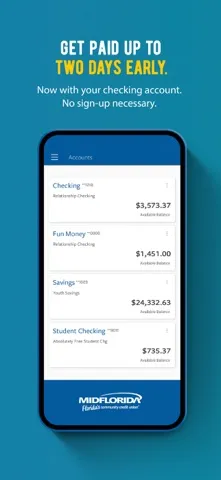
When I picture using MIDFLORIDA Mobile on an ordinary weekday, it starts with a quick balance check before heading out. The app is designed to gather balances from MIDFLORIDA and external accounts in one view, so there is less hopping between banking apps just to get a rough sense of what is available. Custom alerts for deposits, withdrawals, and card purchases can also make it easier to keep tabs on activity as the day unfolds.
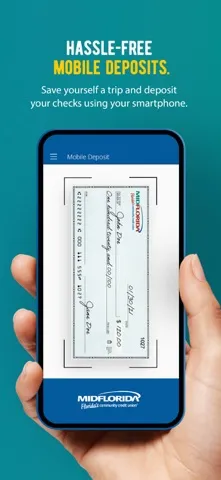
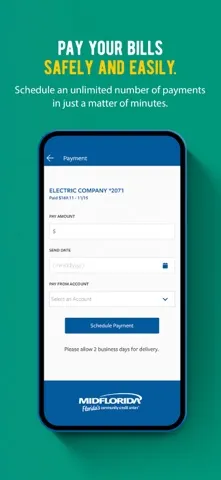
Later, a bill comes due or I need to move money between accounts. The app supports electronic bill payments and transfers between MIDFLORIDA accounts, as well as transfers to and from other accounts I own. If a check arrives, check deposit is part of the offering too. These are the kinds of routine errands that make mobile banking useful: small tasks that otherwise mean finding a computer or waiting until I can visit a branch.
A member bank, not a budget app
The obvious comparison is a credit union's website or its other banking channels. MIDFLORIDA Mobile puts account access and common transactions on an iOS device, with extras such as card controls, savings round-ups, and goal tracking alongside the basics. For someone already banking with MIDFLORIDA, that combination may reduce the need to use separate tools for simple account checks and card management.
This is not a general budgeting service that works independently of a financial institution. Registration requires MIDFLORIDA membership and enrollment in its free online banking platform, so it will not suit someone looking for an account-agnostic finance app. Its budgeting tools and goal trackers are useful additions, but the app's central job is still managing MIDFLORIDA banking relationships, not replacing every dedicated financial planning tool.
Small habits that help
I would start by choosing a few alerts that match my real concerns rather than turning on every notification at once. Deposit alerts can help confirm incoming money, while purchase and withdrawal alerts give a timely nudge to review activity. The app also provides access to statements and important documents, so checking those during a regular monthly account review can keep paperwork from becoming a separate chore.
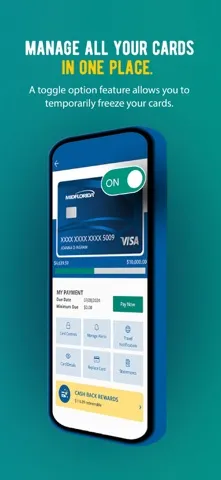
The other useful habit is to make the app's controls part of a routine instead of waiting for a problem. A misplaced card can be locked through the app, and spending restrictions can be set by merchant type, transaction type, or limits. For saving, Smart Save rounds up debit card purchases, while goal trackers offer a place to follow progress. These features work best when they reflect a simple plan I can stick with.
More From Our News Desk

Zoom Meetings, Google Meet, or Teams: Which Is Easiest to Join?

How I Build a Free Streaming Lineup With Tubi

Why Crunchyroll Is the Default Anime App for So Many Fans

YouTube TV: A Practical Guide to Cutting Cable

Rummikub and the Small Comfort of Phone Games

TeamViewer Remote Control or AnyDesk for Helping Family?
Who will get the most from it
I would recommend MIDFLORIDA Mobile to existing MIDFLORIDA members who want to check balances, pay bills, transfer money, deposit checks, and manage their cards from an iPhone or iPad. It has enough extra tools to make a regular banking routine more convenient, especially for people who like account alerts, automated round-up savings, and a place to track financial goals.
It may not be a fit for someone who is not a MIDFLORIDA member, or for anyone looking primarily for a standalone budgeting product. The requirement to enroll in the credit union's online banking platform is central to using it. I would also suggest checking the current App Store compatibility details before installing, since the stated minimum requirement is iOS 17.6.
MIDFLORIDA Mobile is developed by MIDFLORIDA Credit Union and is available for iOS through the Apple App Store. The supplied store details give it a 3.0 out of 5 rating from 151 ratings. Its current version is 4.4.0, and the stated minimum operating system is iOS 17.6. The app first appeared on March 2, 2012, with the recorded last update dated August 26, 2026.
The app is free to download, and the supplied price is $0.00. Its content rating is 4+. To use it, you must be a MIDFLORIDA member and enrolled in the credit union's free online banking platform. The store details supplied for this review do not include an install count or other pricing information, so I would check the App Store for current details before downloading.
A closer look at daily banking
Getting started
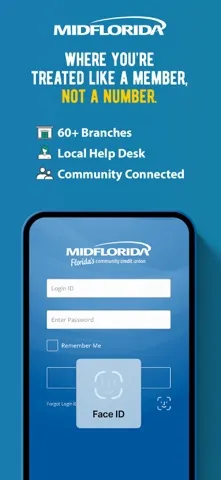
My first impression is that this is meant to be a practical home base for members, not a showcase of flashy finance features. The app brings together account management, payments, card settings, and savings tools under the MIDFLORIDA name. Before getting started, the important step is having membership and enrollment in free online banking; the app is built around that existing relationship.
Once set up, I would begin with the basics: review balances, check available statements, and decide which alerts are worth receiving. The option to include external accounts can make the account overview more useful for someone who keeps money at more than one institution. That setup is likely to pay off over time, since a consolidated view is most helpful when it reflects the accounts I actually want to monitor.
Everyday account tasks
The core experience revolves around familiar banking errands. I can use the app to view account balances, pay bills electronically, deposit checks, and transfer money among my MIDFLORIDA accounts. It can also handle transfers to or from other accounts I own. That mix covers many of the tasks I would otherwise do through online banking, with the convenience of having access from an iOS device.
The day-to-day value depends on how often I need those tasks. Someone who mainly checks a balance and pays a few bills may appreciate having everything close at hand, while a member who rarely banks on a phone may not use the full toolkit. Either way, it is helpful that account management is paired with document access and customizable alerts, rather than being limited to a simple balance screen.
Card and savings tools
Card controls are one of the more useful additions. If a debit or credit card is misplaced, the app can lock or unlock it. Members can also set restrictions based on merchant type, transaction type, or spending limits, and redeem rewards. Those options offer more direct control over how a card is used than a basic account overview provides, though they are most valuable when I take the time to tailor them to my needs.
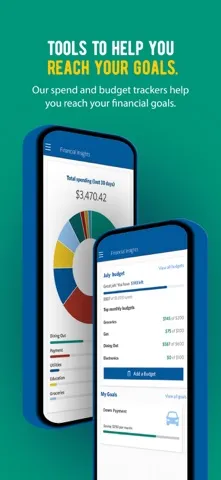
On the savings side, Smart Save rounds up debit card purchases, and the app includes budgeting tools and goal trackers. These features give members ways to connect everyday spending with a savings habit. The app also provides financial literacy courses, which add an educational element alongside account management. I see these as useful extras rather than a reason to treat the app as a full financial coaching service.
A simple weekly routine
A manageable routine could start with a brief account check once or twice a week. I would scan balances, review recent activity through alerts, and look over any upcoming bills. If money needs to move between accounts, transfers are available in the app; if a check needs depositing, that task is there too. The point is to make a few minutes of routine maintenance easier, not to turn every day into a financial review.
At the end of the month, I could look at statements and documents, revisit a savings goal, and adjust card restrictions if my spending needs have changed. Smart Save can handle round-ups in the background, while alerts provide reminders about account activity. Keeping these tasks on a regular schedule would help me use the app's broader feature set without constantly checking it or reacting to every small transaction.
Limits to keep in mind
The biggest limitation is also straightforward: this app is for MIDFLORIDA members who are enrolled in its online banking platform. It is not a way for anyone to open a general-purpose finance account and start managing money across institutions without that relationship. External account viewing and transfers add flexibility, but they do not change the membership requirement at the center of the experience.
The App Store rating supplied for the app is 3.0 out of 5 from 151 ratings, so I would not assume every member will have the same experience. Compatibility is another practical check: the stated minimum is iOS 17.6. Finally, while the app offers budgeting and goal tools, people who want a more specialized planning workflow may prefer to pair their banking app with another service that better matches those needs.
MIDFLORIDA Mobile has a clear purpose: make everyday credit union banking easier to handle on an iOS device. Its mix of transfers, bill payments, check deposits, alerts, card controls, and savings tools gives members plenty to work with. The membership requirement keeps its audience specific, but for that audience, the practical range is appealing.
I would suggest it to MIDFLORIDA members who want their routine banking tasks and card controls within reach, and who meet the iOS requirement. It is less compelling for people seeking a standalone finance app or a highly specialized budgeting system. If you already bank with the credit union, it is a sensible app to consider for everyday account management.
MIDFLORIDA Mobile Frequently Asked Questions
What is MIDFLORIDA Mobile used for?
MIDFLORIDA Mobile is for members who want to manage everyday banking from an iOS device. Its features include checking balances, viewing external accounts, paying bills, depositing checks, transferring money, and controlling cards. It also offers alerts, savings tools, budgeting and goal features, and financial literacy courses. Use requires MIDFLORIDA membership and enrollment in free online banking.
Which devices can run MIDFLORIDA Mobile?
The app is available for iOS through the Apple App Store. The supplied minimum operating system is iOS 17.6. Check the App Store product information on your device for current compatibility details, since availability can depend on the operating system and device requirements in effect when you download it.
What iOS version does MIDFLORIDA Mobile require?
The stated minimum is iOS 17.6. The app is intended for MIDFLORIDA members enrolled in the credit union's free online banking platform. If you are unsure whether your device meets the current requirements, check the app's compatibility information in the Apple App Store before installing.
Does MIDFLORIDA Mobile cost anything?
The app is free to download, with a supplied price of $0.00. The available details do not specify other pricing or in-app purchase information. Check the Apple App Store for current terms and any details that may vary. Access to the banking features requires MIDFLORIDA membership and online banking enrollment.
Is MIDFLORIDA Mobile right for me?
It is a good candidate if you are a MIDFLORIDA member who wants mobile access to common banking tasks, card controls, alerts, and savings features. It is not designed as a general finance app for people without a MIDFLORIDA account. Members who want a dedicated, specialized budgeting experience may also want to consider whether the included tools meet their needs.
Pros
- Combines bill payments, transfers, check deposits, and balance checks for MIDFLORIDA members.
- Offers card locks and spending restrictions alongside account alerts.
- Includes Smart Save round-ups, goal trackers, and financial literacy courses.
- Can show balances from external accounts added by the member.
Cons
- Requires MIDFLORIDA membership and enrollment in its online banking platform.
- Requires iOS 17.6, which may exclude older devices.
- Its budgeting tools may not replace a dedicated planning app.
- Category
- Finance
- Version
- 4.4.0











