Metronome: Tempo
- 1.85K
- 3.7
- Installs
- 100.00K
- Price
- $1.49
Screenshots
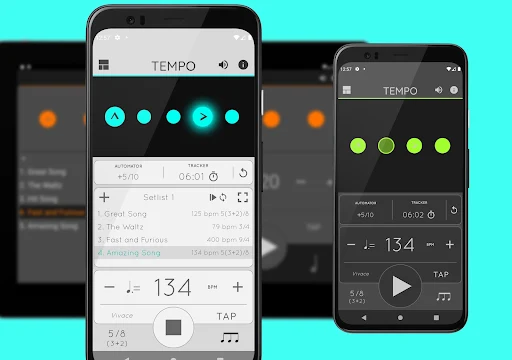
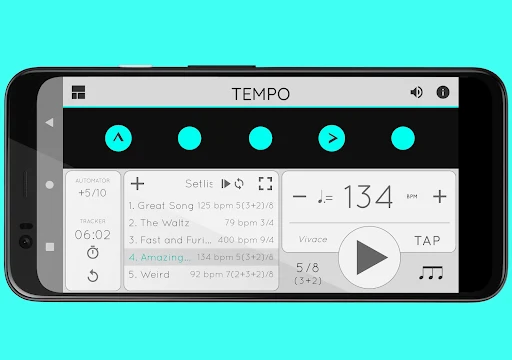
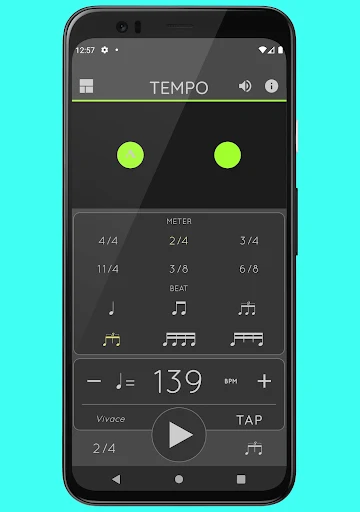
Analysis by Reviewed APKs
Metronome: Tempo is a paid Android metronome for musicians who want more than a steady tick. It covers everyday practice, rehearsals and performance, with adjustable rhythms, saved setlists and tools for timing longer sessions. I like that its many options are organized around distinct modes rather than presented as one long checklist. It feels especially useful for players who repeat specific exercises or need to prepare several tempos in advance.
A Practice Session That Flows
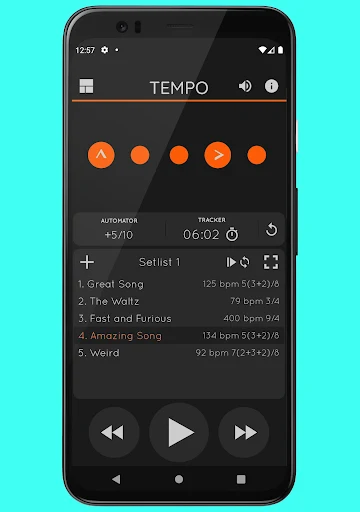
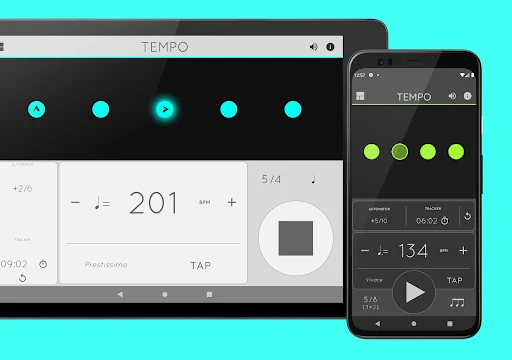
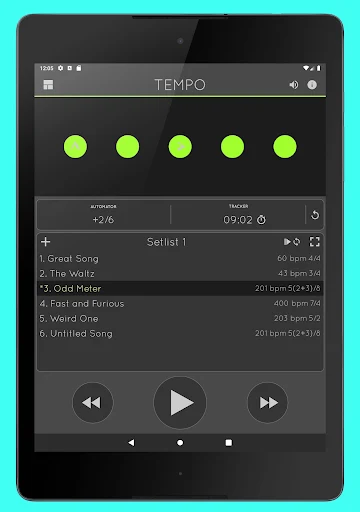
When I sit down to work through a passage, I usually want to get to a steady pulse quickly, then change the rhythm only if the music calls for it. Tempo lets me set a pace from 10 to 400 beats per minute, choose a time signature and start playing. The pulsing LEDs provide a visual cue alongside the sound, which can be handy when I want another way to follow the beat.
For a more involved exercise, I can adjust accents or turn individual beats off to shape a pattern, then save that configuration in a setlist. The practice tools can track elapsed time or bars played, stop playback at a chosen limit, and change tempo at set intervals. That makes the app useful for a focused session with a plan, not just a quick check of whether a piece is moving too fast.
More Than a Simple Click
A basic metronome is enough when all I need is a regular pulse at one speed. Tempo is a better fit when I want to shape the beat, work through a sequence of saved settings or use a practice timer. Its five modes—Basic, Preset, Setlist, Practice and Gig—are intended for different combinations of those jobs, so the app can serve both a quick warm-up and a more structured rehearsal.
That range does not make it a notation editor, a lesson library or a complete music production setup. Its central job is keeping time and helping organize metronome configurations. I would not choose it expecting guided instruction or tools for recording a performance. For someone who only needs a single, unchanging click, the extra modes may be more than necessary; for a player who revisits different rhythms, they have a clearer purpose.
Build a Reusable Routine
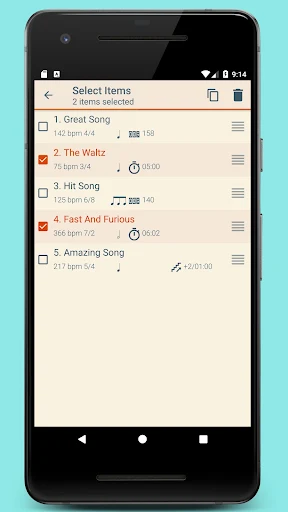
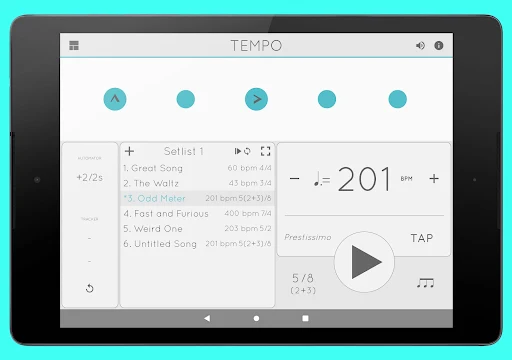
I get more out of Tempo when I save settings I expect to use again instead of rebuilding them every time. Multiple setlists can hold presets, and the app includes tools to search, copy, overwrite and delete entries in batches. Quick editing helps when a small change is all I need. This is a practical way to keep a rehearsal sequence or a group of recurring exercises organized.
For tempo work, I can use the automatic adjustment option to change the pace after a chosen number of bars or amount of time. Coach Mode alternates between audible and muted bars, giving practice a different kind of timing challenge. I would start with small, intentional changes rather than switching on every option at once; the useful habit is to build a routine that supports the music I am working on.
More From Our News Desk

Zoom Meetings, Google Meet, or Teams: Which Is Easiest to Join?

How I Build a Free Streaming Lineup With Tubi

Why Crunchyroll Is the Default Anime App for So Many Fans

YouTube TV: A Practical Guide to Cutting Cable

Rummikub and the Small Comfort of Phone Games

TeamViewer Remote Control or AnyDesk for Helping Family?
Who Will Get the Most From It
I would recommend Tempo to musicians who practice regularly and want a metronome that can handle varied meters, custom accents and saved sequences. Students can use its tracking and automatic tempo changes to give a practice block more structure, while teachers may find setlists useful for preparing repeated lesson material. Players preparing for a gig can also keep configurations together rather than setting every rhythm from scratch.
It may be less appealing if you want only the simplest possible click, since Tempo includes several modes and management options beyond basic playback. It is also not a substitute for instruction or a broader music-making app. People who use AirTurn Bluetooth controllers have an additional control option, and setlists can be shared with friends, including users of the iOS version. The app makes the most sense when those details fit an existing routine.
Metronome: Tempo is made by Frozen Ape Pte. Ltd. On Google Play it has over 100,000 installs and a 3.7-star rating from 1,854 ratings. Its content rating is Everyone. The listed Android version is 5.1.7, and the app’s release date is April 3, 2012.
The app costs $1.49 and offers in-app purchases priced at $0.99 per item. It contains no ads. The listed last update is October 26, 2026. Google Play does not provide a minimum Android version in the details used for this review, so check the store page for device compatibility before installing.
A Metronome Built Around Practice
A Clear Start
When I first opened Tempo, the appeal was its single-screen approach: the main idea is to make a beat, then adjust it to suit the task. Rather than treating every option as a separate tool, the app groups functionality into five modes. Basic, Preset, Setlist, Practice and Gig each present a different mix, which gives the interface a sense of purpose beyond a standard tempo dial.
The setup choices cover a wide range. Tempo supports 30 time signatures, six rhythm patterns for simple meters and three for compound meters. Its range runs from 10 to 400, and tap tempo offers a way to find a pace by tapping rather than entering it as a target. That breadth is useful, though a new user may need a little time to decide which mode and settings suit a particular session.
The Everyday Pulse
For daily practice, the essentials are tempo, meter and a sound that stays easy to follow. Tempo offers 12 sound sets, including one intended for live drumming click tracks, plus volume control. The visual LEDs pulse with the beat, so the app provides more than one kind of cue. I can see why that would help when I want to keep my eyes on an instrument or check the pulse without relying only on sound.
The app also supports playback outside the app, so a metronome session can continue while I use something else on the device. That is a useful bit of flexibility for a routine where I may need to switch tasks without stopping the pulse. Classical metronome and Italian tempo markings are included too, giving musicians familiar reference points alongside the numerical tempo setting.
Rhythm and Setlist Tools
The beat customization is one of Tempo’s more distinctive strengths. I can customize accents or turn beats off, which makes it possible to create rhythms that are not just evenly emphasized clicks. The flashing LEDs also act as buttons for customizing beats. For anyone practicing a particular rhythmic emphasis, this offers more control than selecting a time signature and leaving every beat identical.
Setlists give those configurations somewhere to live. I can store presets in multiple lists, search for them, copy between lists, overwrite an entry or remove several at once. Sharing and backup happen via email, and the setlist data file is compatible with Tempo for iOS. This makes the organizational side relevant to players who return to saved material, rather than a feature that only matters during initial setup.
A More Focused Session
A practical way to use the app is to make a short list of the tempos and rhythms I need for a practice block, then keep them together as a setlist. During the session, the tracker can count bars or time the practice, and playback can stop automatically once the chosen limit is reached. Those controls are useful for putting a boundary around an exercise instead of letting one passage take over the whole evening.
When I want to make a passage gradually more demanding, the automator can adjust tempo after a chosen number of bars or a chosen amount of time. Coach Mode offers another option by alternating unmuted and muted bars. I would use these deliberately, as tools to support a specific exercise rather than features to turn on by default. The app’s modes make it easier to keep the chosen workflow in view.
Keep the Tradeoffs in View
Tempo’s depth is also its main consideration. Thirty time signatures, multiple patterns, five modes and setlist management give it room to serve different musicians, but someone seeking only a basic click may not need all that choice. The single-screen design helps keep the experience cohesive, yet the number of available controls still means that exploring the app takes longer than starting a bare-bones metronome.
The app is a timing and practice companion, not a tutor or a composition suite. Its tracking features can organize practice, but they do not turn a practice session into guided lessons. It is also a paid download with in-app purchases, so the price is worth weighing against how often I would use the added tools. For players who rely on AirTurn, Bluetooth controller support is a useful inclusion; it is not necessary for everyone.
Metronome: Tempo earns its place through practical depth: flexible meters, beat customization, setlists and tools for shaping a practice session. I like that its core job remains clear even as it adds options for players with more specific needs. The interface may take some exploring, but the modes and saved configurations give recurring work a more organized home.
I’d recommend it to musicians who practice often and want a metronome that can grow beyond one tempo and one click. If all you need is a simple pulse, you may not get enough value from its extra controls. For structured practice, rehearsals or gig preparation, Tempo is a capable option to consider.
Metronome Frequently Asked Questions
What is Metronome: Tempo used for?
Metronome: Tempo provides a steady musical pulse and lets users configure tempos, time signatures, rhythm patterns and accents. It can save configurations in setlists, track bars or practice time, and automatically adjust tempo or stop playback at a limit. That makes it suitable for music practice, teaching and performance preparation, as well as other timing routines described by the developer.
Which devices can run Metronome: Tempo?
The app is available on Android through Google Play, and its setlist data file is compatible with Tempo for iOS. It also supports AirTurn Bluetooth controllers. The minimum Android version can vary by device and store availability, so check the Google Play page for current compatibility details before installing.
What Android version does Metronome: Tempo require?
The minimum Android version is not provided in the app details used here. Requirements can vary as app and device support change, so the Google Play page is the best place to check compatibility for your phone or tablet. The listed app version is 5.1.7.
How much does Metronome: Tempo cost?
Metronome: Tempo is listed at $1.49, with in-app purchases priced at $0.99 per item. It contains no ads. Store pricing or purchase details can vary, so check the Google Play page for the current price and any available in-app purchase information before buying.
Is Metronome: Tempo suitable for beginner musicians?
It can suit beginners who want to practice with a metronome, since its core job is keeping time and its modes support different practice workflows. Its broad set of rhythm and setlist controls may be more than someone needs at first. Players who want a very simple click may prefer a more minimal option; those who expect lessons or instruction should look elsewhere.
Pros
- Supports 30 time signatures, beat accents and tempo settings from 10 to 400.
- Setlists can organize presets and be shared or backed up by email.
- Practice tools track bars or time and can automate tempo changes.
- Playback continues outside the app, with 12 sound sets and visual LEDs.
Cons
- The range of modes and controls may feel excessive for a basic metronome.
- The app is paid and also offers in-app purchases.
- It focuses on timing and practice rather than lessons or broader music production.
- Category
- Music & Audio
- Version
- 5.1.7











