KMPlayer - All Video Player
- 384.84K
- 4.1
- Installs
- 10.00M
- Price
- Free

Screenshots


Analysis by Reviewed APKs
KMPlayer - All Video Player is for watching locally stored videos, listening to music, and handling subtitle files in one Android player. It suits people whose media library includes a mix of formats or who want more control over playback than a basic player offers. I like the breadth of its playback tools, though its many settings and paid extras make it feel more involved than a simple tap-and-watch app.
A flexible evening player
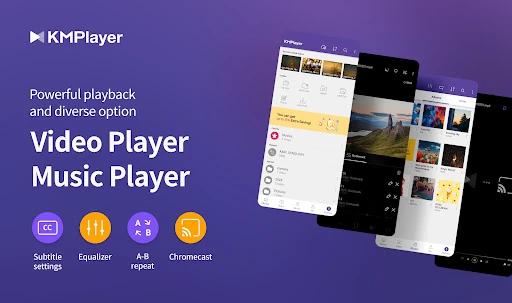
Imagine settling in to watch a downloaded film after a long day, only to find that your usual player struggles with its format or subtitle track. KMPlayer is built for that sort of situation: it supports a wide range of video, music, and subtitle formats, and lets you adjust subtitle size, color, and position. I can see it being especially handy when a media folder has accumulated files from different sources.
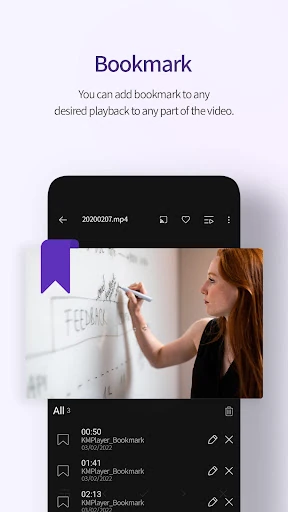
The useful difference is that playback does not have to be one-size-fits-all. You can change the screen size, tune color controls such as brightness and saturation, or use section repeat to revisit a particular stretch. Bookmarks help you return to a chosen point. Those options are practical rather than flashy; they matter most when a video needs a little adjustment or you want to pick up a specific section again.
More than a basic player
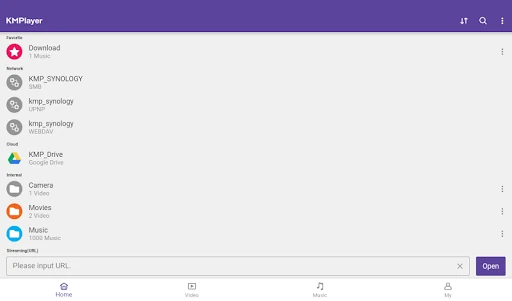
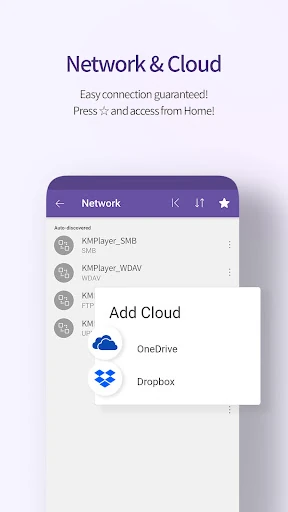
Compared with a minimal video app, KMPlayer aims to cover more ground. Alongside device media, it supports URL playback, Chromecast, network sources including FTP, UPnP, SMB, and WebDAV, plus Dropbox and OneDrive. That makes it a broader playback hub for people who already use those sources, rather than merely a viewer for one folder of videos.
That range is not a reason to replace every media app, though. KMPlayer is focused on playing and managing playback, not on being a streaming subscription service or a place to discover a catalog of shows. Some editing and conversion tools sit behind VIP in-app purchases. If you just want to press play on an occasional clip, the extra options may be more than you need.
Small habits that help
A little setup can make the player easier to live with. I would adjust subtitle size and placement once for a particular video, then use the quick button for playback options I change often. When watching something in short sessions, bookmarking a time point gives me a simple way to return without scrubbing through the whole file.
For music as well as video, the separate equalizer settings offer a way to save different sound adjustments for each. Section repeat is another useful tool for revisiting a scene, a line, or a short passage without restarting the file. These features work best when used as small conveniences during playback, not as a reason to spend every evening configuring the player.
More From Our News Desk

Zoom Meetings, Google Meet, or Teams: Which Is Easiest to Join?

How I Build a Free Streaming Lineup With Tubi

Why Crunchyroll Is the Default Anime App for So Many Fans

YouTube TV: A Practical Guide to Cutting Cable

Rummikub and the Small Comfort of Phone Games

TeamViewer Remote Control or AnyDesk for Helping Family?
Who will appreciate KMPlayer
I would recommend KMPlayer to Android users with varied personal media libraries, especially if they regularly encounter different file formats, subtitles, or playback preferences. Its wide format support and controls give people room to tailor how a file looks and sounds. It also has useful options for those who want to play media from supported network or cloud sources, or send video to a TV with Chromecast.
It may be less appealing if you want the simplest possible player and rarely change playback settings. The number of controls can feel like extra work when all you need is a quick clip. Some additional tools, including video and audio cutting, GIF creation, and MP3 conversion, are part of VIP. Anyone considering those features should weigh the in-app purchase against how often they would actually use them.
KMPlayer - All Video Player is made by PANDORA.TV and is listed in Video Players & Editors. On Google Play, it has over 10 million installs and a 4.1-star rating from about 385,000 ratings. The app is free to download and contains no ads.
In-app purchases are available, with Google Play prices ranging from $1.99 to $19.99 per item. The content rating is Everyone. The listed version is 36.04.235; it was released on March 19, 2014, and last updated on October 14, 2026.
Playback controls for a mixed media library
Getting started
When I first opened a player like this, the main question I had was whether it could handle the files I already keep on my phone. KMPlayer’s stated support spans familiar video and audio formats such as MP4, MKV, AVI, MP3, WAV, and FLAC, along with several subtitle types. That breadth makes it a plausible choice for a collection that is not all encoded the same way.
Access to local media depends on file permissions. The app describes storage access for older Android versions and all-files access on Android 11 and above. Pop-up play uses an optional permission to draw over other apps, while the basic service can be used without granting that permission. I appreciate that distinction: it lets users decide whether that extra playback mode is worth enabling.
Daily playback
The everyday experience is centered on adjusting playback without leaving the video behind. Quick button access is intended to make player options easier to reach, while expand and contract controls let you change the displayed video area. Color adjustments include brightness, light intensity, hue, saturation, and gamma, which can help when a particular file looks too dim or washed out.
Subtitle controls are a particularly practical part of the package. You can change their color, size, and position, and the supported subtitle formats include options such as SRT, SSA/ASS, WebVTT, and VobSub. When I imagine watching a subtitled film on a smaller screen, being able to move or enlarge text seems more useful than a long list of obscure playback toggles.
Standout tools
Bookmarks and section repeat are the features I would reach for most often beyond ordinary play and pause. A bookmark saves a time point for returning later, while section repeat loops between two selected points. They suit different moments: one helps with a longer viewing session broken into parts, and the other is useful when you want to replay a short passage.
KMPlayer also reaches beyond files stored on the device. It supports Chromecast playback to a TV, URL playback for online video, network sources such as SMB and WebDAV, and Dropbox and OneDrive. These options make it more versatile for people who already have media in those places, though they are not necessary for watching a single file saved locally.
A practical routine
For a relaxed evening routine, I would start by choosing a video, set its subtitle size and position for the screen, and adjust brightness only if the picture needs it. If I had to pause partway through, a bookmark could help me return to the right moment. That is a straightforward way to use the app without turning a movie night into a tour of every setting.
For music, the separate equalizers for audio and video offer another small bit of organization. I would save a preferred sound adjustment for each use and leave it alone unless a particular file calls for a change. The point is not to optimize every track; it is to make recurring preferences easier to keep consistent.
Limits to consider
A broad feature set inevitably means more choices than a bare-bones player. People who only watch a few common file types may not benefit from network protocols, cloud playback, detailed color controls, or multiple subtitle options. The extra flexibility is most valuable when it solves a real playback problem, not simply because the options are present.
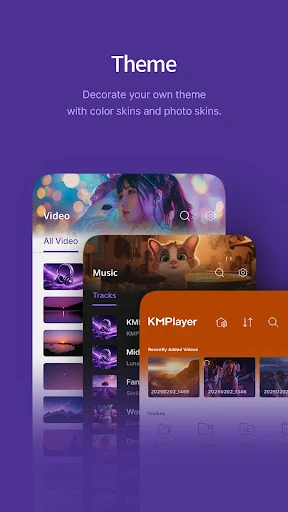
Some advertised extras are VIP features rather than part of the basic playback toolkit. These include a torrent client with real-time playback during downloading, cutting video and audio, creating GIFs, MP3 conversion, and VIP themes. The app also requests access to device media, and pop-up play requires optional permission. Those are worth keeping in mind when deciding how much of KMPlayer you need.
KMPlayer - All Video Player makes a strong case as a flexible Android media player, particularly for people with varied file formats, subtitle preferences, or media stored across supported sources. Its bookmarks, repeat controls, playback adjustments, and Chromecast support add useful ways to tailor a session.
I would try it if your current player regularly leaves you adjusting files or hunting for playback options. If you mainly watch the occasional common-format clip, a simpler app may suit you better. The VIP tools are an extra to consider, not a requirement for the core player.
KMPlayer Frequently Asked Questions
What is KMPlayer - All Video Player used for?
KMPlayer plays video, music, and subtitle files in a range of formats. It also offers playback controls such as bookmarks, section repeat, subtitle adjustments, and equalizers. Supported sources include device media, URLs, network protocols, Dropbox, and OneDrive, and it supports Chromecast for watching video on a TV.
Which devices can run KMPlayer - All Video Player?
KMPlayer - All Video Player is an Android app available through Google Play. The minimum Android version can vary by release and device, so check the Google Play store listing for the requirement that applies to your phone or tablet.
Does KMPlayer - All Video Player cost money?
The app is free to download and contains no ads. It offers in-app purchases priced from $1.99 to $19.99 per item. Some additional tools, including cutting media, creating GIFs, MP3 conversion, and VIP themes, are described as VIP features. Check Google Play for current purchase details.
Does KMPlayer - All Video Player need file access?
KMPlayer requests permission to access media stored on the device. Its description says Android 11 and later use an all-files access permission, while older versions use storage access. Pop-up play uses optional permission to draw over other apps; the basic service can be used without that optional permission.
Is KMPlayer - All Video Player suitable for casual viewing?
It can work for casual viewing, but its many playback and source options are most useful to people who want flexibility with formats, subtitles, or media locations. If you only watch occasional clips and prefer a very simple interface, that breadth may feel unnecessary. VIP extras are optional in-app purchases.
Pros
- Supports a broad range of video, audio, and subtitle formats.
- Offers bookmarks, section repeat, subtitle controls, and color adjustments.
- Can play media from supported network and cloud sources.
- Chromecast support makes TV playback an option.
Cons
- The many controls may feel excessive for simple, occasional viewing.
- Several editing and conversion tools require VIP in-app purchases.
- Accessing device media requires storage-related permissions.
- Category
- Video Players & Editors
- Version
- 36.04.235











