jetAudio Hi-Res Music Player
- 182.86K
- 4.1
- Installs
- 10.00M
- Price
- Free

Screenshots
Analysis by Reviewed APKs
jetAudio Hi-Res Music Player is an Android music player for people who keep their own audio files and want more control over playback than a basic player usually offers. I found its mix of format support, equalizer tools, sound effects, and network streaming appealing for a varied music collection. It is capable and flexible, though the free version’s ads and the number of options take some getting used to.
A listening session at home
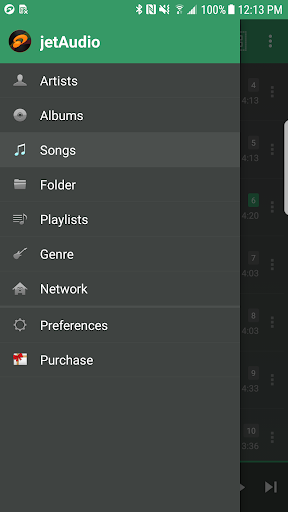
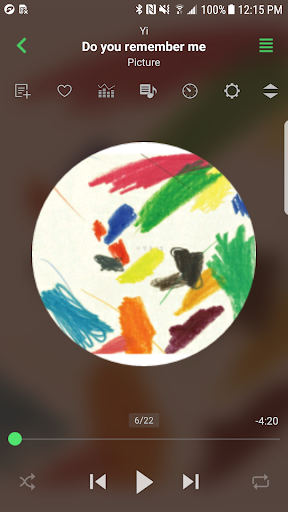
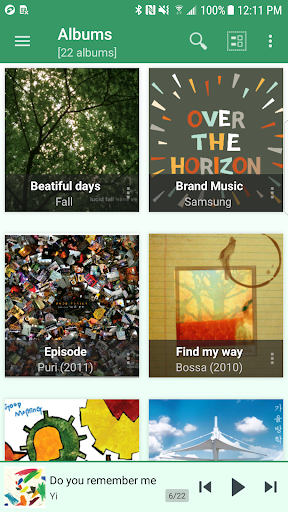
When I first opened jetAudio, I pictured using it during the kind of evening when I want to put my phone down and let an album run. I could browse by artist, album, song, playlist, genre, or folder, then choose an equalizer preset and leave the player to handle the rest. Gapless playback and crossfading are useful touches when I want a continuous listen rather than a string of abrupt starts and stops.
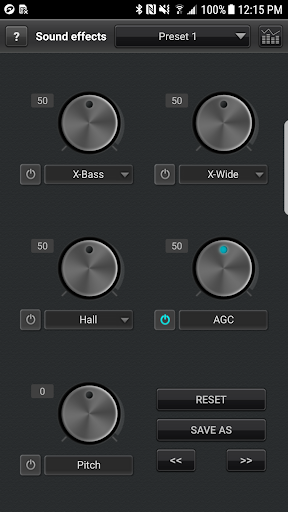
The practical difference shows up with a mixed library. jetAudio supports formats including MP3, WAV, OGG, FLAC, M4A, APE, OPUS, and AIFF, so I would not need to treat every folder as if it came from the same source. If I switch from a quiet recording to a louder track, automatic gain control can help smooth out volume variation. It is a local music player first, with extra listening controls layered on.
More than a basic player
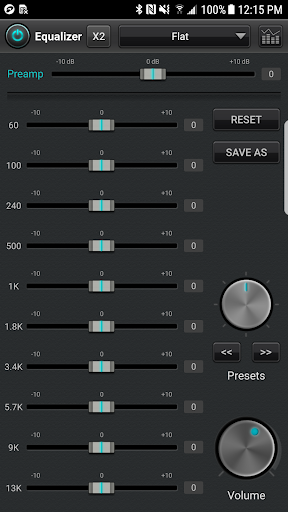
Compared with a simple player built around a short queue and a few playback buttons, jetAudio gives more attention to sound adjustment and library browsing. It includes 32 equalizer presets, and the free Basic version includes a 10-band graphic equalizer along with effects such as X-Wide, Reverb, and X-Bass. There are also playback speed controls, a sleep timer, and options for repeat, fade-in, and fade-out.
It is not a music subscription service or a place to discover a catalog of songs. The material describes playing files you have and streaming from network shares, WebDAV servers, and supported cloud services. That makes it a better fit for someone managing a personal collection than someone who wants one app to supply all their music. Its many adjustments may also feel like extra work if all you want is a clean, minimal player.
Small habits that help
I would start with a familiar album and try one or two of the 32 presets before changing individual equalizer bands. That gives me a quick sense of how the controls affect my own headphones without turning every listening session into a setup project. If tracks in a playlist have noticeably different volumes, AGC is worth trying; if I am listening through a continuous mix, gapless playback may matter more than crossfade.
A few small tools suit daily routines well. I can set the sleep timer before listening in bed, use Repeat A-B to revisit a passage, or adjust playback speed for a particular track. The player also supports Bluetooth headphone button controls, and its widgets offer ways to keep playback close at hand. I would change one setting at a time, then leave the ones I actually use alone.
More From Our News Desk

Zoom Meetings, Google Meet, or Teams: Which Is Easiest to Join?

How I Build a Free Streaming Lineup With Tubi

Why Crunchyroll Is the Default Anime App for So Many Fans

YouTube TV: A Practical Guide to Cutting Cable

Rummikub and the Small Comfort of Phone Games

TeamViewer Remote Control or AnyDesk for Helping Family?
Who might enjoy jetAudio
I would recommend jetAudio to Android listeners with a sizeable collection of downloaded or otherwise accessible music files, especially if that collection includes several formats. The equalizer presets, sound effects, folders-and-genres browsing, and network or cloud streaming make it more versatile than a bare-bones local player. People who like adjusting playback to suit a track or listening situation have plenty to explore without needing to use every control.
It may be a poor match for someone who wants a minimalist interface, has no interest in managing music files, or expects a streaming subscription library. The free Basic version includes ads and omits some Plus features, so listeners who want the full feature set should weigh that trade-off. I would also suggest taking time to explore the controls rather than expecting every option to be obvious on the first pass.
jetAudio Hi-Res Music Player is made by Team Jet and is in the Music & Audio category on Google Play. It has more than 10 million installs and a 4.1-star rating from about 183,000 ratings. Google Play marks it as free to download, with ads and in-app purchases. Individual in-app items are priced from $1.99 to $12.99.
The app has an Everyone content rating. Its current version is 13.2.0; it was released on May 22, 2012, and the recorded last update is October 25, 2026. The supplied store facts do not specify a minimum Android version, so check Google Play for the requirement that applies to your device.
A Closer Look at Everyday Listening
First impressions and setup
My first impression is that jetAudio is built for people who want choices. It presents itself as a music player, but it also offers library browsing, sound adjustments, streaming from shared locations, and extras such as widgets. That breadth is useful once I know what I need, though it can make the app feel busier than a player designed mainly to start a song quickly.
I would begin by browsing my music by album or folder, whichever best matches how I keep files organized. Then I would play something familiar and explore the included presets before touching the graphic equalizer. A familiar track makes it easier to judge whether a change is welcome. I would leave the advanced options for later rather than trying to tune everything during the first few minutes.
Daily playback
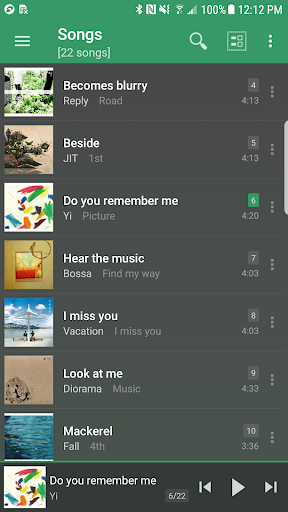
For ordinary listening, jetAudio covers the basics of moving through a collection: I can browse by artist, album, song, playlist, genre, or folder and then play what I choose. Three list modes are available, and the app also supports grid layouts, though Basic limits layout choices to the Album browser. Those options help adapt browsing to a collection without changing what the app is fundamentally for.
Once playback starts, the practical extras are easy to understand. I can use repeat, crossfade, gapless playback, or fade-in and fade-out depending on the music. Speed control runs from 50% to 200% with pitch adjusted in the Basic version. If I want to listen without watching the screen, Bluetooth headphone button control and widgets can make the player easier to use between tasks.
Standout listening tools
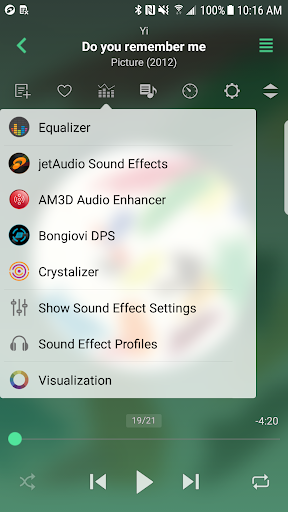
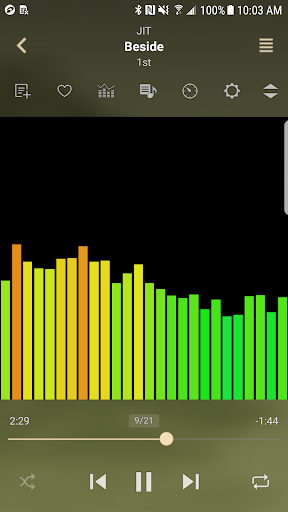
The equalizer is one of the clearest reasons to choose jetAudio over a simpler player. Basic includes 32 presets and a 10-band graphic equalizer; Plus adds a 20-band option. Sound effects include X-Wide, Reverb, and X-Bass, and the description also identifies Crystalizer, AM3D Audio Enhancer, Bongiovi DPS, and visualizations as separately sold plugins. That makes it possible to start with included controls and consider extras only if they matter to me.
Network playback is another useful distinction. jetAudio can stream music from shared folders on a local home network or from WebDAV servers, including network drives and USB drives attached to a router. It can also stream files from Google Drive, Dropbox, Box, and OneDrive. That is handy when music lives somewhere other than the phone, though it is a different use case from simply browsing files already stored on the device.
There are smaller additions that suit particular habits. A sleep timer can be set for up to 24 hours, and Repeat A-B lets me replay a specific section. The app includes 14 widgets and can find a track on YouTube. Last.fm support requires the official Last.fm app. These are supporting tools rather than reasons everyone needs the player, but together they give regular listeners room to tailor how they use it.
A practical weekly routine
If I were using jetAudio through a normal week, I would keep the routine simple: browse to a chosen album, pick a preset that suits the headphones I am using, and leave playback controls as they are unless a specific need comes up. When moving between tracks with uneven volume, I would try AGC. For albums intended to flow from one track to the next, I would favor gapless playback over crossfade.
For a shared home collection, I would use the network or cloud streaming options when I want to listen to files without first putting them on the phone. I might also put a widget on the home screen or set a sleep timer at night. The point is to use the features that solve a real problem, not to spend every session adjusting equalizer bands and browsing menus.
Limits to keep in mind
The biggest trade-off is the difference between Basic and Plus. Basic includes ads and does not include some features available in Plus. The listed Plus-only items include a 20-band equalizer, tag editing, lyrics stored in tags, additional lock screens, pitch shifting, more precise speed control, and MIDI playback. Some sound-effect and visualization plugins are also sold separately through in-app purchases, so the full set of options is not all part of the free experience.
There is also a learning curve. A wide range of controls is helpful for a music enthusiast, but can feel like clutter if I only want a simple queue and an obvious play button. Support for WMA can depend on the device, according to the app description, so I would check that format against my phone rather than assume every file type behaves identically.
Finally, jetAudio is centered on music files and playback rather than supplying a streaming catalog. Its network and cloud options extend where those files can come from, but they do not turn it into a subscription service. It makes most sense when I already have music I want to organize and play.
jetAudio Hi-Res Music Player is a flexible choice for listeners who want broad file support, useful playback controls, and room to adjust the sound. I like that it can handle both device-based libraries and music from network or cloud locations. Its depth is a genuine advantage, but the ads in Basic and the separation between Basic and Plus deserve a look before settling in.
I would try it if my music collection is important to me and I enjoy having playback options to tune. If I wanted the simplest possible player or a built-in subscription catalog, I would look elsewhere. For file-focused listening on Android, jetAudio offers a lot to work with once I make the interface and controls part of my routine.
jetAudio Hi-Res Music Player Frequently Asked Questions
What is jetAudio Hi-Res Music Player used for?
jetAudio is used to browse and play music files, with support for a broad range of audio formats. It also offers equalizer presets, sound effects, playback controls, and streaming from local network shares, WebDAV servers, and supported cloud services. It is a player for music you can access, not a subscription catalog described in the app details.
Which devices can run jetAudio Hi-Res Music Player?
The supplied platform information identifies jetAudio as an Android app on Google Play. The specific minimum Android version is not provided in the available store facts, and requirements can vary with updates and devices. Check the Google Play page for the current requirement for your phone or tablet.
Does jetAudio Hi-Res Music Player cost money?
jetAudio is free to download and includes ads and in-app purchases. Individual in-app items are priced from $1.99 to $12.99. The description distinguishes the Basic and Plus versions, with some features reserved for Plus and certain sound or visualization plugins sold separately. Check Google Play for current purchase details.
Does jetAudio Hi-Res Music Player support network music?
Yes. The app description says it can stream music from shared folders on a local home network, WebDAV servers, and cloud services including Google Drive, Dropbox, Box, and OneDrive. It is useful for listening to files stored beyond the phone, though the services and setup should match the way your music is stored.
Who should use jetAudio Hi-Res Music Player?
It is a good fit for Android listeners who have their own music files and want format support, equalizer controls, sound effects, and flexible playback. It may be less appealing if you prefer a very simple player or want an app that provides a subscription music catalog. The ads and Plus-only features are also worth considering.
Pros
- Plays a wide range of music formats, including FLAC, OPUS, AIFF, and WAV.
- Offers 32 equalizer presets, sound effects, and multiple playback controls.
- Streams music from network shares, WebDAV servers, and supported cloud services.
- Includes practical extras such as widgets, a sleep timer, and Repeat A-B.
Cons
- The free Basic version includes ads and excludes some Plus features.
- The number of controls may feel overwhelming to listeners who prefer simplicity.
- Some sound and visualization plugins are sold separately through in-app purchases.
- Category
- Music & Audio
- Version
- 13.2.0











