iNaturalist
- 11.17K
- 3.7
- Installs
- 5.00M
- Price
- Free

Screenshots
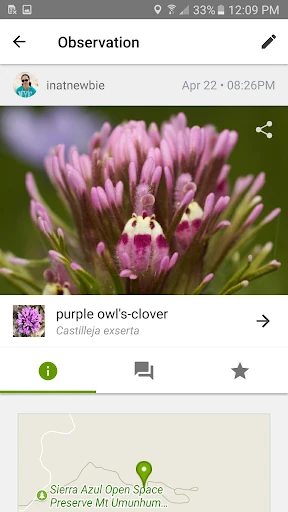
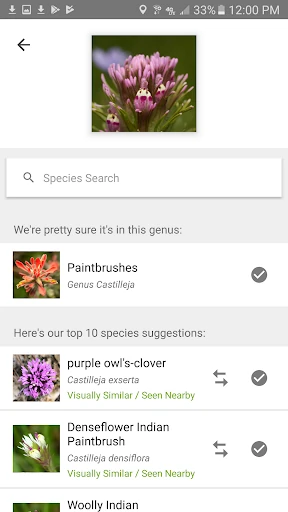
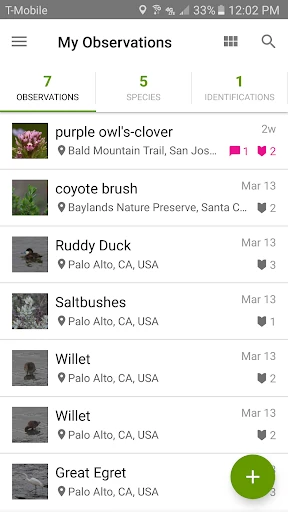
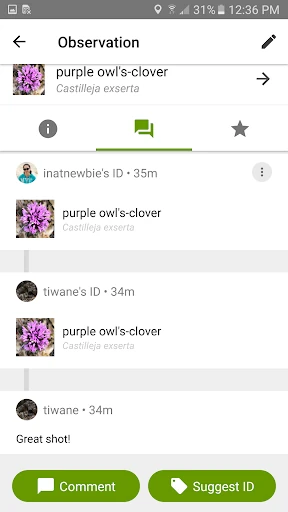
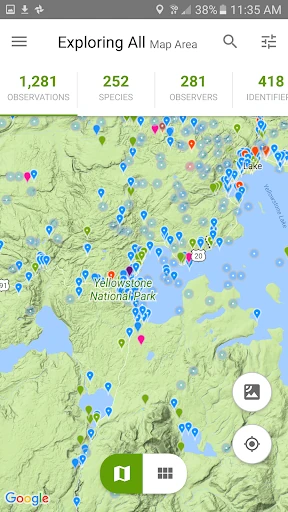
Analysis by Reviewed APKs
iNaturalist is a nature observation app for people who want to identify plants and animals, record what they find, and learn alongside a community. I like its blend of personal field notes and shared discovery: a photo can become a question for others, or part of a larger scientific record. It suits curious walkers and dedicated naturalists, though it works best when you enjoy taking time to observe.
Turn a Walk Into Discovery
On a weekend walk, I might notice a flower I can't name or an unfamiliar insect resting on a railing. With iNaturalist, I can record the observation and get suggestions for what it might be. That gives the moment somewhere to go after I have taken the photo: I can share it with the community, learn from identification help, and keep a record of what caught my attention along the way.
The appeal is not just getting a possible name for a species. Other community members can help identify what I saw, and discussion gives the observation a social, learning-oriented side. I can imagine using it on a local trail, in a garden, or during a trip when ordinary scenery suddenly becomes interesting. It encourages me to look more closely, without turning every outing into a formal nature survey.
More Than a Pocket Field Guide
A standard field guide is useful when I want a self-contained reference, and a general search can be quick when I already know what details to look up. iNaturalist takes a different route: it combines identification suggestions with observations shared by people and a community that can contribute identifications. That makes it especially appealing when I have a photo but not enough knowledge to narrow down what I am seeing by myself.
I would not treat it as a replacement for a dedicated identification reference or as a promise of an instant, definitive answer. Its focus is documenting and sharing observations, learning from suggestions and other people, and contributing data that can help research. If I only want a quick answer with no interest in recording a find or joining a conversation, the community aspect may feel like more than I need.
Make Observing a Small Habit
I get more from an observation app when I use it during the moment, rather than relying on memory later. A simple habit is to pause when something catches my eye, take a clear photo, and record the observation before moving on. When I have time, I can return to suggestions and community identifications. That keeps a casual walk enjoyable while giving each find a better chance of becoming a useful record.
Projects offer another way to give observations a focus. I could follow a project connected to a particular place or kind of species, then pay closer attention to what fits that interest during an outing. I would keep the routine light: notice, record, and check back when convenient. The app is more rewarding when I treat it as an ongoing learning practice instead of expecting every entry to become a complete field report.
More From Our News Desk

Zoom Meetings, Google Meet, or Teams: Which Is Easiest to Join?

How I Build a Free Streaming Lineup With Tubi

Why Crunchyroll Is the Default Anime App for So Many Fans

YouTube TV: A Practical Guide to Cutting Cable

Rummikub and the Small Comfort of Phone Games

TeamViewer Remote Control or AnyDesk for Helping Family?
Who Will Enjoy It
I would recommend iNaturalist to curious people who enjoy walks, gardening, travel, or simply noticing the wildlife around home. It can suit beginners because suggestions and community identifications give them a way into unfamiliar species, while experienced naturalists may appreciate sharing observations and helping others. The social element is part of the experience, so it is a good fit for anyone who likes learning through other people's contributions as well as their own.
It may be less satisfying for someone who wants a fast, private lookup and has no interest in recording or sharing what they see. The app's value comes from observations, suggestions, discussion, and participation in projects, so its community-centered approach takes some patience. I would also set expectations carefully: identification suggestions are a starting point for learning, not a reason to stop observing details or considering the broader context.
On Google Play, iNaturalist is published by iNaturalist and has more than 5 million installs. Its rating is 3.7 out of 5 from around 11,170 ratings. The app is free to download, has no in-app purchases, and contains no ads. Google Play gives it an Everyone content rating, making it suitable for a broad audience.
The current Android version is 1.37.2, and it requires Android 6.0 or later. Google Play gives its original release date as December 30, 2011, and its most recent update date as September 30, 2025. Those details make it a long-running app with a recent maintenance update, while the Android requirement covers devices running version 6.0 and newer.
A Closer Look at Everyday Nature
A Welcoming First Look
When I first opened iNaturalist, the central idea was easy to grasp: notice a living thing, record it, and use suggestions or community help to learn more. That is a friendly starting point for someone who is unsure where to begin with species identification. The app does not ask me to arrive as an expert; curiosity is enough to give an observation a purpose.
I would start with something familiar close to home rather than making my first session a major outing. A plant in a yard or an animal spotted on a regular walk gives me a low-pressure way to try recording an observation and see how the community side works. That first small entry also helps set expectations: iNaturalist is a place to keep learning, not just a single-use answer tool.
The Day-to-Day Rhythm
In everyday use, the basic loop feels natural: I notice a plant or animal, record the observation, and look at suggestions or community identifications. If someone else has seen something similar, their contribution can help me understand what I found. I can also discuss observations and help identify what other people have seen, so participation goes both ways rather than stopping at my own discoveries.
That back-and-forth makes the app feel more like a shared notebook than a private list of names. I can return to an observation to learn from the responses, then carry that new knowledge into the next walk. The trade-off is that learning with a community may take more patience than a quick search. For me, that suits the slower pleasure of paying attention outdoors.
Community and Projects
The strongest distinguishing feature is the combination of suggestions and crowdsourced identifications. A suggestion gives me somewhere to start, while community input can add knowledge from people who care about the same kinds of observations. I like that the app also invites users to discuss and help with other people's identifications. It frames nature learning as a shared activity rather than a one-way lookup.
Projects add a more focused community layer. I can follow groups built around a particular place or species, which gives an outing a theme without changing the basic act of recording what I notice. The app also presents observations as contributions to research and conservation work. That wider purpose gives an everyday sighting a satisfying context, while keeping the actual activity grounded in careful observation.
A Practical Weekly Routine
A routine I would use is to make a few observations during an ordinary walk, then check back later for suggestions and identifications. That separates the pleasure of being outside from the temptation to spend the entire outing staring at a screen. I can take time with a photo when something is genuinely interesting, record it, and continue walking before reviewing the community side at home.
Once I have a theme in mind, following a relevant project can help focus what I look for. I might pay closer attention to a certain place or a particular kind of species, then share observations that fit. I would keep expectations modest and consistent: a handful of thoughtful records is more enjoyable than trying to document everything. The habit works because it can fit around an existing walk.
Keep Expectations Grounded
Identification suggestions are helpful, but I would treat them as clues to explore rather than unquestionable answers. The app describes suggestions alongside community identifications, which means the learning process includes other people's input. That is a strength, but it also means a user looking for an immediate, self-contained verdict may find the experience less direct than a simple reference tool.
The community and project features are most useful when I am willing to participate, even if that participation is just checking back on my own observations. Someone who wants a completely private record may not value the sharing-centered approach as much. And while the app encourages contributions to research-quality data, careful observation still matters; recording a sighting is a contribution, not a substitute for understanding what was actually observed.
I would also remember that the app's purpose is nature learning and observation, not a general encyclopedia for every question about the outdoors. Its strongest use is connecting a sighting with suggestions, people, and projects. Keeping that purpose in mind helps me judge it on what it does well instead of expecting it to behave like an all-purpose search app.
iNaturalist makes ordinary encounters with plants and animals feel worth recording. I like that it combines identification suggestions with human input and a broader community purpose, rather than reducing nature to a quick label. Its best moments come when I am willing to observe, share, and learn over time.
I would recommend it to anyone who wants to become more attentive outdoors and enjoys community learning. If all I needed were a private, instant answer, I would choose something simpler. For curious walkers and naturalists, though, iNaturalist offers a useful way to turn sightings into an ongoing practice.
iNaturalist Frequently Asked Questions
What is iNaturalist used for?
iNaturalist helps people identify plants and animals, record and share observations, and learn from suggestions and community identifications. Users can discuss sightings, help identify other people's observations, and follow projects centered on a place or species. It also presents shared observations as data that can support scientific research and conservation work.
Which devices can run iNaturalist?
The facts provided here cover the Android app on Google Play, which requires Android 6.0 or later. Device compatibility can depend on the particular device and current store requirements, so it is worth checking the Google Play page before installing. The app's nature-observation purpose is suited to use while recording plants and animals.
Does iNaturalist cost money?
iNaturalist is free to download on Google Play. It has no in-app purchases and contains no ads, according to the provided app facts. Store details can change over time, so check Google Play for the current information before installing. Its community features center on recording observations, learning identifications, and following projects.
What Android version does iNaturalist require?
The Android app requires Android 6.0 or later. Google Play lists version 1.37.2 as the current version in the provided facts, with a last update date of September 30, 2025. Requirements may change with future releases, so the Google Play page is the best place to check compatibility for a particular device.
Is iNaturalist a good fit for beginners?
It can suit beginners who want to learn about plants and animals, since it offers identification suggestions and community help. It is especially appealing if you enjoy recording and sharing observations rather than looking for a private, one-off answer. More experienced naturalists can also contribute by discussing observations and helping identify what others have seen.
Pros
- Combines identification suggestions with crowdsourced help from a nature-focused community.
- Makes it easy to record and share observations from everyday outings.
- Projects add a focused way to follow places or species.
- Free to use, with no in-app purchases or ads.
Cons
- Community-based identification may take more patience than a quick lookup.
- Sharing and discussion may not suit people who want a private field notebook.
- Suggestions are a starting point, not a substitute for careful observation.
- Category
- Education
- Version
- 1.37.2











