GCU Student
- 382
- 2.6
- Installs
- 50.00K
- Price
- Free

Screenshots
Analysis by Reviewed APKs
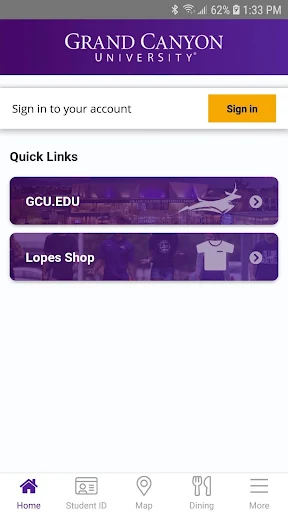
GCU Student is a campus companion for registered Grand Canyon University students, with practical tools for checking a class schedule, finding places on campus, and keeping track of dining dollars. I see its appeal in the small gaps between classes, when a quick answer matters more than a full student portal. Its focus is useful, though a Google Play rating of 2.6 suggests the experience may not work equally well for everyone.
A Day Around Campus
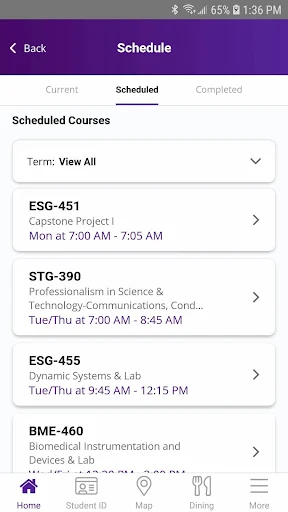
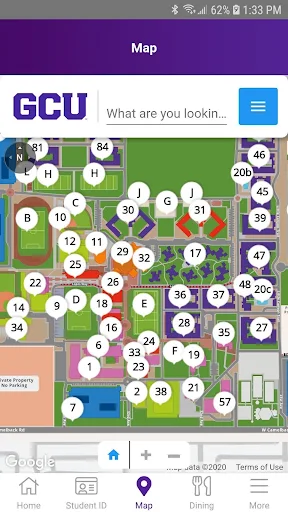
Picture a busy morning: I want to confirm where my next class meets, find a nearby dining venue, and avoid walking across campus in the wrong direction. GCU Student brings those campus-specific tasks together. The schedule can show the location of an on-campus class, while the map covers places such as student housing, athletics, and student services. That makes the app most valuable as a quick reference during the day.
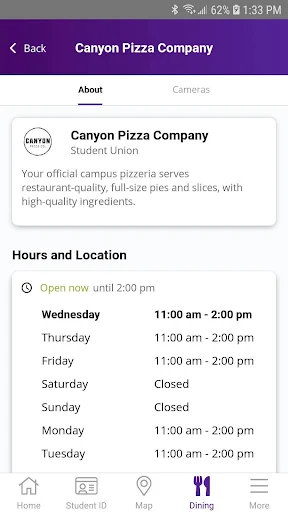
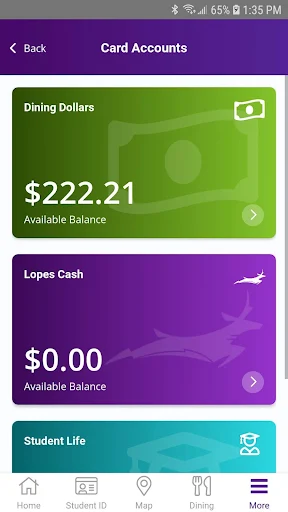
At lunch, the dining information adds another useful layer. I can check venue hours and descriptions, and food line cameras can help me get a sense of how busy a place is before I head over. If I use dining dollars, the app also offers tools for checking the balance and budgeting. None of these tasks is complicated on its own; the convenience comes from having them gathered in one university-focused app.
Campus Tool, Not a Portal
The obvious alternative is a university website or another student information tool. GCU Student has a narrower, more physical-campus focus: schedules and classroom locations sit alongside maps, dining details, dining-dollar tools, Chapel check-in, and a mobile ID. That combination suits someone moving through the GCU campus and needing practical details on a phone, rather than someone looking for a general-purpose planner.
I would not treat it as a replacement for every academic or social service. The supplied feature details describe campus logistics and student access, not grade tracking, assignment management, peer networking, or event alerts. If those are the main things I need, I should look to the relevant university services instead. The app's strength is helping with the everyday business of being on campus, not serving as an all-in-one hub for every part of student life.
Small Habits That Help
A little preparation can make a campus app more useful. I would check the schedule before leaving for the day, especially when I have classes in different parts of campus, and use the map when I am heading somewhere unfamiliar. Looking up dining hours before a meal is another easy habit. These quick checks can prevent unnecessary detours without turning the app into something I need to monitor constantly.
Students who use the dining-dollar tools can make a routine of checking their balance and budget before choosing where to eat. The mobile ID may also be handy to keep available when using dining dollars or accessing other campus locations. For Chapel, the app can enable automated check-in and show the sessions checked into. Those features are most useful when I remember to use them as part of an existing routine.
More From Our News Desk

Zoom Meetings, Google Meet, or Teams: Which Is Easiest to Join?

How I Build a Free Streaming Lineup With Tubi

Why Crunchyroll Is the Default Anime App for So Many Fans

YouTube TV: A Practical Guide to Cutting Cable

Rummikub and the Small Comfort of Phone Games

TeamViewer Remote Control or AnyDesk for Helping Family?
Who May Find It Useful
I would recommend GCU Student to registered GCU students who spend time on campus and want quick access to their class locations, a campus map, dining information, or a mobile ID. It is particularly practical for someone still learning where buildings and services are, or for a student who wants dining details and campus access tools together. Basic information is also available to people who are not students.
It may be less appealing to someone who wants a broad academic dashboard or a social app. The described features do not cover grades, assignments, or connecting with classmates, so students looking for those tools should not assume they are included. The Google Play rating is 2.6 from 382 ratings, a reason to keep expectations measured and check whether the app fits the specific campus tasks I need it to handle.
GCU Student is an Education app from Grand Canyon University. On Google Play it has 50,000+ installs and a 2.6 rating from 382 ratings. It is free to download, with no in-app purchases and no ads. Its content rating is Everyone. The available version information says it varies with device, so the exact version may differ across compatible phones.
The app was released on May 15, 2015. A minimum Android version and a most recent update date are not provided in the available facts, so compatibility can depend on the device and is worth checking on Google Play. The described features are intended for Grand Canyon University students, with basic information also available to nonstudents.
The Campus Details That Matter
A Focused First Impression
When I first consider GCU Student, the appeal is easy to understand: it is built around the specific errands and questions that come up on a university campus. The description points to class locations, maps, dining information, a mobile ID, and Chapel check-in. That is a more grounded starting point than a broad promise to manage every part of college life.
The available summary mentions a refreshed look and updates to the mobile ID. That suggests attention to the app's appearance and a central campus-access feature, but it does not spell out every setup step or design change. I would approach it as a practical companion to try alongside my usual routine, then see which campus details I actually return to.
Useful Between Classes
Day to day, the class schedule and campus map are the features I would expect to reach for most often. A schedule that includes the location of an on-campus class saves me from switching between a timetable and a separate map just to work out where I am going. The map's coverage of housing, athletics, student services, and other campus locations gives it a clear role beyond classroom navigation.
Dining information makes the app relevant outside class time. Venue descriptions and hours can help me choose where to go, while food line cameras offer an extra way to check a dining venue before walking there. I like that these details connect to an ordinary decision—where and when to eat—rather than asking students to learn a complicated system just to get a small benefit.
Campus Features With Purpose
The dining-dollar tools are one of the more distinctive parts of the package. Students can check dining dollars and use the app's tools to budget them, putting a practical money-related detail beside dining hours and venue information. I would treat these as reference tools for staying aware of a balance, rather than assuming the app replaces any other university account or financial service.
The mobile ID also gives the app a role beyond looking things up. The description says it can help students use dining dollars and access other locations around campus. Automated Chapel check-in is another campus-specific feature, and the app can show sessions a student has checked into. Together, these tools make the app more than a map, while keeping its purpose tied to GCU routines.
A Simple Daily Routine
A workable routine could start before I leave: glance at the schedule, note the location of the first class, and use the map if I am heading somewhere unfamiliar. Between classes, I could check the next location rather than waiting until I am already on the move. This is a modest use of the app, but it is exactly where a campus-specific tool can save a few avoidable wrong turns.
Later, I could look at dining venue hours and descriptions before choosing lunch, then check my dining-dollar balance as part of keeping an eye on spending. If I use Chapel check-in, I can use the app's session information to see what I have checked into. These are separate tasks, but they fit naturally into the same day and make the app easier to remember.
Keep Expectations Grounded
The main limitation is scope. The described feature set is useful for campus life, but it does not establish that the app handles grades, coursework, social connections, or campus event notifications. I would not install it expecting a complete student portal. Students who need those functions may have to use other university resources alongside it.
There is also a reason to approach the experience with some caution: Google Play shows a 2.6 rating from 382 ratings. That score does not explain what each student encountered, but it is a reminder that a useful idea and a smooth experience are not the same thing. I would check the current store details and try the features relevant to my routine before relying on it for every campus task.
GCU Student has a clear job: make everyday campus information and selected student tools easier to reach. The schedule, map, dining details, dining-dollar tools, mobile ID, and Chapel check-in give it practical value for students who regularly move around GCU.
I would try it if I were a GCU student looking for campus-specific convenience, while keeping expectations focused on the features described. It is less suitable as a general academic organizer or a social platform. The modest Play rating makes checking the current app experience worthwhile before making it part of a routine.
GCU Student Frequently Asked Questions
What is GCU Student used for?
GCU Student is a campus companion for Grand Canyon University. Students can use it to view a class schedule and on-campus locations, find places on a campus map, check dining venue information and dining-dollar tools, use a mobile ID, and manage automated Chapel check-in. Basic information is also available to people who are not students.
Which phones and platforms support GCU Student?
GCU Student is an Android app available through Google Play. The available facts do not give a minimum Android version, and compatibility may vary by device. I would check the Google Play store details for the current requirements on a particular phone before relying on it.
Does GCU Student cost money?
The app is free to download, and the available facts say it has no in-app purchases and no ads. Store information can change over time, so it is sensible to check Google Play for current details before installing or using the app.
What Android version does GCU Student require?
A minimum Android version is not provided in the available app facts. The version is described as varying with device, so support may depend on the phone. Check the Google Play store page on the device you plan to use for the latest compatibility information.
Is GCU Student useful for someone who is not a student?
The app provides basic information for people who are not Grand Canyon University students, but its main tools are student-focused. The schedule, dining-dollar features, mobile ID, and Chapel check-in are geared toward registered students. Someone who mainly wants general information may have less reason to use it regularly.
Pros
- Combines class locations, campus maps, and dining details for everyday campus planning.
- Includes dining-dollar checking and budgeting tools alongside venue information.
- Mobile ID and Chapel check-in address specific GCU student routines.
- Free to download, with no ads or in-app purchases.
Cons
- Google Play rating is 2.6 from 382 ratings, so expectations should stay measured.
- The described features do not make it a complete academic or social hub.
- Minimum Android requirements are not included in the available facts.
- Category
- Education











