Foscam
- 14.91K
- 2.7
- Installs
- 1.00M
- Price
- Free

Screenshots
Analysis by Reviewed APKs
Foscam is a companion app for managing compatible Foscam security cameras from an Android phone. It is aimed at people who want to check a live camera view, adjust a camera remotely, or keep several cameras organized by location. After spending time with its feature set, my take is that it is a practical, camera-focused tool rather than a general home-security hub; its usefulness depends on having the right camera.
A quick camera check
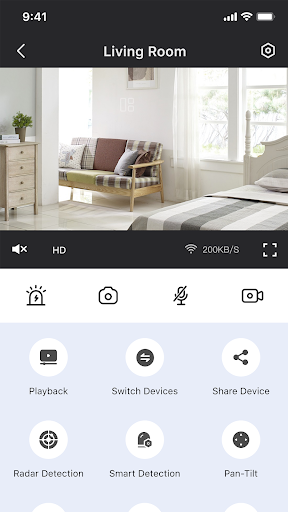
Picture coming home from work and wanting to check whether the front room is empty before you let a pet roam through it. Foscam’s central job is to bring a compatible camera’s live view to your phone, so you can take a look without being in the same room. I like that this is a straightforward use case: open the camera view, see what is happening, and decide whether you need to do anything.
The app’s remote controls add a little more than passive watching. Depending on the camera, the listed functions include panning and tilting, switching night vision on, speaking through two-way audio, and taking a snapshot or recording video. That makes it useful for a brief check-in as well as a closer look. It is still a camera-management app, though, so the experience starts with having a Foscam camera set up.
A camera companion, not a hub
Foscam makes the most sense alongside its compatible cameras. The app provides a phone-based way to set them up, view live video, and control supported camera functions remotely. If you already use Foscam cameras around a home, office, or store, having their views and controls in one place is more convenient than treating each camera as an isolated device.
I would not mistake it for an all-purpose security service or a general video player. Its described role is managing Foscam cameras, and the available experience depends on the camera hardware. Someone looking for a broad smart-home control center, a standalone recording editor, or a camera-independent monitoring app may find the focus too narrow. For owners who want camera access on a phone, that narrower purpose can also be a welcome bit of simplicity.
Small habits that help
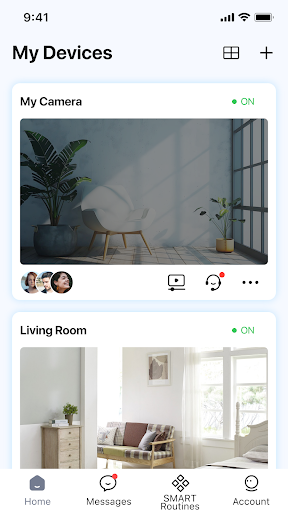
A little organization can make a multi-camera setup easier to use. Foscam supports organizing cameras by location, so I would name or group them in a way that matches how I think about the space: for example, by room or by area of a workplace. When I want a quick check, that structure should make it easier to choose the right view rather than opening cameras one by one at random.
It also helps to think of the controls as tools for specific moments. A live view is enough for a quick glance; pan and tilt can help when the camera is movable, while a snapshot or recording can capture something I want to keep. Two-way audio is more useful when I have a reason to speak through the camera than as a feature to leave running. These small choices keep the app focused on what I need right then.
More From Our News Desk

Zoom Meetings, Google Meet, or Teams: Which Is Easiest to Join?

How I Build a Free Streaming Lineup With Tubi

Why Crunchyroll Is the Default Anime App for So Many Fans

YouTube TV: A Practical Guide to Cutting Cable

Rummikub and the Small Comfort of Phone Games

TeamViewer Remote Control or AnyDesk for Helping Family?
Who may find it useful
I would recommend Foscam to someone who already has a compatible Foscam camera, or is choosing one and wants phone-based access to its live view and remote controls. It is especially relevant for people who check a room, shop, or office from time to time and want camera controls in the same app. The ability to organize multiple cameras by location is a practical fit for anyone with more than one view to manage.
It may not suit someone without a Foscam camera, or a person expecting a complete security system with a wide set of unrelated smart-home tools. The app’s appeal rests on camera management, not on turning a phone into a camera or replacing other equipment. I would also keep expectations tied to the individual camera: the app describes several remote controls, but the hardware you use determines which ones are relevant to your setup.
Foscam is published by IVYIOT LLC. On Google Play, it has over 1 million installs and a 2.7-star rating from around 14,900 ratings. It is free to download, and the store facts show no in-app purchases or ads. The content rating is Everyone. Those figures give a useful sense of its store presence, though they do not tell me how well it will work with a particular camera.
The current version shown in the supplied store facts is 5.3.28. The app was released on November 2, 2014, and its recorded last update is November 2, 2026. No minimum Android version is provided in those facts, so anyone checking device compatibility should look at the current Google Play information for their phone. Camera compatibility is also worth checking before relying on the app.
How Foscam Fits Into a Routine
Getting started
When I first opened a camera-management app like Foscam, my first question would be whether setup feels like a chore. Its described setup options include scanning a QR code or using EZLink smart configuration, giving users two ways to pair a camera. That is a sensible starting point for a phone-centered workflow, especially when I am setting up a camera near the router or in the room where it will stay.
After pairing, the main appeal is having the camera view and controls available on the phone. I would take a moment at setup to identify which camera belongs to which location, particularly in a home or small workplace with multiple units. Clear organization pays off later, when I just want to check a particular area rather than spend time figuring out which view I opened.
The everyday view
For everyday use, live video is the anchor. I can imagine checking a camera during a lunch break or taking a quick look at a room while I am elsewhere. That is a different rhythm from sitting down to watch a recording: it is a brief, purposeful check. Foscam’s stated focus on remote access suits those moments, when I want a look at what is happening without walking over to the camera.
The practical experience will naturally depend on the camera and connection involved. The app describes real-time viewing, but I would treat a live view as a quick check rather than assume every visit will feel identical. If the image or connection is not behaving as expected, that can interrupt an otherwise simple routine. The basic idea remains easy to understand: pick the camera and see its current view.
Useful remote controls
The controls are what give Foscam more purpose than a simple camera viewer. For supported cameras, I can pan or tilt remotely, switch night vision on, use two-way audio, capture a snapshot, or record a video. Those are concrete tools for different situations: repositioning a view, checking in after dark, speaking through the camera, or keeping a still or clip.
I especially like that these actions are tied to a live camera rather than presented as separate general-purpose features. If I am checking on a room and need a wider angle, pan and tilt may help. If I want to say something, two-way audio gives the camera a more interactive role. The feature list is useful, but it does not promise that every camera supports every control, so I would match expectations to my model.
A simple check-in routine
A realistic routine might start with a quick live-view check before leaving a shop or settling in for the evening. I would select the location, look at the current video, and use a remote control only if there is a reason. If a detail is worth retaining, the snapshot or recording option gives me a direct way to capture it. This kind of short visit is where a camera companion app earns its place on my phone.
With cameras in different areas, I would keep the location organization consistent and use the same names I use in conversation. That avoids a small but annoying pause when I want the kitchen camera and have to guess among generic labels. I would also treat audio as an occasional check-in tool, not a substitute for being present. A few tidy habits can make a focused app feel much more convenient.
Limits to keep in view
The main limitation is the app’s dependence on compatible Foscam cameras. Without one, the camera setup and remote-viewing functions have little purpose. Even with a camera, the available controls can depend on the hardware, so I would not assume every model offers pan and tilt, night vision, or the same audio and capture options.
The Google Play rating is 2.7 stars across around 14,900 ratings, a store figure worth considering alongside the feature set. A rating alone cannot predict how the app will behave with an individual camera or phone, but it is a reason to check recent user feedback and device compatibility before building a routine around it. Its narrow camera-management focus is a strength for the right owner and a limitation for everyone else.
Foscam is easiest to understand as a remote control and viewing companion for compatible Foscam cameras. Live video, camera controls, audio, and multi-camera organization cover the core needs without pretending to be a full smart-home platform. I like the practical focus, especially for quick checks and occasional remote adjustments.
I would try it if I already owned a compatible camera and wanted phone access to its view and controls. If I am shopping for an app before choosing any camera, I would first make sure the hardware fits my needs. Foscam has a clear job, but it is most convincing when paired with the right camera.
Foscam Frequently Asked Questions
What do people use the Foscam app for?
Foscam is used to set up and manage compatible Foscam security cameras from a phone. Its described functions include viewing live video, remotely panning or tilting supported cameras, using night vision and two-way audio, and capturing snapshots or recordings. It can also organize multiple cameras by location, which is useful when checking more than one area.
Which phones and devices support Foscam?
The supplied store facts describe Foscam as an Android app on Google Play. The provided information does not give a minimum Android version, so check the current Google Play page for the requirement that applies to your phone. The app is designed to manage Foscam cameras, and the camera itself needs to be compatible with the controls you want to use.
Does the Foscam app cost money?
The supplied Google Play facts show Foscam as free to download, with no in-app purchases and no ads. Store details can change over time, so it is sensible to check the current Google Play page before installing. Having the app does not by itself establish which camera hardware is needed; check that the camera you plan to use is compatible.
What Android version does Foscam require?
The minimum Android version is not given in the supplied store facts. Requirements can vary as an app is updated, so the current Google Play page is the best place to check the version needed for your device. The listed current app version is 5.3.28, but that does not by itself specify which Android releases it supports.
Is Foscam a good fit for every security camera owner?
Foscam is intended for people managing compatible Foscam cameras, with features for live viewing, remote controls, and organizing several cameras by location. It may not suit someone without a compatible camera or someone seeking a broader smart-home platform. Camera capabilities can differ, so check the camera details and current store information before deciding whether it fits your setup.
Pros
- Combines live camera viewing with several useful remote controls.
- Offers QR-code and EZLink setup options for pairing cameras.
- Can organize multiple cameras by location.
- Includes two-way audio, snapshots, and video recording for supported cameras.
Cons
- Its usefulness depends on having a compatible Foscam camera.
- Available controls may differ depending on the camera model.
- The Google Play rating is relatively low at 2.7 stars.
- Category
- Video Players & Editors
- Version
- 5.3.28











