Equalizer FX: Sound Enhancer
- 78.14K
- 4.4
- Installs
- 5.00M
- Price
- Free
Screenshots

Analysis by Reviewed APKs
Equalizer FX: Sound Enhancer is an Android audio tool for adjusting how music sounds, with controls for equalization, bass, stereo effects and loudness. It suits listeners who want more say over playback from music apps and streaming services. I like that it offers both ready-made presets and room for personal adjustments, though it is best viewed as a listening companion rather than a music player or a fix for every audio setup.
A listening session, tuned
Picture settling in for a playlist on the way home. You open your usual music app, then use Equalizer FX to nudge the sound toward more bass or a different balance. The app is designed to work alongside music players and streaming services, so the idea is to shape audio without replacing the app you already use to choose what to hear.
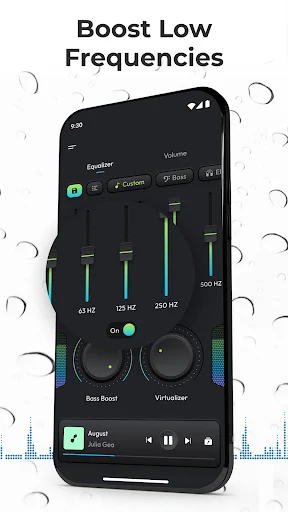
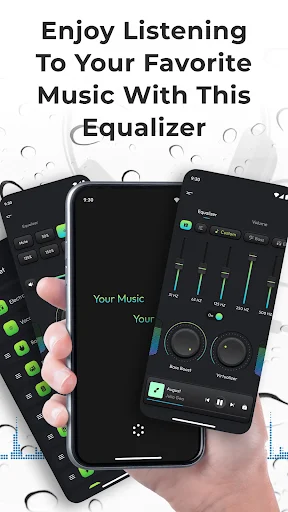
When I first considered how this would fit into an ordinary routine, the useful part was having several kinds of adjustment in one place: frequency levels, bass boost, virtualization and loudness. I could imagine starting with a preset, then making a small change for a particular pair of headphones. The main appeal is practical control, not a complicated studio workflow.
An audio companion, not a player
Equalizer FX makes most sense beside a music player or a streaming service. It is not presented as a place to browse a library, build a queue or discover new artists. Instead, it applies sound effects to listening through other supported apps, including services such as Spotify, Pandora and TuneIn Radio, according to its description.
That distinction matters if you are comparing it with a full music app or a device-wide audio setup. It focuses on listening adjustments rather than playback management, and it specifically does not work with FM radio. The volume booster is also something to use carefully: raising loudness can make audio much louder, and the description itself urges caution.
Small habits that help
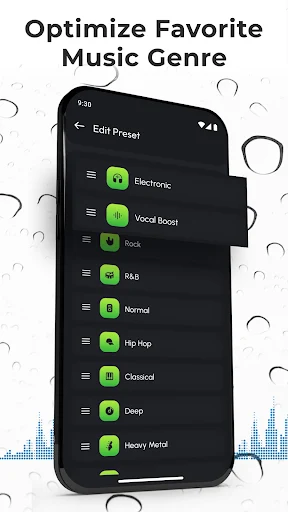
A sensible way to explore the app is to begin with one of its 12 presets rather than pushing every control at once. Listen to a familiar track, make one adjustment, and compare. That makes it easier to tell whether a change is actually helping your listening, instead of turning the equalizer into a guessing game.
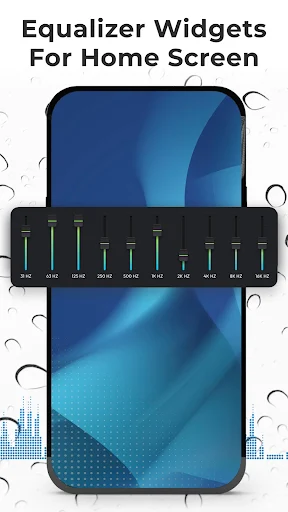
Once you find a balance you like, the option to create your own presets can make repeat listening less fiddly. Home-screen widgets are another possible shortcut, while the automatic on/off behavior is meant to respond when a music player starts or stops. These features suit people who want their sound adjustments close at hand without rebuilding them each session.
More From Our News Desk

Zoom Meetings, Google Meet, or Teams: Which Is Easiest to Join?

How I Build a Free Streaming Lineup With Tubi

Why Crunchyroll Is the Default Anime App for So Many Fans

YouTube TV: A Practical Guide to Cutting Cable

Rummikub and the Small Comfort of Phone Games

TeamViewer Remote Control or AnyDesk for Helping Family?
Who may enjoy the controls
I would recommend Equalizer FX to Android listeners who already have a preferred music player or streaming service and want to experiment with the sound. The preset collection offers a straightforward place to start, while custom presets suit anyone who likes to settle on a personal balance. It is especially relevant if bass, stereo effect or overall loudness are the kinds of settings you regularly wish you could adjust.
It may be a poor fit if you want an all-in-one music library, FM radio support or a hands-off experience with no sound tweaking. Results can depend on the playback app and device setup, so I would approach the controls as something to test with your own listening rather than expect identical behavior everywhere. Anyone sensitive to louder playback should take particular care with the volume booster.
Equalizer FX: Sound Enhancer is a Music & Audio app from ZipoApps. Google Play shows over five million installs and a 4.4-star rating from about 78,000 ratings. It is free to download, contains ads and offers in-app purchases. The stated in-app purchase range is $0.99 to $149.99 per item, so paid options may differ in price.
The app is rated Everyone on Google Play. Its current listed version is 3.9.0.2, with a release date of December 8, 2012, and a last update dated September 23, 2026. The supplied app details do not give a minimum Android version, so check the Google Play page on your device for current compatibility information.
How the sound controls fit real listening
Getting started
My first impression is that Equalizer FX is built around a clear job: adjust the sound while you listen elsewhere. Rather than asking you to move your music into a new player, it is intended to work with music players and streaming services. That makes it easier to consider as an addition to a routine you already have.
The controls cover different kinds of change, from frequency shaping to bass and stereo effects. I would start with a familiar track and a moderate setting, then listen for the difference. The description also notes a special setup step for Lollipop: clear the MusicFX application data before installing Equalizer FX, then choose the new equalizer from the music player's equalizer option.
The everyday experience
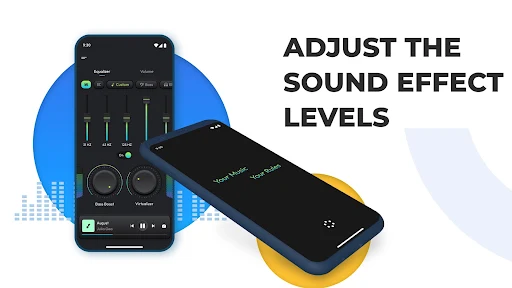
Day to day, the attraction is the ability to adjust how familiar music comes across without changing the source app. A preset can be a quick starting point when you do not want to fine-tune frequency levels. For more deliberate listening, the app allows adjustments to the equalizer effect, bass boost and virtualization.
That gives the app a practical role during a commute, at home or whenever you are using a supported music service. I would keep the changes modest and compare them with the original sound. The volume booster deserves extra restraint: its purpose is to increase loudness, and the description warns that the effect can be significant.
More than equalization
The standout feature is the combination of controls rather than a single bass slider. Equalizer FX includes a music equalizer for changing the frequency balance, bass boost for emphasizing low frequencies, and virtualization to enhance the stereo effect. A loudness enhancer is also included for increasing music volume, with the app description specifying Android 4.4 and higher for that effect.
There are 12 presets, plus the option to create personal ones, which can make repeat listening more convenient. Home-screen widgets provide another way to reach the app's controls. The automatic on/off behavior is designed to follow music playback, switching when a player starts or stops. These are useful touches for a utility meant to sit alongside other audio apps.
A simple listening routine
For a low-effort routine, I would pick a track I know well and begin with one of the presets. After listening for a minute, I would adjust one effect at a time—perhaps the bass, then the stereo effect—so the change stays easy to judge. A familiar song is a better reference than switching tracks after every tweak.
If a particular adjustment works well across several listening sessions, saving it as a custom preset can spare repeated setup. A widget may be handy if you expect to revisit the controls often, and automatic activation can reduce the need to manage the effect manually while music is playing. I would still check the sound after switching between players or services.
Limits to keep in mind
Equalizer FX is not a universal solution for every audio source. Its description says it works with music players and streaming services, but it does not work with FM radio. It also depends on other apps for playback, so anyone looking for a standalone music player should choose a different kind of app.
Compatibility and behavior can vary with the device and player setup, and the supplied details do not specify a minimum Android version for the app itself. The volume booster should be treated carefully, as raising loudness can make listening unexpectedly intense. Ads and optional in-app purchases are also part of the free app experience.
Equalizer FX: Sound Enhancer is a focused option for people who want to shape music playback without leaving their existing player or streaming service. Its presets, custom settings and mix of audio effects give curious listeners several ways to experiment. I would keep expectations practical: it is a sound adjustment tool, not a replacement for a music app or a universal audio fix.
I recommend giving it a try if you listen on Android and enjoy making small changes to your sound. Start with a preset, keep loudness boosts restrained and see how it behaves with your usual player. If you prefer music playback to stay entirely untouched, or rely on FM radio, this is probably not the right companion.
Equalizer FX Frequently Asked Questions
What is Equalizer FX: Sound Enhancer used for?
Equalizer FX is used to adjust music sound while listening through music players and streaming services. Its controls include an equalizer, bass boost, virtualization and a loudness enhancer. It also offers presets, custom presets, widgets and automatic on/off behavior tied to playback. The description says it does not work with FM radio.
Is Equalizer FX: Sound Enhancer available on iPhone?
The supplied details describe Equalizer FX as an Android app, and its distribution information is for Google Play. No iPhone version is specified in the available app details. Check the relevant app store for current platform availability and compatibility before installing.
What Android version does Equalizer FX: Sound Enhancer require?
The app details do not specify a minimum Android version for the app overall. They do say that the volume booster effect is available on Android 4.4 and higher. Requirements can vary by device and app version, so check the Google Play page for the current compatibility information.
Does Equalizer FX: Sound Enhancer cost money?
Equalizer FX is free to download, contains ads and offers in-app purchases. The stated purchase range is $0.99 to $149.99 per item. What is offered and the prices shown may vary, so check the Google Play page for current purchase details.
Who should use Equalizer FX: Sound Enhancer?
It may suit Android listeners who already use a music player or streaming service and want to adjust bass, frequency balance, stereo effect or loudness. It may not suit people seeking a music library or FM radio support. Because playback behavior can depend on the device and player, checking it with your usual setup is sensible.
Pros
- Combines frequency adjustment, bass boost, virtualization and loudness controls in one companion app.
- Offers 12 presets and lets listeners create their own sound profiles.
- Designed to work alongside music players and streaming services rather than replace them.
- Includes home-screen widgets and automatic on/off behavior tied to music playback.
Cons
- Does not work with FM radio, according to the app description.
- Volume boosting can make playback significantly louder and calls for caution.
- Contains ads and offers a wide range of optional in-app purchase prices.
- Category
- Music & Audio
- Version
- 3.9.0.2











